- 1三种方法,Python轻松提取PDF中全部图片_python如何将pdf提取出图片效果最好的插件
- 2字节AI LAB NLP算法二面凉+被捞后通过
- 3r7525服务器电源管理系统,Dell EMC旗舰级双路AMD机架服务器PowerEdge R7525一览
- 4学习Eegret UI Editor-如何使用自己做的exml皮肤文件_ui_editor
- 5Could NOT find Boost (missing: uuid) 和 LNK2019 unresolved external symbol _Bcrypt*_could not find uuid_msgs (missing: uuid_msgs_dir)
- 6【工具使用】浏览器控制台,network面板上传/下载请求日志文件,方便调试_网页控制台日志下载
- 7华为OD入职一年介绍和建议_应届生适合去华为od吗
- 8聽講座后對需求管理的感悟_需求管理的体会
- 9【C/C++】全局变量、局部变量、const、static、内存管理和释放_c++ 全局变量 局部变量默认初始化
- 10第五章 过 JDBC 连接 SQL 网关
Python编程:supervisor模块管理进程实例_error: ,
赞
踩
Supervisor是进程管理程序,能将一个普通的命令行进程变为后台daemon,并监控进程状态,异常退出时能自动重启。
单纯的讲理论比较难懂,下面通过一个监控flask程序的实例来探究
文档:http://supervisord.org/index.html
安装
$ pip install supervisor

# 推荐使用yum安装,能简化很多配置步骤
yum install -y supervisor
- 1
- 2
- 3
- 4
新建一个flask项目
新建server.py作为被监控的程序
from flask import Flask
app = Flask(__name__)

@app.route('/')
def hello_world():
    return 'Hello World!'

if __name__ == '__main__':
    app.run()
- 1
- 2
- 3
- 4
- 5
- 6
- 7
- 8
- 9
新建log文件夹用于存放日志
配置
新建文件夹supervisor_demo,用来作为工作目录,并切换到该文件夹下
生成配置文件
$ echo_supervisord_conf > supervisord.conf
- 1
推荐线上使用默认路径:
echo_supervisord_conf > /etc/supervisor/supervisord.conf
- 1
打开supervisord.conf文件,在最下面找到:
;[include]
;files = relative/directory/*.ini
- 1
- 2
此处是需要监控程序的配置文件,修改为:
[include]
files = conf/*.ini   ;需手动新建conf文件夹
- 1
- 2
新建文件conf/server.ini, 并打开编辑(重点关注黑色字就行)
; 设置进程的名称,使用 supervisorctl 来管理进程时需要使用该进程名
[program: myweb]
command=python server.py   ; 添加刚刚新建的server.py文件名
;numprocs=1                 ; 默认为1
;process_name=%(program_name)s   ; 默认为 %(program_name)s,即 [program:x] 中的 x
;directory=/home/python/tornado_server ; 执行 command 之前,先切换到工作目录
;user=oxygen                 ; 使用 oxygen 用户来启动该进程
;程序崩溃时自动重启,重启次数是有限制的,默认为3次
autorestart=true
redirect_stderr=true        ; 重定向输出的日志
stdout_logfile =log/server.log   ; 新建log文件夹
loglevel=info   ;日志级别
- 1
- 2
- 3
- 4
- 5
- 6
- 7
- 8
- 9
- 10
- 11
- 12
- 13
启动
二选其一即可
$ supervisord   # 不指定配置文件启动
$ supervisord -c supervisord.conf  # 指定配置文件路径启动
- 1
- 2
查看是否启动
ps aux | grep supervisord
- 1
打开log/server.log 看到已经打印出如下记录
* Running on http://127.0.0.1:5000/ (Press CTRL+C to quit)
- 1
访问 http://127.0.0.1:5000/
可以看到
Hello World!
- 1
下面试着修改下flask项目
def hello_world():
    return 'New Hello World!' # 修改这里
- 1
- 2
- 3
查看状态
$ supervisorctl status

myweb                            RUNNING   pid 20266, uptime 0:05:58
- 1
- 2
- 3
我们将这个被监控的进程杀掉
kill 20266
- 1
稍等片刻,查看log下面的日志,发现flask服务器重启了
再访问下http://127.0.0.1:5000/
New Hello World!
- 1
说明这个进程又被重启了,这就是supervisor的作用
开机启动:https://github.com/Supervisor/initscripts
关闭
先关闭supervisor启动脚本,之后再关闭supervisord服务
$ supervisorctl stop all
$ ps aux | grep supervisord
$ kill pid
- 1
- 2
- 3
下面是此项目的目录结构
supervisor_demo         # 项目目录
├── conf              # 需要监控程序的 配置文件夹
│   └── server.ini   # 需要监控程序的 单个配置文件
├── log               # 日志文件夹
│   └── server.log   # 自动生成的日志文件
├── server.py         # 被监控的程序
└── supervisord.conf  # 配置文件
- 1
- 2
- 3
- 4
- 5
- 6
- 7
- 8
用浏览器来管理
打开配置文件supervisord.conf, 找到如下配置项并编辑
[inet_http_server]
port=127.0.0.1:9001
username=user
password=123
- 1
- 2
- 3
- 4
更改了supervisor配置文件,需要重启
$ supervisorctl reload
- 1
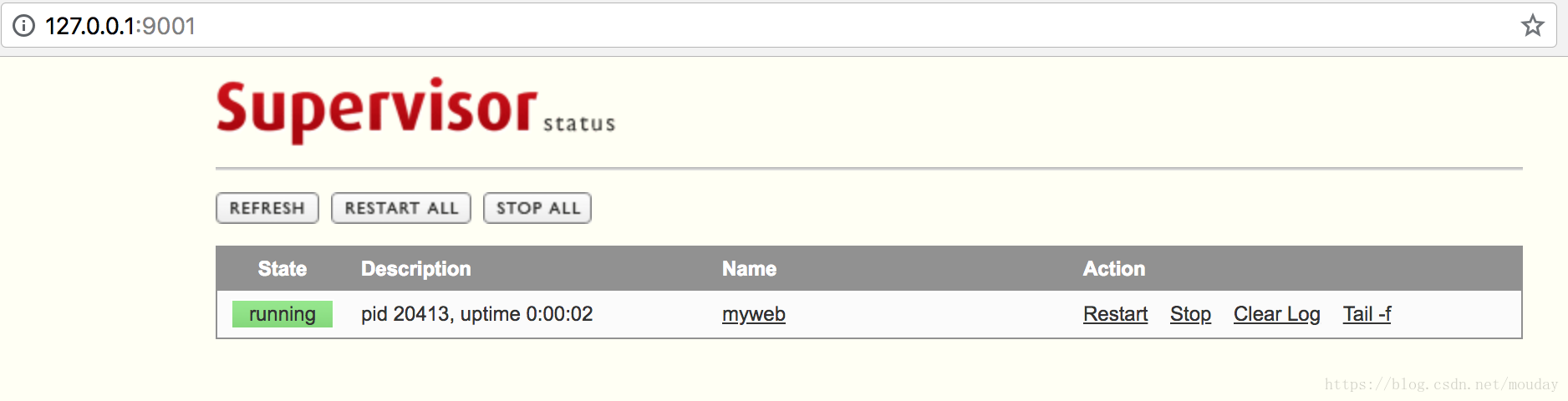
访问http://127.0.0.1:9001/ 进入后台管理
管理命令
# 启动supervisor
supervisord

# 修改完配置文件后重新启动supervisor
supervisorctl reload

# 查看supervisor监管的进程状态
supervisorctl status

# 启动XXX进程
supervisorctl start 进程名

# 停止XXX进程
supervisorctl stop 进程名

# 停止全部进程,注:start、restart、stop都不会载入最新的配置文件。
supervisorctl stop all

# 根据最新的配置文件,启动新配置或有改动的进程,配置没有改动的进程不会受影响而重启
supervisorctl update

# 查看日志
supervisorctl tail -f 进程名

- 1
- 2
- 3
- 4
- 5
- 6
- 7
- 8
- 9
- 10
- 11
- 12
- 13
- 14
- 15
- 16
- 17
- 18
- 19
- 20
- 21
- 22
- 23
如果需要监控redis,可以参考:
使用 Supervisor 来管理 Redis 进程
备注:
由于 Supervisor 管理的进程不能设置为 daemon 模式,故如果 Redis 无法正常启动,可以查看一下 Redis 的配置,并将daemonize选项设置为 no
平滑启动
supervisorctl reload并不像nginx -s reload是平滑启动,而是会重启所有的进程
用下面的命令监测被改动的文件,然后平滑启动
supervisorctl  reread
supervisorctl  update

# 整合成一条指令,方便复制
supervisorctl reread && supervisorctl update
- 1
- 2
- 3
- 4
- 5
报错及解决
1、报错
error: <class 'xmlrpclib.Fault'>, <Fault 6: 'SHUTDOWN_STATE'>:
file: /usr/lib64/python2.7/xmlrpclib.py line: 794
- 1
- 2
supervisord正在执行reload,还没有加载完成,紧接着执行supervisorctl restart XXX导致的,已经将reload过程修改为supervisorctl reread && supervisorctl update all)
参考
https://www.cnblogs.com/lijiaocn/p/9979256.html
2、报错
error: <class 'socket.error'>, [Errno 2]
No such file or directory: file: /usr/lib64/python2.7/socket.py line: 224
- 1
- 2
上面报错的意思是没有启动服务端,就是说启动的客户端找不到服务端地址,需要增加参数
# 启动服务端
supervisord -c /etc/supervisor/supervisord.conf

# 启动客户端
supervisorctl -c /etc/supervisor/supervisord.conf
- 1
- 2
- 3
- 4
- 5
参考:
https://stackoverflow.com/questions/18859063/supervisor-socket-error-issue
3、多命令启动
多条命令需要使用bash来启动
例如:
bash -c "source ~/.bash_profile && workon py3 && scrapyd"
- 1
参考:
https://stackoverflow.com/questions/42443259/supervisorctl-always-reports-error-error-no-such-file
4、报错
unix:///tmp/supervisor.sock no such file
- 1
原因:supervisor 默认配置会把 socket 文件和 pid 守护进程生成在/tmp/目录下,/tmp/目录是缓存目录,Linux 会根据不同情况自动删除其下面的文件。
修改配置文件
vim /etc/supervisor/supervisord.conf
- 1
[unix_http_server]
;file=/tmp/supervisor.sock   ; (the path to the socket file)
file=/var/run/supervisor.sock   ; 修改为 /var/run 目录,避免被系统删除

[supervisord]
;logfile=/tmp/supervisord.log ; (main log file;default $CWD/supervisord.log)
logfile=/var/log/supervisor.log ; 修改为 /var/log 目录,避免被系统删除
pidfile=/var/run/supervisord.pid ; 修改为 /var/run 目录,避免被系统删除
...

[supervisorctl]
; 必须和'unix_http_server'里面的设定匹配
;serverurl=unix:///tmp/supervisor.sock ; use a unix:// URL  for a unix socket
serverurl=unix:///var/run/supervisor.sock ; 修改为 /var/run 目录,避免被系统删除
- 1
- 2
- 3
- 4
- 5
- 6
- 7
- 8
- 9
- 10
- 11
- 12
- 13
- 14
- 15
最后更新配置
supervisorctl update
- 1
5、报错
spider_admin_pro BACKOFF unknown error making dispatchers for 'spider_admin_pro': EISDIR
- 1
很多文章说,有可能是权限问题,首先看下是不是权限问题。
再看一下是不是有同名文件
官网文档给出的示例:
[program:cat]
command=/bin/cat
numprocs=1
directory=/tmp
stdout_logfile=/a/path
stderr_logfile=/a/path
- 1
- 2
- 3
- 4
- 5
- 6
看到path,我以为是一个文件夹路径,新建了一个同名文件夹,然后就报错了,
其实写成下面的参数更直观,需要配置一个文件名
[program:cat]
command=/bin/cat
numprocs=1
directory=/tmp
stdout_logfile=/a/path/out.log
stderr_logfile=/a/path/err.log
- 1
- 2
- 3
- 4
- 5
- 6
centos配置开机自启
1、新建文件supervisord.service
#supervisord.service

[Unit]
Description=Supervisor daemon

[Service]
Type=forking
ExecStart=/usr/bin/supervisord -c /etc/supervisor/supervisord.conf
ExecStop=/usr/bin/supervisorctl shutdown
ExecReload=/usr/bin/supervisorctl reload
KillMode=process
Restart=on-failure
RestartSec=42s

[Install]
WantedBy=multi-user.target
- 1
- 2
- 3
- 4
- 5
- 6
- 7
- 8
- 9
- 10
- 11
- 12
- 13
- 14
- 15
- 16
- 17
2、 将文件拷贝到/usr/lib/systemd/system/
cp supervisord.service /usr/lib/systemd/system/
- 1
3、启动服务
systemctl enable supervisord      # 启动服务

systemctl is-enabled supervisord  # 验证一下是否为开机启动

systemctl start supervisord

systemctl status supervisord

systemctl stop supervisord
- 1
- 2
- 3
- 4
- 5
- 6
- 7
- 8
- 9
进程没有重启
当我们使用bash命令启动后,发现想关闭进程,没有完全关闭,子进程还依然存在,可以配置如下
stopasgroup=true     ;默认为false,进程被杀死时,是否向这个进程组发送stop信号,包括子进程
killasgroup=true     ;默认为false,向进程组发送kill信号,包括子进程
- 1
- 2
参考:解决 supervisor中stop django进程不能真正的停止 问题
完整示例
来自官网: http://supervisord.org/configuration.html#program-x-section-example
[program:cat]
command=/bin/cat
process_name=%(program_name)s
numprocs=1
directory=/tmp
umask=022
priority=999
autostart=true
autorestart=unexpected
startsecs=10
startretries=3
exitcodes=0
stopsignal=TERM
stopwaitsecs=10
stopasgroup=false
killasgroup=false
user=chrism
redirect_stderr=false
stdout_logfile=/a/path
stdout_logfile_maxbytes=1MB
stdout_logfile_backups=10
stdout_capture_maxbytes=1MB
stdout_events_enabled=false
stderr_logfile=/a/path
stderr_logfile_maxbytes=1MB
stderr_logfile_backups=10
stderr_capture_maxbytes=1MB
stderr_events_enabled=false
environment=A="1",B="2"
serverurl=AUTO
- 1
- 2
- 3
- 4
- 5
- 6
- 7
- 8
- 9
- 10
- 11
- 12
- 13
- 14
- 15
- 16
- 17
- 18
- 19
- 20
- 21
- 22
- 23
- 24
- 25
- 26
- 27
- 28
- 29
- 30
经验总结
一个好的做法是:
-
将配置文件放在项目中,可以跟随项目一起管理
-
通过软连接的方式,将
/etc/supervisor/config下的配置文件,指向当前项目的配置文件,避免文件拷贝出多份
# 例如:项目demo-project中的配置文件做软链

# 添加软连接
ln -s /data/wwwroot/demo-project/supervisor-demo.conf /etc/supervisor/config/supervisor-demo.conf
- 1
- 2
- 3
- 4
附件
一份通用的配置文件
/etc/supervisor/supervisord.conf
; Sample supervisor config file.
;
; For more information on the config file, please see:
; http://supervisord.org/configuration.html
;
; Notes:
;  - Shell expansion ("~" or "$HOME") is not supported.  Environment
;    variables can be expanded using this syntax: "%(ENV_HOME)s".
;  - Quotes around values are not supported, except in the case of
;    the environment= options as shown below.
;  - Comments must have a leading space: "a=b ;comment" not "a=b;comment".
;  - Command will be truncated if it looks like a config file comment, e.g.
;    "command=bash -c 'foo ; bar'" will truncate to "command=bash -c 'foo ".
;
; Warning:
;  Paths throughout this example file use /tmp because it is available on most
;  systems.  You will likely need to change these to locations more appropriate
;  for your system.  Some systems periodically delete older files in /tmp.
;  Notably, if the socket file defined in the [unix_http_server] section below
;  is deleted, supervisorctl will be unable to connect to supervisord.

[unix_http_server]
;file=/tmp/supervisor.sock   ; the path to the socket file
file=/var/run/supervisor.sock
;chmod=0700                 ; socket file mode (default 0700)
;chown=nobody:nogroup       ; socket file uid:gid owner
;username=user              ; default is no username (open server)
;password=123               ; default is no password (open server)

; Security Warning:
;  The inet HTTP server is not enabled by default.  The inet HTTP server is
;  enabled by uncommenting the [inet_http_server] section below.  The inet
;  HTTP server is intended for use within a trusted environment only.  It
;  should only be bound to localhost or only accessible from within an
;  isolated, trusted network.  The inet HTTP server does not support any
;  form of encryption.  The inet HTTP server does not use authentication
;  by default (see the username= and password= options to add authentication).
;  Never expose the inet HTTP server to the public internet.

;[inet_http_server]         ; inet (TCP) server disabled by default
;port=127.0.0.1:9001        ; ip_address:port specifier, *:port for all iface
;username=user              ; default is no username (open server)
;password=123               ; default is no password (open server)

[supervisord]
;logfile=/tmp/supervisord.log ; main log file; default $CWD/supervisord.log
logfile=/var/log/supervisor.log
logfile_maxbytes=1MB        ; max main logfile bytes b4 rotation; default 50MB
logfile_backups=3           ; # of main logfile backups; 0 means none, default10
loglevel=info                ; log level; default info; others: debug,warn,trace
;pidfile=/tmp/supervisord.pid ; supervisord pidfile; default supervisord.pid
pidfile=/var/run/supervisord.pid
nodaemon=false               ; start in foreground if true; default false
silent=false                 ; no logs to stdout if true; default false
minfds=1024                  ; min. avail startup file descriptors; default 1024
minprocs=200                 ; min. avail process descriptors;default 200
;umask=022                   ; process file creation umask; default 022
;user=supervisord            ; setuid to this UNIX account at startup; recommended if root
;identifier=supervisor       ; supervisord identifier, default is 'supervisor'
;directory=/tmp              ; default is not to cd during start
;nocleanup=true              ; don't clean up tempfiles at start; default false
;childlogdir=/tmp            ; 'AUTO' child log dir, default $TEMP
;environment=KEY="value"     ; key value pairs to add to environment
;strip_ansi=false            ; strip ansi escape codes in logs; def. false

; The rpcinterface:supervisor section must remain in the config file for
; RPC (supervisorctl/web interface) to work.  Additional interfaces may be
; added by defining them in separate [rpcinterface:x] sections.

[rpcinterface:supervisor]
supervisor.rpcinterface_factory = supervisor.rpcinterface:make_main_rpcinterface

; The supervisorctl section configures how supervisorctl will connect to
; supervisord.  configure it match the settings in either the unix_http_server
; or inet_http_server section.

[supervisorctl]
;serverurl=unix:///tmp/supervisor.sock ; use a unix:// URL  for a unix socket
serverurl=unix:///var/run/supervisor.sock
;serverurl=http://127.0.0.1:9001 ; use an http:// url to specify an inet socket
;username=chris              ; should be same as in [*_http_server] if set
;password=123                ; should be same as in [*_http_server] if set
;prompt=mysupervisor         ; cmd line prompt (default "supervisor")
;history_file=~/.sc_history  ; use readline history if available

; The sample program section below shows all possible program subsection values.
; Create one or more 'real' program: sections to be able to control them under
; supervisor.

;[program:theprogramname]
;command=/bin/cat              ; the program (relative uses PATH, can take args)
;process_name=%(program_name)s ; process_name expr (default %(program_name)s)
;numprocs=1                    ; number of processes copies to start (def 1)
;directory=/tmp                ; directory to cwd to before exec (def no cwd)
;umask=022                     ; umask for process (default None)
;priority=999                  ; the relative start priority (default 999)
;autostart=true                ; start at supervisord start (default: true)
;startsecs=1                   ; # of secs prog must stay up to be running (def.1)
;startretries=3                ; max # of serial start failures when starting (default 3)
;autorestart=unexpected        ; when to restart if exited after running (def: unexpected)
;exitcodes=0                   ; 'expected' exit codes used with autorestart (default 0)
;stopsignal=QUIT               ; signal used to kill process (default TERM)
;stopwaitsecs=10               ; max num secs to wait b4 SIGKILL (default 10)
;stopasgroup=false             ; send stop signal to the UNIX process group (default false)
;killasgroup=false             ; SIGKILL the UNIX process group (def false)
;user=chrism                   ; setuid to this UNIX account to run the program
;redirect_stderr=true          ; redirect proc stderr to stdout (default false)
;stdout_logfile=/a/path        ; stdout log path, NONE for none; default AUTO
;stdout_logfile_maxbytes=1MB   ; max # logfile bytes b4 rotation (default 50MB)
;stdout_logfile_backups=10     ; # of stdout logfile backups (0 means none, default 10)
;stdout_capture_maxbytes=1MB   ; number of bytes in 'capturemode' (default 0)
;stdout_events_enabled=false   ; emit events on stdout writes (default false)
;stdout_syslog=false           ; send stdout to syslog with process name (default false)
;stderr_logfile=/a/path        ; stderr log path, NONE for none; default AUTO
;stderr_logfile_maxbytes=1MB   ; max # logfile bytes b4 rotation (default 50MB)
;stderr_logfile_backups=10     ; # of stderr logfile backups (0 means none, default 10)
;stderr_capture_maxbytes=1MB   ; number of bytes in 'capturemode' (default 0)
;stderr_events_enabled=false   ; emit events on stderr writes (default false)
;stderr_syslog=false           ; send stderr to syslog with process name (default false)
;environment=A="1",B="2"       ; process environment additions (def no adds)
;serverurl=AUTO                ; override serverurl computation (childutils)

; The sample eventlistener section below shows all possible eventlistener
; subsection values.  Create one or more 'real' eventlistener: sections to be
; able to handle event notifications sent by supervisord.

;[eventlistener:theeventlistenername]
;command=/bin/eventlistener    ; the program (relative uses PATH, can take args)
;process_name=%(program_name)s ; process_name expr (default %(program_name)s)
;numprocs=1                    ; number of processes copies to start (def 1)
;events=EVENT                  ; event notif. types to subscribe to (req'd)
;buffer_size=10                ; event buffer queue size (default 10)
;directory=/tmp                ; directory to cwd to before exec (def no cwd)
;umask=022                     ; umask for process (default None)
;priority=-1                   ; the relative start priority (default -1)
;autostart=true                ; start at supervisord start (default: true)
;startsecs=1                   ; # of secs prog must stay up to be running (def.1)
;startretries=3                ; max # of serial start failures when starting (default 3)
;autorestart=unexpected        ; autorestart if exited after running (def: unexpected)
;exitcodes=0                   ; 'expected' exit codes used with autorestart (default 0)
;stopsignal=QUIT               ; signal used to kill process (default TERM)
;stopwaitsecs=10               ; max num secs to wait b4 SIGKILL (default 10)
;stopasgroup=false             ; send stop signal to the UNIX process group (default false)
;killasgroup=false             ; SIGKILL the UNIX process group (def false)
;user=chrism                   ; setuid to this UNIX account to run the program
;redirect_stderr=false         ; redirect_stderr=true is not allowed for eventlisteners
;stdout_logfile=/a/path        ; stdout log path, NONE for none; default AUTO
;stdout_logfile_maxbytes=1MB   ; max # logfile bytes b4 rotation (default 50MB)
;stdout_logfile_backups=10     ; # of stdout logfile backups (0 means none, default 10)
;stdout_events_enabled=false   ; emit events on stdout writes (default false)
;stdout_syslog=false           ; send stdout to syslog with process name (default false)
;stderr_logfile=/a/path        ; stderr log path, NONE for none; default AUTO
;stderr_logfile_maxbytes=1MB   ; max # logfile bytes b4 rotation (default 50MB)
;stderr_logfile_backups=10     ; # of stderr logfile backups (0 means none, default 10)
;stderr_events_enabled=false   ; emit events on stderr writes (default false)
;stderr_syslog=false           ; send stderr to syslog with process name (default false)
;environment=A="1",B="2"       ; process environment additions
;serverurl=AUTO                ; override serverurl computation (childutils)

; The sample group section below shows all possible group values.  Create one
; or more 'real' group: sections to create "heterogeneous" process groups.

;[group:thegroupname]
;programs=progname1,progname2  ; each refers to 'x' in [program:x] definitions
;priority=999                  ; the relative start priority (default 999)

; The [include] section can just contain the "files" setting.  This
; setting can list multiple files (separated by whitespace or
; newlines).  It can also contain wildcards.  The filenames are
; interpreted as relative to this file.  Included files *cannot*
; include files themselves.

[include]
files = conf/*.ini
- 1
- 2
- 3
- 4
- 5
- 6
- 7
- 8
- 9
- 10
- 11
- 12
- 13
- 14
- 15
- 16
- 17
- 18
- 19
- 20
- 21
- 22
- 23
- 24
- 25
- 26
- 27
- 28
- 29
- 30
- 31
- 32
- 33
- 34
- 35
- 36
- 37
- 38
- 39
- 40
- 41
- 42
- 43
- 44
- 45
- 46
- 47
- 48
- 49
- 50
- 51
- 52
- 53
- 54
- 55
- 56
- 57
- 58
- 59
- 60
- 61
- 62
- 63
- 64
- 65
- 66
- 67
- 68
- 69
- 70
- 71
- 72
- 73
- 74
- 75
- 76
- 77
- 78
- 79
- 80
- 81
- 82
- 83
- 84
- 85
- 86
- 87
- 88
- 89
- 90
- 91
- 92
- 93
- 94
- 95
- 96
- 97
- 98
- 99
- 100
- 101
- 102
- 103
- 104
- 105
- 106
- 107
- 108
- 109
- 110
- 111
- 112
- 113
- 114
- 115
- 116
- 117
- 118
- 119
- 120
- 121
- 122
- 123
- 124
- 125
- 126
- 127
- 128
- 129
- 130
- 131
- 132
- 133
- 134
- 135
- 136
- 137
- 138
- 139
- 140
- 141
- 142
- 143
- 144
- 145
- 146
- 147
- 148
- 149
- 150
- 151
- 152
- 153
- 154
- 155
- 156
- 157
- 158
- 159
- 160
- 161
- 162
- 163
- 164
- 165
- 166
- 167
- 168
- 169
- 170
- 171
- 172
- 173
- 174
- 175
参考: