
热门标签
热门文章
- 1区块链的共识与共识机制_区块链共识机制
- 2区块链金融科技:技术融合与挑战应对【文末送书-16】
- 3Docker容器的可视化管理工具—DockerUI本地部署与远程访问_docker可视化管理平台
- 4html简洁漂亮的个人简历,个人主页,个人简介网页版(源码)_个人简介html代码模板
- 5多维时序 | Matlab实现GRO-CNN-BiLSTM-Attention淘金算法优化卷积神经网络-双向长短期记忆网络结合注意力机制多变量时间序列预测
- 6【微服务】Ribbon负载均衡_修改ribbon负载均衡的规则
- 7[DNS网络] 网页无法打开、显示不全、加载卡顿缓慢 | 解决方案
- 810天玩转Python第2天:python判断语句基础示例全面详解与代码练习
- 9小说电子书阅读系统设计与实现
- 10关于目标检测中按照比例将数据集随机划分成训练集和测试集
当前位置: article > 正文
Springboot 整合多线程示例(简单易懂)_springboot 多线程
作者:算法研究专家 | 2024-01-31 23:28:20
赞
踩
springboot 多线程
在之前的示例里我们实现了读取路径下所有csv文件,将其中数据转化为json对象并另存为json文件的功能。但是,在之前的代码中,我们是以顺序处理的方式依次处理csv文件的,只有在一个文件处理完之后才能开始处理下一个文件,总处理时间为所有文件处理时间之和,当文件数据量较大时会花费很长时间;所以,在这里我们引入多线程处理方法,让多个文件同时进行处理,这样总处理时间会大大减少。
一. 多线程引入
1. 配置线程池
- package com.example.demo.config;
-
- import org.springframework.context.annotation.Bean;
- import org.springframework.context.annotation.Configuration;
- import org.springframework.scheduling.annotation.EnableAsync;
- import org.springframework.scheduling.concurrent.ThreadPoolTaskExecutor;
-
- import java.util.concurrent.Executor;
- import java.util.concurrent.ThreadPoolExecutor;
-
- @Configuration
- @EnableAsync
- public class AsyncConfiguration {
-
- @Bean("async")
- public Executor doSomethingExecutor() {
- ThreadPoolTaskExecutor executor = new ThreadPoolTaskExecutor();
- // 核心线程数:线程池创建时候初始化的线程数
- executor.setCorePoolSize(10);
- // 最大线程数:线程池最大的线程数,只有在缓冲队列满了之后才会申请超过核心线程数的线程
- executor.setMaxPoolSize(20);
- // 缓冲队列:用来缓冲执行任务的队列
- executor.setQueueCapacity(500);
- // 允许线程的空闲时间60秒:当超过了核心线程之外的线程在空闲时间到达之后会被销毁
- executor.setKeepAliveSeconds(60);
- // 线程池名的前缀:设置好了之后可以方便我们定位处理任务所在的线程池
- executor.setThreadNamePrefix("async-");
- // 缓冲队列满了之后的拒绝策略:由调用线程处理(一般是主线程)
- executor.setRejectedExecutionHandler(new ThreadPoolExecutor.CallerRunsPolicy());
- executor.initialize();
- return executor;
- }
-
- }

2. 编写示例
在方法前加上注释 @Async("async") 声明此方法可使用多线程
- package com.example.demo.controller;
-
- import com.alibaba.fastjson.JSONObject;
- import com.example.demo.service.AsyncServer;
- import org.springframework.beans.factory.annotation.Autowired;
- import org.springframework.web.bind.annotation.CrossOrigin;
- import org.springframework.web.bind.annotation.RequestMapping;
- import org.springframework.web.bind.annotation.RequestMethod;
- import org.springframework.web.bind.annotation.RestController;
-
- @RestController
- @RequestMapping("/async")
- @CrossOrigin(value = "*", maxAge = 3600)
- public class AsyncController {
-
- @Autowired
- private AsyncServer server;
-
- @RequestMapping(value = "/test", method = RequestMethod.GET)
- public JSONObject asyncTest() throws InterruptedException{
- JSONObject output = new JSONObject();
- long startTime = System.currentTimeMillis();
- int counter = 10;
- for (int i = 0; i<counter ; i++) {
- server.asyncTest(i);
- }
- long endTime = System.currentTimeMillis();
- output.put("msg", "succeed");
- output.put("花费时间: ", endTime-startTime);
- return output;
- }
-
- }
- package com.example.demo.service;
-
- import org.springframework.scheduling.annotation.Async;
- import org.springframework.stereotype.Service;
-
- @Service
- public class AsyncServer {
-
- @Async("async")
- public void asyncTest(Integer counter) throws InterruptedException{
- Thread.sleep(2000);
- System.out.println("线程" + Thread.currentThread().getName() + " 执行异步任务:" + counter);
- }
-
- }
以上示例为创建 10 个线程,每个线程阻塞 2 秒后打印出结果,使用 postman 调用接口结果如下:
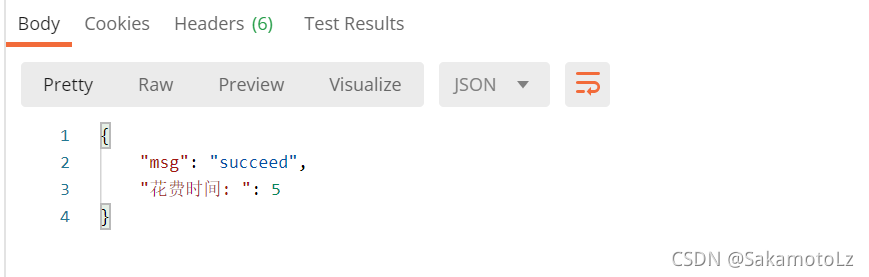
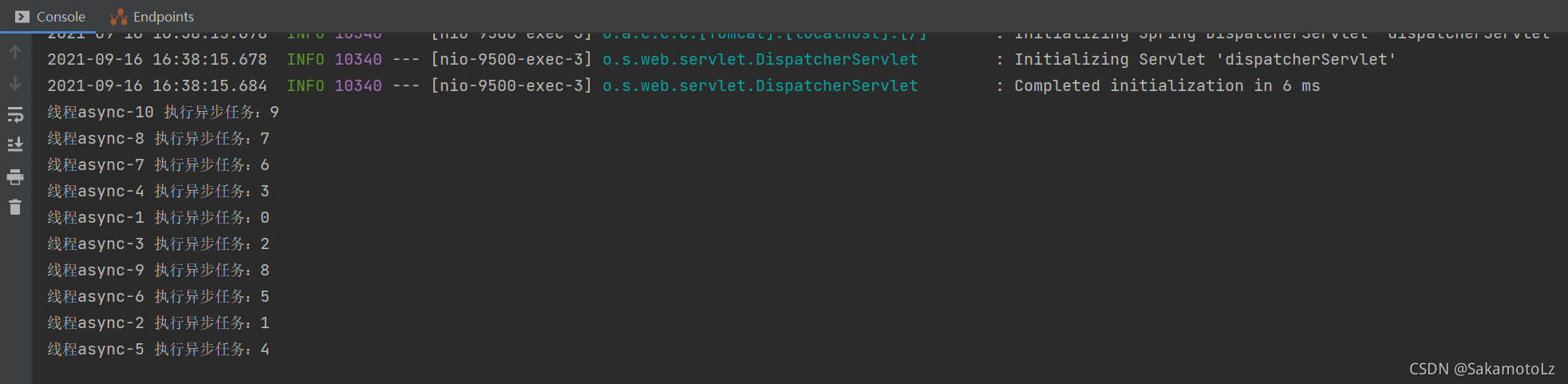
可以看到计数 counter 并不是按 1~9 顺序打出的,证明是多线程同步执行的;但是 postman 返回结果中花费时间为 5 ,而代码中设置了每个线程阻塞 2 秒后打印结果 ,所以这里主线程是非阻塞式的,也就是说主线程运行到 for 循环语句后并没有等待所有线程执行结束后再继续运行;所以这里我们要将他修改为阻塞式。
- package com.example.demo.controller;
-
- import com.alibaba.fastjson.JSONObject;
- import com.example.demo.service.AsyncServer;
- import org.springframework.beans.factory.annotation.Autowired;
- import org.springframework.web.bind.annotation.CrossOrigin;
- import org.springframework.web.bind.annotation.RequestMapping;
- import org.springframework.web.bind.annotation.RequestMethod;
- import org.springframework.web.bind.annotation.RestController;
-
- import java.util.concurrent.CountDownLatch;
-
- @RestController
- @RequestMapping("/async")
- @CrossOrigin(value = "*", maxAge = 3600)
- public class AsyncController {
-
- @Autowired
- private AsyncServer server;
-
- @RequestMapping(value = "/test", method = RequestMethod.GET)
- public JSONObject asyncTest() throws InterruptedException{
- JSONObject output = new JSONObject();
- long startTime = System.currentTimeMillis();
- int counter = 10;
- CountDownLatch countDownLatch = new CountDownLatch(counter);
- for (int i = 0; i<counter ; i++) {
- server.asyncTest(i, countDownLatch);
- }
- countDownLatch.await();
- long endTime = System.currentTimeMillis();
- output.put("msg", "succeed");
- output.put("花费时间: ", endTime-startTime);
- return output;
- }
-
- }
- package com.example.demo.service;
-
- import org.springframework.scheduling.annotation.Async;
- import org.springframework.stereotype.Service;
-
- import java.util.concurrent.CountDownLatch;
-
- @Service
- public class AsyncServer {
-
- @Async("async")
- public void asyncTest(Integer counter, CountDownLatch countDownLatch) throws InterruptedException{
- Thread.sleep(2000);
- System.out.println("线程" + Thread.currentThread().getName() + " 执行异步任务:" + counter);
- countDownLatch.countDown();
- }
-
- }
- countDownLatch这个类使一个线程等待其他线程各自执行完毕后再执行。
- 是通过一个计数器来实现的,计数器的初始值是线程的数量。每当一个线程执行完毕后,计数器的值就-1,当计数器的值为0时,表示所有线程都执行完毕,然后在闭锁上等待的线程就可以恢复工作了。
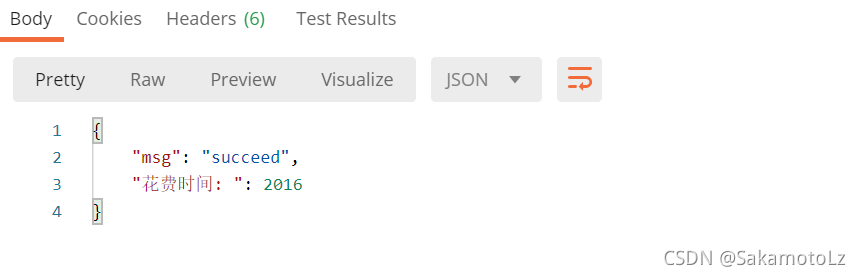
可以看到,现在是等待所有线程都运行结束之后,主线程才继续进行。
二. 实际使用示例
这里以上一篇文档中对csv文件的批处理方法为例:
- package com.example.dataprocessing.controller;
-
- import com.alibaba.fastjson.JSONObject;
- import com.example.dataprocessing.service.ReadCSVServer;
- import org.json.JSONException;
- import org.springframework.web.bind.annotation.*;
-
- import javax.annotation.Resource;
- import java.io.IOException;
- import java.util.List;
- import java.util.concurrent.CountDownLatch;
- import java.util.concurrent.ExecutionException;
-
- @RestController
- @RequestMapping("/read")
- @CrossOrigin(value = "*", maxAge = 3600)
- public class ReadCSVController {
-
- @Resource
- private ReadCSVServer server;
-
-
- @RequestMapping(value = "/csv", method = RequestMethod.POST)
- public JSONObject readCSVFil(@RequestBody JSONObject get) throws IOException,JSONException,InterruptedException, ExecutionException {
- JSONObject output = new JSONObject();
- String filePath = get.getString("filePath");
- filePath.replace("\\", "/");
- long startTime = System.currentTimeMillis();
- List<String> filePaths = server.getFileInPath(filePath);
- CountDownLatch countDownLatch = new CountDownLatch(filePaths.size());
- if (filePaths != null) {
- for (String fileName : filePaths) {
- server.readCSVAndWrite(countDownLatch, fileName, filePath);
- }
- }
- countDownLatch.await();
- long endTime = System.currentTimeMillis();
- output.put("msg", "succeed");
- output.put("data", "已处理"+filePaths.size()+"个文件;耗时"+(endTime-startTime)/1000+"秒");
- return output;
- }
-
-
- }
- package com.example.dataprocessing.service;
- import com.alibaba.fastjson.JSON;
- import com.example.dataprocessing.dao.impl.ReadCSVImpl;
- import org.json.JSONException;
- import org.json.JSONObject;
- import org.springframework.beans.factory.annotation.Value;
- import org.springframework.data.mongodb.core.MongoTemplate;
- import org.springframework.scheduling.annotation.Async;
- import org.springframework.stereotype.Service;
- import javax.annotation.Resource;
- import java.io.*;
- import java.util.ArrayList;
- import java.util.List;
- import java.util.Scanner;
- import java.util.concurrent.CountDownLatch;
-
- @Service
- public class ReadCSVServer {
-
-
- /**
- * 读取路径下所有.csv文件
- * @return List<String>
- * */
- public List<String> getFileInPath(String filePath) {
- List<String> csvList = new ArrayList<>();
- File f = new File(filePath);
- File[] ts = f.listFiles();
- for (int i=0;i<ts.length;i++) {
- if (ts[i].isFile()) {
- String fileName = ts[i].toString();
- //获取最后一个.的位置
- int lastIndexOf = fileName.lastIndexOf(".");
- //获取文件的后缀名
- String suffix = fileName.substring(lastIndexOf);
- if (suffix.equals(".csv")) {
- csvList.add(fileName);
- }
- }
- }
- return csvList;
- }
-
-
- @Async("async")
- public void readCSVAndWrite(CountDownLatch countDownLatch, String fileName, String filePath) throws IOException,JSONException,InterruptedException {
- List<String[]> list = new ArrayList<>();
- FileInputStream inputStream = null;
- Scanner sc = null;
- try {
- inputStream = new FileInputStream(fileName);
- if (inputStream.getChannel().size() == 0) {
- countDownLatch.countDown();
- }
- sc = new Scanner(inputStream, "UTF-8");
- String headLine = new String();
- String[] headArray = null;
- if (sc.hasNextLine()) {
- headLine = sc.nextLine();
- headArray = headLine.split(",");
- }
- while (sc.hasNextLine()) {
- String line = sc.nextLine();
- String[] strArray = line.split(",(?=(?:[^\"]*\"[^\"]*\")*[^\"]*$)");
- if (strArray.length!=0) {
- list.add(strArray);
- }
- if (list.size() == 30000) {
- List<com.alibaba.fastjson.JSONObject> jsons = csv2JSON(headArray, list);
- writeObj(jsons, filePath, fileName);
- list.clear();
- } else if (!sc.hasNextLine()) {
- List<com.alibaba.fastjson.JSONObject> jsons = csv2JSON(headArray, list);
- countDownLatch.countDown();
- writeObj(jsons, filePath, fileName);
- }
- }
- // note that Scanner suppresses exceptions
- if (sc.ioException() != null) {
- throw sc.ioException();
- }
- } finally {
- if (inputStream != null) {
- inputStream.close();
- }
- if (sc != null) {
- sc.close();
- }
- }
- }
- /**
- * 将csv中的一行数据转换成一个一级json
- * @param keys json的key,顺序需与csv中的value对应
- * @param values csv中数据作为value
- * @return
- */
- @Async("async")
- public JSONObject csv2JSON(String[] keys, String[] values) throws JSONException {
- JSONObject json = new JSONObject();
- for (int i = 0; i < keys.length; i++) {
- try{
- String value = values[i].replace("\"", "");
- json.put(keys[i],value);
- }
- catch (ArrayIndexOutOfBoundsException e){
- }
- }
- return json;
- }
-
- /**
- * 将csv的每一行数据都转换成一级json,返回json数组
- * @param keys json的key,顺序需与csv中的value对应
- * @param stringsList 读取csv返回的List<String[]>
- * @return
- */
- @Async("async")
- public List<com.alibaba.fastjson.JSONObject> csv2JSON(String[] keys, List<String[]> stringsList) throws JSONException {
- List<com.alibaba.fastjson.JSONObject> jsons = new ArrayList<>();
- int index = 0 ;
- for (String[] strings : stringsList
- ) {
- JSONObject json = this.csv2JSON(keys, strings);
- String jsonStr = json.toString();
- com.alibaba.fastjson.JSONObject obj = JSON.parseObject(jsonStr);
- jsons.add(obj);
- }
- return jsons;
- }
-
-
-
- @Async("async")
- public void writeObj(List<com.alibaba.fastjson.JSONObject> jsonObjects, String path, String fileName) throws IOException {
- String newFileName = fileName.replace(".csv", ".txt");
- try {
- // 防止文件建立或读取失败,用catch捕捉错误并打印,也可以throw
- /* 写入Txt文件 */
- File writename = new File(path);// 相对路径,如果没有则要建立一个新的output。txt文件
- if(!writename.exists()){
- writename.mkdirs();
- }
- writename = new File(newFileName);// 相对路径,如果没有则要建立一个新的output。txt文件
- writename.createNewFile(); // 创建新文件
- BufferedWriter out = new BufferedWriter(new FileWriter(writename, true));
- for (com.alibaba.fastjson.JSONObject jsonObject: jsonObjects) {
- out.write(jsonObject.toString()+"\n");
- }
- System.out.println("写入成功!");
- out.flush(); // 把缓存区内容压入文件
- out.close(); // 最后记得关闭文件
-
- } catch (Exception e) {
- e.printStackTrace();
- }
-
- }
-
-
-
- }
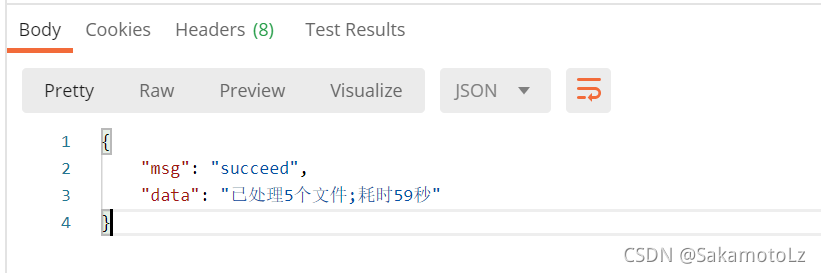
未使用多线程时:
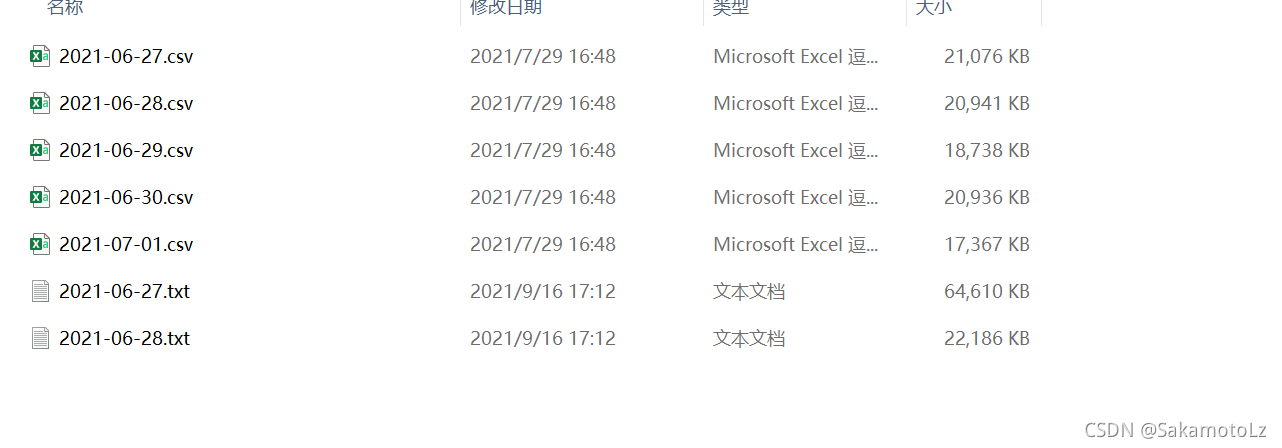
可以看到是一个文件一个文件依次进行处理的。
使用多线程时:
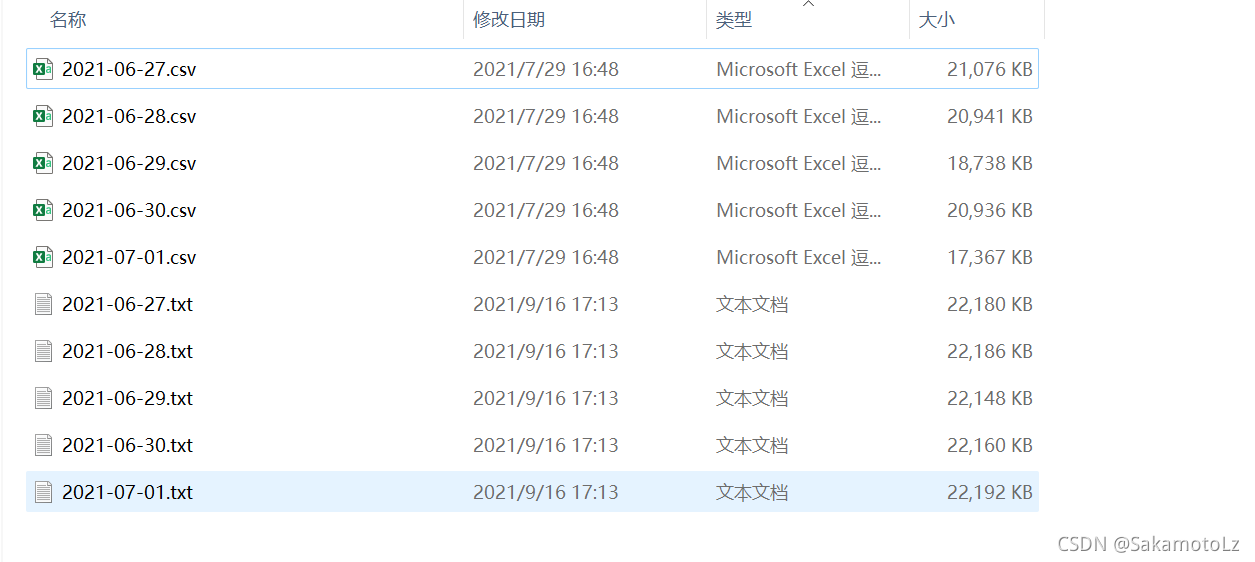
可以看到是5个文件同时进行处理的。
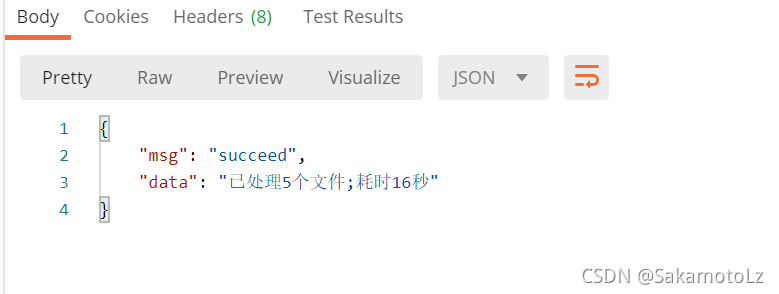
耗时为处理最大的文件所花费的时间,可以看到,花费的时间大大减少;毫无疑问,当需要处理的文件数量更庞大时,耗费时间的缩减将会更加明显。
本文内容由网友自发贡献,转载请注明出处:【wpsshop博客】
推荐阅读


相关标签

