
- 1Python中的条件语句if-elif-if用法_python if elif elif
- 2一文教你如何处理高并发
- 32024美赛数学建模C题思路&源码
- 4【云原生】Docker基于Dockerfile多级构建,实现缩小镜像体积
- 5Python爬虫【二】爬取PC网页版“微博辟谣”账号内容(selenium同步单线程)_爬虫跳过 微博登录页面
- 6若依RuoYi框架数据库权限控制表解析_ruoyi用户表是哪个
- 7操作系统基础篇_段页式管理中,怎样访问内存,取得某一条数据或指令
- 8Anaconda3\Scripts\activate.bat 不是内部或外部命令,也不是可运行的程序的问题处理方法_c:\users\huawei\anaconda3\scripts\activate.bat' 不是
- 9TypeScript学习笔记1-TS环境搭建
- 10okhttp3使用详解_okhttp3 使用
【OpenStack Liberty】cinder创建卷过程源码解析_cinder创建卷的流程
赞
踩
提示:本文基于openstack liberty版本源码进行梳理
前言
本文主要对cinder创建volume的主要调用点进行了梳理,篇幅较长,跟着文档阅读代码效果更佳~
一、知识回顾
最开始的Cinder简介文章中有一张图可以总结下创建卷时,各个模块之间的调用关系
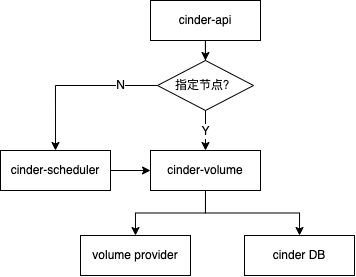
主要模块的目录下会有三个主要文件api.py、manager.py、rpcapi.py
api.py:对rpc调用做了层封装,供其他模块导入,调用;
manager.py:最核心代码,这里的XXXManager类(如:VolumeManager)用于执行接收到的rpc请求(rpc服务端)
rpcapi.py:可理解为rpc客户端,里面的方法实现都是请求server端(即manager)。请求过程为将请求发送到mq,server端处理。
二、代码走读
1. cinder-api部分
cinder-api接收到创建卷的请求,执行的是cinder.api.v1.volumes.VolumeController.create方法
		@wsgi.serializers(xml=VolumeTemplate)
    @wsgi.deserializers(xml=CreateDeserializer)
    def create(self, req, body):

        # 省略代码为合法性校验,下面这里是主要代码
        new_volume = self.volume_api.create(context,
                                            size,
                                            volume.get('display_name'),
                                            volume.get('display_description'),
                                            **kwargs)

        # TODO(vish): Instance should be None at db layer instead of
        #             trying to lazy load, but for now we turn it into
        #             a dict to avoid an error.
        new_volume = dict(new_volume)

        retval = _translate_volume_detail_view(context, new_volume, image_uuid)

        return {'volume': retval}

- 1
- 2
- 3
- 4
- 5
- 6
- 7
- 8
- 9
- 10
- 11
- 12
- 13
- 14
- 15
- 16
- 17
- 18
- 19
上面这个方法经过一系列校验之后,调用self.volume_api.create(),这里的volume_api实际上是cinder.volume.api.API,然后我们看下这里的create方法:
    # cinder.volume.api.API
  	def create(self, context, size, name, description, snapshot=None,
               ...):

      	# 省略代码主要对创建卷的一些参数进行进一步校验

        try:
          	# 这里指定了scheduler_rpcapi
            sched_rpcapi = (self.scheduler_rpcapi if (not cgsnapshot and
                            not source_cg) else None)
            volume_rpcapi = (self.volume_rpcapi if (not cgsnapshot and
                             not source_cg) else None)
            # **构造并返回工作流
            flow_engine = create_volume.get_flow(self.db,
                                                 self.image_service,
                                                 availability_zones,
                                                 create_what,
                                                 sched_rpcapi,
                                                 volume_rpcapi)
        except Exception:
            msg = _('Failed to create api volume flow.')
            LOG.exception(msg)
            raise exception.CinderException(msg)

        # Attaching this listener will capture all of the notifications that
        # taskflow sends out and redirect them to a more useful log for
        # cinders debugging (or error reporting) usage.
        with flow_utils.DynamicLogListener(flow_engine, logger=LOG):
            flow_engine.run()
            vref = flow_engine.storage.fetch('volume')
            LOG.info(_LI("Volume created successfully."), resource=vref)
            return vref
- 1
- 2
- 3
- 4
- 5
- 6
- 7
- 8
- 9
- 10
- 11
- 12
- 13
- 14
- 15
- 16
- 17
- 18
- 19
- 20
- 21
- 22
- 23
- 24
- 25
- 26
- 27
- 28
- 29
- 30
- 31
- 32
上面代码主要逻辑是获取到工作流并运行,这个工作流主要做以下操作:
- 为相关任务注入键和值。
- 提取并验证输入键和值。
- 保留配额(在任何失败时恢复配额)。
- 创建数据库条目。
- 提交配额。
- 投射到卷管理器或调度程序以进行进一步处理。
来看一下get_flow的关键代码:
def get_flow(db_api, image_service_api, availability_zones, create_what,
             scheduler_rpcapi=None, volume_rpcapi=None):
  	# 创建线性工作流
    api_flow = linear_flow.Flow(flow_name)

    api_flow.add(ExtractVolumeRequestTask(
        image_service_api,
        availability_zones,
        rebind={'size': 'raw_size',
                'availability_zone': 'raw_availability_zone',
                'volume_type': 'raw_volume_type'}))
    api_flow.add(QuotaReserveTask(),
                 EntryCreateTask(db_api),
                 QuotaCommitTask())

    if scheduler_rpcapi and volume_rpcapi:
        # This will cast it out to either the scheduler or volume manager via
        # the rpc apis provided.
        api_flow.add(VolumeCastTask(scheduler_rpcapi, volume_rpcapi, db_api))

    # Now load (but do not run) the flow using the provided initial data.
    return taskflow.engines.load(api_flow, store=create_what)
- 1
- 2
- 3
- 4
- 5
- 6
- 7
- 8
- 9
- 10
- 11
- 12
- 13
- 14
- 15
- 16
- 17
- 18
- 19
- 20
- 21
- 22
- 23
这里依次添加了5个Task:
- ExtractVolumeRequestTask 获取request信息
- QuotaReserverTask 预留配额
- EntryCreateTask 在数据库中创建volume条目
- QuotaCommitTask 确认配额
- VolumeCastTask 向cinder-scheduler发送消息,实际就是把消息发给rabbitmq,
前4个Task都是做准备工作,第5个task才真正讲消息发送出去
我们来看一下最后一个Task的具体内容:
找Task的execute方法,发现最终执行的方法是_cast_cfreate_volume
    def _cast_create_volume(self, context, request_spec, filter_properties):

      	# 省略代码为参数组装

        if not host:
            # Cast to the scheduler and let it handle whatever is needed
            # to select the target host for this volume.
            self.scheduler_rpcapi.create_volume(
                context,
                CONF.volume_topic,
                volume_id,
                snapshot_id=snapshot_id,
                image_id=image_id,
                request_spec=request_spec,
                filter_properties=filter_properties)
        else:
            # Bypass the scheduler and send the request directly to the volume
            # manager.
            now = timeutils.utcnow()
            values = {'host': host, 'scheduled_at': now}
            volume_ref = self.db.volume_update(context, volume_id, values)
            if not cgsnapshot_id:
                self.volume_rpcapi.create_volume(
                    context,
                    volume_ref,
                    volume_ref['host'],
                    request_spec,
                    filter_properties,
                    allow_reschedule=False)
- 1
- 2
- 3
- 4
- 5
- 6
- 7
- 8
- 9
- 10
- 11
- 12
- 13
- 14
- 15
- 16
- 17
- 18
- 19
- 20
- 21
- 22
- 23
- 24
- 25
- 26
- 27
- 28
- 29
- 30
如果没指定host,请求会直接转发到cinder-scheduler进行调度,若指定host,将会绕过调度,请求直接发送到volume manager上。
这里我们只讨论默认未指定host的情况
至此,cinder-api部分结束了,后续的创建流程交由cinder-scheduler进行调度
2. cinder-scheduler部分
上面VolumeCastTask中的self.scheduler_rpcapi为cinder.scheduler.rpcapi.SchedulerAPI
所以代码执行到了cinder.scheduler.rpcapi.SchedulerAPI.create_volume()
    def create_volume(self, ctxt, topic, volume_id, snapshot_id=None,
                      image_id=None, request_spec=None,
                      filter_properties=None):

        cctxt = self.client.prepare(version='1.2')
        request_spec_p = jsonutils.to_primitive(request_spec)
        return cctxt.cast(ctxt, 'create_volume',
                          topic=topic,
                          volume_id=volume_id,
                          snapshot_id=snapshot_id,
                          image_id=image_id,
                          request_spec=request_spec_p,
                          filter_properties=filter_properties)
- 1
- 2
- 3
- 4
- 5
- 6
- 7
- 8
- 9
- 10
- 11
- 12
- 13
这里请求会被SchedulerManager的create_volume消费,原因请参考scheduler启动流程中rpcserver启动
  class SchedulerManager(manager.Manager):
  	def create_volume(self, context, topic, volume_id, snapshot_id=None,
                      image_id=None, request_spec=None,
                      filter_properties=None):

        self._wait_for_scheduler()
        try:
          	# 这里又构造了一个线性工作流
            flow_engine = create_volume.get_flow(context,
                                                 db, self.driver,
                                                 request_spec,
                                                 filter_properties,
                                                 volume_id,
                                                 snapshot_id,
                                                 image_id)
        except Exception:
            msg = _("Failed to create scheduler manager volume flow")
            LOG.exception(msg)
            raise exception.CinderException(msg)

        with flow_utils.DynamicLogListener(flow_engine, logger=LOG):
            flow_engine.run()
- 1
- 2
- 3
- 4
- 5
- 6
- 7
- 8
- 9
- 10
- 11
- 12
- 13
- 14
- 15
- 16
- 17
- 18
- 19
- 20
- 21
- 22
- 23
这里又创建了一个线性工作流:
def get_flow(context, db_api, driver_api, request_spec=None,
             filter_properties=None,
             volume_id=None, snapshot_id=None, image_id=None):

    """Constructs and returns the scheduler entrypoint flow.

    This flow will do the following:

    1. 为依赖任务注入键值
    2. 从提供的输入中提取scheduler规格参数
    3. 使用提供的调度程序驱动程序选择主机并传递卷创建请求
    """
    create_what = {
        'context': context,
        'raw_request_spec': request_spec,
        'filter_properties': filter_properties,
        'volume_id': volume_id,
        'snapshot_id': snapshot_id,
        'image_id': image_id,
    }

    flow_name = ACTION.replace(":", "_") + "_scheduler"
    scheduler_flow = linear_flow.Flow(flow_name)

    # This will extract and clean the spec from the starting values.
    scheduler_flow.add(ExtractSchedulerSpecTask(
        db_api,
        rebind={'request_spec': 'raw_request_spec'}))

    # This will activate the desired scheduler driver (and handle any
    # driver related failures appropriately).
    scheduler_flow.add(ScheduleCreateVolumeTask(db_api, driver_api))

    # Now load (but do not run) the flow using the provided initial data.
    return taskflow.engines.load(scheduler_flow, store=create_what)
- 1
- 2
- 3
- 4
- 5
- 6
- 7
- 8
- 9
- 10
- 11
- 12
- 13
- 14
- 15
- 16
- 17
- 18
- 19
- 20
- 21
- 22
- 23
- 24
- 25
- 26
- 27
- 28
- 29
- 30
- 31
- 32
- 33
- 34
- 35
这里工作流包含两个task:
- ExtractSchedulerSpecTask:从初始值中提取并清理规格
- ScheduleCreateVolumeTask:筛选符合规则的host并向volume模块发起rpc请求
ScheduleCreateVolumeTask的execute主逻辑:
    def execute(self, context, request_spec, filter_properties):
    	self.driver_api.schedule_create_volume(context, request_spec,
                                                   filter_properties)
- 1
- 2
- 3
这里self.driver_api是cinder.scheduler.filter_scheduler.FilterScheduler
  class FilterScheduler(driver.Scheduler):
    def schedule_create_volume(self, context, request_spec, filter_properties):
        weighed_host = self._schedule(context, request_spec,
                                      filter_properties)

        if not weighed_host:
            raise exception.NoValidHost(reason=_("No weighed hosts available"))

        host = weighed_host.obj.host
        volume_id = request_spec['volume_id']
				# 更新数据库
        updated_volume = driver.volume_update_db(context, volume_id, host)
        self._post_select_populate_filter_properties(filter_properties,
                                                     weighed_host.obj)

        # context is not serializable
        filter_properties.pop('context', None)
				# 向cinder-volume发起rpc请求
        self.volume_rpcapi.create_volume(context, updated_volume, host,
                                         request_spec, filter_properties,
                                         allow_reschedule=True)
- 1
- 2
- 3
- 4
- 5
- 6
- 7
- 8
- 9
- 10
- 11
- 12
- 13
- 14
- 15
- 16
- 17
- 18
- 19
- 20
- 21
至此,cinder-sechduler部分调用完毕。
3. cinder-volume部分
cinder-scheduler向cinder-volume发起了创建卷的请求,请求被cinder.volume.manager.VolumeManager.create_volume消费
class VolumeManager(manager.SchedulerDependentManager):
    def create_volume(self, context, volume_id, request_spec=None,
                      filter_properties=None, allow_reschedule=True):

        		# 主流程
            flow_engine = create_volume.get_flow(
                context_elevated,
                self,
                self.db,
                self.driver,
                self.scheduler_rpcapi,
                self.host,
                volume_id,
                allow_reschedule,
                context,
                request_spec,
                filter_properties,
                image_volume_cache=self.image_volume_cache,
            )
- 1
- 2
- 3
- 4
- 5
- 6
- 7
- 8
- 9
- 10
- 11
- 12
- 13
- 14
- 15
- 16
- 17
- 18
- 19
这里依然构建了一个工作流:
def get_flow(context, manager, db, driver, scheduler_rpcapi, host, volume_id,
             allow_reschedule, reschedule_context, request_spec,
             filter_properties, image_volume_cache=None):

    volume_flow.add(ExtractVolumeRefTask(db, host, set_error=False))

    retry = filter_properties.get('retry', None)

    do_reschedule = allow_reschedule and request_spec and retry
    volume_flow.add(OnFailureRescheduleTask(reschedule_context, db,
                                            scheduler_rpcapi,
                                            do_reschedule))

    LOG.debug("Volume reschedule parameters: %(allow)s "
              "retry: %(retry)s", {'allow': allow_reschedule, 'retry': retry})

    volume_flow.add(ExtractVolumeSpecTask(db),
                    NotifyVolumeActionTask(db, "create.start"),
                    CreateVolumeFromSpecTask(manager,
                                             db,
                                             driver,
                                             image_volume_cache),
                    CreateVolumeOnFinishTask(db, "create.end"))

    # Now load (but do not run) the flow using the provided initial data.
    return taskflow.engines.load(volume_flow, store=create_what)
- 1
- 2
- 3
- 4
- 5
- 6
- 7
- 8
- 9
- 10
- 11
- 12
- 13
- 14
- 15
- 16
- 17
- 18
- 19
- 20
- 21
- 22
- 23
- 24
- 25
- 26
- 27
工作流有以下作用:
- 确定是否启用重新安排(提前)。
- 为相关任务注入键和值。
- 选择仅在失败任务时激活的2个任务中的1个(其中一个用于更新数据库状态&通知或更新数据库状态&通知&重新安排)。
- 从提供的输入中提取卷规格。
- 通知已开始创建卷。
- 根据提取的卷规范创建卷。
- 附加一个on successonly任务,通知卷创建已结束并执行进一步的数据库状态更新。
这里添加的Task有:
- ExtractVolumeRefTask
- OnFailureRescheduleTask
- ExtractVolumeSpecTask
- NotifyVolumeActionTask
- CreateVolumeFromSpecTask
- CreateVolumeOnFinishTask
前四个task还是做创建前的准备任务,第5个task进行真正的创建工作,最后一个task进行扫尾更新数据库
看一下CreateVolumeFromSpecTask
    def execute(self, context, volume_ref, volume_spec):
        # 根据不同创建类型调用不同方法
        if create_type == 'raw':
            model_update = self._create_raw_volume(volume_ref=volume_ref,
                                                   **volume_spec)
        elif create_type == 'snap':
            model_update = self._create_from_snapshot(context,
                                                      volume_ref=volume_ref,
                                                      **volume_spec)
        elif create_type == 'source_vol':
            model_update = self._create_from_source_volume(
                context, volume_ref=volume_ref, **volume_spec)
        elif create_type == 'source_replica':
            model_update = self._create_from_source_replica(
                context, volume_ref=volume_ref, **volume_spec)
        elif create_type == 'image':
            model_update = self._create_from_image(context,
                                                   volume_ref=volume_ref,
                                                   **volume_spec)
        else:
            raise exception.VolumeTypeNotFound(volume_type_id=create_type)
- 1
- 2
- 3
- 4
- 5
- 6
- 7
- 8
- 9
- 10
- 11
- 12
- 13
- 14
- 15
- 16
- 17
- 18
- 19
- 20
- 21
可以看到task根据不同的创建类型,走了不同的创建方法,看下raw格式的创建过程:
    def _create_raw_volume(self, volume_ref, **kwargs):
        return self.driver.create_volume(volume_ref)
- 1
- 2
这里的self.driver是在VolumeManager初始化时加载的。根据配置,默认为cinder.volume.drivers.lvm.LVMVolumeDriver
# cinder.volume.drivers.lvm.LVMVolumeDriver
def create_volume(self, name, size_str, lv_type='default', mirror_count=0):
        """Creates a logical volume on the object's VG.

        :param name: Name to use when creating Logical Volume
        :param size_str: Size to use when creating Logical Volume
        :param lv_type: Type of Volume (default or thin)
        :param mirror_count: Use LVM mirroring with specified count

        """

        if lv_type == 'thin':
            pool_path = '%s/%s' % (self.vg_name, self.vg_thin_pool)
            cmd = ['lvcreate', '-T', '-V', size_str, '-n', name, pool_path]
        else:
            cmd = ['lvcreate', '-n', name, self.vg_name, '-L', size_str]

        if mirror_count > 0:
            cmd.extend(['-m', mirror_count, '--nosync',
                        '--mirrorlog', 'mirrored'])
            terras = int(size_str[:-1]) / 1024.0
            if terras >= 1.5:
                rsize = int(2 ** math.ceil(math.log(terras) / math.log(2)))
                # NOTE(vish): Next power of two for region size. See:
                #             http://red.ht/U2BPOD
                cmd.extend(['-R', str(rsize)])

        try:
          	# 执行命令
            self._execute(*cmd,
                          root_helper=self._root_helper,
                          run_as_root=True)
        except putils.ProcessExecutionError as err:
            LOG.exception(_LE('Error creating Volume'))
            LOG.error(_LE('Cmd     :%s'), err.cmd)
            LOG.error(_LE('StdOut  :%s'), err.stdout)
            LOG.error(_LE('StdErr  :%s'), err.stderr)
            raise
- 1
- 2
- 3
- 4
- 5
- 6
- 7
- 8
- 9
- 10
- 11
- 12
- 13
- 14
- 15
- 16
- 17
- 18
- 19
- 20
- 21
- 22
- 23
- 24
- 25
- 26
- 27
- 28
- 29
- 30
- 31
- 32
- 33
- 34
- 35
- 36
- 37
- 38
通过上面代码可以看到创建卷的具体命令。
至此volume创建完成。
总结
以上就是cinder创建volume的主要调用流程,仅仅贴上主要代码及注释,中间各项细节加载可以根据这个方向去仔细看,本文不再贴出。
如有错误欢迎指教
Copyright © 2003-2013 www.wpsshop.cn 版权所有,并保留所有权利。

