
热门标签
热门文章
- 1盘点2023年Q3的开源模型,这些值得推荐!_exllamav2hf
- 2在Flask中实现websocket_flask websocket
- 3关于“React 和 Vue 该用哪个”我真的栓Q_react vue 选型
- 4网络安全工具——Wireshark抓包工具_抓包工具wireshark
- 5数学基础--均值、方差、标准差、协方差_均值和标准差
- 6自回归模型(Autoregressive model)(auto)
- 7SpringBoot多数据源切换,AOP实现动态数据源切换_dynamicdatasource.adddatasource()
- 8西瓜视频登录页面_69av
- 9Qt - Clion使用cmake运行QtCreator创建的qmake项目,无改动切换自如_clion 创建qmake 项目
- 10Git使用总结_git topic
当前位置: article > 正文
Hutool导入导出用法
作者:代码优化者 | 2024-01-31 17:37:10
赞
踩
Hutool导入导出用法
整理了下Hutool导入导出的简单使用。
导入maven或jar包(注意这里导入的poi只是为了优化样式)
<!-- https://mvnrepository.com/artifact/cn.hutool/hutool-all -->
<dependency>
    <groupId>cn.hutool</groupId>
    <artifactId>hutool-all</artifactId>
    <version>5.3.0</version>
</dependency>

<!-- https://mvnrepository.com/artifact/org.apache.poi/poi -->
<dependency>
    <groupId>org.apache.poi</groupId>
    <artifactId>poi</artifactId>
    <version>4.0.1</version>
</dependency>
- 1
- 2
- 3
- 4
- 5
- 6
- 7
- 8
- 9
- 10
- 11
- 12
- 13
代码部分:
import cn.hutool.core.io.FileUtil;
import cn.hutool.poi.excel.ExcelReader;
import cn.hutool.poi.excel.ExcelUtil;
import cn.hutool.poi.excel.ExcelWriter;
import org.apache.poi.ss.usermodel.*;

import javax.servlet.ServletOutputStream;
import java.io.*;
import java.util.ArrayList;
import java.util.Arrays;
import java.util.LinkedList;
import java.util.List;

/**
 * hutool测试(导入导出)
 */
public class HutoolTest {

    public static void main(String[] args) {
        //导出
        exportExcel();

        //导入
        importExcel();
    }

    /**
     * 导出
     */
    private static void exportExcel(){
        //本地导出的路径
        String exportPath = "E:/测试图片/测试.xlsx";
        try{
            //处理表头对应数据
            List<String> titleList = new LinkedList<>();
            titleList.add("姓名");
            titleList.add("年龄");
            titleList.add("地点");

            // 创建一些数据
            List<List<String>> data = new ArrayList<>();
            data.add(Arrays.asList("张三", "25", "北京"));
            data.add(Arrays.asList("李四", "30", "上海"));

            // 通过工具类创建writer
            ExcelWriter writer = new ExcelWriter();
            // 一次性写出内容,使用默认样式,强制输出标题
            writer.writeHeadRow((Iterable<?>) titleList);
            // 写入内容
            writer.write(data);

            //设置表头宽度
            setSizeColumnBt(writer.getSheet(),titleList.size());

            Workbook workbook = writer.getWorkbook();

            //服务器上返回时
//            response.setContentType("application/vnd.ms-excel;charset=ISO-8859-1");
//            filename = new String(filename.getBytes("GB2312"), "ISO8859-1");
//            response.setHeader("content-disposition", "attachment;filename=" + filename);
//            response.addHeader("Pargam", "no-cache");
//            response.addHeader("Cache-Control", "no-cache");
//            ServletOutputStream sout = response.getOutputStream();

            //本地导出时
            ByteArrayOutputStream sout = new ByteArrayOutputStream();
            workbook.write(sout);
            InputStream input = new ByteArrayInputStream(sout.toByteArray());
            // 测试导出到本地
            writeToLocal(exportPath,input);

            System.out.println("导出完成");

            // 关闭writer,释放内存
            writer.close();
            workbook.close();
            sout.flush();
            sout.close();
        } catch (Exception e) {
            e.printStackTrace();
        }
    }

	/**
     * 导入
     */
    private static void importExcel(){
        //本地导入的路径
        String importPath = "E:/测试图片/测试.xlsx";

        // 指定 Excel 文件路径(正常是通过input流转)
        File excelFile = FileUtil.file(importPath);

        // 创建 ExcelReader 对象
        ExcelReader reader = ExcelUtil.getReader(excelFile);

        // 读取第一个sheet的数据
        List<List<Object>> data = reader.read();

        for (List<Object> data1 : data){
            System.out.println(data1.toString());
        }
    }

    /**
     * 自适应宽度(中文支持)(表头)
     *
     * @param sheet sheet
     * @param cellSize  因为for循环从0开始,size值为 列数-1
     */
    private static void setSizeColumnBt(Sheet sheet, int cellSize) {
        for (int columnNum = 0; columnNum <= cellSize; columnNum++) {
            int columnWidth = sheet.getColumnWidth(columnNum) / 256;
            Row currentRow = sheet.getRow(0);
            if (currentRow.getCell(columnNum) != null) {
                Cell currentCell = currentRow.getCell(columnNum);
                if (currentCell.getCellType() == CellType.STRING) {
                    int length = currentCell.getStringCellValue().getBytes().length;
                    if (columnWidth < length + 1) {
                        columnWidth = length + 8;
                    }
                }
            }
            sheet.setColumnWidth(columnNum, columnWidth * 256);
        }
    }

    /**
     * 将InputStream写入本地文件
     * @param destination 写入本地目录
     * @param input 输入流
     * @throws IOException IOException
     */
    public static void writeToLocal(String destination, InputStream input)
            throws IOException {
        int index;
        byte[] bytes = new byte[1024];
        FileOutputStream downloadFile = new FileOutputStream(destination);
        while ((index = input.read(bytes)) != -1) {
            downloadFile.write(bytes, 0, index);
            downloadFile.flush();
        }
        input.close();
        downloadFile.close();

    }
}

- 1
- 2
- 3
- 4
- 5
- 6
- 7
- 8
- 9
- 10
- 11
- 12
- 13
- 14
- 15
- 16
- 17
- 18
- 19
- 20
- 21
- 22
- 23
- 24
- 25
- 26
- 27
- 28
- 29
- 30
- 31
- 32
- 33
- 34
- 35
- 36
- 37
- 38
- 39
- 40
- 41
- 42
- 43
- 44
- 45
- 46
- 47
- 48
- 49
- 50
- 51
- 52
- 53
- 54
- 55
- 56
- 57
- 58
- 59
- 60
- 61
- 62
- 63
- 64
- 65
- 66
- 67
- 68
- 69
- 70
- 71
- 72
- 73
- 74
- 75
- 76
- 77
- 78
- 79
- 80
- 81
- 82
- 83
- 84
- 85
- 86
- 87
- 88
- 89
- 90
- 91
- 92
- 93
- 94
- 95
- 96
- 97
- 98
- 99
- 100
- 101
- 102
- 103
- 104
- 105
- 106
- 107
- 108
- 109
- 110
- 111
- 112
- 113
- 114
- 115
- 116
- 117
- 118
- 119
- 120
- 121
- 122
- 123
- 124
- 125
- 126
- 127
- 128
- 129
- 130
- 131
- 132
- 133
- 134
- 135
- 136
- 137
- 138
- 139
- 140
- 141
- 142
- 143
- 144
- 145
- 146
- 147
导出结果截图:
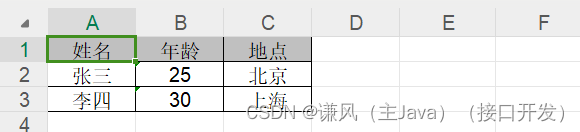
导入结果打印:
[姓名, 年龄, 地点]
[张三, 25, 北京]
[李四, 30, 上海]
- 1
- 2
- 3
声明:本文内容由网友自发贡献,转载请注明出处:【wpsshop】
推荐阅读
相关标签

