
热门标签
热门文章
- 1云原生之使用Docker部署Dashy个人导航页_docker 导航页
- 2xcode iOS 17.2 not install, Simulator 手动安装_ios17.2 simulator
- 3nvidia driver、cuda、cudnn、nvidia-docker 安装、配置和部署(Ubuntu 18.04 LTS)_nvidia docker 版本
- 4Unity零基础入门 - 见缝插针_开发gamemanager去生成针
- 5企业、工厂如何运用智能物联网技术, 降低能耗、实现节能减排?_对于和物联网控制系统节能合作需要了解什么内容
- 62-4《学生食堂信息管理系统》饭卡管理模块_录入时间列(register_date)默认值为当前录入时间
- 7kubernetes--pod的生命周期管理(PostStart,PreStop)
- 8neo4j教程-安装部署_neo4j安装
- 9【TCP】流量控制和拥塞控制
- 10论文排版神器VSCode+LaTeX最新保姆级图文配置教程_vscode latex
当前位置: article > 正文
模板匹配 解决模板旋转以及重复检测问题_模板匹配如何针对旋转
作者:思考机器4 | 2024-01-31 14:31:07
赞
踩
模板匹配如何针对旋转
OpenCV Error: Assertion failed (scn == 3 || scn == 4)
 in cv::cvtColor, file C:\projects\opencv-python\opencv\modules\imgproc\src\color.cpp, line 11111
- 1
- 2
1 加载路径有错误
2 参数0是灰度,再灰度化出错
模板匹配
import cv2
import numpy as np

#加载原始RGB图像
img_rgb = cv2.imread("C:/Users/AEC/Desktop/1.png")
#创建一个原始图像的灰度版本,所有操作在灰度版本中处理,然后在RGB图像中使用相同坐标还原
img_gray = cv2.cvtColor(img_rgb, cv2.COLOR_BGR2GRAY)

#加载将要搜索的图像模板
template = cv2.imread('C:/Users/AEC/Desktop/2.png',0)
#记录图像模板的尺寸
w, h = template.shape[::-1]

"""
#查看三组图像(图像标签名称,文件名称)
cv2.namedWindow("rgb")
cv2.imshow('rgb',img_rgb)
cv2.namedWindow("gray")
cv2.imshow('gray',img_gray)
cv2.namedWindow("template")
cv2.imshow('template',template)
cv2.waitKey(0)
cv2.destroyAllWindows()
"""
#使用matchTemplate对原始灰度图像和图像模板进行匹配
res = cv2.matchTemplate(img_gray,template,cv2.TM_CCOEFF_NORMED)
#设定阈值
threshold = 0.7
#res大于70%
loc = np.where( res >= threshold)

#使用灰度图像中的坐标对原始RGB图像进行标记
for pt in zip(*loc[::-1]):
    cv2.rectangle(img_rgb, pt, (pt[0] + w, pt[1] + h), (0,0,255), 2)
#显示图像
cv2.namedWindow("Detected",0)
cv2.imshow('Detected',img_rgb)
cv2.imwrite("1_after.png",img_rgb)
cv2.waitKey(0)
cv2.destroyAllWindows()

- 1
- 2
- 3
- 4
- 5
- 6
- 7
- 8
- 9
- 10
- 11
- 12
- 13
- 14
- 15
- 16
- 17
- 18
- 19
- 20
- 21
- 22
- 23
- 24
- 25
- 26
- 27
- 28
- 29
- 30
- 31
- 32
- 33
- 34
- 35
- 36
- 37
- 38
- 39
- 40
- 41
模板

原图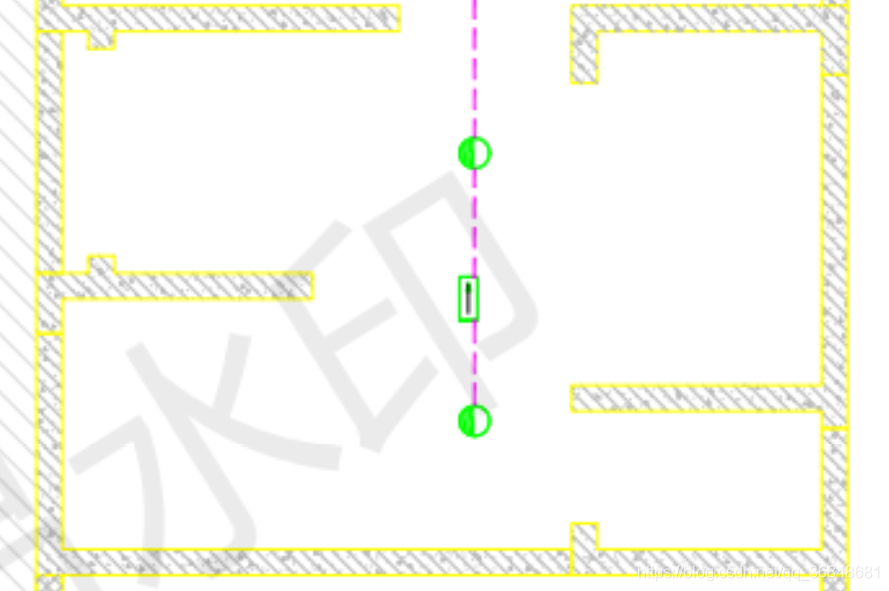
原图
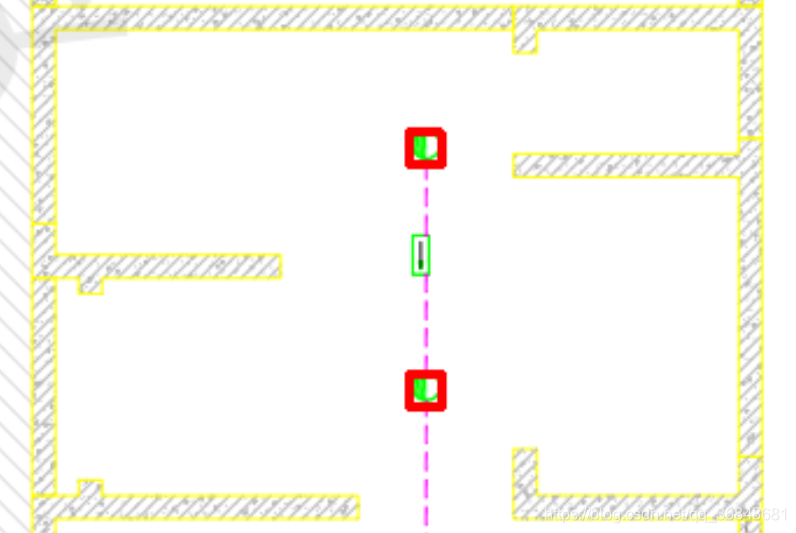
效果图
问题1 如果图像旋转了就匹配不到,试着解决这个问题 解决方案:
旋转模板匹配图案
问题2 可以看到对同一个图有多个框标定,需要去重,只需要保留一个
解决方案:对框边界值设置阈值,阈值范围内就当成一个框
问题3 可能有漏检过检情况
通过调节阈值解决
经过差不多大半天的努力解决了以上一些问题
下面这个程序实现对两个图案的匹配
import cv2
import numpy as np

# 加载原始RGB图像
img_rgb = cv2.imread("origin.png")
# 创建一个原始图像的灰度版本,所有操作在灰度版本中处理,然后在RGB图像中使用相同坐标还原
img_gray = cv2.cvtColor(img_rgb, cv2.COLOR_BGR2GRAY)
# 加载将要搜索的图像模板
#模板1 筛选图案1
template1 = cv2.imread('template1.png', 0)
#模板2 3 筛选图案2
template2 = cv2.imread('template2.png', 0)
template3 = cv2.imread('template3.png', 0)
# 记录图像模板的尺寸
w1, h1 = template1.shape[::-1]
w2, h2 = template2.shape[::-1]
w3, h3 = template3.shape[::-1]

def rotate_bound(image, angle):#图片旋转但不改变大小,模板匹配中大小改变对匹配效果有影响
    (h, w) = image.shape[:2]
    (cX, cY) = (w // 2, h // 2)#//是向下取整
    M = cv2.getRotationMatrix2D((cX, cY), -angle, 1.0)
    cos = np.abs(M[0, 0])
    sin = np.abs(M[0, 1])
    nW = int((h * sin) + (w * cos))
    nH = int((h * cos) + (w * sin))
    M[0, 2] += (nW / 2) - cX
    M[1, 2] += (nH / 2) - cY
    return cv2.warpAffine(image, M, (nW, nH))

#选出所有匹配旋转模板且不重复的图案
def make_contour(template,w,h,angle,threshold):
    rects = []
    # 模板旋转匹配
    for i in range(0, 360, angle):
        new_rotate = rotate_bound(template, i)
        # 把图片旋转后黑色的部分填充成白色
        new_rotate[new_rotate == 0] = 255
        # 使用matchTemplate对原始灰度图像和图像模板进行匹配
        res = cv2.matchTemplate(img_gray, new_rotate, cv2.TM_CCOEFF_NORMED)
        # 设定阈值
        loc = np.where(res >= threshold)
        #x,y坐标对调打包
        for pt in zip(*loc[::-1]):
            point = np.array([[pt[0], pt[1]], [pt[0] + w, pt[1]],
                    [pt[0], pt[1] + h], [pt[0] + w, pt[1] + h]])
            rects.append(cv2.boundingRect(point))
    #模板匹配后符合要求的所有图案数量
    length = len(rects)
    #设定阈值
    threshold = 3
    i = 0
    #如果两个图案距离在阈值范围内,则等同,然后用集合去重
    while(i<length):
        print(i)
        for j in range(length):
            if j != i:
                if np.abs(rects[j][0]-rects[i][0])<= threshold:
                    if np.abs(rects[j][1]-rects[i][1]) <= threshold:
                        rects[j] = rects[i]
        i = i+1
    return set(rects)

#在原图把匹配的模板框出来并输出坐标文档
def draw_contour(contours,color):
    count = 0
    for contour in contours:
        cv2.rectangle(img_rgb, (contour[0], contour[1]), (contour[0] + contour[2], contour[1] + contour[3]),
                             color, 1)
        cx = contour[0] + (contour[2] // 2)
        cy = contour[1] + (contour[3] // 2)
        count = count + 1
        cv2.putText(img_rgb, str(count), (cx, cy), cv2.FONT_HERSHEY_SIMPLEX, 1,color, 1, 1)
        with open("data.txt", "a+") as f:
            f.write("contour" + '\t' + str(count) + '\t' + 'cx: ' + str(cx) + '  \t' + 'cy: ' + str(cy) + '\n')
            # 显示图像
    cv2.imwrite("after.png", img_rgb)

if __name__=='__main__':
    #a+可读可写覆盖
    with open("data.txt", "a+") as f:
        f.write('contour1'+'\n')
    threshold1 = 0.69
    contours1 = make_contour(template1,w1,h1,90,threshold1)
    color1 = (255, 0, 0)
    draw_contour(contours1,color1)

    img_rgb = cv2.imread("after.png")
    img_gray = cv2.cvtColor(img_rgb, cv2.COLOR_BGR2GRAY)
    with open("data.txt", "a+") as f:
        f.write('\n'+'contour2'+'\n')
    color2 = (0,0,255)
    threshold2 = 0.53
    #合并轮廓
    contours2 = list(make_contour(template2, w2, h2,30,threshold2))+list(make_contour(template3, w3, h3, 30, threshold2))
    draw_contour(contours2,color2)
- 1
- 2
- 3
- 4
- 5
- 6
- 7
- 8
- 9
- 10
- 11
- 12
- 13
- 14
- 15
- 16
- 17
- 18
- 19
- 20
- 21
- 22
- 23
- 24
- 25
- 26
- 27
- 28
- 29
- 30
- 31
- 32
- 33
- 34
- 35
- 36
- 37
- 38
- 39
- 40
- 41
- 42
- 43
- 44
- 45
- 46
- 47
- 48
- 49
- 50
- 51
- 52
- 53
- 54
- 55
- 56
- 57
- 58
- 59
- 60
- 61
- 62
- 63
- 64
- 65
- 66
- 67
- 68
- 69
- 70
- 71
- 72
- 73
- 74
- 75
- 76
- 77
- 78
- 79
- 80
- 81
- 82
- 83
- 84
- 85
- 86
- 87
- 88
- 89
- 90
- 91
- 92
- 93
- 94
- 95
- 96
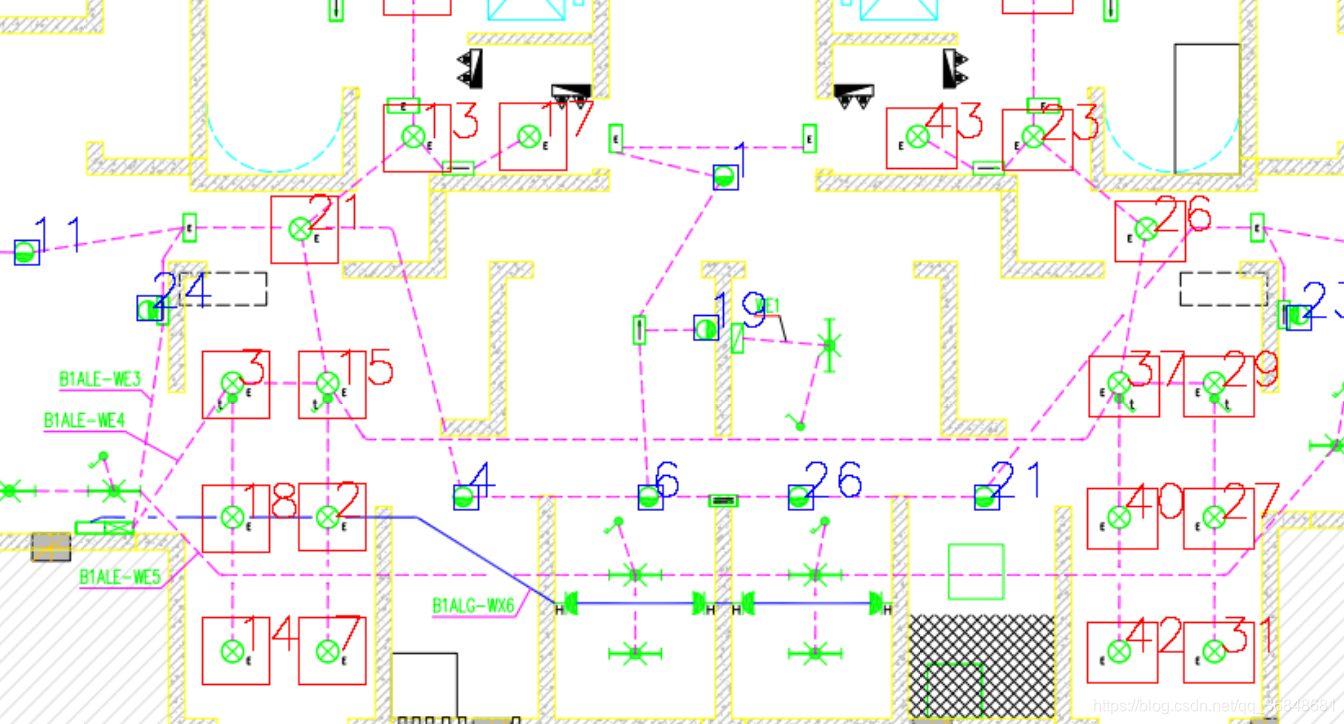
匹配效果很好,阈值调节需要谨慎,0.01的差距可能会造成一个漏检
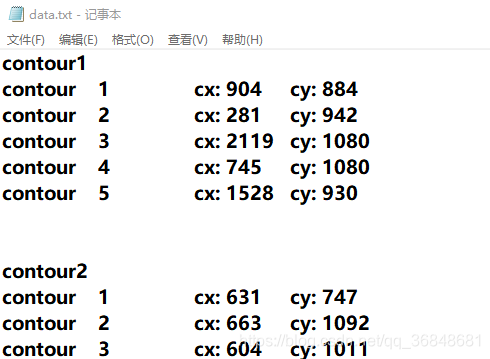
输出每个框的位置坐标
声明:本文内容由网友自发贡献,不代表【wpsshop博客】立场,版权归原作者所有,本站不承担相应法律责任。如您发现有侵权的内容,请联系我们。转载请注明出处:https://www.wpsshop.cn/article/detail/50790
推荐阅读
相关标签

