
热门标签
热门文章
- 1Qt如何在进度条上显示自定义文字_qml自定义进度条里加字
- 2程序员常用的几个效率小工具,可好用了!_16进制编辑器在线
- 3探索Java中最常用的框架:Spring、Spring MVC、Spring Boot、MyBatis和Netty_和spring类似的框架
- 4全局数组的定义、声明和使用_全局数组怎么定义
- 5Python爬虫:数据获取requests
- 6JDBC是什么_jdbc是什么意思
- 7fastlane 进行 ios 构建_nslocalizedrecoverysuggestion=xcode will continue
- 8python 提取固定列名数据_python获取数据库列名
- 9python搭建博客系统_基于python3.7和django2.1的多人博客系统
- 10力扣:删除有序数组中的重复项(简单)_力扣 数组去重
当前位置: article > 正文
python222网站实战(SpringBoot+SpringSecurity+MybatisPlus+thymeleaf+layui)-系统属性管理实现
作者:代码优化者 | 2024-01-31 08:26:44
赞
踩
python222网站实战(SpringBoot+SpringSecurity+MybatisPlus+thymeleaf+layui)-系统属性管理实现
锋哥原创的Springboot+Layui python222网站实战:
 https://www.bilibili.com/video/BV1yX4y1a7qM/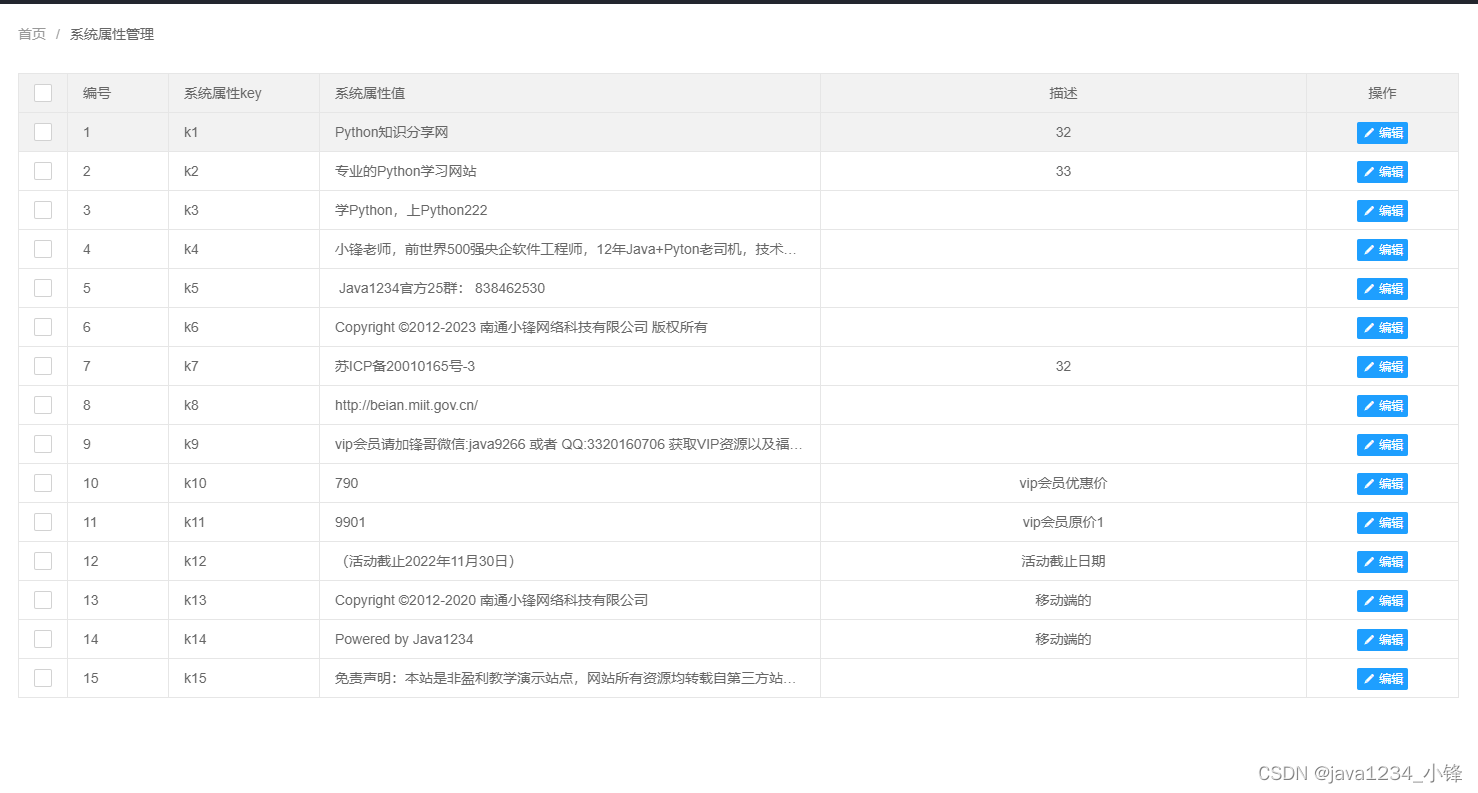
新建PropertyAdminController 类
- package com.python222.controller.admin;
-
- import com.python222.entity.Property;
- import com.python222.service.PropertyService;
- import org.springframework.beans.factory.annotation.Autowired;
- import org.springframework.web.bind.annotation.RequestMapping;
- import org.springframework.web.bind.annotation.RestController;
-
- import java.util.HashMap;
- import java.util.List;
- import java.util.Map;
-
- /**
- * 管理员-系统属性控制器
- * @author Administrator
- *
- */
- @RestController
- @RequestMapping(value = "/admin/property")
- public class PropertyAdminController {
-
- @Autowired
- private PropertyService propertyService;
-
-
- /**
- * 根据条件分页查询系统属性
- * @return
- * @throws Exception
- */
- @RequestMapping(value = "/list")
- public Map<String,Object> list()throws Exception{
- Map<String, Object> resultMap = new HashMap<>();
- List<Property> propertyList=propertyService.list();
- resultMap.put("code", 0);
- resultMap.put("data", propertyList);
- return resultMap;
- }
-
- /**
- *修改系统属性
- * @param property
- * @return
- */
- @RequestMapping("/update")
- public Map<String,Object> update(Property property)throws Exception{
- propertyService.updateById(property);
- Map<String, Object> resultMap = new HashMap<>();
- resultMap.put("success", true);
- return resultMap;
- }
-
-
- /**
- * 根据id查询系统属性实体
- * @param id
- * @return
- * @throws Exception
- */
- @RequestMapping("/findById")
- public Map<String,Object> findById(Integer id)throws Exception{
- Map<String, Object> resultMap = new HashMap<>();
- Property property=propertyService.getById(id);
- resultMap.put("property", property);
- resultMap.put("success", true);
- return resultMap;
- }
- }

propertyManage.html
- <!DOCTYPE html>
- <html>
- <head>
- <meta charset="UTF-8">
- <title>系统属性管理</title>
- <link rel="stylesheet" href="/static/layui/css/layui.css"></link>
- <link rel="stylesheet" href="/static/css/css.css"></link>
- </head>
- <body>
-
-
- <div style="padding: 20px">
- <span class="layui-breadcrumb">
- <a>首页</a>
- <a><cite>系统属性管理</cite></a>
- </span>
- <div style="padding-top: 20px;">
- <div>
- <table width="100%" id="linkListTable" ></table>
- </div>
- </div>
- </div>
-
- <script src="/static/layui/layui.js"></script>
- <script src="/static/js/jquery.js"></script>
- <script src="/static/js/common.js"></script>
- <script type="text/javascript">
-
- layui.use(['element','form','table'], function(){
- var form=layui.form;
- var element = layui.element; //导航的hover效果、二级菜单等功能,需要依赖element模块
- $ = layui.jquery; // 使用jquery
- table = layui.table;
-
- table.render({
- elem: '#linkListTable'
- ,url:'/admin/property/list'
- ,cols: [[
- {type:'checkbox'}
- ,{field:'id', width:100,title: '编号'}
- ,{field:'k', width:150,title: '系统属性key'}
- ,{field:'v', width:500,title: '系统属性值'}
- ,{field:'remark', title: '描述',align:'center'}
- ,{field:'action', width:150, title: '操作',align:'center',templet:formatAction}
- ]]
- });
- });
-
-
- function modifyLink(id){
- layer.open({
- type: 2,
- title: '修改系统属性',
- area: ['600px', '700px'],
- content: '/admin/updateProperty.html?id='+id //iframe的url
- });
- }
-
- function formatAction(d){
- return "<button class='layui-btn layui-btn-normal layui-btn-xs' onclick='modifyLink("+d.id+")'><i class='layui-icon layui-icon-edit'></i>编辑</button>";
- }
-
-
- </script>
- </body>
- </html>
updateProperty.html
- <!DOCTYPE html>
- <html>
- <head>
- <meta charset="UTF-8">
- <title>修改系统属性</title>
- <link rel="stylesheet" href="/static/layui/css/layui.css"></link>
- <style type="text/css">
-
- table tr td{
- padding: 10px;
- }
-
- </style>
- </head>
- <body>
- <div style="padding: 20px">
- <form method="post">
- <table>
- <tr>
- <td>系统属性Key:</td>
- <td><input type="text" disabled id="k" name="k" class="layui-input" style="width: 300px"/></td>
- </tr>
- <tr>
- <td>系统属性值:</td>
- <td><textarea type="text" id="v" name="v" class="layui-input" style="width: 300px;height: 100px" ></textarea></td>
- </tr>
- <tr>
- <td>系统属性默认值:</td>
- <td>
- <textarea type="text" id="defaultValue" name="defaultValue" class="layui-input" style="width: 300px;height: 100px" ></textarea></td>
- </tr>
- <tr>
- <td>系统属性描述:</td>
- <td>
- <textarea type="text" id="remark" name="remark" class="layui-input" style="width: 300px;height: 100px" ></textarea>
- </td>
- </tr>
- <tr>
- <td><button class="layui-btn" onclick="submitData();return false;">提交</button></td>
- <td><font id="errorInfo" color="red"></font></td>
- </tr>
- </table>
- </form>
- </div>
- <script src="/static/layui/layui.js"></script>
- <script src="/static/js/jquery.js"></script>
- <script src="/static/js/common.js"></script>
- <script type="text/javascript">
-
- layui.use(['form'], function(){
-
- });
-
- function submitData(){
- var v=$("#v").val().trim();
- var remark=$("#remark").val().trim();
- if(v=="") {
- $("#errorInfo").text("请输入友情链接值!");
- $("#v").focus();
- return false;
- }
- var id=getQueryVariable("id");
- if(id){
- $.post("/admin/property/update",{id:id,v:v,remark:remark},function(result){
- if(result.success){
- layer.alert('修改成功!',function () {
- parent.reloadPage();
- });
- }else{
- $("#errorInfo").text(result.errorInfo);
- }
- },"json");
- }
- }
-
-
-
- function getQueryVariable(variable){
- var query = window.location.search.substring(1);
- var vars = query.split("&");
- for (var i=0;i<vars.length;i++) {
- var pair = vars[i].split("=");
- if(pair[0] == variable){return pair[1];}
- }
- return(false);
- }
-
- $(function(){
-
- var id=getQueryVariable("id");
-
- if(id){
- $.post("/admin/property/findById",{id:id},function(result){
- if(result.success){
- var property=result.property;
- $("#k").val(property.k);
- $("#v").val(property.v);
- $("#defaultValue").val(property.defaultValue);
- $("#remark").val(property.remark);
- }else{
- layer.alert('服务器加载有问题,请联系管理员!');
- }
- },"json");
- }
- });
-
-
- </script>
- </body>
- </html>
声明:本文内容由网友自发贡献,不代表【wpsshop博客】立场,版权归原作者所有,本站不承担相应法律责任。如您发现有侵权的内容,请联系我们。转载请注明出处:https://www.wpsshop.cn/article/detail/50002
推荐阅读


相关标签

