
热门标签
热门文章
- 1k8s 将pod节点上的文件拷贝到本地_pod里面的文件怎么复制出来
- 2BP神经网络入门(原理+matlab代码实现)_bp神经网络matlab
- 3uniapp通讯录等敏感权限检查、申请。获取通话记录等内容_uniapp 打开通话记录权限
- 4经典目标检测YOLO系列(一)复现YOLOV1(5)模型的训练及验证
- 5自然语言处理(Natural Language Processing,NLP)解密
- 6【物联网】继续深入探索ADC模拟转数字的原理——Flash ADC&流水线ADC&逐次逼近型SAR ADC_为什么4bit的flash adc会用到16个比较器
- 7华为od模式违反了法律和道德吗?【华为OD面试常见问题解析2023版】_华为od综面有问题
- 8华为机试(Python)真题Od【A卷+B卷+C卷+D卷】_华为od机试好过吗
- 9Git入门教程
- 10WebFlux中使用WebSocket的拓展功能分析
当前位置: article > 正文
两个路由页面相互传递信息,history.replace,history.replace传递参数,两个页面利用路由来传递参数
作者:代码探索者 | 2024-01-30 21:46:00
赞
踩
history.replace
最终效果:

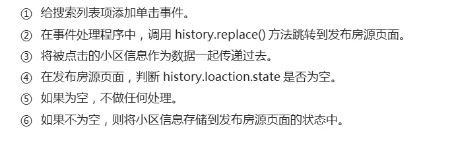
搜索页面源码:
重点关注:
 onTipsClick = (item) => {  this.props.history.replace('/rent/add',{
  name: item.communityName,
  id: item.community
     })
 }
- 1
- 2
- 3
- 4
- 5
import React, { Component } from "react";

import { SearchBar } from "antd-mobile";

import { getCity } from "../../../utils/city";
import API from "../../../utils/api";
import styles from "./index.module.css";


export default class Search extends Component {
  // 当前城市id
  cityId = getCity().value;

  state = {
    // 搜索框的值
    searchTxt: "",
    tipsList: [],
  };
  timerId = null
  // 渲染搜索结果列表
  renderTips = () => {
    const { tipsList } = this.state;

    return tipsList.map((item) => (
      <li key={item.community} className={styles.tip} onClick={()=> {this.onTipsClick(item)}}>
        {item.communityName}
      </li>
    ));
  };
  onTipsClick = (item) => {
  this.props.history.replace('/rent/add',{
    name: item.communityName,
    id: item.community
  })
  }
  handleSearchTxt = (value) => {
    this.setState({
      searchTxt: value,
    });
    if (!value) {
      return this.setState({
        tipsList: []
      });
    } else {
      clearTimeout(this.timerId)
      this.timerId =  setTimeout(async ()=>{
        const { data: { body} } = await API.get("/area/community",{
          params: {
            name: value,
            id: this.cityId
          },
        });
       this.setState({
         tipsList: body
       })
      },500)
    }
  };
  render() {
    const { history } = this.props;
    const { searchTxt } = this.state;

    return (
      <div className={styles.root}>
        {/* 搜索框 */}
        <SearchBar
          placeholder="请输入小区或地址"
          value={searchTxt}
          onChange={this.handleSearchTxt}
          showCancelButton={true}
          onCancel={() => history.replace("/rent/add")}
        />

        {/* 搜索提示列表 */}
        <ul className={styles.tips}>{this.renderTips()}</ul>
      </div>
    );
  }
}

- 1
- 2
- 3
- 4
- 5
- 6
- 7
- 8
- 9
- 10
- 11
- 12
- 13
- 14
- 15
- 16
- 17
- 18
- 19
- 20
- 21
- 22
- 23
- 24
- 25
- 26
- 27
- 28
- 29
- 30
- 31
- 32
- 33
- 34
- 35
- 36
- 37
- 38
- 39
- 40
- 41
- 42
- 43
- 44
- 45
- 46
- 47
- 48
- 49
- 50
- 51
- 52
- 53
- 54
- 55
- 56
- 57
- 58
- 59
- 60
- 61
- 62
- 63
- 64
- 65
- 66
- 67
- 68
- 69
- 70
- 71
- 72
- 73
- 74
- 75
- 76
- 77
- 78
- 79
- 80
添加页面源码:
重点关注:
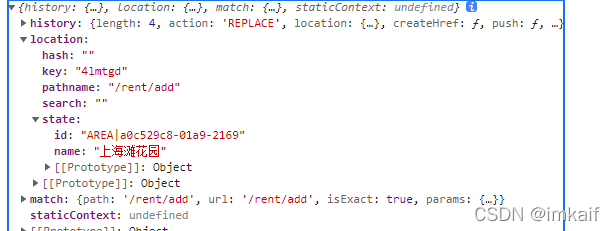
 const { state } = props.location
 const  community = {
  name: '',
  id: ''
}
 if (state) {
  //  有小区数据,存储到状态中
  community.name = state.name;
  community.id = state.id;
 }
- 1
- 2
- 3
- 4
- 5
- 6
- 7
- 8
- 9
- 10
history.replace传过来的值
import React, { Component } from 'react' import { Flex, List, InputItem, Picker, ImagePicker, TextareaItem, Modal } from 'antd-mobile' import NavHeader from '../../../components/NavHeader' import HousePackge from '../../../components/HousePackage' import styles from './index.module.css' const alert = Modal.alert // 房屋类型 const roomTypeData = [ { label: '一室', value: 'ROOM|d4a692e4-a177-37fd' }, { label: '二室', value: 'ROOM|d1a00384-5801-d5cd' }, { label: '三室', value: 'ROOM|20903ae0-c7bc-f2e2' }, { label: '四室', value: 'ROOM|ce2a5daa-811d-2f49' }, { label: '四室+', value: 'ROOM|2731c38c-5b19-ff7f' } ] // 朝向: const orientedData = [ { label: '东', value: 'ORIEN|141b98bf-1ad0-11e3' }, { label: '西', value: 'ORIEN|103fb3aa-e8b4-de0e' }, { label: '南', value: 'ORIEN|61e99445-e95e-7f37' }, { label: '北', value: 'ORIEN|caa6f80b-b764-c2df' }, { label: '东南', value: 'ORIEN|dfb1b36b-e0d1-0977' }, { label: '东北', value: 'ORIEN|67ac2205-7e0f-c057' }, { label: '西南', value: 'ORIEN|2354e89e-3918-9cef' }, { label: '西北', value: 'ORIEN|80795f1a-e32f-feb9' } ] // 楼层 const floorData = [ { label: '高楼层', value: 'FLOOR|1' }, { label: '中楼层', value: 'FLOOR|2' }, { label: '低楼层', value: 'FLOOR|3' } ] export default class RentAdd extends Component { constructor(props) { super(props) // console.log(props); const { state } = props.location const community = { name: '', id: '' } if (state) { // 有小区数据,存储到状态中 community.name = state.name; community.id = state.id; } this.state = { // 临时图片地址 tempSlides: [], // 小区的名称和id community, // 价格 price: '', // 面积 size: 0, // 房屋类型 roomType: '', // 楼层 floor: '', // 朝向: oriented: '', // 房屋标题 title: '', // 房屋图片 houseImg: '', // 房屋配套: supporting: '', // 房屋描述 description: '' } } // 取消编辑,返回上一页 onCancel = () => { alert('提示', '放弃发布房源?', [ { text: '放弃', onPress: async () => this.props.history.go(-1) }, { text: '继续编辑' } ]) } render() { const Item = List.Item const { history } = this.props const { community, price, roomType, floor, oriented, description, tempSlides, title } = this.state return ( <div className={styles.root}> <NavHeader onLeftClick={this.onCancel}>发布房源</NavHeader> <List className={styles.header} renderHeader={() => '房源信息'} data-role="rent-list" > {/* 选择所在小区 */} <Item extra={community.name || '请输入小区名称'} arrow="horizontal" onClick={() => history.replace('/rent/search')} > 小区名称 </Item> <InputItem placeholder="请输入租金/月" extra="¥/月" value={price}> 租 金 </InputItem> <InputItem placeholder="请输入建筑面积" extra="㎡"> 建筑面积 </InputItem> <Picker data={roomTypeData} value={[roomType]} cols={1}> <Item arrow="horizontal"> 户 型 </Item> </Picker> <Picker data={floorData} value={[floor]} cols={1}> <Item arrow="horizontal">所在楼层</Item> </Picker> <Picker data={orientedData} value={[oriented]} cols={1}> <Item arrow="horizontal"> 朝 向 </Item> </Picker> </List> <List className={styles.title} renderHeader={() => '房屋标题'} data-role="rent-list" > <InputItem placeholder="请输入标题(例如:整租 小区名 2室 5000元)" value={title} /> </List> <List className={styles.pics} renderHeader={() => '房屋图像'} data-role="rent-list" > <ImagePicker files={tempSlides} multiple={true} className={styles.imgpicker} /> </List> <List className={styles.supporting} renderHeader={() => '房屋配置'} data-role="rent-list" > <HousePackge select /> </List> <List className={styles.desc} renderHeader={() => '房屋描述'} data-role="rent-list" > <TextareaItem rows={5} placeholder="请输入房屋描述信息" autoHeight value={description} /> </List> <Flex className={styles.bottom}> <Flex.Item className={styles.cancel} onClick={this.onCancel}> 取消 </Flex.Item> <Flex.Item className={styles.confirm} onClick={this.addHouse}> 提交 </Flex.Item> </Flex> </div> ) } }
- 1
- 2
- 3
- 4
- 5
- 6
- 7
- 8
- 9
- 10
- 11
- 12
- 13
- 14
- 15
- 16
- 17
- 18
- 19
- 20
- 21
- 22
- 23
- 24
- 25
- 26
- 27
- 28
- 29
- 30
- 31
- 32
- 33
- 34
- 35
- 36
- 37
- 38
- 39
- 40
- 41
- 42
- 43
- 44
- 45
- 46
- 47
- 48
- 49
- 50
- 51
- 52
- 53
- 54
- 55
- 56
- 57
- 58
- 59
- 60
- 61
- 62
- 63
- 64
- 65
- 66
- 67
- 68
- 69
- 70
- 71
- 72
- 73
- 74
- 75
- 76
- 77
- 78
- 79
- 80
- 81
- 82
- 83
- 84
- 85
- 86
- 87
- 88
- 89
- 90
- 91
- 92
- 93
- 94
- 95
- 96
- 97
- 98
- 99
- 100
- 101
- 102
- 103
- 104
- 105
- 106
- 107
- 108
- 109
- 110
- 111
- 112
- 113
- 114
- 115
- 116
- 117
- 118
- 119
- 120
- 121
- 122
- 123
- 124
- 125
- 126
- 127
- 128
- 129
- 130
- 131
- 132
- 133
- 134
- 135
- 136
- 137
- 138
- 139
- 140
- 141
- 142
- 143
- 144
- 145
- 146
- 147
- 148
- 149
- 150
- 151
- 152
- 153
- 154
- 155
- 156
- 157
- 158
- 159
- 160
- 161
- 162
- 163
- 164
- 165
- 166
- 167
- 168
- 169
- 170
- 171
- 172
- 173
- 174
- 175
- 176
- 177
- 178
- 179
- 180
- 181
- 182
- 183
- 184
- 185
- 186
- 187
- 188
- 189
- 190
- 191
- 192
- 193
- 194
- 195
- 196
- 197
- 198
- 199
- 200
- 201
- 202
- 203
- 204
- 205
- 206
- 207
- 208
- 209
- 210
声明:本文内容由网友自发贡献,不代表【wpsshop博客】立场,版权归原作者所有,本站不承担相应法律责任。如您发现有侵权的内容,请联系我们。转载请注明出处:https://www.wpsshop.cn/article/detail/49729
推荐阅读


相关标签

