- 1Elasticsearch 创建、更新、删除文档、处理冲突_elasticsearchrepository更新
- 2linux/Ubuntu系统上安装mysql数据库(附图详解)
- 3FFMPEG数据结构_ffopgtg
- 4AssertionError: Torch not compiled with CUDA enabled【pycharm/python3/pip】
- 5Docker Compose 命令详解_dockercompose命令详解
- 6adb常用命令总结_adb shell dumpsys activity
- 7Git进阶:修改上次提交 git commit --amend_git amend修改再次提交
- 8a标签下载功能(同域和跨域)_a标签跨域下载
- 9STM32CubeMX(5)—— STM32利用PWM控制42步进电机_pwm四路输出控制步进电机正反转
- 10STM32 PWM实现呼吸灯_stm32点呼吸灯
Vue|VNode、elm、context、el是个啥?_vue3 vnode el
赞
踩
vue越来越熟练,但是一些基础的概念却渐渐模糊。模糊中又会变得自我怀疑,然后重新梳理,重新认识、深入了解 ~ VNode、elm、context、el ~他们是个啥,担任着什么样子的角色 ?那就得从指令钩子函数开始
研究准备阶段
/* @flow */
export default class VNode {
  tag: string | void; /** 当前标签如:div */
  data: VNodeData | void;
  children: ?Array<VNode>;
  text: string | void;
  elm: Node | void; /** 存在于VNode中 即div.class名所代表一个Node对象,可直接操作dom */
  ns: string | void;
  context: Component | void; /** 上下文环境,即当前VNode所在的上下文环境。也即是当前VNode的父虚拟节点上下文环境 */
  functionalContext: Component | void; // only for functional component root nodes
  key: string | number | void;
  componentOptions: VNodeComponentOptions | void;
  componentInstance: Component | void; // component instance
  parent: VNode | void; // component placeholder node
  raw: boolean; // contains raw HTML? (server only)
  isStatic: boolean; // hoisted static node
  isRootInsert: boolean; // necessary for enter transition check
  isComment: boolean; // empty comment placeholder?
  isCloned: boolean; // is a cloned node?
  isOnce: boolean; // is a v-once node?

  constructor (
    tag?: string,
    data?: VNodeData,
    children?: ?Array<VNode>,
    text?: string,
    elm?: Node,
    context?: Component,
    componentOptions?: VNodeComponentOptions
  ) {
    /*当前节点的标签名*/
    this.tag = tag
    /*当前节点对应的对象,包含了具体的一些数据信息,是一个VNodeData类型,可以参考VNodeData类型中的数据信息*/
    this.data = data
    /*当前节点的子节点,是一个数组*/
    this.children = children
    /*当前节点的文本*/
    this.text = text
    /*当前虚拟节点对应的真实dom节点*/
    this.elm = elm
    /*当前节点的命名空间*/
    this.ns = undefined
    /*上下文作用域:VueComponent 即我们知道的 this */
    this.context = context
    /*函数化组件作用域*/
    this.functionalContext = undefined
    /*节点的key属性,被当作节点的标志,用以优化*/
    this.key = data && data.key
    /*组件的option选项*/
    this.componentOptions = componentOptions
    /*当前节点对应的组件的实例*/
    this.componentInstance = undefined
    /*当前节点的父节点*/
    this.parent = undefined
    /*简而言之就是是否为原生HTML或只是普通文本,innerHTML的时候为true,textContent的时候为false*/
    this.raw = false
    /*静态节点标志*/
    this.isStatic = false
    /*是否作为根节点插入*/
    this.isRootInsert = true
    /*是否为注释节点*/
    this.isComment = false
    /*是否为克隆节点*/
    this.isCloned = false
    /*是否有v-once指令*/
    this.isOnce = false
  }

  // DEPRECATED: alias for componentInstance for backwards compat.
  /* istanbul ignore next */
  get child (): Component | void {
    return this.componentInstance
  }
export const createEmptyVNode = (text: string = '') => {
  const node = new VNode()
  node.text = text
  node.isComment = true
  return node
}

export function createTextVNode (val: string | number) {
  return new VNode(undefined, undefined, undefined, String(val))
}

// optimized shallow clone
// used for static nodes and slot nodes because they may be reused across
// multiple renders, cloning them avoids errors when DOM manipulations rely
// on their elm reference.
export function cloneVNode (vnode: VNode): VNode {
  const cloned = new VNode(
    vnode.tag,
    vnode.data,
    // #7975
    // clone children array to avoid mutating original in case of cloning
    // a child.
    vnode.children && vnode.children.slice(),
    vnode.text,
    vnode.elm,
    vnode.context,
    vnode.componentOptions,
    vnode.asyncFactory
  )
  cloned.ns = vnode.ns
  cloned.isStatic = vnode.isStatic
  cloned.key = vnode.key
  cloned.isComment = vnode.isComment
  cloned.fnContext = vnode.fnContext
  cloned.fnOptions = vnode.fnOptions
  cloned.fnScopeId = vnode.fnScopeId
  cloned.asyncMeta = vnode.asyncMeta
  cloned.isCloned = true
  return cloned
}

- 1
- 2
- 3
- 4
- 5
- 6
- 7
- 8
- 9
- 10
- 11
- 12
- 13
- 14
- 15
- 16
- 17
- 18
- 19
- 20
- 21
- 22
- 23
- 24
- 25
- 26
- 27
- 28
- 29
- 30
- 31
- 32
- 33
- 34
- 35
- 36
- 37
- 38
- 39
- 40
- 41
- 42
- 43
- 44
- 45
- 46
- 47
- 48
- 49
- 50
- 51
- 52
- 53
- 54
- 55
- 56
- 57
- 58
- 59
- 60
- 61
- 62
- 63
- 64
- 65
- 66
- 67
- 68
- 69
- 70
- 71
- 72
- 73
- 74
- 75
- 76
- 77
- 78
- 79
- 80
- 81
- 82
- 83
- 84
- 85
- 86
- 87
- 88
- 89
- 90
- 91
- 92
- 93
- 94
- 95
- 96
- 97
- 98
- 99
- 100
- 101
- 102
- 103
- 104
- 105
- 106
- 107
- 108
- 109
- 110
- 111
- 112
- 113
上面则展示了VNode源码,且标注了部分注释。但即使通读了上面源码,也只是模模糊糊、并不深刻。因为只有放入项目即使用,才能身临其境的深刻理解。
接下来 , 将对VNode、elm、context、el 相关程序文件放入项目中,进行窥探 ~
将element-ui源码中的一个js文件 ./package/src/utils/clickoutside.js 放到Vue项目中,并在main.js中进行全局引入
import Vue from 'vue'
import App from './App.vue'
import router from './router'
import store from './store'
import Clickoutside from '@/views/clickoutside';
Vue.use(Clickoutside)

new Vue({
  router,
  store,
  render: h => h(App)
}).$mount('#app')
- 1
- 2
- 3
- 4
- 5
- 6
- 7
- 8
- 9
- 10
- 11
- 12
- 13
在引入的clickoutside.js文件中,对关键位置作了日志log的打印 :
/**
 * package/src/utils/clickoutside.js
 * v-clickoutside
 * @desc 点击元素外面才会触发的事件
 * @example
 * ```vue
 * <div v-element-clickoutside="handleClose">
 * ```
 */
const clickoutsideContext = '@@clickoutsideContext';

export default {
  bind(el, binding, vnode) {
    const documentHandler = function(e) {
      console.log('directives vnode =>', vnode)
      console.log('directives vnode.context =>', vnode.context)
      console.log('directives e.target =>', e.target)
      console.log('directives vnode.context[el[clickoutsideContext].methodName] =>', vnode.context[el[clickoutsideContext].methodName])
      if (vnode.context && !el.contains(e.target)) {
        vnode.context[el[clickoutsideContext].methodName]();
      }
    };
    console.log('directives el是什么类型 =>', (typeof el))
    el[clickoutsideContext] = {
      documentHandler,
      methodName: binding.expression,
      arg: binding.arg || 'click'
    };
    console.log('directives el =>', el)
    console.log('directives el[clickoutsideContext].methodName =>', el[clickoutsideContext].methodName)
    console.log('directives el[clickoutsideContext].arg =>', el[clickoutsideContext].arg)
    console.log('directives el[clickoutsideContext] =>', el[clickoutsideContext])
    document.addEventListener(el[clickoutsideContext].arg, documentHandler);
  },

  update(el, binding) {
    el[clickoutsideContext].methodName = binding.expression;
  },

  unbind(el) {
    document.removeEventListener(
      el[clickoutsideContext].arg,
      el[clickoutsideContext].documentHandler);
  },

  install(Vue) {
    Vue.directive('clickoutside', {
      bind: this.bind,
      unbind: this.unbind
    });
  }
};
- 1
- 2
- 3
- 4
- 5
- 6
- 7
- 8
- 9
- 10
- 11
- 12
- 13
- 14
- 15
- 16
- 17
- 18
- 19
- 20
- 21
- 22
- 23
- 24
- 25
- 26
- 27
- 28
- 29
- 30
- 31
- 32
- 33
- 34
- 35
- 36
- 37
- 38
- 39
- 40
- 41
- 42
- 43
- 44
- 45
- 46
- 47
- 48
- 49
- 50
- 51
- 52
- 53
项目中使用看代码<templete/>
<template >
  <div class="acc-transfer-container" ref="template">
    <div class="header">
      <div class="img-back">
        <span class="img"></span>
      </div>
      <div class="span">
        <span>账户转账c</span>
      </div>
    </div>
    <div class="transfer-list">
      <li-acc-click mType="收款账户" :account="payee" ></li-acc-click>
      <li-show mType="币种" :allBalance="currency" ></li-show>
      <li-acc-input :callbackInput="callbackInput"></li-acc-input>
      <li-acc-click mType="付款账户" :account="payAcc"></li-acc-click>
      <li-show :allBalance="allBalance"></li-show>
    </div>
    <!-- 引入自定义指令 v-clickoutside ->
    <div class="outside-click" v-clickoutside="clickoutsideMehthod">点击 有 触动</div>
    <el-button type="danger" round size="medium" class="btn_next" @click="sayHello($event)">下一步</el-button>
  </div>
</template>
- 1
- 2
- 3
- 4
- 5
- 6
- 7
- 8
- 9
- 10
- 11
- 12
- 13
- 14
- 15
- 16
- 17
- 18
- 19
- 20
- 21
- 22
从代码中看,下截图中的按钮点击 有 触动 则是引入自定义指令的按钮
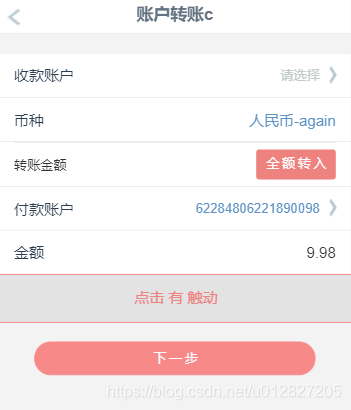
以上是为研究 VNode、elm、context、el的准备过程,ok!接下来进入日志的研究过程。
研究开始阶段
注意: 这些VNode、elm、context、el的研究是出自指令钩子函数。即从指令函数参数vnode 和 el出发,对自定义指令所用到的标签,进行研究。一定要明确这里介绍和研究的基础环境条件。
研究从指令钩子函数出发,研究第一项 el
经过上述准备,执行运行该vue项目工程,首次进入该vue页面时,有日志 输出。

研究从指令钩子函数出发,在vue官网对指令钩子函数的参数,给以解释
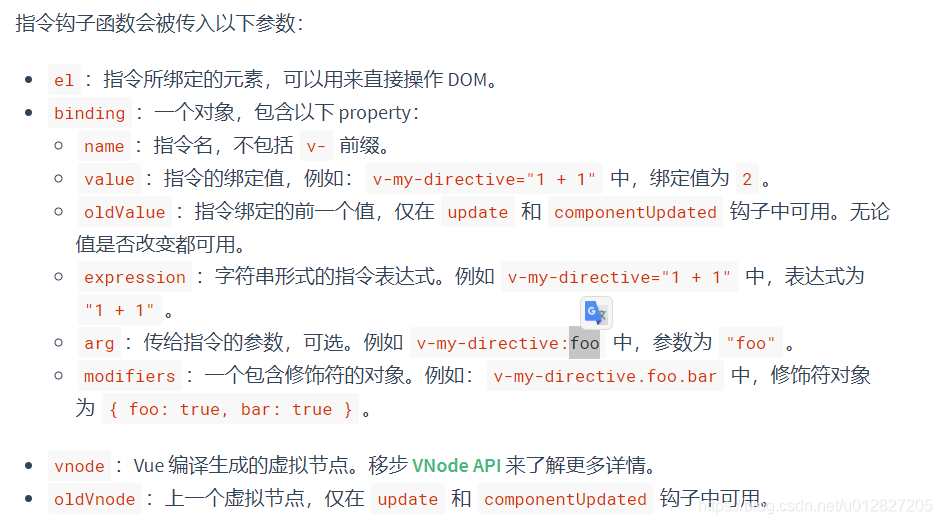
结合日志输出截图、clickoutside.js以及vue程序,来看
指令钩子函数中的参数el 是一个object的对象,且该对象指向(仅指向) <div class="outside-click">点击 有 触动</div> 所代表的对象。vue官网说el是指令所绑定元素,可直接用来操作dom,显然跟<templete>中的
<div class="outside-click" v-clickoutside="clickoutsideMehthod">点击 有 触动</div>
- 1
不期而遇。
提问:这里是对指令函数参数中el的解释,那么与VNode中的elm有什么区别?与VNode中的context中的el又有什么区别? 带着问题接着向下看呗 ~
研究从指令钩子函数出发,研究第二项 vnode
点击使用指令v-clickoutside的标签按钮"点击有触动"外边,有日志 输出
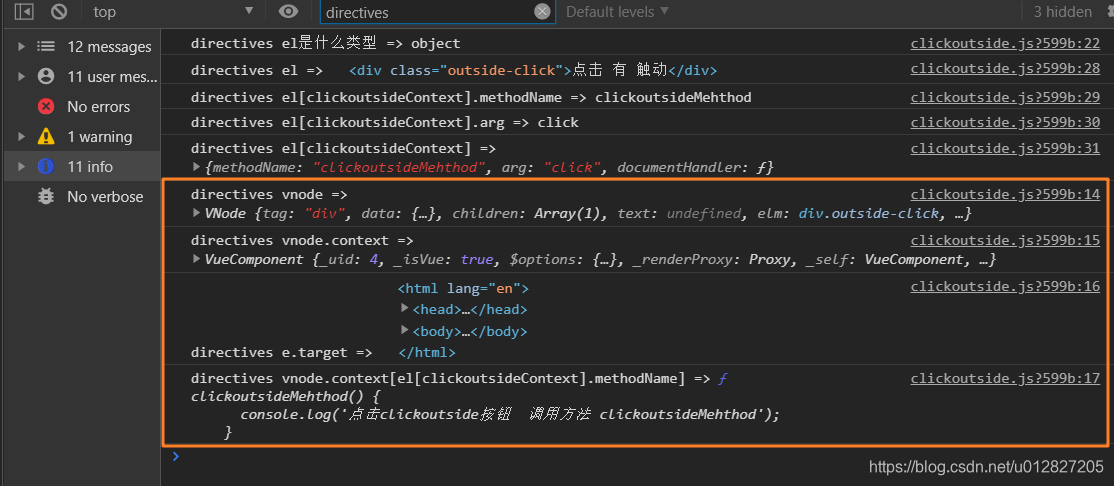
根据该日志输出来看VNode,该VNode是来自指令钩子函数参数bind(el, binding, vnode) 即VNode表示<div class="outside-click" v-clickoutside="clickoutsideMehthod">点击 有 触动</div>的虚拟节点
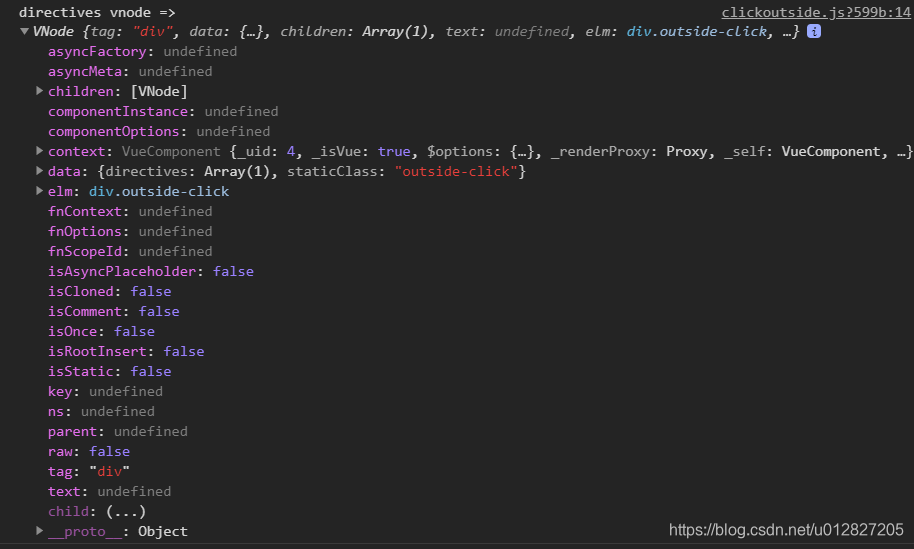
接下来对VNode截图内的关键字段进行逐个查看、解释
elm:[div.outside-click] = 是VNode中的一个字段,但是可以看到它的类型是div.outside-click对象。可直接用来操作dom,指令函数参数中el和vnode中的elm是同一个!! 为证明这个结论,在bind指令钩子函数中新增了日志输出 ,
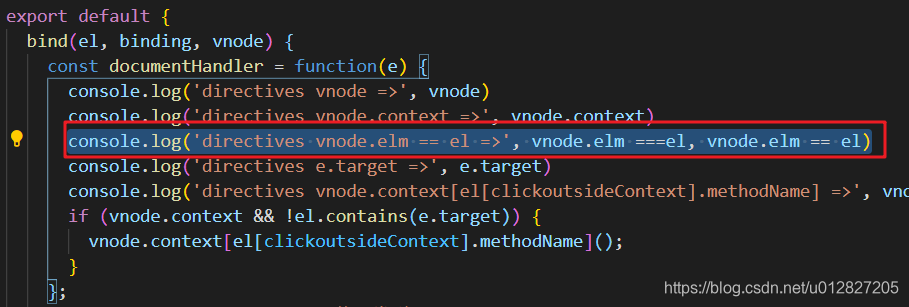
最终的验证输出结果是,符合预期
/** console.log('directives vnode.elm == el =>', vnode.elm ===el, vnode.elm == el) */
directives vnode.elm == el => true true
- 1
- 2
children:[VNode] = 是VNode中的一个字段,类型是VNode,是<div class="outside-click" v-clickoutside="clickoutsideMehthod">点击 有 触动</div>的数组子节点
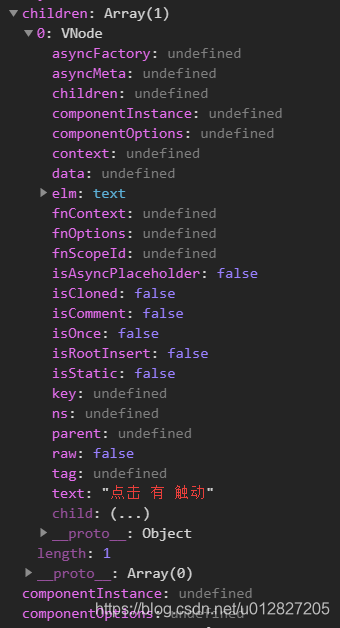
进入该数组子节点详情看,该数组中只有一个元素,VNode虚拟节点。对应的标签对象类型是text,内容是点击 有 触动 。
data:{directives:Array(1), staticClass: “outside-click”} = 是VNode中的一个字段,类型是对象。
tag:“div” = 是VNode中的一个字段,类型是div字符串。
context:VueComponent = 是VNode中的一个字段,类型是VueComponent,是当前虚拟节点所在的上下文环境。
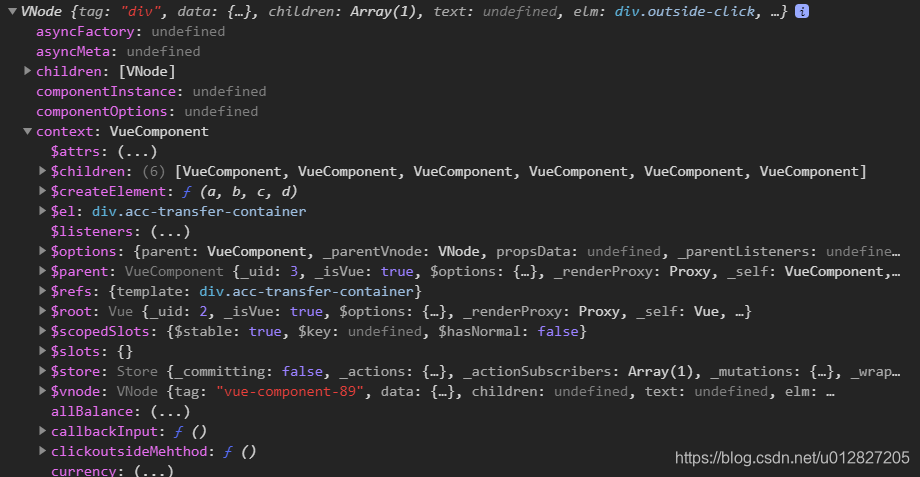
从该context内容详情中我们是不是看到了熟悉的内容。
研究VNode中的context
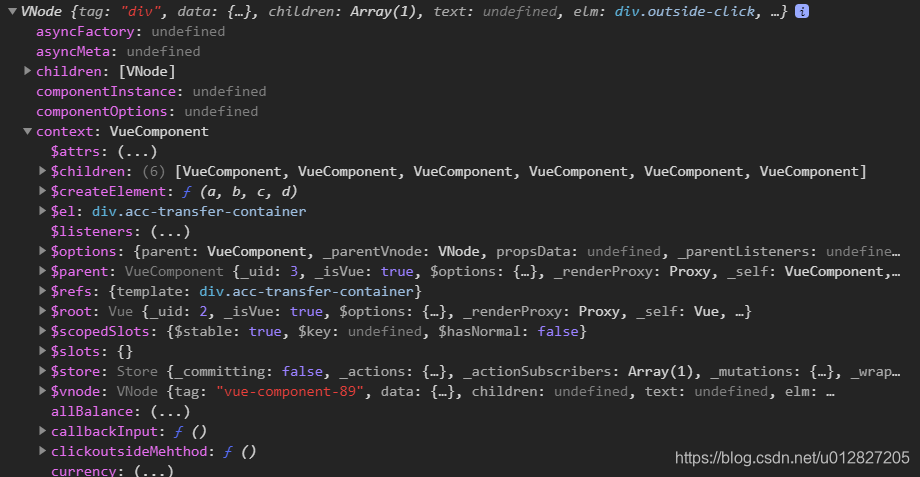
从截图中context:VueComponent,是$el:div.acc-transfer-container ,说明该上下文环境是使用了自定义指令v-clickoutside的标签,所在的上下文环境。即<template >中的 <div class="acc-transfer-container" ref="template">所创造的环境!创造的-环境!
从该context内容详情中我们是不是看到了熟悉的内容。哪里熟悉?即我们在vue开发中,经常在下截图中使用 this.$el、this.$data、this.$refs等,还记得不?
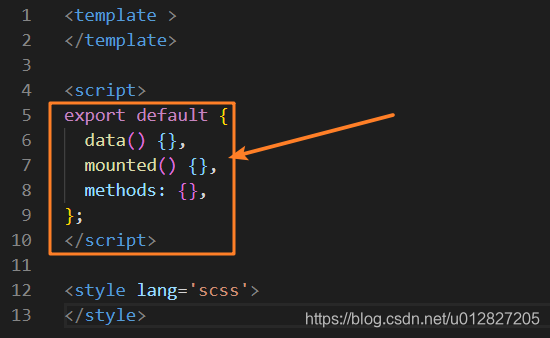
说明了什么?说明我们上截图中的上下文环境context即我们使用的this,this指向context。而context上下文环境的类型也是VueComponent。明白了吧?![注意:当前结论是以当前案例的层次结构为例子来说明]
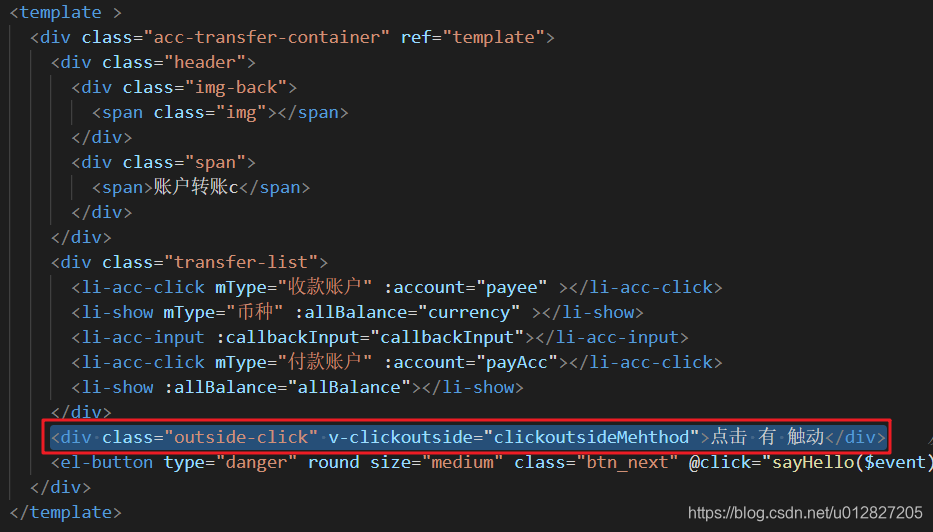
从这个模板嵌套层次看,<.script> 中使用的this就是上下文环境,且上下文环境类型是VueComponent。
context中的$el :是 指创建当前上下文环境的标签对象。与指令函数中的el和vnode中的$elm不同。context中的$el 是在指令函数中el和vnode中的$elm 的更外层标签。而指令函数中的el和vnode中的$elm是相同的。
读懂了以上内容就能清楚以上两个问题了
1,VNode、elm、context、el ~ 他们是个啥,担任着什么样子的角色 ?
2,指令函数参数中el的解释,那么与VNode中的elm有什么区别?与VNode中的context中的el又有什么区别?
参考文献:
https://github.com/answershuto/learnVue/blob/master/docs/VNode
https://cn.vuejs.org