
热门标签
热门文章
- 1Educational Codeforces Round 161 (Rated for Div. 2)补题
- 2SpringBoot - @InitBinder注解详解
- 3我的wsl不见了_wsl突然找不到了
- 4MYSQL之错误代码----mysql错误代码与JAVA实现
- 5Ubuntu 20.04 ROS Noetic及Realsense-ROS的安装和多机通信_noetic realsense
- 6JAVA开发(AOP之ProceedingJoinPoint)_proceedingjoinpoint 获取参数
- 7【硬核】源码 + 案例分享 JDK8 新特性中的四大函数式接口_jdk8四大函数
- 8美团BERT的探索和实践 | CSDN原力计划
- 9力扣 707. 设计链表_力扣 设计链表
- 10opencv学习 特征提取
当前位置: article > 正文
unity 更换鼠标图标,设置默认图标_unity default cursor
作者:数据科学创新者 | 2024-01-30 19:49:14
赞
踩
unity default cursor
工具:unity2018.4.2f1、VS2017
一、准备好鼠标样式,如图我用PS截取的鼠标图标(大小:70x70):

二、将图标放入工程,并设置图片类型,如图所示:
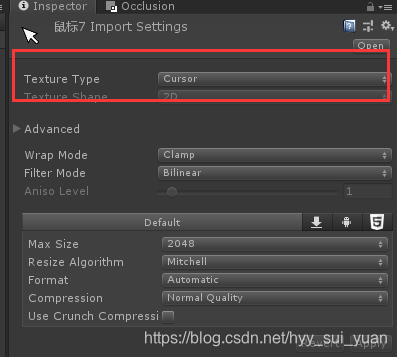
三、开始写代码,代码如下:
- using UnityEngine;
- using UnityEngine.UI;
-
- public class ChangeMouseImage : MonoBehaviour
- {
- //鼠标样式
- [SerializeField]
- Texture2D m_mouseStyle;
-
- bool m_isDefault = false;
-
- // Start is called before the first frame update
- void Start()
- {
- transform.Find("ChangeMouseBtn").GetComponent<Button>().onClick.AddListener(() =>ChangeImage());
- }
-
- // Update is called once per frame
- void Update()
- {
-
- }
-
- void ChangeImage()
- {
- m_isDefault = !m_isDefault;
-
- //unity默认鼠标样式
- if (m_isDefault)
- {
- Cursor.SetCursor(null,Vector2.zero,CursorMode.Auto);
- }
- else
- {
- // 摘要:
- // Specify a custom cursor that you wish to use as a cursor.
- // 指定要用作光标的自定义光标。
- //
- // 参数:
- // texture:
- // The texture to use for the cursor. To use a texture, you must first import it
- // with `Read/Write`enabled. Alternatively, you can use the default cursor import
- // setting. If you created your cursor texture from code, it must be in RGBA32 format,
- // have alphaIsTransparency enabled, and have no mip chain. To use the default cursor,
- // set the texture to `Null`.
- // 用于光标的纹理。要使用纹理,必须先导入它 启用“读 / 写”。或者,可以使用默认的光标导入
- // 设置。如果从代码创建光标纹理,则它必须为RGBA32格式,启用AlphaistTransparency,并且没有mip链。要使用默认光标,
- // 将纹理设置为“Null”。
- //
- // hotspot:
- // The offset from the top left of the texture to use as the target point (must
- // be within the bounds of the cursor).
- // 要用作目标点的纹理左上角的偏移(必须在光标的范围内)。
- //
- // cursorMode:
- // Allow this cursor to render as a hardware cursor on supported platforms, or force
- // software cursor.
- // 允许此游标在支持的平台上呈现为硬件游标,或强制软件光标。
- Cursor.SetCursor(m_mouseStyle,new Vector2(5,5), CursorMode.Auto);
- //这里第二个参数设置为5,5是因为我的鼠标图片存在空白像素
- }
- }
- }

如图:

如果鼠标是充满整个图片的话,鼠标光标会偏大,不好看,所以我特意在周围添了些空白像素
注:脚本挂载在canvas上,不要忘记将图片拖到脚本上
声明:本文内容由网友自发贡献,不代表【wpsshop博客】立场,版权归原作者所有,本站不承担相应法律责任。如您发现有侵权的内容,请联系我们。转载请注明出处:https://www.wpsshop.cn/article/detail/48835
推荐阅读
相关标签

