
热门标签
热门文章
- 1目标检测数据集 - 猫狗检测数据集下载「包含VOC、COCO、YOLO三种格式」_下载猫狗数据集
- 2STM32 HAL库函数——HAL_TIM_Base_Start_IT()详解
- 3Qt5下串口编程中“QIODevice::write (QSerialPort): device not open”问题的分析处理总结
- 4学生食堂信息管理系统_《学生食堂信息管理系统》饭卡管理模块的 e-r 图如图 1.6 .1 所示,逻辑 数据模型
- 5程序员思维模式 - 主调试循环_写程序陷入思维循环
- 6微信小程序:fail api scope is not declared in the privacy agreement(授权点击没反应)
- 7【设计模式】适配器模式怎么理解?
- 8【chatglm3】(4):如何设计一个知识库问答系统,参考智谱AI的知识库系统,
- 9【C语言】--求一个3 * 3矩阵对角线元素之和_求一个3*3矩阵对角线元素之和
- 10【C#入门练习及答案】_c#代码练习
当前位置: article > 正文
unity发布设置(最小化、置顶、限制单开)_unity 窗口置顶
作者:cm456 | 2024-01-30 19:45:09
赞
踩
unity 窗口置顶
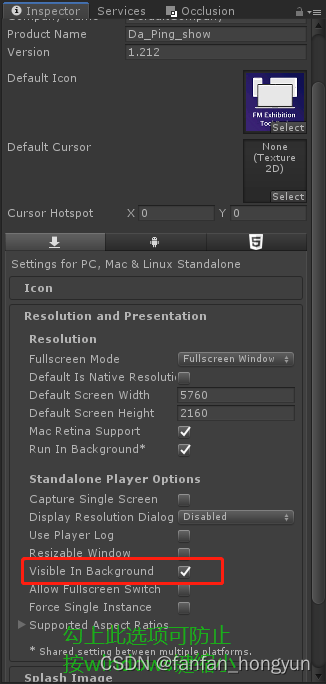
1. 勾上下图标红处,发布后可防止按windows键缩小
2.发布后程序默认最小化
- using System;
- using System.Runtime.InteropServices;
- using UnityEngine;
-
- /// <summary>
- /// 开始时最小化窗口
- /// </summary>
- public class SetWindowMin : MonoBehaviour
- {
- [DllImport("user32.dll")]
- public static extern bool ShowWindow(IntPtr hwnd, int nCmdShow);
- [DllImport("user32.dll")]
- static extern IntPtr GetActiveWindow();
-
- const int SW_SHOWMINIMIZED = 2; //{最小化, 激活}
- const int SW_SHOWMAXIMIZED = 3;//最大化
- const int SW_SHOWRESTORE = 1;//还原
-
- private void Start()
- {
- ShowWindow(GetActiveWindow(), SW_SHOWMINIMIZED);
- }
- }

3.发布的程序只能开一个进程
- using System.Collections;
- using System.Collections.Generic;
- using System.Diagnostics;
- using UnityEngine;
-
- public class Process_sigle : MonoBehaviour
- {
- // Start is called before the first frame update
- void Start()
- {
- //检测是否打开
- Process[] app = Process.GetProcessesByName("Da_Ping_show");
- if (app.Length >1)
- {
- for (int i =1; i < app.Length; i++)
- {
- app[i].Kill();
- }
- return;
- }
- }
- }
声明:本文内容由网友自发贡献,不代表【wpsshop博客】立场,版权归原作者所有,本站不承担相应法律责任。如您发现有侵权的内容,请联系我们。转载请注明出处:https://www.wpsshop.cn/article/detail/48783
推荐阅读
相关标签

