
热门标签
热门文章
- 1决策树 随机森林_随机森林决策树数量的选择
- 22021-02-22_waylandsink
- 3Fonts字体简介_font中ttf都代表的是什么字体
- 4http:/222.212.79/app/zscd.html,emscripten/src/shell.html at 1.29.12 · emscripten-core/emscripten · G...
- 5linux重装后文件会不会丢失,重做日志文件丢失的恢复(二)
- 6状态压缩dp
- 7SQL语句使用大全,最常用的sql语句_sql语句大全及用法
- 8python3和Python2的区别
- 9详解K8s Pod对象的生命周期_container lifecycle prestop
- 10Project Summary
当前位置: article > 正文
使用Nexus从私服上传和下载依赖_nexus2如何设置下载依赖
作者:pjghi | 2024-01-30 19:45:05
赞
踩
nexus2如何设置下载依赖
从私服中下载依赖
【第一步】在maven的settings.xml中<mirrors>标签中配置,此时就需要注释掉aliyun的配置。
<mirror>
    <id>nexus-heima</id>
    <mirrorOf>*</mirrorOf>
    <url>http://localhost:8081/repository/maven-public/</url>
</mirror>
- 1
- 2
- 3
- 4
- 5
【第二步】在nexus中设置允许匿名下载,如果不允许将不会从私服中下载依赖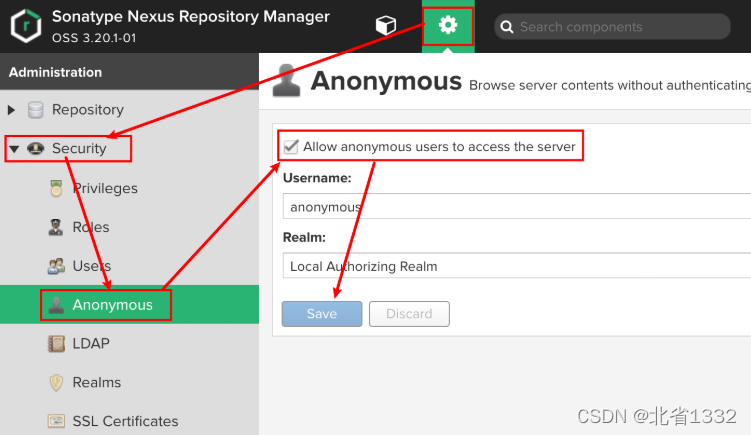
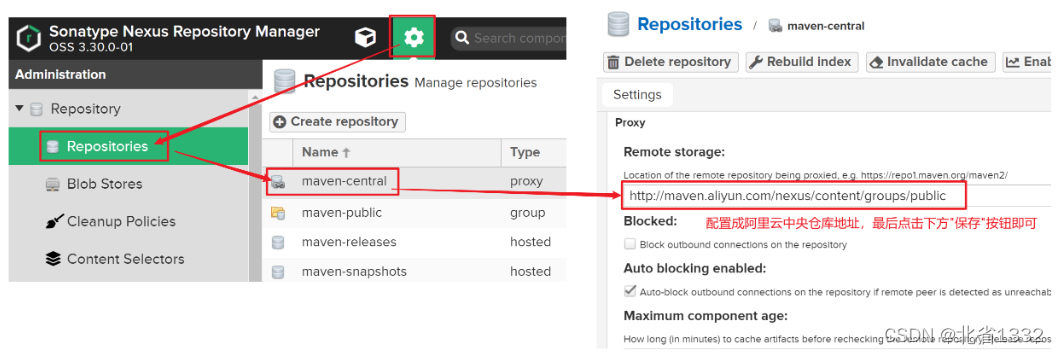
如果私服中没有对应的jar,会去中央仓库下载,速度很慢。可以配置让私服去阿里云中下载依赖。
从私服中上传依赖
【第一步】配置本地仓库访问私服的权限(在maven的settings.xml的servers标签中配置)
<server>
  <!--id任意,多个server的id不重复就行,后面会用到-->
  <id>heima-nexus</id>
  <username>admin</username>
  <password>123456</password><!--填写自己nexus设定的登录密码-->
</server>
- 1
- 2
- 3
- 4
- 5
- 6
【第二步】配置当前项目访问私服上传资源的保存位置(项目的pom.xml文件中配置)
<distributionManagement>
    <repository>
      	<!--和maven/settings.xml中server中的id一致,表示使用该id对应的用户名和密码-->
        <id>heima-nexus</id>
      	<!--如果jar的版本是release版本,那么就上传到这个仓库,根据自己情况修改-->
        <url>http://localhost:8081/repository/heima-releases/</url>
    </repository>
    <snapshotRepository>
      	<!--和maven/settings.xml中server中的id一致,表示使用该id对应的用户名和密码-->
        <id>heima-nexus</id>
      	<!--如果jar的版本是snapshot版本,那么就上传到这个仓库,根据自己情况修改-->
        <url>http://localhost:8081/repository/heima-snapshots/</url>
    </snapshotRepository>
</distributionManagement>
- 1
- 2
- 3
- 4
- 5
- 6
- 7
- 8
- 9
- 10
- 11
- 12
- 13
- 14
要和maven的settings.xml中server中定义的<id>heima-nexus</id>对应
【第三步】发布资源到私服命令
mvn deploy
声明:本文内容由网友自发贡献,不代表【wpsshop博客】立场,版权归原作者所有,本站不承担相应法律责任。如您发现有侵权的内容,请联系我们。转载请注明出处:https://www.wpsshop.cn/article/detail/48781
推荐阅读
相关标签

