
热门标签
热门文章
- 1使用VPN代理之后,无法使用Git拉取代码_开了代理 代码git不了
- 2【flutter笔记--组件篇】flutter_unity_widget
- 34核16G服务器价格腾讯云PK阿里云
- 4h5plus 当前webview_HTML5+规范:Webview的使用详解
- 5人脸识别4:Android InsightFace实现人脸识别Face Recognition(含源码)
- 6怎么学习英语汉译英_汉译英 学习
- 7DHT11详细介绍(内含51和STM32代码)
- 8Docker 常用【容器】命令_docker进入容器命令
- 9Python 机器学习+深度学习项目实战
- 10Unity大型地图切割_unity getalphamaps
当前位置: article > 正文
Unity中Animation创建的动画如何指定播放_unity animator 播放某一帧
作者:代码吟游诗人 | 2024-01-30 19:12:11
赞
踩
unity animator 播放某一帧
使用Unity自带的Animation制作的动画如何指定帧播放和结束?
1.选择需要播放的动画,Inspector面板右键Debug,勾选Legacy
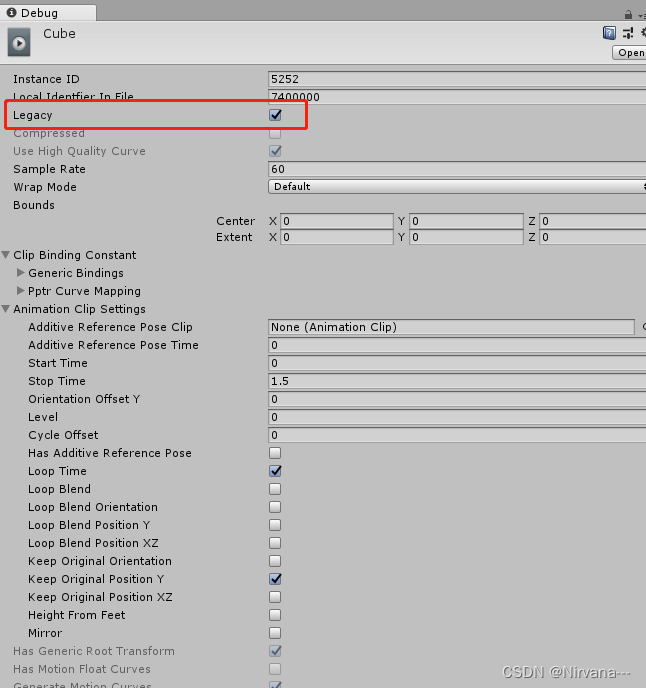 2.添加脚本,挂载脚本
using System;
using System.Collections;
using System.Collections.Generic;
using UnityEngine;

public class AnimationTest : MonoBehaviour
{

	public Animation _animation;
	[Tooltip("哪一帧开始")]
	public int startFrame;
	[Tooltip("哪一帧结束")]
	public int endFrame;
	[Tooltip("动画名字")]
	public string aniName;

	private float starttime;
	// Use this for initialization
	void Start ()
	{
		_animation = gameObject.GetComponent<Animation>();
		//_animation[aniName].time = startFrame / _animation[aniName].clip.frameRate;

		_animation[aniName].time = (float)startFrame / 60;

		PlayAnimation(_animation, aniName, (float)endFrame/60, () => { Debug.Log("开始播放"); }, () => { Debug.Log("动画暂停"); });
	}

	// Update is called once per frame
	void Update ()
	{

	}

	public void PlayAnimation(Animation ani, string clipname, float time, Action startAct = null,Action tempAct=null)
    {
		StartCoroutine(PlayAnimationItor(ani, clipname, startAct, time, tempAct));
    }


	IEnumerator PlayAnimationItor(Animation ani, string clipname, Action startAct, float time, Action tempAct)
    {


		startAct?.Invoke();

		ani.Play(clipname);

		yield return new WaitForSeconds(time);
		ani.Stop();
		tempAct?.Invoke();
    }
}

- 1
- 2
- 3
- 4
- 5
- 6
- 7
- 8
- 9
- 10
- 11
- 12
- 13
- 14
- 15
- 16
- 17
- 18
- 19
- 20
- 21
- 22
- 23
- 24
- 25
- 26
- 27
- 28
- 29
- 30
- 31
- 32
- 33
- 34
- 35
- 36
- 37
- 38
- 39
- 40
- 41
- 42
- 43
- 44
- 45
- 46
- 47
- 48
- 49
- 50
- 51
- 52
- 53
- 54
总结
声明:本文内容由网友自发贡献,转载请注明出处:【wpsshop博客】
推荐阅读
相关标签

