- 1关于LeetCode每日一题打卡失败的感悟_leecode可以补做每日一题吗
- 2Python之各种进制的转换。(常用的几种!)_python 十进制的整数 换成18进制的值
- 3再谈网络安全的自动化_网络安全 自动化
- 4【力扣题解:删除排序数组中的重复项】_数组去重 力扣
- 5CSAPP - 反编译 string_length
- 6不能为虚拟电脑 Win10 打开一个新任务. The virtual machine ‘Win10‘ has terminated unexpectedly during startup with..
- 7TTL电平、CMOS电平、RS232通信电平的概念及区别_供电电压和通信电压区别232通信
- 8java防沉迷代码_unity 防沉迷PlayerId接入流程
- 9力扣刷MySQL-第三弹(详细讲解)
- 10Caddi Programming Contest 2021(AtCoder Beginner Contest 193)-C - Unexpressed-题解_c unexpressed
Unity代码基础第五天之“见缝插针”游戏(零基础)_unity2d游戏见缝插针资源包
赞
踩
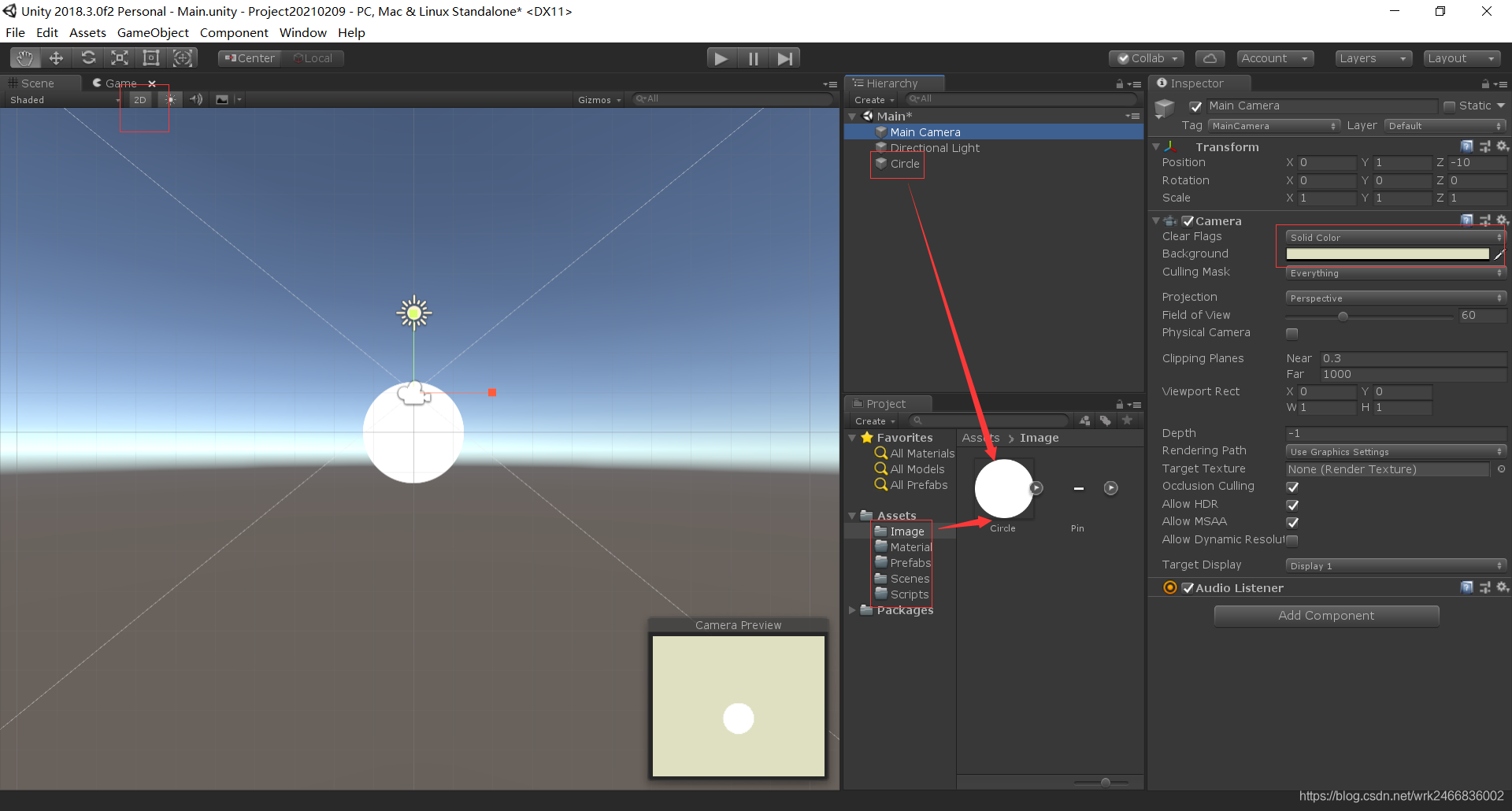
一、创建场景、导入资源
1.转为2D模式
2.调整一下摄像头的背景颜色,以及改成Solid Color
3.导入资源包image,这个如果需要,可以私我
二、开发旋转的小球和分数
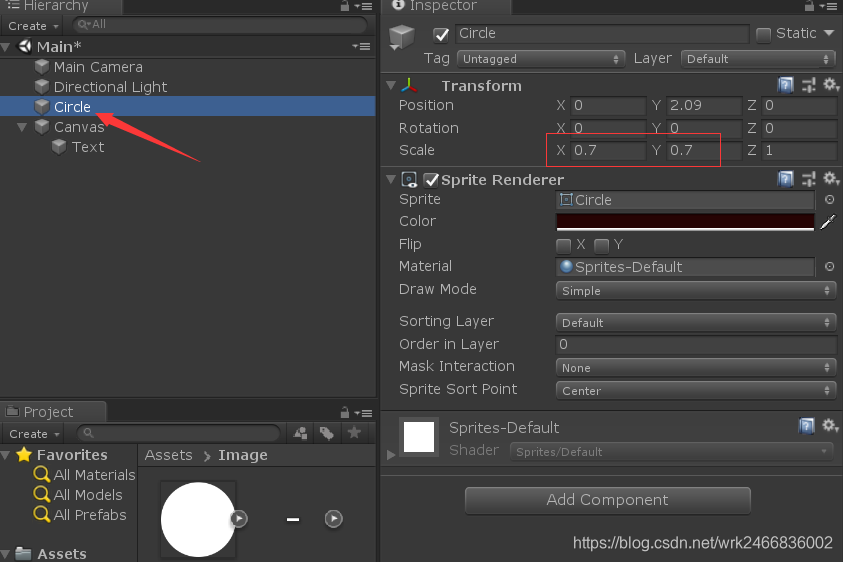
1.调整Circle的大小
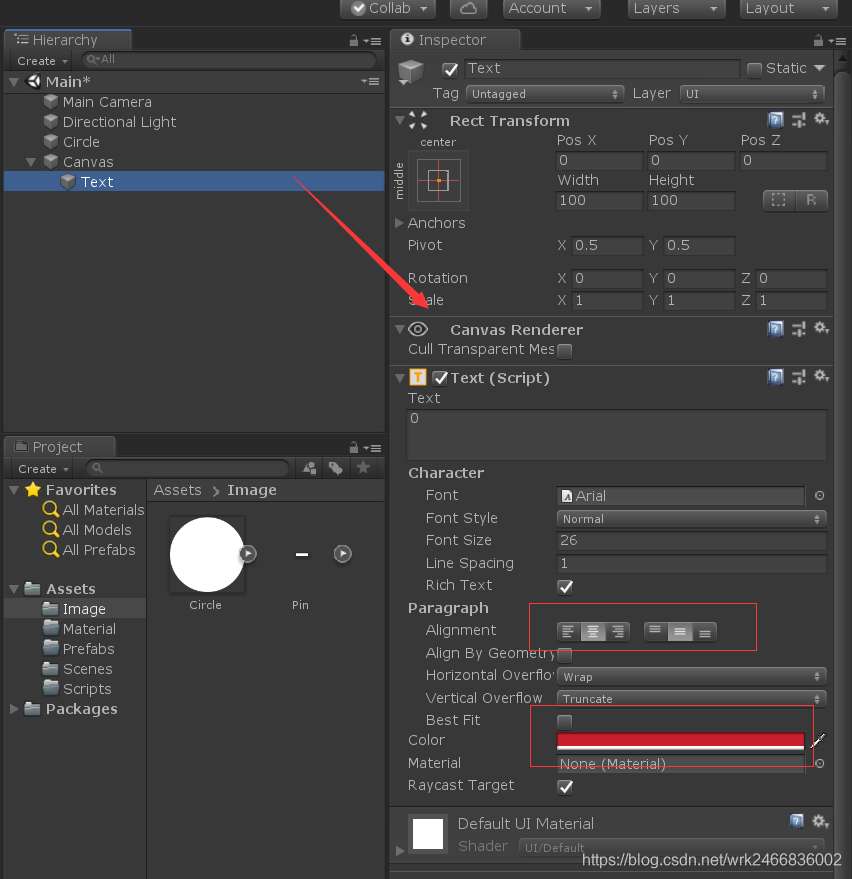
2.在UI里新建一个text,调整好颜色,居中,调整Canvas的大小、宽高等
3.摄像头Main Camera要拖拽到Canvas的Event camera
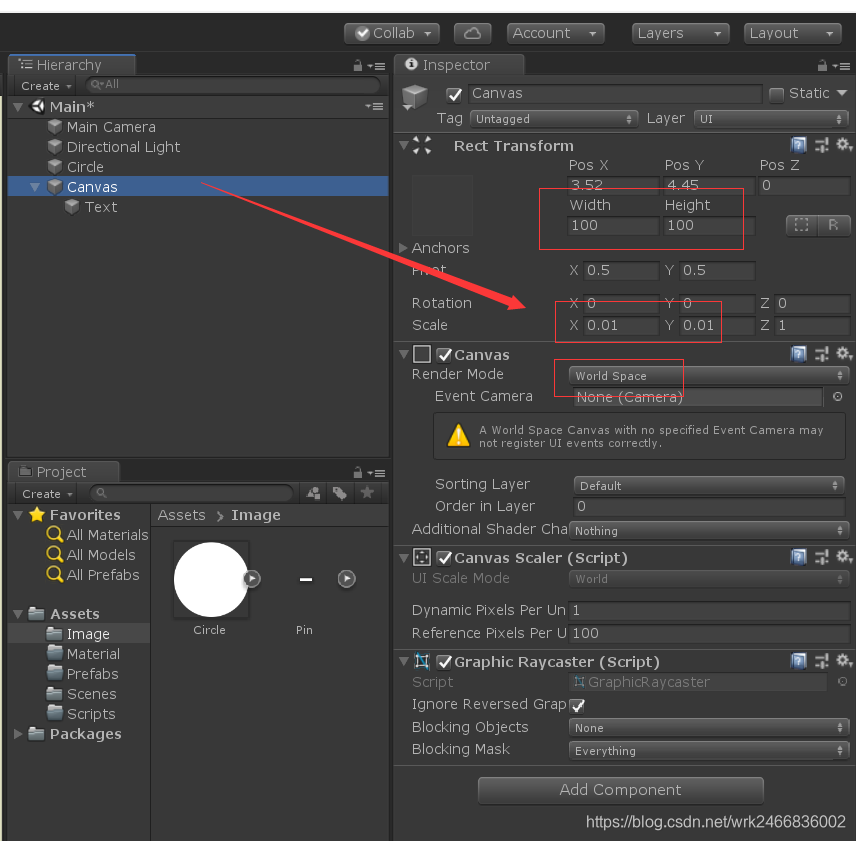
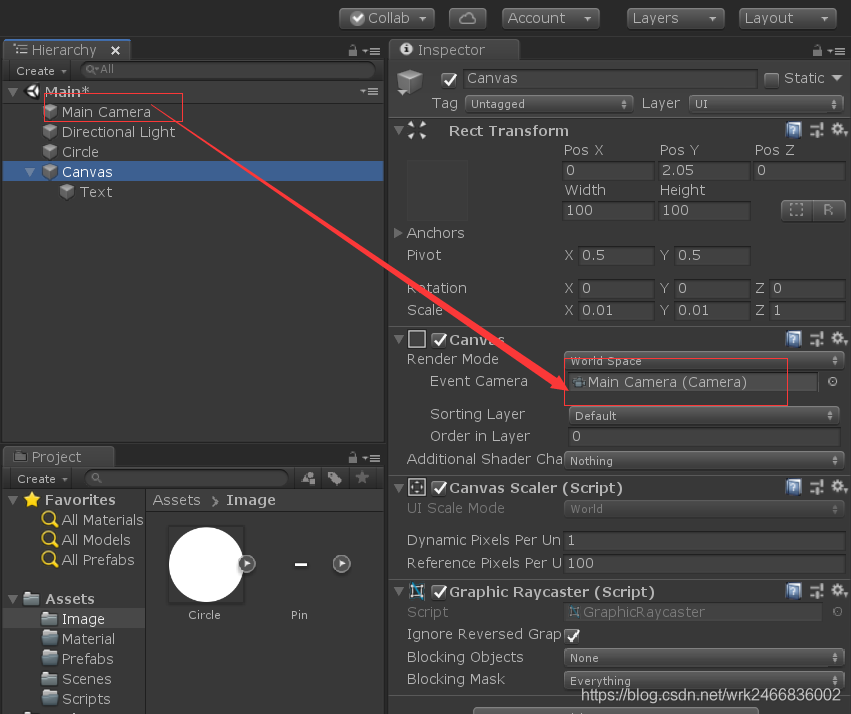
三、控制小球旋转
1.给小球写一段代码,拖拽给小球
- using System.Collections;
- using System.Collections.Generic;
- using UnityEngine;
-
- public class Rotatefun : MonoBehaviour
- {
- public float speed = 90;
- // Start is called before the first frame update
- void Start()
- {
-
- }
-
- // Update is called once per frame
- void Update()
- {
- transform.Rotate(new Vector3(0,0,-speed * Time.deltaTime));//做一个旋转,每秒1米,加个负号就是顺时针旋转
- }
- }

四、开发针的预制体
1.用资源库里的pin做一个针,调整大小长度,Z轴调成90度
2.用资源库的Circle做一个针头,调整大小,并添加碰撞器Cricle collider 2D
3.最后把整个pin拖拽到预制体文件夹里面
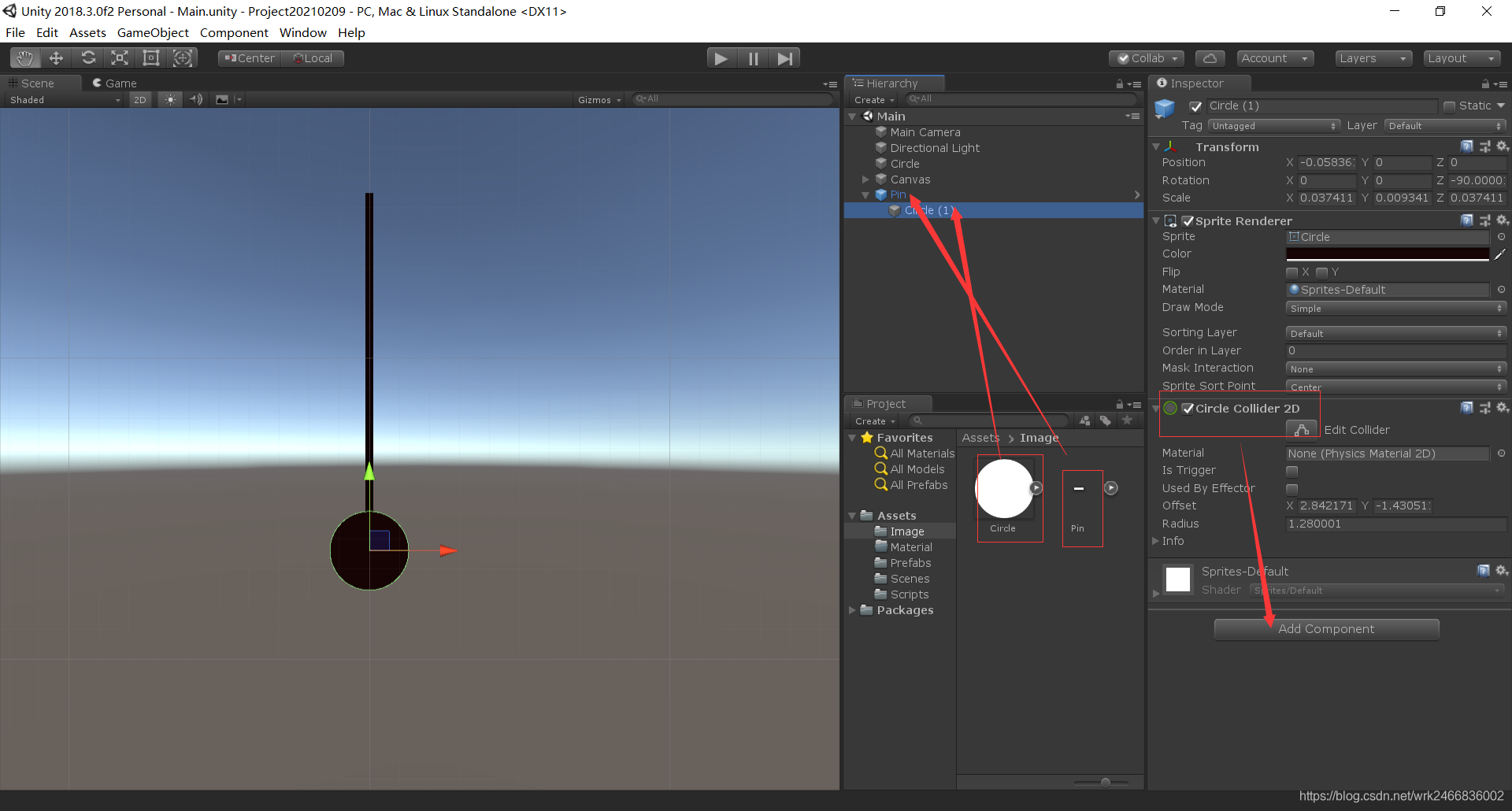
五、开发GameManager去生成针
1.新建3个空的游戏物体StartPoint和SpawnPoint还有GameManager这3个,前面2个沿一条直线排序,第三个位置rest重置下,如图
2.将预制体pin拖拽到游戏物体定义的公有变量下
- using System.Collections;
- using System.Collections.Generic;
- using UnityEngine;
-
- public class GameManager : MonoBehaviour
- {
- public Transform startpoint;//定义一个Transform类型的对象
- public Transform spawnpoint;
-
- public GameObject pinPrefab;
- // Start is called before the first frame update
- void Start()
- {
- startpoint = GameObject.Find("StartPoint").transform;//找到StartPoint对象的transform属性
- spawnpoint = GameObject.Find("SpawnPoint ").transform;
-
- GOspan();
- }
-
- void GOspan() {
- GameObject.Instantiate(pinPrefab, spawnpoint.position, pinPrefab.transform.rotation);//实例化 物体 位置 旋转位置
- }
- // Update is called once per frame
- void Update()
- {
-
- }
- }
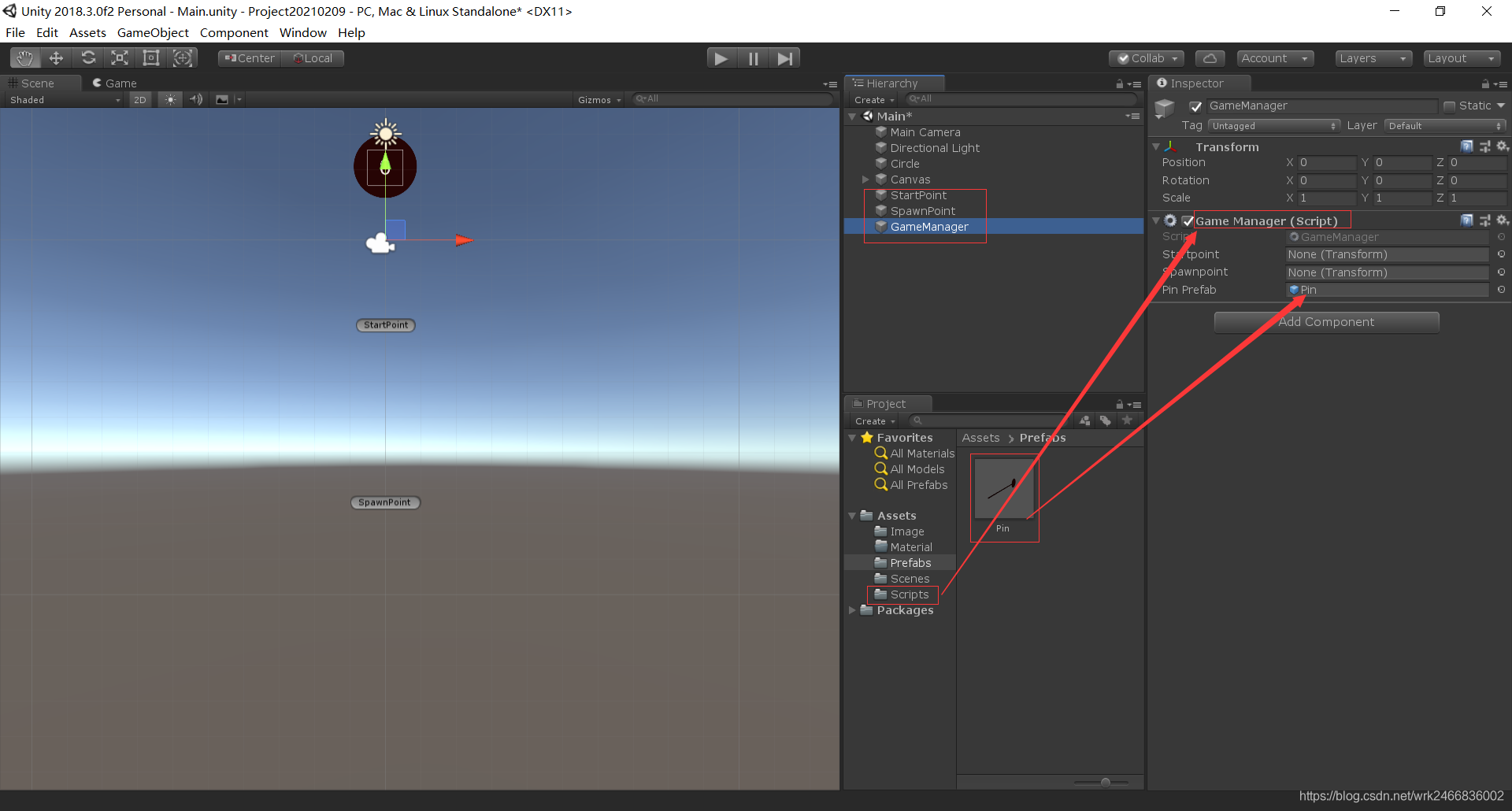
六、控制针移动到就位位置
1.新建一个脚本拖拽给预制体Pin
- using System.Collections;
- using System.Collections.Generic;
- using UnityEngine;
-
- public class Pin : MonoBehaviour
- {
- private bool isFly = false;
- private bool isReach = false;
- private Transform startPoint;
- public float speed = 5;
-
- // Start is called before the first frame update
- void Start()
- {
- startPoint = GameObject.Find("StartPoint").transform;
- }
-
- // Update is called once per frame
- void Update()
- {
- if(isFly == false){
- if (isReach == false)
- {
- transform.position = Vector3.MoveTowards(transform.position, startPoint.position,speed*Time.deltaTime);//(transform.position)针 运动的方法-当前的位置-目标的位置-运动的距离
- //判断是否到达目标位置
- if (Vector3.Distance(transform.position, startPoint.position) < 0.05f) {//如果当前位置-和-目标位置,到达了0.05的时候
- isReach = true;//性能优化
- }
- }
- }
- }
- }
七、控制针的插入
1.在脚本GameManager 中添加,点击事件,等其他方法
2.在脚本Pin中,添加StartFly()开始方法,编写针的运动
- using System.Collections;
- using System.Collections.Generic;
- using UnityEngine;
-
- public class GameManager : MonoBehaviour
- {
- public Transform startpoint;//定义一个Transform类型的对象
- public Transform spawnpoint;
-
- public Pin currentPin;//定义一个类型为Pin的对象
- public GameObject pinPrefab;
- // Start is called before the first frame update
- void Start()
- {
- startpoint = GameObject.Find("StartPoint").transform;//找到StartPoint对象的transform属性
- spawnpoint = GameObject.Find("SpawnPoint ").transform;
-
- GOspan();
- }
-
- void GOspan() {
- //GameObject.Instantiate(pinPrefab, spawnpoint.position, pinPrefab.transform.rotation);//实例化 物体 位置 旋转位置
- currentPin = GameObject.Instantiate(pinPrefab, spawnpoint.position, pinPrefab.transform.rotation).GetComponent<Pin>();//转为了Pin类型,可以在Pin类中访问
- }
- // Update is called once per frame
- void Update()
- {
- if (Input.GetMouseButtonDown(0)) {//如果按下鼠标左键
- currentPin.StartFly();
- }
- }
- }
- using System.Collections;
- using System.Collections.Generic;
- using UnityEngine;
-
- public class Pin : MonoBehaviour//飞行的类
- {
- private bool isFly = false;
- private bool isReach = false;
- private Transform startPoint;
- private Transform circle;
- public float speed = 5;
-
- // Start is called before the first frame update
- void Start()
- {
- startPoint = GameObject.Find("StartPoint").transform;
- //circle = GameObject.Find("Circle").transform;//全局查找
- circle = GameObject.FindGameObjectWithTag("Cirdea").transform;//通过tag标签获取
-
- //Find("Cirdea").transform;
- }
-
- // Update is called once per frame
- void Update()
- {
- if (isFly == false)
- {
- if (isReach == false)
- {
- transform.position = Vector3.MoveTowards(transform.position, startPoint.position, speed * Time.deltaTime);//(transform.position)针 运动的方法-当前的位置-目标的位置-运动的距离
- //判断是否到达目标位置
- if (Vector3.Distance(transform.position, startPoint.position) < 0.05f)
- {//如果当前位置-和-目标位置,到达了0.05的时候
- isReach = true;//性能优化
- }
- }
- }
- else {
- transform.position = Vector3.MoveTowards(transform.position, circle.position, speed * Time.deltaTime);//针的运动 = 当前位置-目标位置-运动的距离
- }
- }
- public void StartFly() {//方法要设置为public,因为GaneManager中要用到
- isFly = true;
- isReach = true;
- }
- }
八、控制针达到的位置和针的连环发射
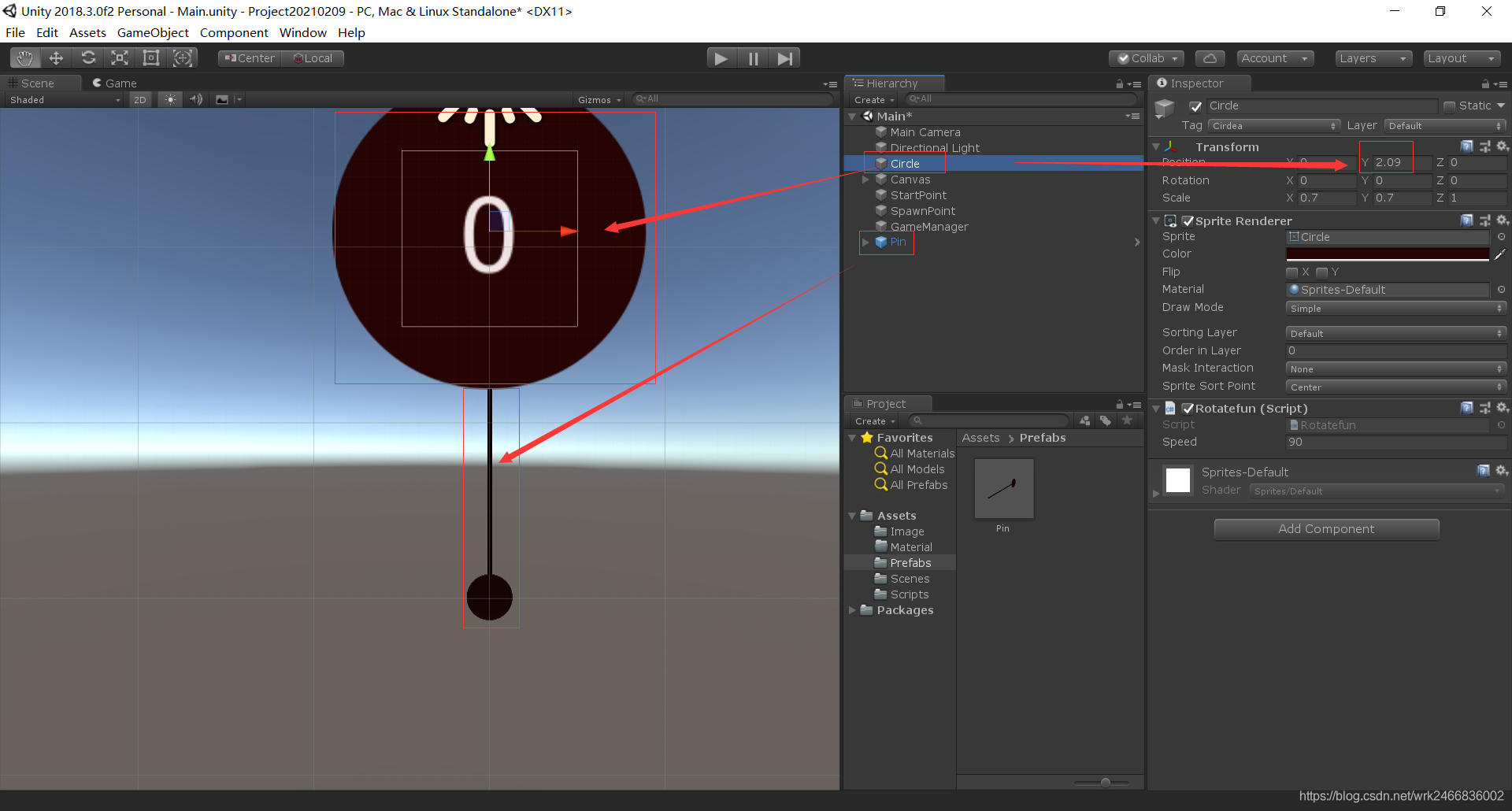
1.把预制体放置到针插中圆的最合适位置,然后用圆的Y-针的Y得到1.44f,也就是“控制针达到的位置”。
2.如果小于0.05f判断是到达了目标位置后,进行一个针的跟随。isFly = false;//这样就不会执行所有代码,针就不会运动了,插在了圆上面
3.在GameManager类中,在按下事件中,调用实列的方法就可以做到连环发射,每点一次就实列化一次。如图
- using System.Collections;
- using System.Collections.Generic;
- using UnityEngine;
-
- public class Pin : MonoBehaviour//飞行的类
- {
- private bool isFly = false;
- private bool isReach = false;
- private Transform startPoint;
- private Transform circle;
- public float speed = 5;
-
- private Vector3 targetCriclePos;
-
-
-
- // Start is called before the first frame update
- void Start()
- {
- startPoint = GameObject.Find("StartPoint").transform;
- //circle = GameObject.Find("Circle").transform;//全局查找
- circle = GameObject.FindGameObjectWithTag("Cirdea").transform;//通过tag标签获取
-
- targetCriclePos = circle.position;
- targetCriclePos.y -= 1.44f;//把预制体放置到针插中圆的最合适位置,然后用圆的Y-针的Y得到1.44f
- }
-
- // Update is called once per frame
- void Update()
- {
- if (isFly == false)
- {
- if (isReach == false)
- {
- transform.position = Vector3.MoveTowards(transform.position, startPoint.position, speed * Time.deltaTime);//(transform.position)针 运动的方法-当前的位置-目标的位置-运动的距离
- //判断是否到达目标位置
- if (Vector3.Distance(transform.position, startPoint.position) < 0.05f)
- {//如果当前位置-和-目标位置,到达了0.05的时候目标位置
- isReach = true;//性能优化
- }
- }
- }
- else {
- //transform.position = Vector3.MoveTowards(transform.position, circle.position, speed * Time.deltaTime);//针的运动 = 当前位置-目标位置-运动的距离
- transform.position = Vector3.MoveTowards(transform.position, targetCriclePos, speed * Time.deltaTime);//targetCriclePos替换目标位置
-
- if (Vector3.Distance(transform.position, targetCriclePos) <0.05f){//如果小于0.05f判断是到达了目标位置
- transform.position = targetCriclePos;//把当前的位置 = 目标位置
- transform.parent = circle;//跟随小球运动
- isFly = false;//这样就不会执行所有代码,针就不会运动了,插在了圆上面
- }
- }
- }
- public void StartFly() {//方法要设置为public,因为GaneManager中要用到
- isFly = true;
- isReach = true;
- }
- }
- using System.Collections;
- using System.Collections.Generic;
- using UnityEngine;
-
- public class GameManager : MonoBehaviour
- {
- public Transform startpoint;//定义一个Transform类型的对象
- public Transform spawnpoint;
-
- public Pin currentPin;//定义一个类型为Pin的对象
- public GameObject pinPrefab;
- // Start is called before the first frame update
- void Start()
- {
- startpoint = GameObject.Find("StartPoint").transform;//找到StartPoint对象的transform属性
- spawnpoint = GameObject.Find("SpawnPoint ").transform;
-
- GOspan();
- }
-
- void GOspan() {
- //GameObject.Instantiate(pinPrefab, spawnpoint.position, pinPrefab.transform.rotation);//实例化 物体 位置 旋转位置
- currentPin = GameObject.Instantiate(pinPrefab, spawnpoint.position, pinPrefab.transform.rotation).GetComponent<Pin>();//转为了Pin类型,可以在Pin类中访问
- }
- // Update is called once per frame
- void Update()
- {
- if (Input.GetMouseButtonDown(0)) {//如果按下鼠标左键
- currentPin.StartFly();
- GOspan();//连环发射,每点一次就实列化一次
- }
- }
- }
九、针头的碰撞和游戏结束的处理
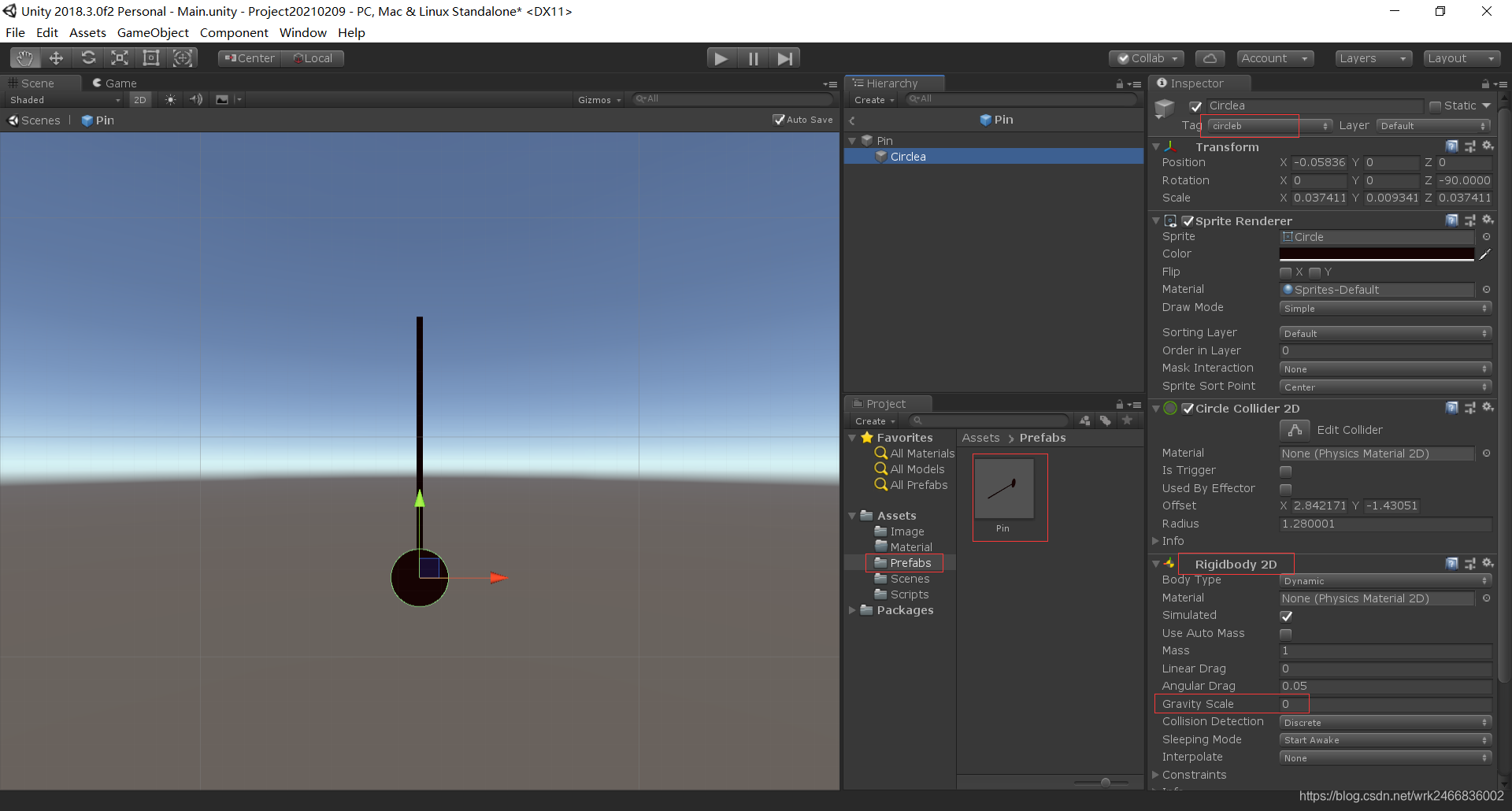
1.在预制体中,对针头添加一个组件“Rigidbody 2D”并把重力调为0,不然会往下掉
2.使用触发模式,不然private void OnTriggerEnter2D(Collider2D collision)方法不会生效
3.添加新的脚本Over 给针头,在GameManager 类里面写下新的方法

- using System.Collections;
- using System.Collections.Generic;
- using UnityEngine;
-
- public class Over : MonoBehaviour
- {
- private void OnTriggerEnter2D(Collider2D collision)//注意:要开启在Circle Collider 2D组件中的IS Trigger,不然不会触发,非常重要
- {
-
- if (collision.tag == "PinHead") {
- Debug.Log(123);
-
- GameObject.Find("GameManager").GetComponent<GameManager>().Gameover();//在GameManager类中,找到结束方法
- }
- }
- // Start is called before the first frame update
- void Start()
- {
-
- }
-
- // Update is called once per frame
- void Update()
- {
-
- }
- }
-
-
-
- using System.Collections;
- using System.Collections.Generic;
- using UnityEngine;
-
- public class GameManager : MonoBehaviour
- {
- public Transform startpoint;//定义一个Transform类型的对象
- public Transform spawnpoint;
-
- public Pin currentPin;//定义一个类型为Pin的对象
- public GameObject pinPrefab;
-
- private bool isGameOver;
-
- void Start()
- {
- startpoint = GameObject.Find("StartPoint").transform;//找到StartPoint对象的transform属性
- spawnpoint = GameObject.Find("SpawnPoint ").transform;
-
- GOspan();
- }
-
- void GOspan() {
- //GameObject.Instantiate(pinPrefab, spawnpoint.position, pinPrefab.transform.rotation);//实例化 物体 位置 旋转位置
- currentPin = GameObject.Instantiate(pinPrefab, spawnpoint.position, pinPrefab.transform.rotation).GetComponent<Pin>();//转为了Pin类型,可以在Pin类中访问
- }
- // Update is called once per frame
- void Update()
- {
- if (isGameOver) return;
-
- if (Input.GetMouseButtonDown(0)) {//如果按下鼠标左键
- currentPin.StartFly();
- GOspan();//连环发射,每点一次就实列化一次
- }
- }
-
- public void Gameover() {
- if (isGameOver) return;
- GameObject.Find("Circle").GetComponent<Rotatefun>().enabled = false;//圆停止旋转
- isGameOver = true;
-
- }
- }
-
十、添加分数显示
1.在脚本中创建一个Text类型的对象,在舞台上面把文本拖拽到这个text上面
- using System.Collections;
- using System.Collections.Generic;
- using UnityEngine;
- using UnityEngine.UI;
-
- public class GameManager : MonoBehaviour
- {
- public Transform startpoint;//定义一个Transform类型的对象
- public Transform spawnpoint;
-
- public Pin currentPin;//定义一个类型为Pin的对象
- public GameObject pinPrefab;
-
- private bool isGameOver;
-
- public Text text;
- int Score = 0;
-
- void Start()
- {
- startpoint = GameObject.Find("StartPoint").transform;//找到StartPoint对象的transform属性
- spawnpoint = GameObject.Find("SpawnPoint ").transform;
-
- GOspan();
- }
-
- void GOspan() {
- //GameObject.Instantiate(pinPrefab, spawnpoint.position, pinPrefab.transform.rotation);//实例化 物体 位置 旋转位置
- currentPin = GameObject.Instantiate(pinPrefab, spawnpoint.position, pinPrefab.transform.rotation).GetComponent<Pin>();//转为了Pin类型,可以在Pin类中访问
- }
- // Update is called once per frame
- void Update()
- {
- if (isGameOver) return;
-
- if (Input.GetMouseButtonDown(0)) {//如果按下鼠标左键
- currentPin.StartFly();
- GOspan();//连环发射,每点一次就实列化一次
- Score++;
- text.text = Score.ToString();//把一个 Number 对象转换为一个字符串
- }
- }
-
- public void Gameover() {
- if (isGameOver) return;//因为每个针头都有,Gameover方法,所以要这样进行处理,只执行一次
- GameObject.Find("Circle").GetComponent<Rotatefun>().enabled = false;//圆停止旋转
- isGameOver = true;
-
- }
- }
十一、游戏结束动画的显示
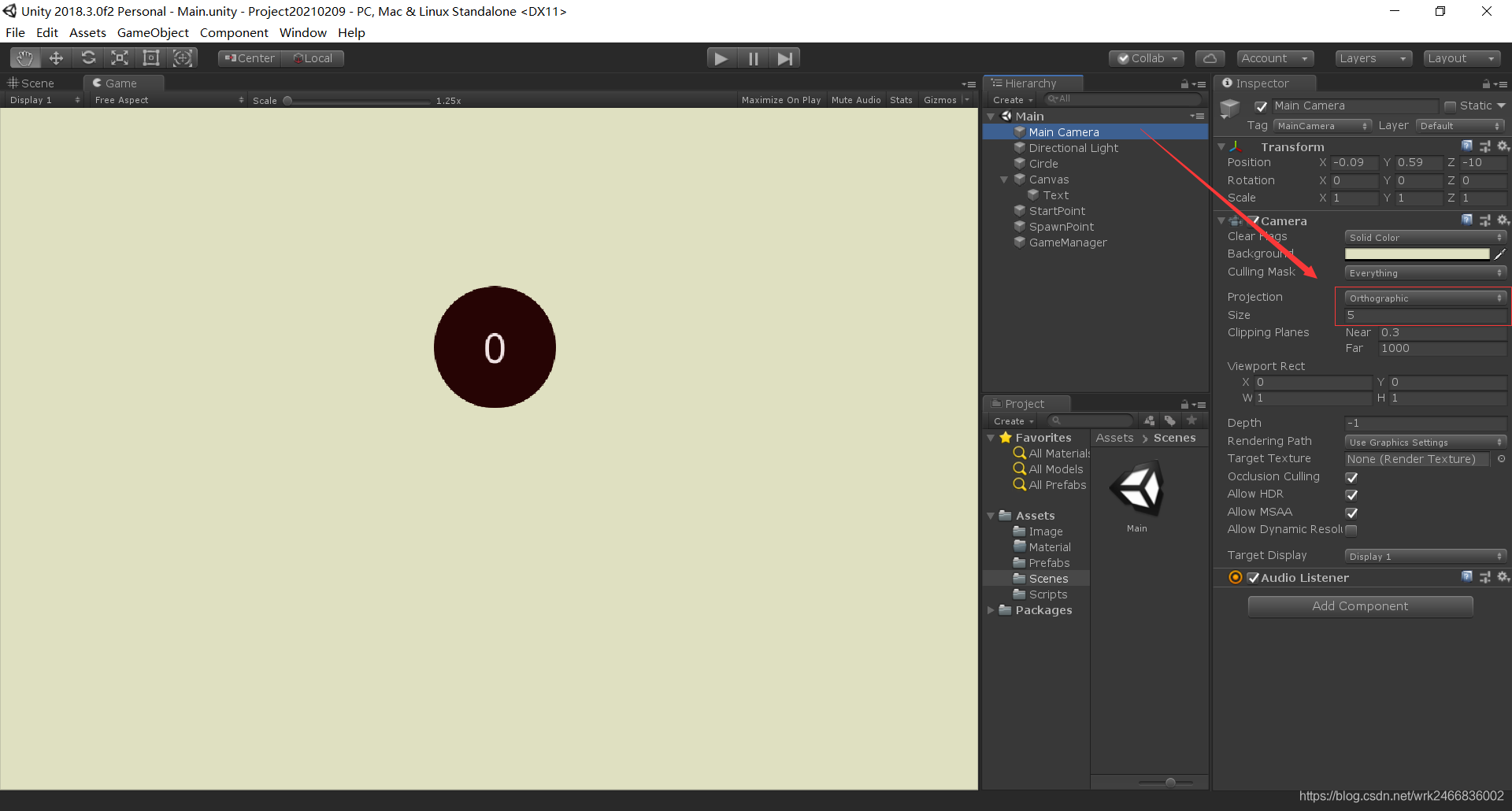
1.利用协程写一个无限循环,改变背景颜色和大小,暂时0.2秒,再重新加载场景
2.注意摄像头中的Projection属性是Orthographic,
- using System.Collections;
- using System.Collections.Generic;
- using UnityEngine;
- using UnityEngine.UI;
- using UnityEngine.SceneManagement;
-
- public class GameManager : MonoBehaviour
- {
- public Transform startpoint;//定义一个Transform类型的对象
- public Transform spawnpoint;
-
- public Pin currentPin;//定义一个类型为Pin的对象
- public GameObject pinPrefab;
-
- private bool isGameOver;
-
- public Text text;
- int Score = 0;
-
- public Camera mainCamera;
- public float speed = 3;
-
- void Start()
- {
- startpoint = GameObject.Find("StartPoint").transform;//找到StartPoint对象的transform属性
- spawnpoint = GameObject.Find("SpawnPoint ").transform;
-
- GOspan();
- }
-
- void GOspan() {
- //GameObject.Instantiate(pinPrefab, spawnpoint.position, pinPrefab.transform.rotation);//实例化 物体 位置 旋转位置
- currentPin = GameObject.Instantiate(pinPrefab, spawnpoint.position, pinPrefab.transform.rotation).GetComponent<Pin>();//转为了Pin类型,可以在Pin类中访问
- }
- // Update is called once per frame
- void Update()
- {
- if (isGameOver) return;
-
- if (Input.GetMouseButtonDown(0)) {//如果按下鼠标左键
- currentPin.StartFly();
- GOspan();//连环发射,每点一次就实列化一次
- Score++;
- text.text = Score.ToString();//把一个 Number 对象转换为一个字符串//必须引用using UnityEngine.UI;
- }
- }
-
- public void Gameover() {
- if (isGameOver) return;//因为每个针头都有,Gameover方法,所以要这样进行处理,只执行一次
- GameObject.Find("Circle").GetComponent<Rotatefun>().enabled = false;//圆停止旋转
- StartCoroutine(GameOverAnimation());//引用协程
- isGameOver = true;
-
- }
-
- IEnumerator GameOverAnimation() {//利用协程
- while (true) {
- mainCamera.backgroundColor = Color.Lerp(mainCamera.backgroundColor,Color.red,speed*Time.deltaTime);//背景颜色 = 当前颜色-目标颜色-速度
- mainCamera.orthographicSize = Mathf.Lerp(mainCamera.orthographicSize, 4, speed * Time.deltaTime);//大小=当前大小-目标颜色-速度
- if (Mathf.Abs(mainCamera.orthographicSize-4)<0.01f) {//当前大小与目前大小的一个差值
- break;//跳出循环
- }
- yield return 0;//1次暂停1针
- }
- yield return new WaitForSeconds(0.2f);//跳出循环后,暂停0.2
- SceneManager.LoadScene(SceneManager.GetActiveScene().buildIndex);//重新加载当前场景,必须引用using UnityEngine.SceneManagement;-当前场景的buildIndex
- }
- }