- 1cpu(s)和%CPU的的区别_%cpu(s)是几核
- 2C++学习笔记——Eigen模块(用于矩阵运算)_c++ eigen
- 3【web样式分析】超出俩行展示 更多_js实现超过两行查看更多
- 4基于Django的RBAC组件(按钮的细粒度权限)进阶篇(三)_rbac 按钮细粒级别的
- 5HBuilder-X 关闭eslint-vue 插件语法检查_hbuilder怎样去掉eslint
- 6【AIGC】Llama2-7B-Chat模型微调_llama-2-7b-chat-hf-q4f32_1
- 7最全docker之docker-compose.yml详解_docker-compose.yml linkai
- 8[latex]插入图片_latex插入图片
- 9python多进程(multiprocessing)(map)_multiprocessing map
- 10KVM虚拟化介绍_kvm的三个组件及作用?请详细描述作用
【机器视觉学习笔记】直方图的绘制及直方图均衡化(C++)_gethistimage
赞
踩
平台:Windows 10 20H2
Visual Studio 2015
OpenCV 4.5.3
本文综合自直方图计算和程序员-图哥——图像处理之直方图均衡化及C++实现
概念
直方图定义

直方图均衡化

直方图均衡化的作用是图像增强。
有两个问题比较难懂,一是为什么要选用累积分布函数,二是为什么使用累积分布函数处理后像素值会均匀分布。
为什么要选用累积分布函数
均衡化过程中,必须要保证两个条件:
①像素无论怎么映射,一定要保证原来的大小关系不变,较亮的区域,依旧是较亮的,较暗依旧暗,只是对比度增大,绝对不能明暗颠倒;
②如果是八位图像,那么像素映射函数的值域应在0和255之间的,不能越界。
综合以上两个条件,累积分布函数是个好的选择,因为累积分布函数是单调增函数(控制大小关系),并且值域是0到1(控制越界问题),所以直方图均衡化中使用的是累积分布函数。
如何运用累积分布函数使得直方图均衡化
直方图均衡化过程中,映射方法是
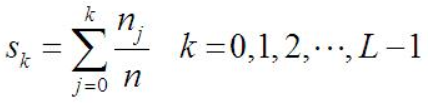
其中,n是图像中像素的总和,
n
k
n_k
nk是当前灰度级的像素个数,L是图像中可能的灰度级总数。
C++ 源码
直方图均衡化
直方图均衡化的代码实现有以下几个步骤:
遍历全图,先统计每个灰度级下的像素点个数(为此我们开辟了256大小的数组);
计算每个灰度级的像素点占总像素的点的比例;
按照第二步求出的比例重新计算每个灰度级下的新的灰度值,即均衡化;
依照新的灰度值表遍历更新图像的灰度值。
Mat getEqualizeHistImage(Mat input)
{
	int gray[256] = { 0 };  //记录每个灰度级别下的像素个数
	double gray_prob[256] = { 0 };  //记录灰度分布密度
	double gray_distribution[256] = { 0 };  //记录累计密度
	int gray_equal[256] = { 0 };  //均衡化后的灰度值

	int gray_sum = 0;  //像素总数

	Mat chRGB[3];

	split(input, chRGB);

	Mat output = input.clone();

	for (unsigned char k = 0; k < 3; ++k)
	{
		for (unsigned short i = 0; i < 256; ++i)
		{
			gray[i] = 0;
			gray_prob[i] = 0;
			gray_distribution[i] = 0;
			gray_equal[i] = 0;
		}

		gray_sum = chRGB[k].cols * chRGB[k].rows;

		//统计每个灰度下的像素个数
		for (int i = 0; i < chRGB[k].rows; i++)
		{
			uchar* p = chRGB[k].ptr<uchar>(i);
			for (int j = 0; j < chRGB[k].cols; j++)
			{
				int vaule = p[j];
				gray[vaule]++;
			}
		}

		//统计灰度频率
		for (int i = 0; i < 256; i++)
		{
			gray_prob[i] = ((double)gray[i] / gray_sum);
		}

		//计算累计密度
		gray_distribution[0] = gray_prob[0];
		for (int i = 1; i < 256; i++)
		{
			gray_distribution[i] = gray_distribution[i - 1] + gray_prob[i];
		}

		//重新计算均衡化后的灰度值,四舍五入。参考公式:(N-1)*T+0.5
		for (int i = 0; i < 256; i++)
		{
			gray_equal[i] = (uchar)(255 * gray_distribution[i] + 0.5);
		}

		//直方图均衡化,更新原图每个点的像素值
		for (int i = 0; i < chRGB[k].rows; i++)
		{
			uchar* p = chRGB[k].ptr<uchar>(i);
			for (int j = 0; j < chRGB[k].cols; j++)
			{
				p[j] = gray_equal[p[j]];
			}
		}
	}
	merge(chRGB, 3, output);
	return output;
}

- 1
- 2
- 3
- 4
- 5
- 6
- 7
- 8
- 9
- 10
- 11
- 12
- 13
- 14
- 15
- 16
- 17
- 18
- 19
- 20
- 21
- 22
- 23
- 24
- 25
- 26
- 27
- 28
- 29
- 30
- 31
- 32
- 33
- 34
- 35
- 36
- 37
- 38
- 39
- 40
- 41
- 42
- 43
- 44
- 45
- 46
- 47
- 48
- 49
- 50
- 51
- 52
- 53
- 54
- 55
- 56
- 57
- 58
- 59
- 60
- 61
- 62
- 63
- 64
- 65
- 66
- 67
- 68
- 69
- 70
绘制直方图
Mat getHistImage(Mat input)
{
	Mat chRGB[3];

	split(input, chRGB);

	// 设定bin数目
	int histSize = 255;

	// 设定取值范围 ( R,G,B) )
	float range[] = { 0, 255 };
	const float* histRange = { range };

	bool uniform = true; bool accumulate = false;

	Mat RGB_Hist[3];

	for(uint8_t i = 0; i < 3; ++i)
		// 计算直方图:
		calcHist(&chRGB[i], 1, 0, Mat(), RGB_Hist[i], 1, &histSize, &histRange, uniform, accumulate);

	// 创建直方图画布
	int hist_w = 400; int hist_h = 400;
	int bin_w = cvRound((double)hist_w / histSize);

	Mat histImage(hist_w, hist_h, CV_8UC3, Scalar(0, 0, 0));

	for(uint8_t i = 0; i < 3; ++i)
		// 将直方图归一化到范围 [ 0, histImage.rows ]
		normalize(RGB_Hist[i], RGB_Hist[i], 0, histImage.rows, NORM_MINMAX, -1, Mat());

	// 在直方图画布上画出直方图
	for (int i = 1; i < histSize; i++)
	{
		line(histImage, Point(bin_w*(i - 1), hist_h - cvRound(RGB_Hist[0].at<float>(i - 1))),
			Point(bin_w*(i), hist_h - cvRound(RGB_Hist[0].at<float>(i))),
			Scalar(0, 0, 255), 2, 8, 0);
		line(histImage, Point(bin_w*(i - 1), hist_h - cvRound(RGB_Hist[1].at<float>(i - 1))),
			Point(bin_w*(i), hist_h - cvRound(RGB_Hist[1].at<float>(i))),
			Scalar(0, 255, 0), 2, 8, 0);
		line(histImage, Point(bin_w*(i - 1), hist_h - cvRound(RGB_Hist[2].at<float>(i - 1))),
			Point(bin_w*(i), hist_h - cvRound(RGB_Hist[2].at<float>(i))),
			Scalar(255, 0, 0), 2, 8, 0);
	}
	/// 显示直方图
	///imshow("calcHist Demo", histImage);
	return histImage;
}
- 1
- 2
- 3
- 4
- 5
- 6
- 7
- 8
- 9
- 10
- 11
- 12
- 13
- 14
- 15
- 16
- 17
- 18
- 19
- 20
- 21
- 22
- 23
- 24
- 25
- 26
- 27
- 28
- 29
- 30
- 31
- 32
- 33
- 34
- 35
- 36
- 37
- 38
- 39
- 40
- 41
- 42
- 43
- 44
- 45
- 46
- 47
- 48
主函数
图片路径根据实际情况调整,注意反斜杠是转义字符的开头,故“\”应替换为“\\”
int main(int argc, char * argv[])
{
	Mat Image = imread("D:\\Work\\OpenCV\\Workplace\\Test_1\\1.jpg");

	imshow("原图", Image);
	imshow("原图直方图", getHistImage(Image));

	imshow("直方图均衡化后的图像", getEqualizeHistImage(Image));
	imshow("直方图均衡化后的直方图", getHistImage(getEqualizeHistImage(Image)));

	waitKey(0);

	return 0;
}
- 1
- 2
- 3
- 4
- 5
- 6
- 7
- 8
- 9
- 10
- 11
- 12
- 13
- 14
效果


完整源码
#include <opencv2/opencv.hpp>
#include <iostream>

using namespace cv;
using namespace std;

Mat getHistImage(Mat input)
{
	Mat chRGB[3];

	split(input, chRGB);

	// 设定bin数目
	int histSize = 255;

	// 设定取值范围 ( R,G,B) )
	float range[] = { 0, 255 };
	const float* histRange = { range };

	bool uniform = true; bool accumulate = false;

	Mat RGB_Hist[3];

	for(uint8_t i = 0; i < 3; ++i)
		// 计算直方图:
		calcHist(&chRGB[i], 1, 0, Mat(), RGB_Hist[i], 1, &histSize, &histRange, uniform, accumulate);

	// 创建直方图画布
	int hist_w = 400; int hist_h = 400;
	int bin_w = cvRound((double)hist_w / histSize);

	Mat histImage(hist_w, hist_h, CV_8UC3, Scalar(0, 0, 0));

	for(uint8_t i = 0; i < 3; ++i)
		// 将直方图归一化到范围 [ 0, histImage.rows ]
		normalize(RGB_Hist[i], RGB_Hist[i], 0, histImage.rows, NORM_MINMAX, -1, Mat());

	// 在直方图画布上画出直方图
	for (int i = 1; i < histSize; i++)
	{
		line(histImage, Point(bin_w*(i - 1), hist_h - cvRound(RGB_Hist[0].at<float>(i - 1))),
			Point(bin_w*(i), hist_h - cvRound(RGB_Hist[0].at<float>(i))),
			Scalar(0, 0, 255), 2, 8, 0);
		line(histImage, Point(bin_w*(i - 1), hist_h - cvRound(RGB_Hist[1].at<float>(i - 1))),
			Point(bin_w*(i), hist_h - cvRound(RGB_Hist[1].at<float>(i))),
			Scalar(0, 255, 0), 2, 8, 0);
		line(histImage, Point(bin_w*(i - 1), hist_h - cvRound(RGB_Hist[2].at<float>(i - 1))),
			Point(bin_w*(i), hist_h - cvRound(RGB_Hist[2].at<float>(i))),
			Scalar(255, 0, 0), 2, 8, 0);
	}
	/// 显示直方图
	///imshow("calcHist Demo", histImage);
	return histImage;
}

Mat getEqualizeHistImage(Mat input)
{
	int gray[256] = { 0 };  //记录每个灰度级别下的像素个数
	double gray_prob[256] = { 0 };  //记录灰度分布密度
	double gray_distribution[256] = { 0 };  //记录累计密度
	int gray_equal[256] = { 0 };  //均衡化后的灰度值

	int gray_sum = 0;  //像素总数

	Mat chRGB[3];

	split(input, chRGB);

	Mat output = input.clone();

	for (unsigned char k = 0; k < 3; ++k)
	{
		for (unsigned short i = 0; i < 256; ++i)
		{
			gray[i] = 0;
			gray_prob[i] = 0;
			gray_distribution[i] = 0;
			gray_equal[i] = 0;
		}

		gray_sum = chRGB[k].cols * chRGB[k].rows;

		//统计每个灰度下的像素个数
		for (int i = 0; i < chRGB[k].rows; i++)
		{
			uchar* p = chRGB[k].ptr<uchar>(i);
			for (int j = 0; j < chRGB[k].cols; j++)
			{
				int vaule = p[j];
				gray[vaule]++;
			}
		}

		//统计灰度频率
		for (int i = 0; i < 256; i++)
		{
			gray_prob[i] = ((double)gray[i] / gray_sum);
		}

		//计算累计密度
		gray_distribution[0] = gray_prob[0];
		for (int i = 1; i < 256; i++)
		{
			gray_distribution[i] = gray_distribution[i - 1] + gray_prob[i];
		}

		//重新计算均衡化后的灰度值,四舍五入。参考公式:(N-1)*T+0.5
		for (int i = 0; i < 256; i++)
		{
			gray_equal[i] = (uchar)(255 * gray_distribution[i] + 0.5);
		}

		//直方图均衡化,更新原图每个点的像素值
		for (int i = 0; i < chRGB[k].rows; i++)
		{
			uchar* p = chRGB[k].ptr<uchar>(i);
			for (int j = 0; j < chRGB[k].cols; j++)
			{
				p[j] = gray_equal[p[j]];
			}
		}
	}
	merge(chRGB, 3, output);
	return output;
}

int main(int argc, char * argv[])
{
	Mat Image = imread("D:\\Work\\OpenCV\\Workplace\\Test_1\\1.jpg");

	imshow("原图", Image);
	imshow("原图直方图", getHistImage(Image));

	imshow("直方图均衡化后的图像", getEqualizeHistImage(Image));
	imshow("直方图均衡化后的直方图", getHistImage(getEqualizeHistImage(Image)));

	waitKey(0);

	return 0;
}
- 1
- 2
- 3
- 4
- 5
- 6
- 7
- 8
- 9
- 10
- 11
- 12
- 13
- 14
- 15
- 16
- 17
- 18
- 19
- 20
- 21
- 22
- 23
- 24
- 25
- 26
- 27
- 28
- 29
- 30
- 31
- 32
- 33
- 34
- 35
- 36
- 37
- 38
- 39
- 40
- 41
- 42
- 43
- 44
- 45
- 46
- 47
- 48
- 49
- 50
- 51
- 52
- 53
- 54
- 55
- 56
- 57
- 58
- 59
- 60
- 61
- 62
- 63
- 64
- 65
- 66
- 67
- 68
- 69
- 70
- 71
- 72
- 73
- 74
- 75
- 76
- 77
- 78
- 79
- 80
- 81
- 82
- 83
- 84
- 85
- 86
- 87
- 88
- 89
- 90
- 91
- 92
- 93
- 94
- 95
- 96
- 97
- 98
- 99
- 100
- 101
- 102
- 103
- 104
- 105
- 106
- 107
- 108
- 109
- 110
- 111
- 112
- 113
- 114
- 115
- 116
- 117
- 118
- 119
- 120
- 121
- 122
- 123
- 124
- 125
- 126
- 127
- 128
- 129
- 130
- 131
- 132
- 133
- 134
- 135
- 136
- 137
- 138
- 139
- 140