
热门标签
热门文章
- 1一文搞懂大模型框架:LangChain
- 21、aigc图像相关
- 3C#正则表达式实例
- 4Android Activity启动模式及其区别_简述activity的四种启动模式及其区别。
- 5讯为IMX6UL开发板CAN接口测试学习笔记_flexcan 2090000.can can0: bit-timing not yet defin
- 6node的基础api
- 7GIS+=地理信息+大数据技术——GIS大数据可视化分析工具_gis大数据处理框架
- 8基于WebUploader实现大文件分片上传
- 9用Python发送通知到企业微信,实现消息推送_python 企业微信
- 10FastGPT,知识库AI !保姆级教程,5分钟上手
当前位置: article > 正文
Springboot学习(一)配置Druid及监控(超详细)_druid.support的pom坐标
作者:算法编织者 | 2024-01-30 12:27:08
赞
踩
druid.support的pom坐标
Spring boot 配置Druid环境的Demo——(Druid环境配置)
#话不多说直接走你
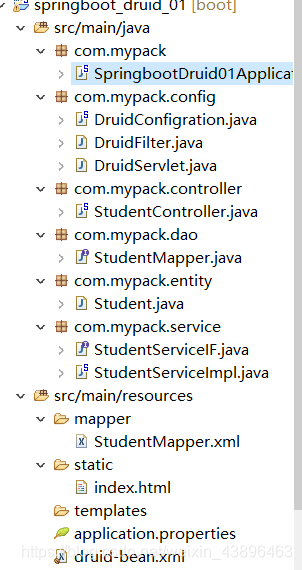
先看下项目基本结构,基本就是大差不差,无非名字不一样
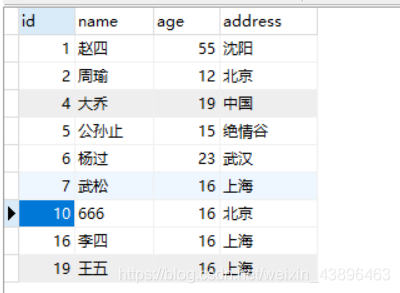
1.首先是数据库表的建立

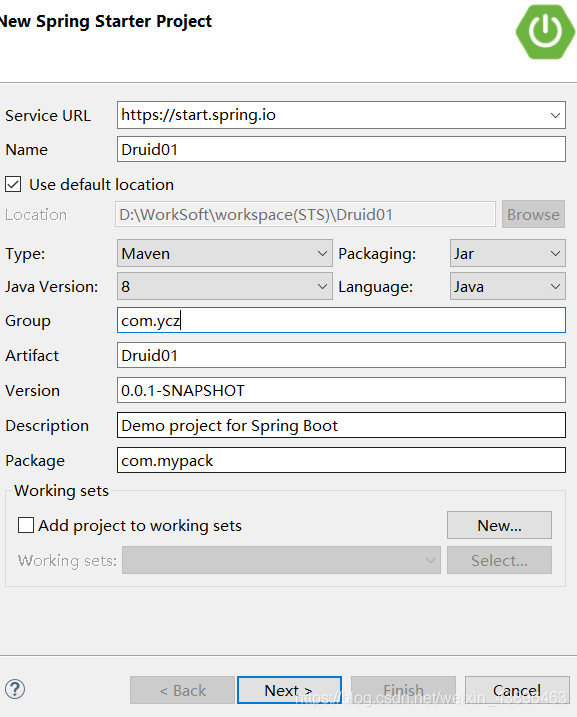
2.创建spring boot 项目
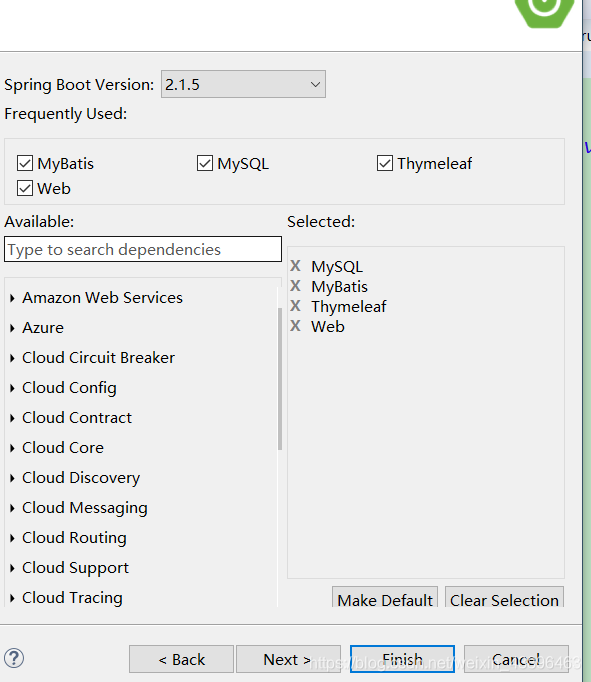
3.配置pom.xml
配置所需要的运行环境
<dependency>
			<groupId>javax.servlet</groupId>
			<artifactId>javax.servlet-api</artifactId>
			<scope>provided</scope>
		</dependency>

		<!-- https://mvnrepository.com/artifact/com.alibaba/druid -->
		<!-- druid连接池 -->
		<dependency>
			<groupId>com.alibaba</groupId>
			<artifactId>druid</artifactId>
			<version>1.1.16</version>
		</dependency>

		<!-- https://mvnrepository.com/artifact/log4j/log4j -->
		<!-- log4j日志 -->
		<dependency>
			<groupId>log4j</groupId>
			<artifactId>log4j</artifactId>
			<version>1.2.17</version>
		</dependency>

		<!-- https://mvnrepository.com/artifact/org.aspectj/aspectjweaver -->
		<dependency>
			<groupId>org.aspectj</groupId>
			<artifactId>aspectjweaver</artifactId>
			<version>1.9.2</version>
		</dependency>

- 1
- 2
- 3
- 4
- 5
- 6
- 7
- 8
- 9
- 10
- 11
- 12
- 13
- 14
- 15
- 16
- 17
- 18
- 19
- 20
- 21
- 22
- 23
- 24
- 25
- 26
- 27
- 28
4.配置application.properties
这个是基本的配置
#server
#端口设置,类似于tomcat的端口号这里**修改成了666不是8080**#
server.port=666
#端口编码设置
server.tomcat.uri-encoding=utf-8

#datasource
spring.datasource.driver-class-name=com.mysql.cj.jdbc.Driver  #这个是高版本的mysql-connector-java
spring.datasource.url=jdbc:mysql://localhost:3306/test?serverTimezone=UTC&characterEncoding=utf-8 ##这里需要设置时区
spring.datasource.username=root
spring.datasource.password=root

#mybatis
mybatis.type-aliases-package=com.mypack.entity
mybatis.mapper-locations=classpath:mapper/*.xml

# thymeleaf
#html的前缀后缀
spring.thymeleaf.prefix=classpath:/static/
spring.mvc.view.prefix=classpath:/static/
spring.thymeleaf.suffix=.html
#基本属性
spring.thymeleaf.servlet.content-type=text/html
spring.thymeleaf.cache=false
spring.thymeleaf.mode=HTML5
- 1
- 2
- 3
- 4
- 5
- 6
- 7
- 8
- 9
- 10
- 11
- 12
- 13
- 14
- 15
- 16
- 17
- 18
- 19
- 20
- 21
- 22
- 23
- 24
- 25
这个是Druid配置
##  druid配置
spring.datasource.type=com.alibaba.druid.pool.DruidDataSource

# 初始化大小,最小,最大
spring.datasource.initialSize=5
spring.datasource.minIdle=5
spring.datasource.maxActive=20
# 配置获取连接等待超时的时间
spring.datasource.maxWait=60000
# 配置间隔多久才进行一次检测,检测需要关闭的空闲连接,单位是毫秒
spring.datasource.timeBetweenEvictionRunsMillis=60000
# 配置一个连接在池中最小生存的时间,单位是毫秒
spring.datasource.minEvictableIdleTimeMillis=300000
# 校验SQL,Oracle配置 spring.datasource.validationQuery=SELECT 1 FROM DUAL,如果不配validationQuery项,则下面三项配置无用
spring.datasource.validationQuery=SELECT 'x'
spring.datasource.testWhileIdle=true
spring.datasource.testOnBorrow=false
spring.datasource.testOnReturn=false
# 打开PSCache,并且指定每个连接上PSCache的大小
spring.datasource.poolPreparedStatements=true
spring.datasource.maxPoolPreparedStatementPerConnectionSize=20
# 配置监控统计拦截的filters,去掉后监控界面sql无法统计,'wall'用于防火墙
spring.datasource.filters=stat,wall,log4j
# 通过connectProperties属性来打开mergeSql功能;慢SQL记录
spring.datasource.connectionProperties=druid.stat.mergeSql=true;druid.stat.slowSqlMillis=5000
# 合并多个DruidDataSource的监控数据
spring.datasource.useGlobalDataSourceStat=true
- 1
- 2
- 3
- 4
- 5
- 6
- 7
- 8
- 9
- 10
- 11
- 12
- 13
- 14
- 15
- 16
- 17
- 18
- 19
- 20
- 21
- 22
- 23
- 24
- 25
- 26
- 27
- 28
5.配置druid-bean.xml
<?xml version="1.0" encoding="UTF-8"?>
<beans xmlns="http://www.springframework.org/schema/beans"
    xmlns:aop="http://www.springframework.org/schema/aop" xmlns:xsi="http://www.w3.org/2001/XMLSchema-instance"
    xsi:schemaLocation="
        http://www.springframework.org/schema/beans
        http://www.springframework.org/schema/beans/spring-beans.xsd
        http://www.springframework.org/schema/aop
        http://www.springframework.org/schema/aop/spring-aop.xsd">

    <!-- 配置_Druid和Spring关联监控配置 -->
    <bean id="druid-stat-interceptor"
        class="com.alibaba.druid.support.spring.stat.DruidStatInterceptor"></bean>

    <!-- 方法名正则匹配拦截配置 -->
    <bean id="druid-stat-pointcut" class="org.springframework.aop.support.JdkRegexpMethodPointcut"
        scope="prototype">
        <property name="patterns">
            <list>

            		<!-- 也就是修改这个地方的文件路径,其他的不用动-->
                <value>com.mypack.mapper.*</value>

            </list>
        </property>
    </bean>

    <aop:config proxy-target-class="true">
        <aop:advisor advice-ref="druid-stat-interceptor"
            pointcut-ref="druid-stat-pointcut" />
    </aop:config>

</beans>
- 1
- 2
- 3
- 4
- 5
- 6
- 7
- 8
- 9
- 10
- 11
- 12
- 13
- 14
- 15
- 16
- 17
- 18
- 19
- 20
- 21
- 22
- 23
- 24
- 25
- 26
- 27
- 28
- 29
- 30
- 31
- 32
6.Application主类的配置
package com.mypack;

import org.mybatis.spring.annotation.MapperScan;
import org.springframework.boot.SpringApplication;
import org.springframework.boot.autoconfigure.SpringBootApplication;
import org.springframework.boot.web.servlet.ServletComponentScan;
import org.springframework.context.annotation.ComponentScan;
import org.springframework.context.annotation.ImportResource;

@SpringBootApplication
@ComponentScan("com.mypack")
@MapperScan("mapper")
@ServletComponentScan  //主要注解,添加这个
@ImportResource(locations = { "classpath:druid-bean.xml" })  //主要注解,添加这个
public class SpringbootDruid01Application {

	public static void main(String[] args) {
		SpringApplication.run(SpringbootDruid01Application.class, args);
	}

}
- 1
- 2
- 3
- 4
- 5
- 6
- 7
- 8
- 9
- 10
- 11
- 12
- 13
- 14
- 15
- 16
- 17
- 18
- 19
- 20
- 21
- 22
Student实体类的创建
package com.mypack.entity;

public class Student {
	int id;
	String name;
	int age;
	String address;

	public int getId() {
		return id;
	}

	public void setId(int id) {
		this.id = id;
	}

	public String getName() {
		return name;
	}

	public void setName(String name) {
		this.name = name;
	}

	public int getAge() {
		return age;
	}

	public void setAge(int age) {
		this.age = age;
	}

	public String getAddress() {
		return address;
	}

	public void setAddress(String address) {
		this.address = address;
	}

}
- 1
- 2
- 3
- 4
- 5
- 6
- 7
- 8
- 9
- 10
- 11
- 12
- 13
- 14
- 15
- 16
- 17
- 18
- 19
- 20
- 21
- 22
- 23
- 24
- 25
- 26
- 27
- 28
- 29
- 30
- 31
- 32
- 33
- 34
- 35
- 36
- 37
- 38
- 39
- 40
- 41
- 42
Dao层的建立
StudentMapper.java
package com.mypack.dao;

import java.util.List;

import org.apache.ibatis.annotations.Mapper;

import com.mypack.entity.Student;

@Mapper
public interface StudentMapper {

public List<Student> queryAllStu();


}
- 1
- 2
- 3
- 4
- 5
- 6
- 7
- 8
- 9
- 10
- 11
- 12
- 13
- 14
- 15
- 16
StudentMapper.xml
<?xml version="1.0" encoding="UTF-8"?>
<!DOCTYPE mapper PUBLIC "-//mybatis.org//DTD Mapper 3.0//EN" "http://mybatis.org/dtd/mybatis-3-mapper.dtd">


 <mapper namespace="com.mypack.dao.StudentMapper">

 	<!-- 查询所有学生 -->
 	<select id="queryAllStu" resultType="Student">
 		select * from stu
 	</select>

 </mapper>
- 1
- 2
- 3
- 4
- 5
- 6
- 7
- 8
- 9
- 10
- 11
- 12
service层
StudentServiceImpl
package com.mypack.service;

import java.util.List;

import org.springframework.beans.factory.annotation.Autowired;
import org.springframework.context.annotation.ComponentScan;
import org.springframework.stereotype.Service;
import org.springframework.transaction.annotation.Transactional;

import com.mypack.dao.StudentMapper;
import com.mypack.entity.Student;

@Transactional
@Service
@ComponentScan("com.mypack.dao")
public class StudentServiceImpl implements StudentServiceIF {


	@Autowired
	StudentMapper studentMapper;

	//查询所有学生
	@Override
	public List<Student> queryAllStu(){
		return studentMapper.queryAllStu();
	}
}
- 1
- 2
- 3
- 4
- 5
- 6
- 7
- 8
- 9
- 10
- 11
- 12
- 13
- 14
- 15
- 16
- 17
- 18
- 19
- 20
- 21
- 22
- 23
- 24
- 25
- 26
- 27
- 28
StudentServiceIF
package com.mypack.service;

import java.util.List;

import com.mypack.entity.Student;

public interface StudentServiceIF {

	//查询所有学生
	List<Student> queryAllStu();

}
- 1
- 2
- 3
- 4
- 5
- 6
- 7
- 8
- 9
- 10
- 11
- 12
controller层
package com.mypack.controller;

import java.util.List;

import org.springframework.beans.factory.annotation.Autowired;
import org.springframework.stereotype.Controller;
import org.springframework.ui.Model;
import org.springframework.web.bind.annotation.RequestMapping;

import com.mypack.entity.Student;
import com.mypack.service.StudentServiceIF;

@Controller
@RequestMapping("/student")
public class StudentController {

	@Autowired
	StudentServiceIF studentService;

	// 查询所有学生
	@RequestMapping("/listall")
	public String queryAllStu(Model model) {
		List<Student> stuList = studentService.queryAllStu();
		model.addAttribute("stu", stuList);
		return "index";
	}

}
- 1
- 2
- 3
- 4
- 5
- 6
- 7
- 8
- 9
- 10
- 11
- 12
- 13
- 14
- 15
- 16
- 17
- 18
- 19
- 20
- 21
- 22
- 23
- 24
- 25
- 26
- 27
- 28
- 29
Druid的Config
1.DruidConfigration
package com.mypack.config;

import java.sql.SQLException;

import javax.sql.DataSource;

import org.springframework.beans.factory.annotation.Value;
import org.springframework.context.annotation.Bean;
import org.springframework.context.annotation.Configuration;
import org.springframework.context.annotation.Primary;

import com.alibaba.druid.pool.DruidDataSource;

@Configuration
public class DruidConfigration {
    @Value("${spring.datasource.url}")
    private String dbUrl;
    @Value("${spring.datasource.username}")
    private String username;
    @Value("${spring.datasource.password}")
    private String password;
    @Value("${spring.datasource.driver-class-name}")
    private String driverClassName;
    @Value("${spring.datasource.initialSize}")
    private int initialSize;
    @Value("${spring.datasource.minIdle}")
    private int minIdle;
    @Value("${spring.datasource.maxActive}")
    private int maxActive;
    @Value("${spring.datasource.maxWait}")
    private int maxWait;
    @Value("${spring.datasource.timeBetweenEvictionRunsMillis}")
    private int timeBetweenEvictionRunsMillis;
    @Value("${spring.datasource.minEvictableIdleTimeMillis}")
    private int minEvictableIdleTimeMillis;
    @Value("${spring.datasource.validationQuery}")
    private String validationQuery;
    @Value("${spring.datasource.testWhileIdle}")
    private boolean testWhileIdle;
    @Value("${spring.datasource.testOnBorrow}")
    private boolean testOnBorrow;
    @Value("${spring.datasource.testOnReturn}")
    private boolean testOnReturn;
    @Value("${spring.datasource.poolPreparedStatements}")
    private boolean poolPreparedStatements;
    @Value("${spring.datasource.maxPoolPreparedStatementPerConnectionSize}")
    private int maxPoolPreparedStatementPerConnectionSize;
    @Value("${spring.datasource.filters}")
    private String filters;
    @Value("${spring.datasource.connectionProperties}")
    private String connectionProperties;
    @Value("${spring.datasource.useGlobalDataSourceStat}")
    private boolean useGlobalDataSourceStat;

    @Bean     //声明其为Bean实例
    @Primary  //在同样的DataSource中,首先使用被标注的DataSource
    public DataSource dataSource(){
        DruidDataSource datasource = new DruidDataSource();
        datasource.setUrl(this.dbUrl);
        datasource.setUsername(username);
        datasource.setPassword(password);
        datasource.setDriverClassName(driverClassName);

        //configuration
        datasource.setInitialSize(initialSize);
        datasource.setMinIdle(minIdle);
        datasource.setMaxActive(maxActive);
        datasource.setMaxWait(maxWait);
        datasource.setTimeBetweenEvictionRunsMillis(timeBetweenEvictionRunsMillis);
        datasource.setMinEvictableIdleTimeMillis(minEvictableIdleTimeMillis);
        datasource.setValidationQuery(validationQuery);
        datasource.setTestWhileIdle(testWhileIdle);
        datasource.setTestOnBorrow(testOnBorrow);
        datasource.setTestOnReturn(testOnReturn);
        datasource.setPoolPreparedStatements(poolPreparedStatements);
        datasource.setMaxPoolPreparedStatementPerConnectionSize(maxPoolPreparedStatementPerConnectionSize);
        datasource.setUseGlobalDataSourceStat(useGlobalDataSourceStat);
        try {
            datasource.setFilters(filters);
        } catch (SQLException e) {
            System.err.println("druid configuration initialization filter: "+ e);
        }
        datasource.setConnectionProperties(connectionProperties);
        return datasource;
    }
}
- 1
- 2
- 3
- 4
- 5
- 6
- 7
- 8
- 9
- 10
- 11
- 12
- 13
- 14
- 15
- 16
- 17
- 18
- 19
- 20
- 21
- 22
- 23
- 24
- 25
- 26
- 27
- 28
- 29
- 30
- 31
- 32
- 33
- 34
- 35
- 36
- 37
- 38
- 39
- 40
- 41
- 42
- 43
- 44
- 45
- 46
- 47
- 48
- 49
- 50
- 51
- 52
- 53
- 54
- 55
- 56
- 57
- 58
- 59
- 60
- 61
- 62
- 63
- 64
- 65
- 66
- 67
- 68
- 69
- 70
- 71
- 72
- 73
- 74
- 75
- 76
- 77
- 78
- 79
- 80
- 81
- 82
- 83
- 84
- 85
- 86
2.DruidFilter
package com.mypack.config;

import javax.servlet.annotation.WebFilter;
import javax.servlet.annotation.WebInitParam;

import com.alibaba.druid.support.http.WebStatFilter;

@WebFilter(filterName="druidWebStatFilter",urlPatterns="/*",
initParams={
    @WebInitParam(name="exclusions",value="*.js,*.gif,*.jpg,*.bmp,*.png,*.css,*.ico,/druid/*")// 忽略资源
})
public class DruidFilter extends WebStatFilter {

}
- 1
- 2
- 3
- 4
- 5
- 6
- 7
- 8
- 9
- 10
- 11
- 12
- 13
- 14
3.DruidServlet
package com.mypack.config;

import javax.servlet.annotation.WebInitParam;
import javax.servlet.annotation.WebServlet;

import com.alibaba.druid.support.http.StatViewServlet;
@WebServlet(urlPatterns = "/druid/*",
    initParams={
//            @WebInitParam(name="allow",value="192.168.16.110,127.0.0.1"),// IP白名单 (没有配置或者为空,则允许所有访问)
//            @WebInitParam(name="deny",value="192.168.16.111"),// IP黑名单 (存在共同时,deny优先于allow)
            @WebInitParam(name="loginUsername",value="admin"),// 用户名
            @WebInitParam(name="loginPassword",value="admin"),// 密码
            @WebInitParam(name="resetEnable",value="false")// 禁用HTML页面上的“Reset All”功能
    })
public class DruidServlet extends StatViewServlet {

    /**
     *
     */
    private static final long serialVersionUID = 1L;

}
- 1
- 2
- 3
- 4
- 5
- 6
- 7
- 8
- 9
- 10
- 11
- 12
- 13
- 14
- 15
- 16
- 17
- 18
- 19
- 20
- 21
- 22
7.index页面测试
<!DOCTYPE html>
<html xmlns:th="http://www.thymeleaf.org">
<head>
<meta charset="UTF-8">
<title>Insert title here</title>
</head>
<body>
	主页面
	<table>
		<tr>
			<td>编号</td><td>姓名</td><td>年龄</td><td>地址</td>
		</tr>
		<tr th:each="stu : ${stu}">
			<td th:text="${stu.id}"></td><td th:text="${stu.name}"></td>
			<td th:text="${stu.age}"></td><td th:text="${stu.address}"></td>
		</tr>
	</table>
</body>
</html>
- 1
- 2
- 3
- 4
- 5
- 6
- 7
- 8
- 9
- 10
- 11
- 12
- 13
- 14
- 15
- 16
- 17
- 18
- 19
8.看效果
查询效果 登陆到Druid后台
用户名密码就是admin 后台DruidServlet中设置的
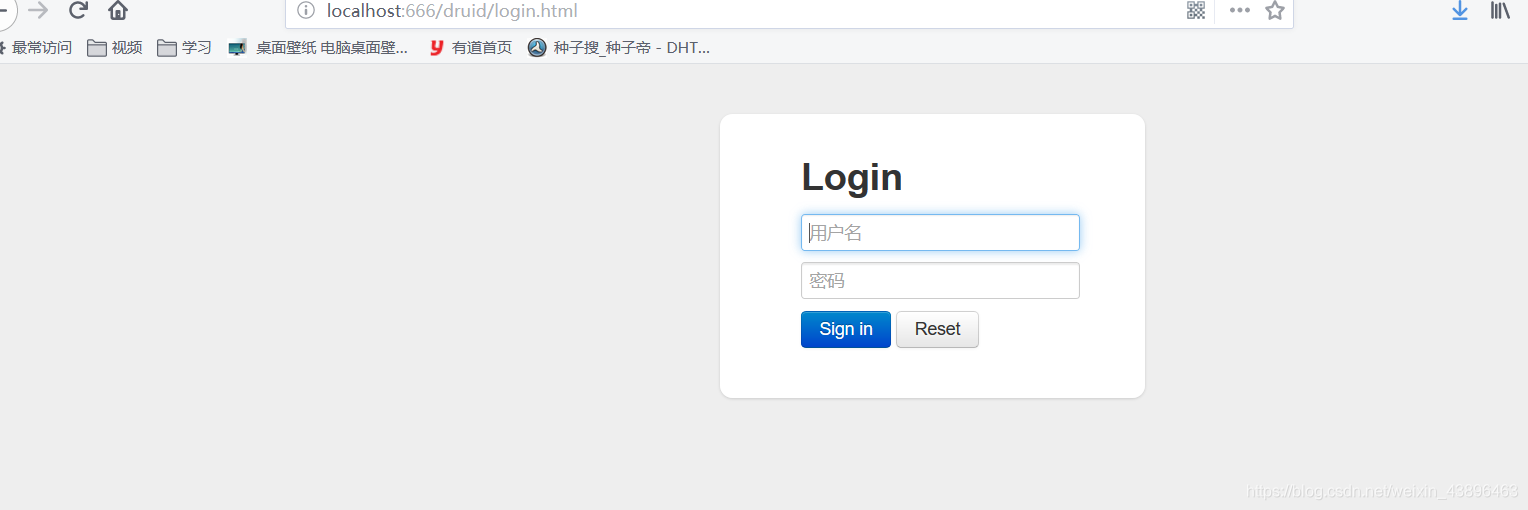
ze 这个就是刚才第一次查询的记录
嗯,感觉还不难哈,都是一些配置
源码放在码云了配置源码
声明:本文内容由网友自发贡献,不代表【wpsshop博客】立场,版权归原作者所有,本站不承担相应法律责任。如您发现有侵权的内容,请联系我们。转载请注明出处:https://www.wpsshop.cn/article/detail/46438
推荐阅读

相关标签

