
热门标签
当前位置: article > 正文
AMD安装Stable-Diffusion步骤笔记_amd stable diffusion
作者:二进制舞者 | 2024-01-30 11:46:51
赞
踩
amd stable diffusion
使用平台
CPU AMD 5950X
GPU AMD 6700XT
Win 11且全程魔法上网
安装步骤
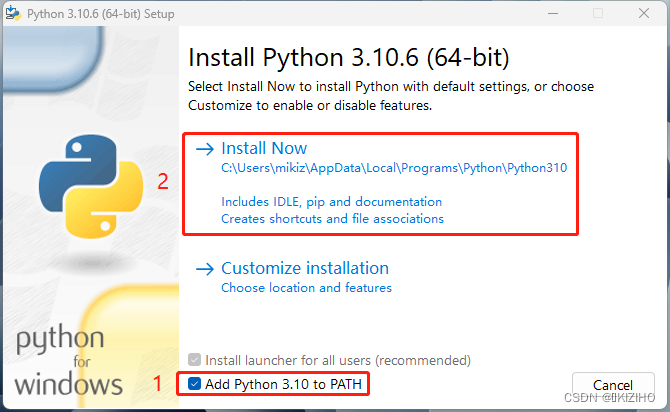
1.安装 Python 3.10.6
下载并安装 Python 3.10.6 必须使用此版本


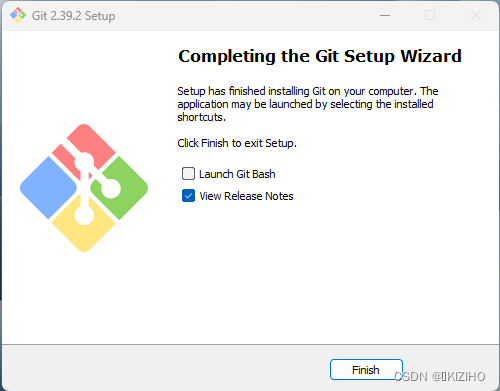
2.安装 git
下载并安装 git 全程Next


3.获取Stable-Diffusion
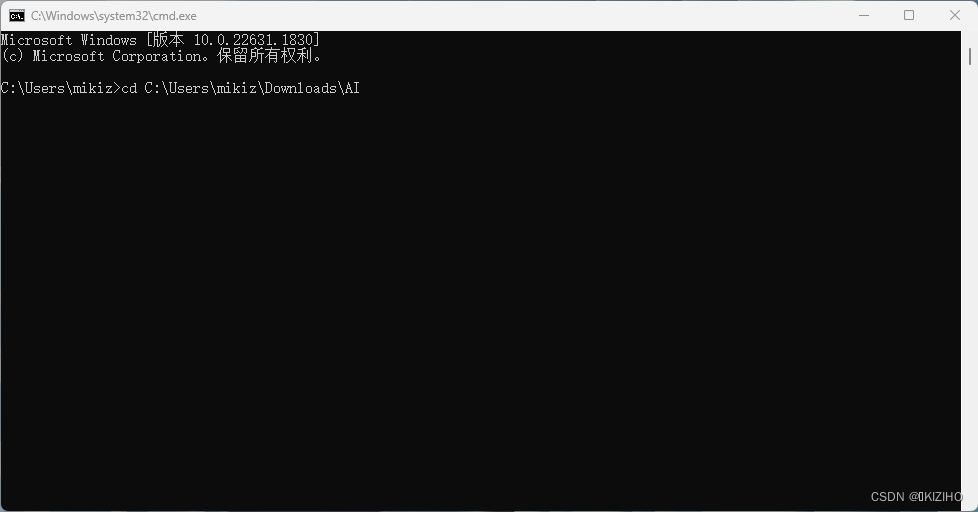
确认安装路径,安装路径要求无中文,这里我以 C:\Users\mikiz\Downloads\AI 为例
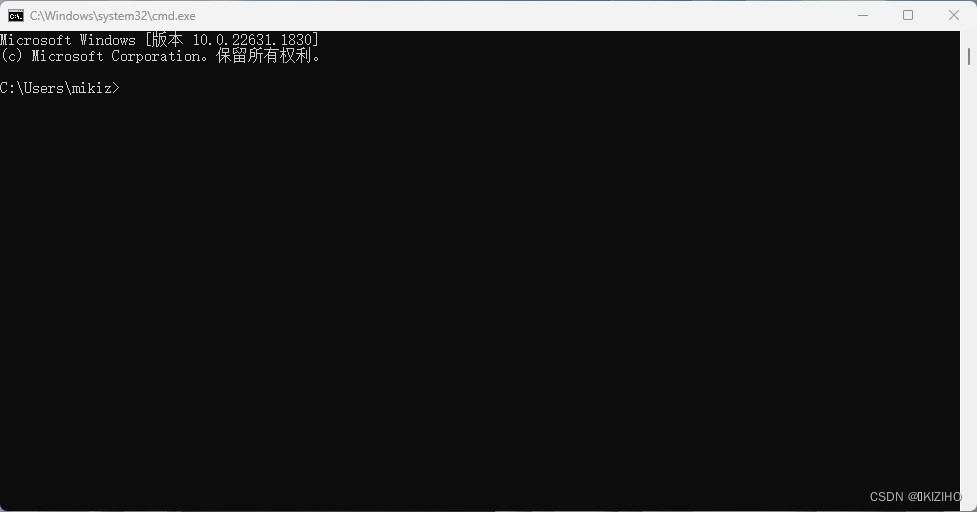
打开运行命令窗口:WIN + R
键入 cmd 打开cmd命令窗口
使用 cd 命令指定Stable-Diffusion安装路径
键入命令
git clone https://github.com/lshqqytiger/stable-diffusion-webui-directml && cd stable-diffusion-webui-directml && git submodule init && git submodule update
- 1
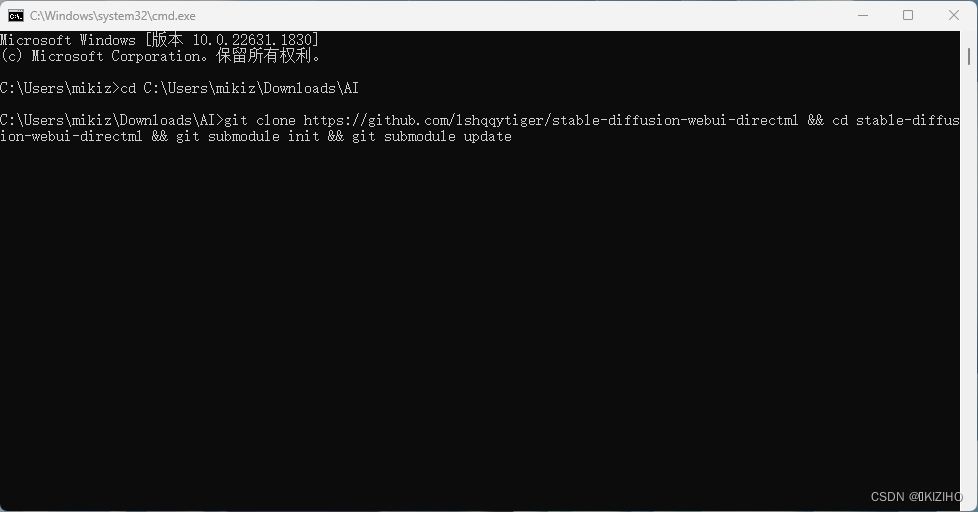
等待安装完成
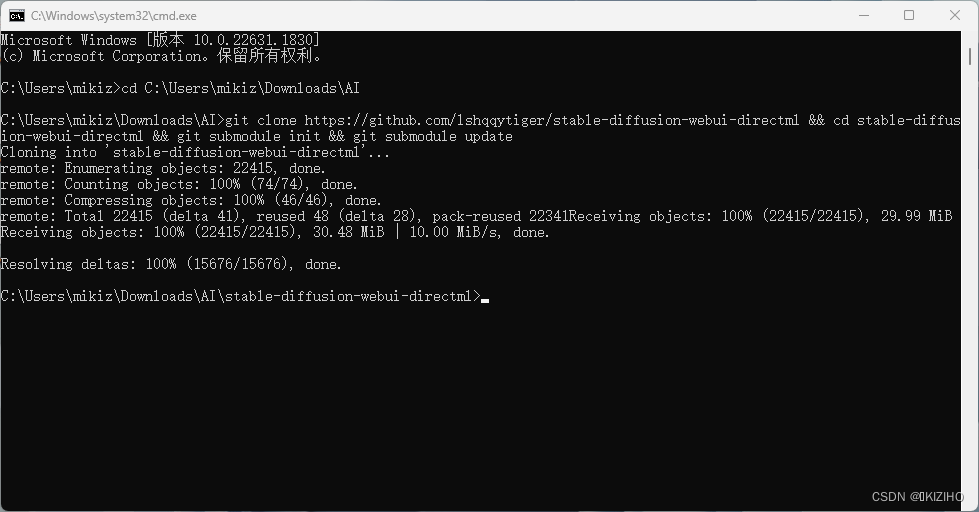
完成后即可关闭cmd窗口
4.运行webui-user.bat
打开文件资源管理器,在安装路径双击运行 webui-user.bat 文件
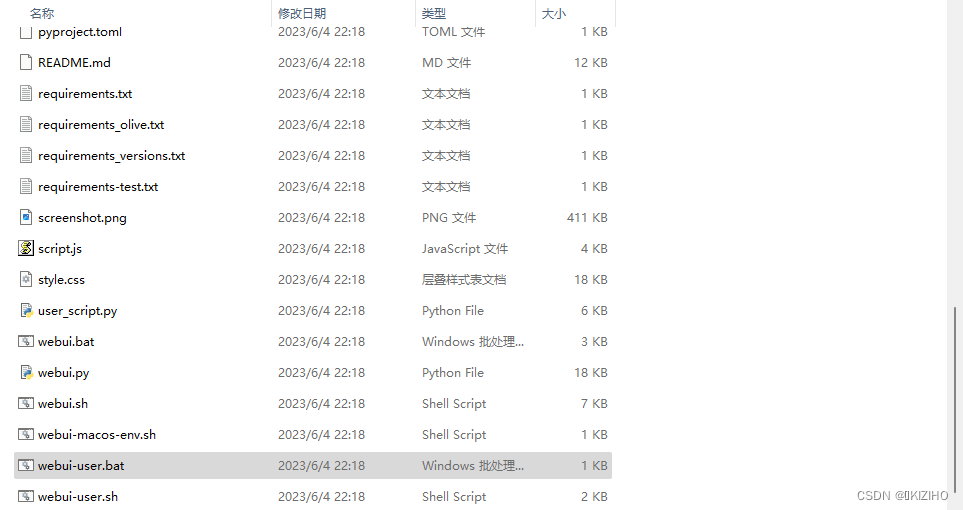
系统会自动打开cmd命令窗口,并开始跑码
如出现以下文件安装失败是因为网络问题,需魔法上网或者修改源
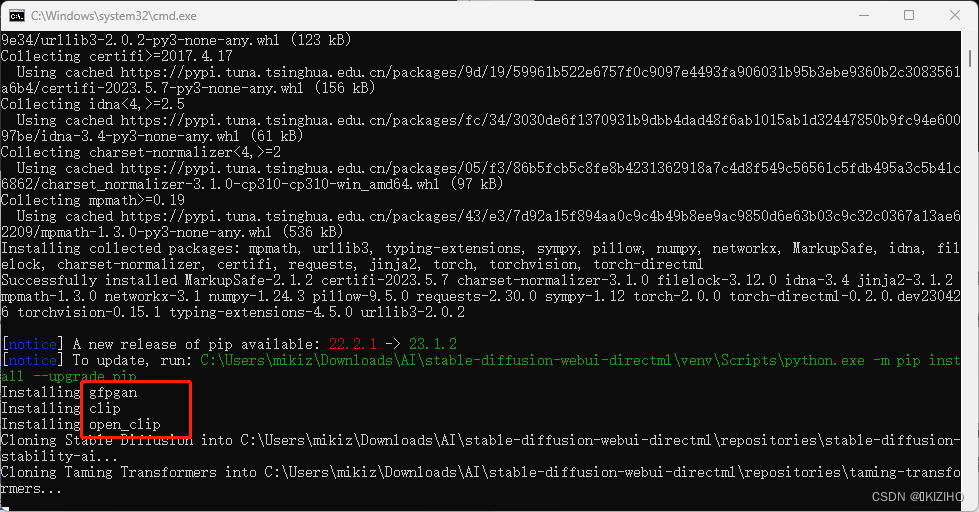
当出现以下错误,程序停止
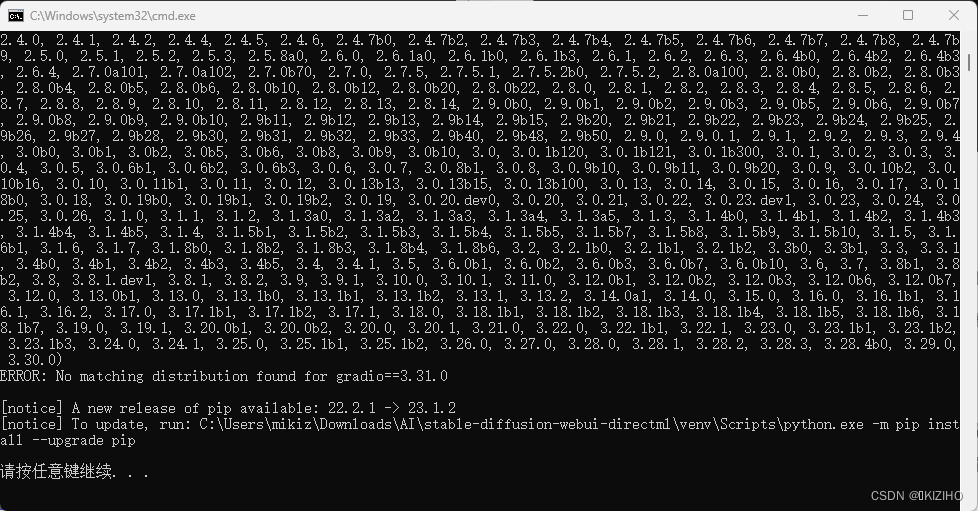
完整结果
Creating venv in directory C:\Users\mikiz\Downloads\AI\stable-diffusion-webui-directml\venv using python "C:\Users\mikiz\AppData\Local\Programs\Python\Python310\python.exe"
venv "C:\Users\mikiz\Downloads\AI\stable-diffusion-webui-directml\venv\Scripts\Python.exe"
fatal: No names found, cannot describe anything.
Python 3.10.6 (tags/v3.10.6:9c7b4bd, Aug  1 2022, 21:53:49) [MSC v.1932 64 bit (AMD64)]
Version: <none>
Commit hash: ebf229bd1727a0f8f0d149829ce82e2012ba7318
Installing torch and torchvision
Looking in indexes: https://pypi.tuna.tsinghua.edu.cn/simple
Collecting torch==2.0.0
  Using cached https://pypi.tuna.tsinghua.edu.cn/packages/87/e2/62dbdfc85d3b8f771bc4b1a979ee6a157dbaa8928981dabbf45afc6d13dc/torch-2.0.0-cp310-cp310-win_amd64.whl (172.3 MB)
Collecting torchvision==0.15.1
  Using cached https://pypi.tuna.tsinghua.edu.cn/packages/03/06/6ba7532c66397defffb79f64cac46f812a29b2f87a4ad65a3e95bc164d62/torchvision-0.15.1-cp310-cp310-win_amd64.whl (1.2 MB)
Collecting torch-directml
  Using cached https://pypi.tuna.tsinghua.edu.cn/packages/0c/40/2bbccb83ea0c1caffd46ab487211c3401c0eaa895698fe968beb913e775e/torch_directml-0.2.0.dev230426-cp310-cp310-win_amd64.whl (8.2 MB)
Collecting typing-extensions
  Using cached https://pypi.tuna.tsinghua.edu.cn/packages/31/25/5abcd82372d3d4a3932e1fa8c3dbf9efac10cc7c0d16e78467460571b404/typing_extensions-4.5.0-py3-none-any.whl (27 kB)
Collecting jinja2
  Using cached https://pypi.tuna.tsinghua.edu.cn/packages/bc/c3/f068337a370801f372f2f8f6bad74a5c140f6fda3d9de154052708dd3c65/Jinja2-3.1.2-py3-none-any.whl (133 kB)
Collecting sympy
  Using cached https://pypi.tuna.tsinghua.edu.cn/packages/d2/05/e6600db80270777c4a64238a98d442f0fd07cc8915be2a1c16da7f2b9e74/sympy-1.12-py3-none-any.whl (5.7 MB)
Collecting networkx
  Using cached https://pypi.tuna.tsinghua.edu.cn/packages/a8/05/9d4f9b78ead6b2661d6e8ea772e111fc4a9fbd866ad0c81906c11206b55e/networkx-3.1-py3-none-any.whl (2.1 MB)
Collecting filelock
  Using cached https://pypi.tuna.tsinghua.edu.cn/packages/ad/73/b094a662ae05cdc4ec95bc54e434e307986a5de5960166b8161b7c1373ee/filelock-3.12.0-py3-none-any.whl (10 kB)
Collecting pillow!=8.3.*,>=5.3.0
  Using cached https://pypi.tuna.tsinghua.edu.cn/packages/3e/14/0030e542f2acfea43635e55584c114e6cfd94d342393a5f71f74c172dc35/Pillow-9.5.0-cp310-cp310-win_amd64.whl (2.5 MB)
Collecting numpy
  Using cached https://pypi.tuna.tsinghua.edu.cn/packages/65/5d/46da284b0bf6cfbf04082c3c5e84399664d69e41c11a33587ad49b0c64e5/numpy-1.24.3-cp310-cp310-win_amd64.whl (14.8 MB)
Collecting requests
  Using cached https://pypi.tuna.tsinghua.edu.cn/packages/96/80/034ffeca15c0f4e01b7b9c6ad0fb704b44e190cde4e757edbd60be404c41/requests-2.30.0-py3-none-any.whl (62 kB)
Collecting MarkupSafe>=2.0
  Using cached https://pypi.tuna.tsinghua.edu.cn/packages/02/2c/18d55e5df6a9ea33709d6c33e08cb2e07d39e20ad05d8c6fbf9c9bcafd54/MarkupSafe-2.1.2-cp310-cp310-win_amd64.whl (16 kB)
Collecting urllib3<3,>=1.21.1
  Using cached https://pypi.tuna.tsinghua.edu.cn/packages/4b/1d/f8383ef593114755429c307449e7717b87044b3bcd5f7860b89b1f759e34/urllib3-2.0.2-py3-none-any.whl (123 kB)
Collecting certifi>=2017.4.17
  Using cached https://pypi.tuna.tsinghua.edu.cn/packages/9d/19/59961b522e6757f0c9097e4493fa906031b95b3ebe9360b2c3083561a6b4/certifi-2023.5.7-py3-none-any.whl (156 kB)
Collecting idna<4,>=2.5
  Using cached https://pypi.tuna.tsinghua.edu.cn/packages/fc/34/3030de6f1370931b9dbb4dad48f6ab1015ab1d32447850b9fc94e60097be/idna-3.4-py3-none-any.whl (61 kB)
Collecting charset-normalizer<4,>=2
  Using cached https://pypi.tuna.tsinghua.edu.cn/packages/05/f3/86b5fcb5c8fe8b4231362918a7c4d8f549c56561c5fdb495a3c5b41c6862/charset_normalizer-3.1.0-cp310-cp310-win_amd64.whl (97 kB)
Collecting mpmath>=0.19
  Using cached https://pypi.tuna.tsinghua.edu.cn/packages/43/e3/7d92a15f894aa0c9c4b49b8ee9ac9850d6e63b03c9c32c0367a13ae62209/mpmath-1.3.0-py3-none-any.whl (536 kB)
Installing collected packages: mpmath, urllib3, typing-extensions, sympy, pillow, numpy, networkx, MarkupSafe, idna, filelock, charset-normalizer, certifi, requests, jinja2, torch, torchvision, torch-directml
Successfully installed MarkupSafe-2.1.2 certifi-2023.5.7 charset-normalizer-3.1.0 filelock-3.12.0 idna-3.4 jinja2-3.1.2 mpmath-1.3.0 networkx-3.1 numpy-1.24.3 pillow-9.5.0 requests-2.30.0 sympy-1.12 torch-2.0.0 torch-directml-0.2.0.dev230426 torchvision-0.15.1 typing-extensions-4.5.0 urllib3-2.0.2

[notice] A new release of pip available: 22.2.1 -> 23.1.2
[notice] To update, run: C:\Users\mikiz\Downloads\AI\stable-diffusion-webui-directml\venv\Scripts\python.exe -m pip install --upgrade pip
Installing gfpgan
Installing clip
Installing open_clip
Cloning Stable Diffusion into C:\Users\mikiz\Downloads\AI\stable-diffusion-webui-directml\repositories\stable-diffusion-stability-ai...
Cloning Taming Transformers into C:\Users\mikiz\Downloads\AI\stable-diffusion-webui-directml\repositories\taming-transformers...
Cloning K-diffusion into C:\Users\mikiz\Downloads\AI\stable-diffusion-webui-directml\repositories\k-diffusion...
Cloning CodeFormer into C:\Users\mikiz\Downloads\AI\stable-diffusion-webui-directml\repositories\CodeFormer...
Cloning BLIP into C:\Users\mikiz\Downloads\AI\stable-diffusion-webui-directml\repositories\BLIP...
Installing requirements for CodeFormer
Installing requirements
Traceback (most recent call last):
  File "C:\Users\mikiz\Downloads\AI\stable-diffusion-webui-directml\launch.py", line 38, in <module>
    main()
  File "C:\Users\mikiz\Downloads\AI\stable-diffusion-webui-directml\launch.py", line 29, in main
    prepare_environment()
  File "C:\Users\mikiz\Downloads\AI\stable-diffusion-webui-directml\modules\launch_utils.py", line 313, in prepare_environment
    run_pip(f"install -r \"{requirements_file}\"", "requirements")
  File "C:\Users\mikiz\Downloads\AI\stable-diffusion-webui-directml\modules\launch_utils.py", line 125, in run_pip
    return run(f'"{python}" -m pip {command} --prefer-binary{index_url_line}', desc=f"Installing {desc}", errdesc=f"Couldn't install {desc}", live=live)
  File "C:\Users\mikiz\Downloads\AI\stable-diffusion-webui-directml\modules\launch_utils.py", line 102, in run
    raise RuntimeError("\n".join(error_bits))
RuntimeError: Couldn't install requirements.
Command: "C:\Users\mikiz\Downloads\AI\stable-diffusion-webui-directml\venv\Scripts\python.exe" -m pip install -r "requirements_versions.txt" --prefer-binary
Error code: 1
stdout: Looking in indexes: https://pypi.tuna.tsinghua.edu.cn/simple
Collecting blendmodes==2022
  Using cached https://pypi.tuna.tsinghua.edu.cn/packages/a9/1a/fc3216efda12211fd50823a720fed817e6d936ecacd9531277207c4e9838/blendmodes-2022-py3-none-any.whl (10 kB)
Collecting transformers==4.25.1
  Using cached https://pypi.tuna.tsinghua.edu.cn/packages/90/5b/02becd3e137fdacdc30c6442d04094d0b92e500f978df00b1a197b68fd2b/transformers-4.25.1-py3-none-any.whl (5.8 MB)
Collecting accelerate==0.18.0
  Using cached https://pypi.tuna.tsinghua.edu.cn/packages/e7/87/25dd46811431cfc5e8d6ba8c80758cb3131574b271fbf06cf1b691dba8d4/accelerate-0.18.0-py3-none-any.whl (215 kB)
Requirement already satisfied: basicsr==1.4.2 in c:\users\mikiz\downloads\ai\stable-diffusion-webui-directml\venv\lib\site-packages (from -r requirements_versions.txt (line 4)) (1.4.2)
Collecting gfpgan==1.3.8
  Using cached https://pypi.tuna.tsinghua.edu.cn/packages/80/a2/84bb50a2655fda1e6f35ae57399526051b8a8b96ad730aea82abeaac4de8/gfpgan-1.3.8-py3-none-any.whl (52 kB)

stderr: ERROR: Could not find a version that satisfies the requirement gradio==3.31.0 (from versions: 0.1.0, 0.1.1, 0.1.2, 0.1.3, 0.1.4, 0.1.5, 0.1.6, 0.1.7, 0.1.8, 0.1.9, 0.2.0, 0.2.1, 0.3.0, 0.3.1, 0.3.2, 0.3.3, 0.3.4, 0.3.5, 0.4.0, 0.4.1, 0.4.2, 0.4.4, 0.5.0, 0.7.0, 0.7.1, 0.7.2, 0.7.3, 0.7.4, 0.7.5, 0.7.6, 0.7.7, 0.7.8, 0.8.0, 0.8.1, 0.9.0, 0.9.1, 0.9.2, 0.9.3, 0.9.4, 0.9.5, 0.9.6, 0.9.7, 0.9.8, 0.9.9.2, 0.9.9.3, 0.9.9.5, 0.9.9.6, 0.9.9.7, 0.9.9.8, 0.9.9.9, 0.9.9.9.2, 1.0.0a1, 1.0.0a3, 1.0.0a4, 1.0.0, 1.0.1, 1.0.2, 1.0.3, 1.0.4, 1.0.5, 1.0.6, 1.0.7, 1.1.0, 1.1.1, 1.1.2, 1.1.3, 1.1.4, 1.1.5, 1.1.6, 1.1.8, 1.1.8.1, 1.1.9, 1.2.2, 1.2.3, 1.3.0, 1.3.1, 1.3.2, 1.4.0, 1.4.2, 1.4.3, 1.4.4, 1.5.0, 1.5.1, 1.5.3, 1.5.4, 1.6.0, 1.6.1, 1.6.2, 1.6.3, 1.6.4, 1.7.0, 1.7.1, 1.7.2, 1.7.3, 1.7.4, 1.7.5, 1.7.6, 1.7.7, 2.0.0, 2.0.1, 2.0.2, 2.0.4, 2.0.5, 2.0.6, 2.0.7, 2.0.8, 2.0.9, 2.0.10, 2.1.0, 2.1.1, 2.1.2, 2.1.4, 2.1.6, 2.1.7, 2.2.0, 2.2.1, 2.2.2, 2.2.3, 2.2.4, 2.2.5, 2.2.6, 2.2.7, 2.2.8, 2.2.9a0, 2.2.9a2, 2.2.10, 2.2.11, 2.2.12, 2.2.13, 2.2.14, 2.2.15, 2.3.0a0, 2.3.0b99, 2.3.0b101, 2.3.0b102, 2.3.0, 2.3.3, 2.3.4, 2.3.5b0, 2.3.5, 2.3.6, 2.3.7b0, 2.3.7b1, 2.3.7b2, 2.3.7, 2.3.8b0, 2.3.9, 2.4.0a0, 2.4.0, 2.4.1, 2.4.2, 2.4.4, 2.4.5, 2.4.6, 2.4.7b0, 2.4.7b2, 2.4.7b3, 2.4.7b4, 2.4.7b5, 2.4.7b6, 2.4.7b7, 2.4.7b8, 2.4.7b9, 2.5.0, 2.5.1, 2.5.2, 2.5.3, 2.5.8a0, 2.6.0, 2.6.1a0, 2.6.1b0, 2.6.1b3, 2.6.1, 2.6.2, 2.6.3, 2.6.4b0, 2.6.4b2, 2.6.4b3, 2.6.4, 2.7.0a101, 2.7.0a102, 2.7.0b70, 2.7.0, 2.7.5, 2.7.5.1, 2.7.5.2b0, 2.7.5.2, 2.8.0a100, 2.8.0b0, 2.8.0b2, 2.8.0b3, 2.8.0b4, 2.8.0b5, 2.8.0b6, 2.8.0b10, 2.8.0b12, 2.8.0b20, 2.8.0b22, 2.8.0, 2.8.1, 2.8.2, 2.8.3, 2.8.4, 2.8.5, 2.8.6, 2.8.7, 2.8.8, 2.8.9, 2.8.10, 2.8.11, 2.8.12, 2.8.13, 2.8.14, 2.9.0b0, 2.9.0b1, 2.9.0b2, 2.9.0b3, 2.9.0b5, 2.9.0b6, 2.9.0b7, 2.9.0b8, 2.9.0b9, 2.9.0b10, 2.9b11, 2.9b12, 2.9b13, 2.9b14, 2.9b15, 2.9b20, 2.9b21, 2.9b22, 2.9b23, 2.9b24, 2.9b25, 2.9b26, 2.9b27, 2.9b28, 2.9b30, 2.9b31, 2.9b32, 2.9b33, 2.9b40, 2.9b48, 2.9b50, 2.9.0, 2.9.0.1, 2.9.1, 2.9.2, 2.9.3, 2.9.4, 3.0b0, 3.0b1, 3.0b2, 3.0b5, 3.0b6, 3.0b8, 3.0b9, 3.0b10, 3.0, 3.0.1b120, 3.0.1b121, 3.0.1b300, 3.0.1, 3.0.2, 3.0.3, 3.0.4, 3.0.5, 3.0.6b1, 3.0.6b2, 3.0.6b3, 3.0.6, 3.0.7, 3.0.8b1, 3.0.8, 3.0.9b10, 3.0.9b11, 3.0.9b20, 3.0.9, 3.0.10b2, 3.0.10b16, 3.0.10, 3.0.11b1, 3.0.11, 3.0.12, 3.0.13b13, 3.0.13b15, 3.0.13b100, 3.0.13, 3.0.14, 3.0.15, 3.0.16, 3.0.17, 3.0.18b0, 3.0.18, 3.0.19b0, 3.0.19b1, 3.0.19b2, 3.0.19, 3.0.20.dev0, 3.0.20, 3.0.21, 3.0.22, 3.0.23.dev1, 3.0.23, 3.0.24, 3.0.25, 3.0.26, 3.1.0, 3.1.1, 3.1.2, 3.1.3a0, 3.1.3a2, 3.1.3a3, 3.1.3a4, 3.1.3a5, 3.1.3, 3.1.4b0, 3.1.4b1, 3.1.4b2, 3.1.4b3, 3.1.4b4, 3.1.4b5, 3.1.4, 3.1.5b1, 3.1.5b2, 3.1.5b3, 3.1.5b4, 3.1.5b5, 3.1.5b7, 3.1.5b8, 3.1.5b9, 3.1.5b10, 3.1.5, 3.1.6b1, 3.1.6, 3.1.7, 3.1.8b0, 3.1.8b2, 3.1.8b3, 3.1.8b4, 3.1.8b6, 3.2, 3.2.1b0, 3.2.1b1, 3.2.1b2, 3.3b0, 3.3b1, 3.3, 3.3.1, 3.4b0, 3.4b1, 3.4b2, 3.4b3, 3.4b5, 3.4, 3.4.1, 3.5, 3.6.0b1, 3.6.0b2, 3.6.0b3, 3.6.0b7, 3.6.0b10, 3.6, 3.7, 3.8b1, 3.8b2, 3.8, 3.8.1.dev1, 3.8.1, 3.8.2, 3.9, 3.9.1, 3.10.0, 3.10.1, 3.11.0, 3.12.0b1, 3.12.0b2, 3.12.0b3, 3.12.0b6, 3.12.0b7, 3.12.0, 3.13.0b1, 3.13.0, 3.13.1b0, 3.13.1b1, 3.13.1b2, 3.13.1, 3.13.2, 3.14.0a1, 3.14.0, 3.15.0, 3.16.0, 3.16.1b1, 3.16.1, 3.16.2, 3.17.0, 3.17.1b1, 3.17.1b2, 3.17.1, 3.18.0, 3.18.1b1, 3.18.1b2, 3.18.1b3, 3.18.1b4, 3.18.1b5, 3.18.1b6, 3.18.1b7, 3.19.0, 3.19.1, 3.20.0b1, 3.20.0b2, 3.20.0, 3.20.1, 3.21.0, 3.22.0, 3.22.1b1, 3.22.1, 3.23.0, 3.23.1b1, 3.23.1b2, 3.23.1b3, 3.24.0, 3.24.1, 3.25.0, 3.25.1b1, 3.25.1b2, 3.26.0, 3.27.0, 3.28.0, 3.28.1, 3.28.2, 3.28.3, 3.28.4b0, 3.29.0, 3.30.0)
ERROR: No matching distribution found for gradio==3.31.0

[notice] A new release of pip available: 22.2.1 -> 23.1.2
[notice] To update, run: C:\Users\mikiz\Downloads\AI\stable-diffusion-webui-directml\venv\Scripts\python.exe -m pip install --upgrade pip

请按任意键继续. . .

- 1
- 2
- 3
- 4
- 5
- 6
- 7
- 8
- 9
- 10
- 11
- 12
- 13
- 14
- 15
- 16
- 17
- 18
- 19
- 20
- 21
- 22
- 23
- 24
- 25
- 26
- 27
- 28
- 29
- 30
- 31
- 32
- 33
- 34
- 35
- 36
- 37
- 38
- 39
- 40
- 41
- 42
- 43
- 44
- 45
- 46
- 47
- 48
- 49
- 50
- 51
- 52
- 53
- 54
- 55
- 56
- 57
- 58
- 59
- 60
- 61
- 62
- 63
- 64
- 65
- 66
- 67
- 68
- 69
- 70
- 71
- 72
- 73
- 74
- 75
- 76
- 77
- 78
- 79
- 80
- 81
- 82
- 83
- 84
- 85
- 86
- 87
- 88
- 89
出现这个问题是因为 gradio 和 pip 版本不对
1)修改应用根目录 requirements.txt 和 requirements_versions.txt 两个文件中的gradio==3.31.0为gradio==3.30.0并保存
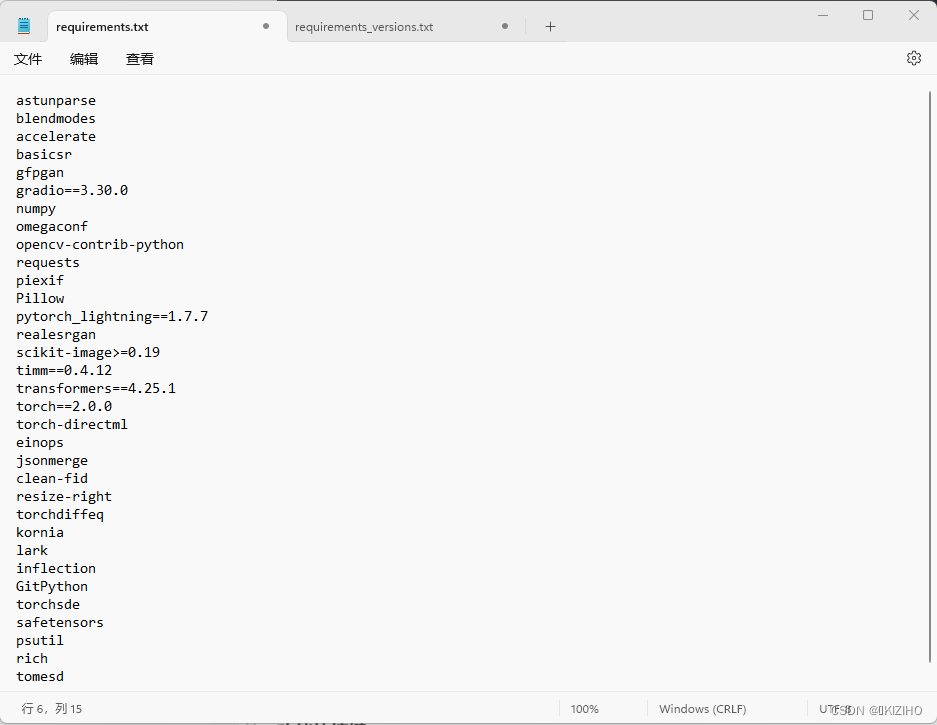
2)新开一个cmd命令窗口,键入倒数第三行 run: 后的提示代码升级pip版本
C:\Users\mikiz\Downloads\AI\stable-diffusion-webui-directml\venv\Scripts\python.exe -m pip install --upgrade pip
- 1

再次运行webui-user.bat,可以看到并无报错,并自动下载一个基础模型
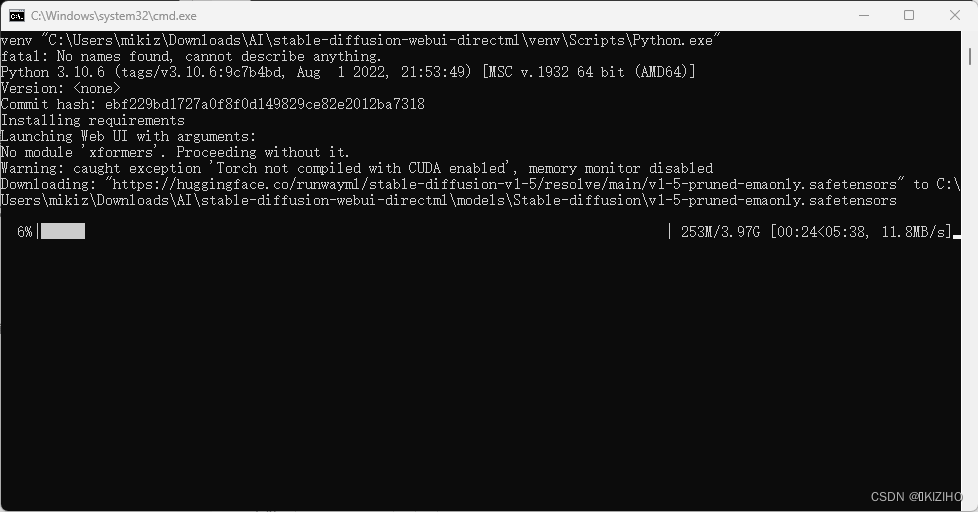
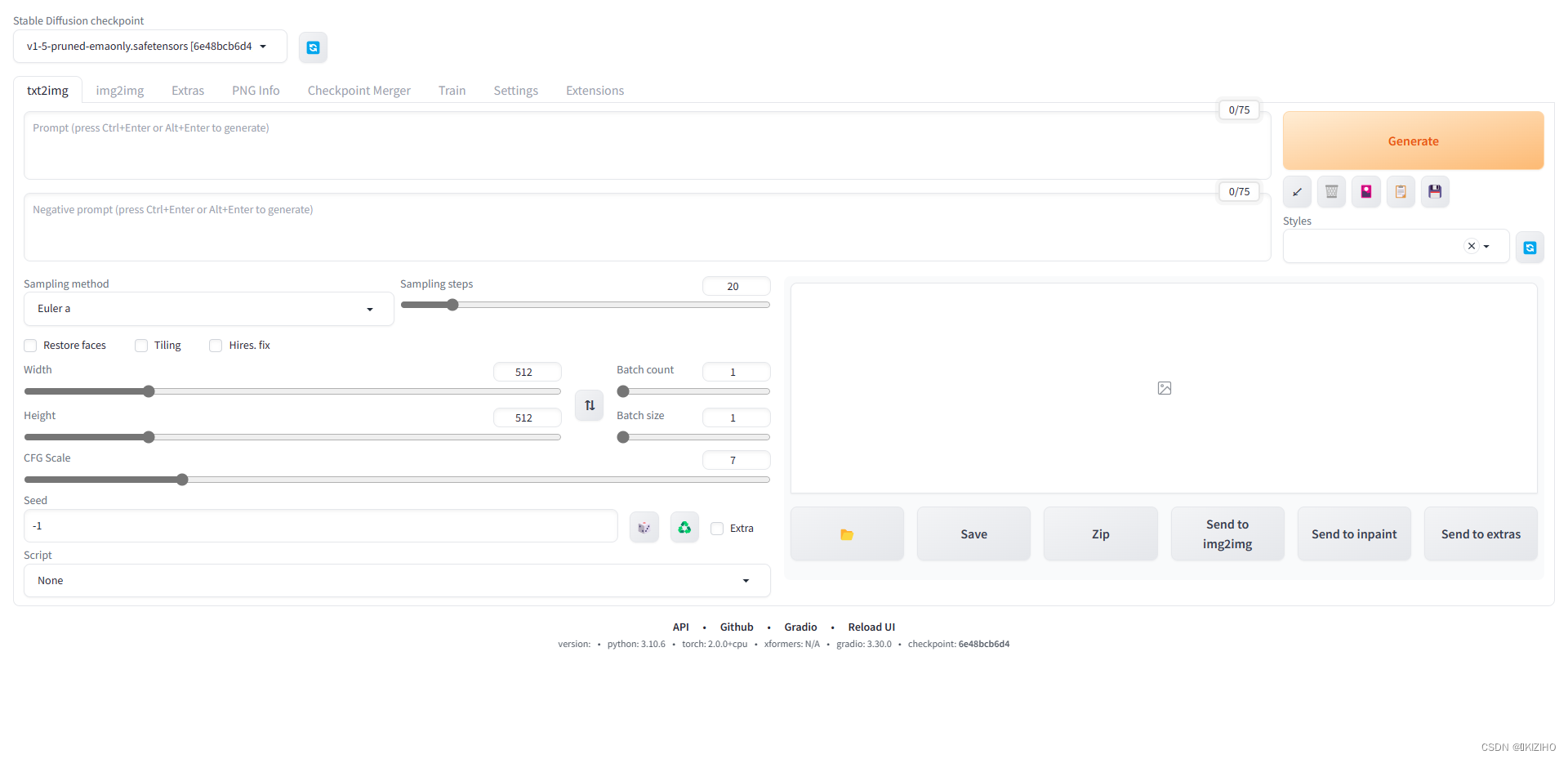
模型下载完成出现一下界面即安装成功
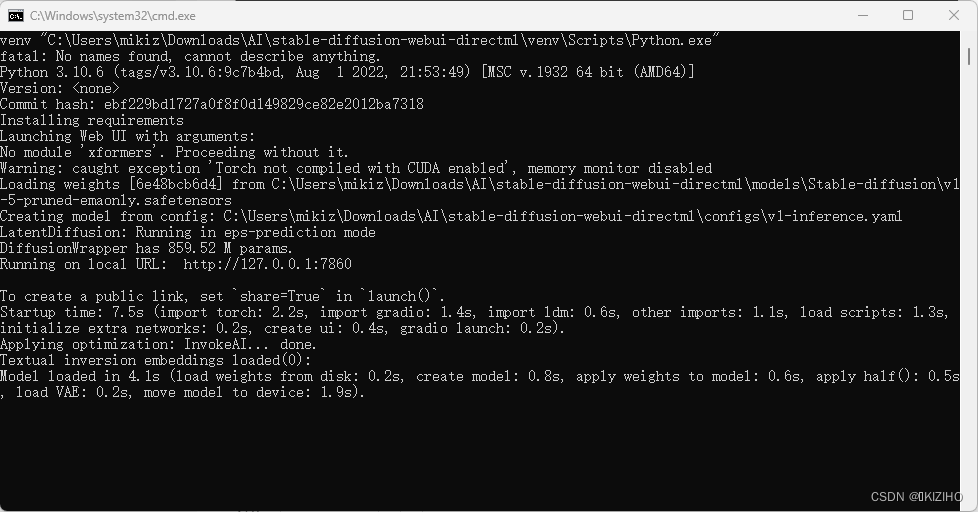
访问使用
浏览器输入cmd命令窗口 http://127.0.0.1:7860 即可
声明:本文内容由网友自发贡献,不代表【wpsshop博客】立场,版权归原作者所有,本站不承担相应法律责任。如您发现有侵权的内容,请联系我们。转载请注明出处:https://www.wpsshop.cn/article/detail/46209
推荐阅读


相关标签

