- 1java--新建list 并赋值
- 2【后端高频面试题--SpringBoot篇】
- 3docker-compose.yml文件的用法——一键部署算法容器_dockercompose冒号前后路径
- 4ssm红色旅游网站系统毕业设计(附源码、运行环境)_丹东网页重做
- 5在使用 npm install的时候提示node-sass command faile 解决方案_npm install 报错 node-sass
- 6docker-compose编排语法_docker-compose 语法
- 7python判断质数 isprime_Python编程判断一个正整数是否为素数的方法
- 8Docke部署本地私有镜像仓库_docke 修改镜像地址
- 9Pytorch搭建ResNet_pytorch resnet
- 10vue cli3中,在vue.config.js文件中怎么引入其他js文件_vue.config.js import
海康visionmaster-VM 嵌入:嵌入用户软件界面的方法
赞
踩
描述
环境:VM4.0.0 + VS2015 及以上
现象:将 VM 整体嵌入到客户软件界面中?
解答
将 VM 软件整体嵌入到客户软件中,需要利用 Panel 控件,并且需要先启动 VM 软件,具
体代码如下:
C#
[DllImport(“User32.dll”, EntryPoint = “SetParent”)]
public static extern int SetParent(IntPtr hWndChild, IntPtr hWndNew
Parent);
[DllImport(“user32.dll”, CharSet = CharSet.Auto)]
public static extern int MoveWindow(IntPtr hWnd, int x, int y, int n
Width, int nHeight, bool BRePaint);
// Start the process
p = System.Diagnostics.Process.Start
(@“D: \VisionMaster4.0.0\Applications\VisionMaster.exe”);
// Wait for process to be created and enter idle condition
p.WaitForInputIdle();
// Get the main handle
appWin = p.MainWindowHandle;
//需要等待 p 启动,可自行判断,可加上 Thread.Sleep(10000);
SetParent(appWin, panel1.Handle);//this 在这里是 Panel 控件
MoveWindow(appWin, 0, 0, this.panel1.Width, this.panel1.Height, tru
e);
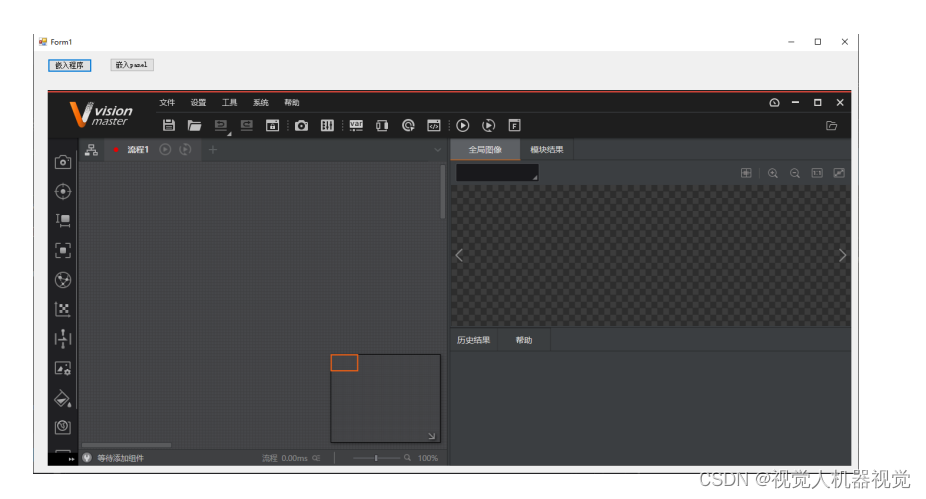
最终效果如下图所示,VM 就整体嵌入到客户软件的 Panel 空间中,并且可以保持 VM 所
具备的功能