
热门标签
热门文章
- 1【学习笔记】部署yolov8到安卓手机
- 2云计算虚拟机管理平台建设: 模块设计, 接口定义, 测试方案设计, 集成发布流程
- 3安全多方计算之六:秘密共享_安全多方计算 秘密共享
- 42023年最新Java八股文面试题,面试应该是够用了(吊打面试官)
- 5ElasticSearch~received plaintext http traffic on an https channel, closing connection Netty4HttpChan
- 6深度学习|BP神经网络
- 7论文初稿查重和定稿查重 神码ai
- 8这是我见过最辱人的事,“HR已读不回”作为一个测试人你会怎么想?
- 9软件测试-基础面试相关
- 10HarmonyOS应用开发者基础认证考试(95分答案)_一个应用可以包含一个或多个ability
当前位置: article > 正文
自动完成文本框(AutoCompleteTextView)的功能与用法_autocompletetextview是什么
作者:IT领航者 | 2024-01-30 10:24:31
赞
踩
autocompletetextview是什么
自动完成文本框(AutoCompleteTextView)从EditText派生而出,实际上它也是一个编辑框,但它比普通编辑框多了一个功能:当用户输入一定字符之后,自动完成文本框会显示一个下拉菜单,供用户从中选择,当用户输入某个菜单项之后,AutoCompleteTextView按用户选择自动填写该文本框。
AutoCompleteTextView除了可以使用EditText提供的XML属性和方法之外,还支持如下表所示的常用XML属性及相关方法:
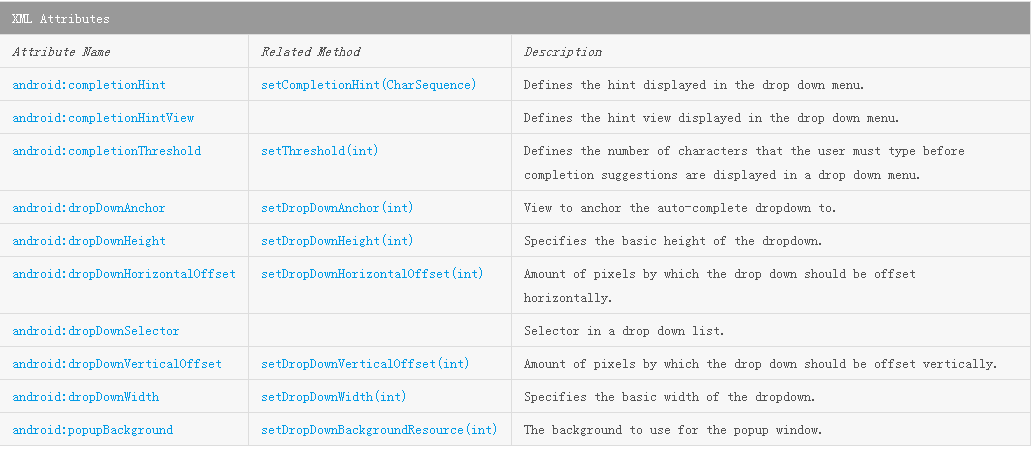
使用AutoCompleteTextView很简单,只要为它设置一个Adapter即可,该Adapter封装了AutoCompleteTextView预设的提示文本。
AutoCompleteTextView还派生了一个子类:MultiAutoCompleteTextView,该子类的功能与AutoCompleteTextView基本相似,只是MultiAutoCompleteTextView允许输入多个提示项,多个提示项以分隔符分隔。MultiAutoCompleteTextView提供了setTokenizer()方法来设置分隔符。
下面简单模拟一下输入QQ号码提示QQ的登录框:
acticity_main.xml
<?xml version="1.0" encoding="utf-8"?>
<LinearLayout xmlns:android="http://schemas.android.com/apk/res/android"
    android:layout_width="match_parent"
    android:layout_height="match_parent"
    android:orientation="vertical">
    <!--定义一个自动完成文本框,
        指定输入一个字符后进行提示-->
    <AutoCompleteTextView
        android:id="@+id/auto"
        android:layout_width="match_parent"
        android:layout_height="wrap_content"
        android:completionHint="请选择你的QQ号码:"
        android:completionThreshold="1" />
</LinearLayout>
- 1
- 2
- 3
- 4
- 5
- 6
- 7
- 8
- 9
- 10
- 11
- 12
- 13
- 14
- 15
MainActivity.java
package com.example.autocompletetextviewtest;

import android.support.v7.app.AppCompatActivity;
import android.os.Bundle;
import android.widget.ArrayAdapter;
import android.widget.AutoCompleteTextView;
import android.widget.MultiAutoCompleteTextView;

public class MainActivity extends AppCompatActivity {
    AutoCompleteTextView autoCompleteTextView;
    MultiAutoCompleteTextView multiAutoCompleteTextView;
    //定义字符串数组,作为提示的文本。这里只是简单模仿,
    //随便写了几个QQ号码
    String[] books = new String[]{
            "123456789","877646746",
            "345678912","666777888",
            "133444555","122777890"
    };

    @Override
    protected void onCreate(Bundle savedInstanceState) {
        super.onCreate(savedInstanceState);
        setContentView(R.layout.activity_main);

        //创建一个ArrayAdapter,封装数组。
        ArrayAdapter<String> arrayAdapter = new ArrayAdapter<String>(this,
                android.R.layout.simple_dropdown_item_1line,books);

        autoCompleteTextView = (AutoCompleteTextView) findViewById(R.id.auto);
        autoCompleteTextView.setAdapter(arrayAdapter);
    }
}

- 1
- 2
- 3
- 4
- 5
- 6
- 7
- 8
- 9
- 10
- 11
- 12
- 13
- 14
- 15
- 16
- 17
- 18
- 19
- 20
- 21
- 22
- 23
- 24
- 25
- 26
- 27
- 28
- 29
- 30
- 31
- 32
- 33
运行效果如下:
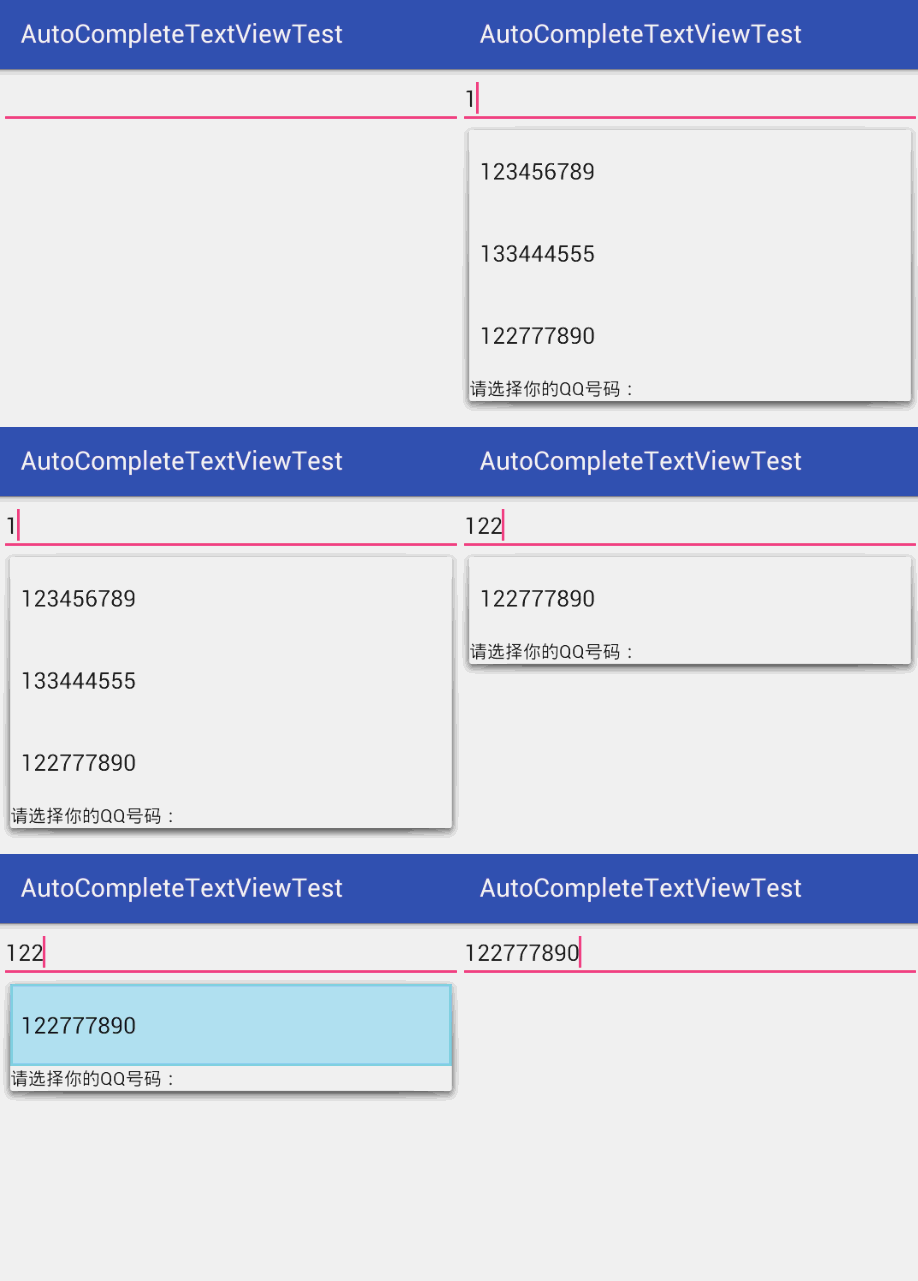
如果向真实的模仿QQ登录框,可以将每次登录的不同的QQ号码保存起来,然后封装在adapter中即可。
这里有个别人写的类似的Demo:
用AutoCompleteTextView实现历史记录提示
参考自:《疯狂Android讲义》
本文内容由网友自发贡献,转载请注明出处:https://www.wpsshop.cn/article/detail/46158
推荐阅读
相关标签

