- 1py实战项目进度甘特图绘制_python 甘特图 多个进度
- 2区块链产业研究:物联网+区块链的应用落地_区块链 物联网 落地
- 3Docker 教程_启动docker
- 4【Kubernetes 企业项目实战】06、基于 Jenkins+K8s 构建 DevOps 自动化运维管理平台(中)_devops自动化运维平台
- 5DP-状态压缩DP(解释+典例)
- 6STM32+esp8266实现单片机与服务器的WiFi通信_基于stm32、esp8266及ov7670的无线图传下位机源码
- 7C语言实现面向对象编程 | 干货_c语言对象编程
- 8高效的Http客户端 OkHttp3使用_okhttp3 form 文件二进制
- 9tomcat最大线程数、最大等待数和最大连接数
- 10认识SOAR-安全事件编排自动化响应
鸿蒙应用开发学习:手机位置信息进阶,从经纬度数据获取地理位置描述信息_geolocationmanager.on('locationchange
赞
踩
一、前言
前几天,我通过学习华为官网的位置服务开发指南,实现了获取手机位置信息的功能,但当时的代码存在两个不足,一是我按照官网的指南使用的是getLastLocation()方法,得到的是最近一次的位置,第一次执行该应用获取到位置信息后,之后再次执行,获取的还是之前的位置信息,与实际位置不符;第二是获取到的位置信息是经度、纬度和海拔等数字信息,不能直管的显示做在的地理位置。
遇到不足,我就希望尽量去解决,这几天通过进一步的学习,我在网上找到了别的网友发布的关于鸿蒙系统获取地理位置的文章,参考他们的文章,我对之前写的代码进行了改进解决了上述两个问题。
二、实现方法
这次改进代码主要参考了以下两篇文章:
我的代码的修改主要有四处:
1.添加了权限检查功能代码,在发现没有权限时会出现弹窗,提供开启权限的选项,这样就不用手工到手机设置里给应用添加权限了。

2. 将getLastLocation()方法替换为getCurrentLocation()方法,这样每次执行该应用都是获取到的当前的位置信息。
3. 在获取到经纬度后,添加了一段代码,通过getAddressesFromLocation()方法获取经纬度对应的地理描述信息。
另外,之前的方法使用了try语句进行错误处理,这次将相关的函数和方法都改为了异步操作,剔除了try语句,使代码更简洁。
4. 对布局进行了修改,增加了显示地址、县区、省份、国家四个文本组件。
这四处改动也是在不断的测试中逐渐完善的。刚开始是添加第一部分,修改第二部分,并添加了第三部分的基础代码。将代码修改后,在真机上测试,首先通过日志信息打印getAddressesFromLocation()方法获取到的地理描述返回结果,发现是一个形如[{, , , , , }]的数据结构,其中有地址、县区、省份、国家等信息。之后通过尝试,成功从返回结果中获取到了我需要的信息,完成了第二部分的代码,最后在添加第三部分的代码将获取到的信息显示在页面中。
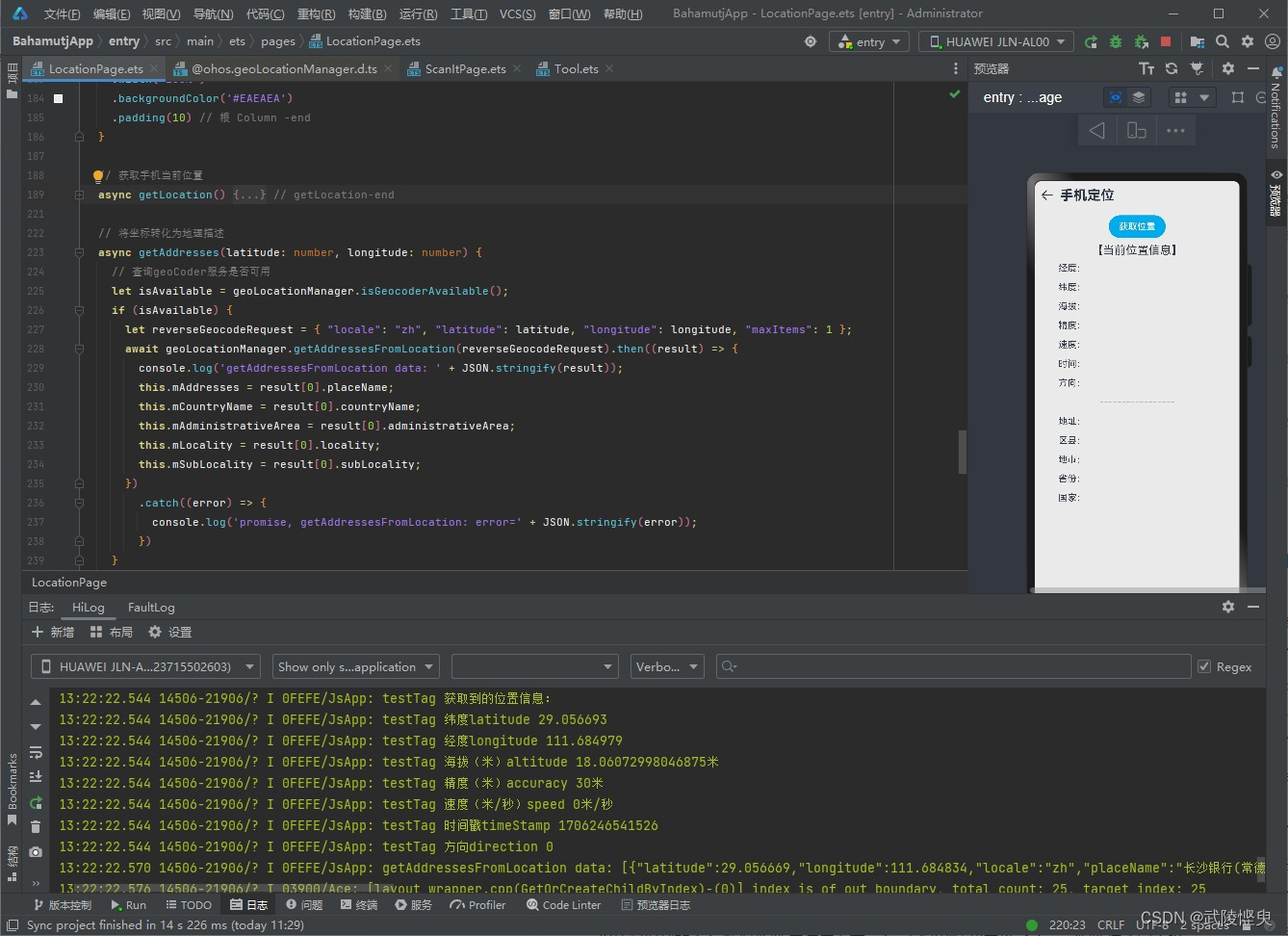
上真机测试,显示了获取到的信息,但美中不足的是,信息都是英文的。

我又在网上一阵搜索,终于在华为开发者联盟官网的论坛里找打了一篇“逆地理编码getAddressesFromLocation获取结果都是英文”的帖子,在这个帖子中找到了解决答案。
方法很简单,在使用getAddressesFromLocation()方法之前,创建reverseGeocodeRequest时,添加"locale": "zh"参数即可。
最终结果如下:
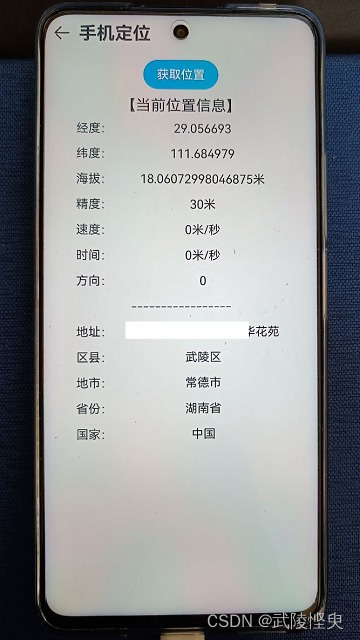
三、代码展示
最后上完整的ets文件代码
- import geoLocationManager from '@ohos.geoLocationManager'
- import abilityAccessCtrl, { Permissions } from '@ohos.abilityAccessCtrl';
- import common from '@ohos.app.ability.common';
-
- // 权限列表
- const permissions: Array<Permissions> = ['ohos.permission.APPROXIMATELY_LOCATION', 'ohos.permission.LOCATION']
-
- let requestInfo = {
- 'priority': geoLocationManager.LocationRequestPriority.ACCURACY,
- 'timeInterval': 0,
- 'distanceInterval': 0,
- 'maxAccuracy': 0
- };
-
- @Entry
- @Component
- struct LocationPage {
-
- // 检测权限是否已经授权,如果未授权就弹出授权弹窗
- reqPermissionsFromUser(permissions: Array<Permissions>): void {
- let context = getContext(this) as common.UIAbilityContext;
- let atManager = abilityAccessCtrl.createAtManager();
- // requestPermissionsFromUser会判断权限的授权状态来决定是否唤起弹窗
- atManager.requestPermissionsFromUser(context, permissions).then((data) => {
- let grantStatus: Array<number> = data.authResults;
- let length: number = grantStatus.length;
- for (let i = 0; i < length; i++) {
- if (grantStatus[i] === 0) {
- // 用户授权,可以继续操作
- } else {
- // 用户拒绝授权,提示用户必须授权才能访问当前页面的功能,并引导用户到系统设置中打开相应的权限
- return;
- }
- }
- // 授权成功
- }).catch((err) => {
- console.error(`requestPermissionsFromUser failed, code is ${err.code}, message is ${err.message}`);
- })
- }
-
- // 组件即将出现时回调该接口,具体实际未在创建自定义组件的新实例后,在执行其build()函数之前执行
- aboutToAppear() {
- this.reqPermissionsFromUser(permissions)
- }
-
- @State mLatitude: string = '' // 经度
- @State mLongitude: string = '' // 纬度
- @State mAltitude: string = '' // 海拔(米)
- @State mAccuracy: string = '' // 精度(米)
- @State mSpeed: string = '' //速度(米/秒)
- @State mTimeStamp: string = '' // 时间戳
- @State mDirection: string = '' // 方向
- @State mAddresses: string = '' // 地址
- @State mCountryName: string = '' // 国家名称
- @State mAdministrativeArea: string = '' // 省份
- @State mLocality: string = '' // 地市
- @State mSubLocality: string = '' // 县区
-
- build() {
- Column() {
-
- Button("获取位置")
- .width(100)
- .backgroundColor($r('app.color.button_bgColor_lightBlue'))
- .margin({ top: 10, bottom: 10 })
- .onClick(() => {
- this.getLocation()
- })
- Text('【当前位置信息】')
- .fontSize(20)
- Grid() {
- GridItem() {
- Text('经度:')
- }
-
- GridItem() {
- Text(this.mLatitude)
- }
-
- GridItem() {
- Text('纬度:')
- }
-
- GridItem() {
- Text(this.mLongitude)
- }
-
- GridItem() {
- Text('海拔:')
- }
-
- GridItem() {
- Text(this.mAltitude)
- }
-
- GridItem() {
- Text('精度:')
- }
-
- GridItem() {
- Text(this.mAccuracy)
- }
-
- GridItem() {
- Text('速度:')
- }
-
- GridItem() {
- Text(this.mSpeed)
- }
-
- GridItem() {
- Text('时间:')
- }
-
- GridItem() {
- Text(this.mSpeed)
- }
-
- GridItem() {
- Text('方向:')
- }
-
- GridItem() {
- Text(this.mDirection)
- }
-
- GridItem() {
- Text('-----------------')
- }
- .columnStart(0)
- .columnEnd(1)
-
- GridItem() {
- Text('地址:')
- }
-
- GridItem() {
- Text(this.mAddresses)
- }
-
- GridItem() {
- Text('区县:')
- }
-
- GridItem() {
- Text(this.mSubLocality)
- }
-
- GridItem() {
- Text('地市:')
- }
-
- GridItem() {
- Text(this.mLocality)
- }
-
- GridItem() {
- Text('省份:')
- }
-
- GridItem() {
- Text(this.mAdministrativeArea)
- }
-
-
- GridItem() {
- Text('国家:')
- }
-
- GridItem() {
- Text(this.mCountryName)
- }
- }
- .columnsTemplate('1fr 4fr')
- .rowsGap(15)
- .padding(10)
- .width('90%')
- }
- .width('100%')
- .backgroundColor('#EAEAEA')
- .padding(10)
- }
-
- // 获取手机当前位置
- async getLocation() {
- let locationChange = (location) => {
- console.log('locationChanger: data: ' + JSON.stringify(location));
- };
- geoLocationManager.on('locationChange', requestInfo, locationChange);
- // 等待获取当前位置-异步操作
- await geoLocationManager.getCurrentLocation(requestInfo).then((result) => {
- this.mLatitude = result.latitude.toString();
- this.mLongitude = result.longitude.toString();
- this.mAltitude = result.altitude.toString() + '米';
- this.mAccuracy = result.accuracy.toString() + '米';
- this.mSpeed = result.speed.toString() + '米/秒';
- this.mTimeStamp = result.timeStamp.toString();
- this.mDirection = result.direction.toString();
-
- //console.log('当前位置:' + JSON.stringify(result));
- console.log("testTag", "获取到的位置信息:")
- console.log("testTag", "纬度latitude " + this.mLatitude)
- console.log("testTag", "经度longitude " + this.mLongitude)
- console.log("testTag", "海拔(米)altitude " + this.mAltitude)
- console.log("testTag", "精度(米)accuracy " + this.mAccuracy)
- console.log("testTag", "速度(米/秒)speed " + this.mSpeed)
- console.log("testTag", "时间戳timeStamp " + this.mTimeStamp)
- console.log("testTag", "方向direction " + this.mDirection)
- // 获取地址信息
- this.getAddresses(result.latitude, result.longitude)
- })
- .catch((error) => {
- console.log('promise, getCurrentLocation: error=' + JSON.stringify(error));
- })
- geoLocationManager.off('locationChange', locationChange);
- } // getLocation-end
-
- // 将坐标转化为地理描述
- async getAddresses(latitude: number, longitude: number) {
- // 查询geoCoder服务是否可用
- let isAvailable = geoLocationManager.isGeocoderAvailable();
- if (isAvailable) {
- let reverseGeocodeRequest = { "locale": "zh", "latitude": latitude, "longitude": longitude, "maxItems": 1 };
- await geoLocationManager.getAddressesFromLocation(reverseGeocodeRequest).then((result) => {
- console.log('getAddressesFromLocation data: ' + JSON.stringify(result));
- this.mAddresses = result[0].placeName;
- this.mCountryName = result[0].countryName;
- this.mAdministrativeArea = result[0].administrativeArea;
- this.mLocality = result[0].locality;
- this.mSubLocality = result[0].subLocality;
- })
- .catch((error) => {
- console.log('promise, getAddressesFromLocation: error=' + JSON.stringify(error));
- })
- }
- }
-
-
- }