- 1Python Get()函数用法介绍_python中get函数用法
- 2【LaTex】LaTex的下载与安装(超详细、超简洁)_latex下载
- 3解决LinuxCentos ping不通网关、外网,以及网络图标消失、每次重启后ping不通问题_centosping不通网关
- 4HarmonyOS应用开发者基础认证【闯关习题 满分答案】
- 5Ubuntu Server版本选择及安装(一)
- 6使用蒙特卡罗方法计算圆周率(Python版)_蒙特卡罗法计算圆周率python
- 7css3 flex弹性布局详解
- 8C++类与对象(1)—初步认识
- 9python中的torch.nn.Softmax() 用法和例子 dim=1 dim=2
- 10国外资源国内镜像访问(亲测)_huggingface 镜像
okHttp3的原理剖析
赞
踩
okHttp3的原理剖析
1.基本使用
先来一个okHttp3最基本的使用实例
Request request = new Request.Builder()
        .url("https://github.com/")
        .addHeader("content-type","text/html")
        .build();
OkHttpClient okHttpClient = new OkHttpClient.Builder().build();
okHttpClient.newCall(request).enqueue(new okhttp3.Callback() {
    @Override
    public void onFailure(okhttp3.Call call, IOException e) {

    }

    @Override
    public void onResponse(okhttp3.Call call, okhttp3.Response response) throws IOException {

    }
})

- 1
- 2
- 3
- 4
- 5
- 6
- 7
- 8
- 9
- 10
- 11
- 12
- 13
- 14
- 15
- 16
Request、Response、Call 基本概念
-
Request
每一个Http请求都包含了一个URL;一个请求方式(get/post);一些请求头,比如Content-Type,User-Agent和Cache-Control等等;如果是post的请求方式的话,还需要一个请求体(RequestBody),主要包含一个特定内容类型的数据类的主体部分,具体可看下图
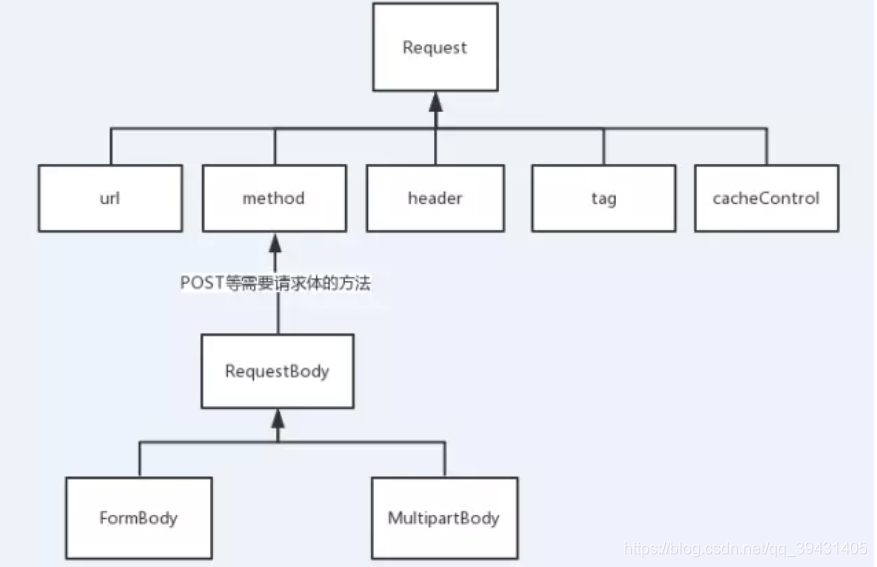
-
Response
响应是对请求的回复,包含状态码、HTTP头和主体部分。 -
Call
OkHttp使用Call抽象出一个满足请求的模型,尽管中间可能会有多个请求或响应。执行Call有两种方式,同步或异步(execute()/enqueue() )
2.跟随源码剖析原理
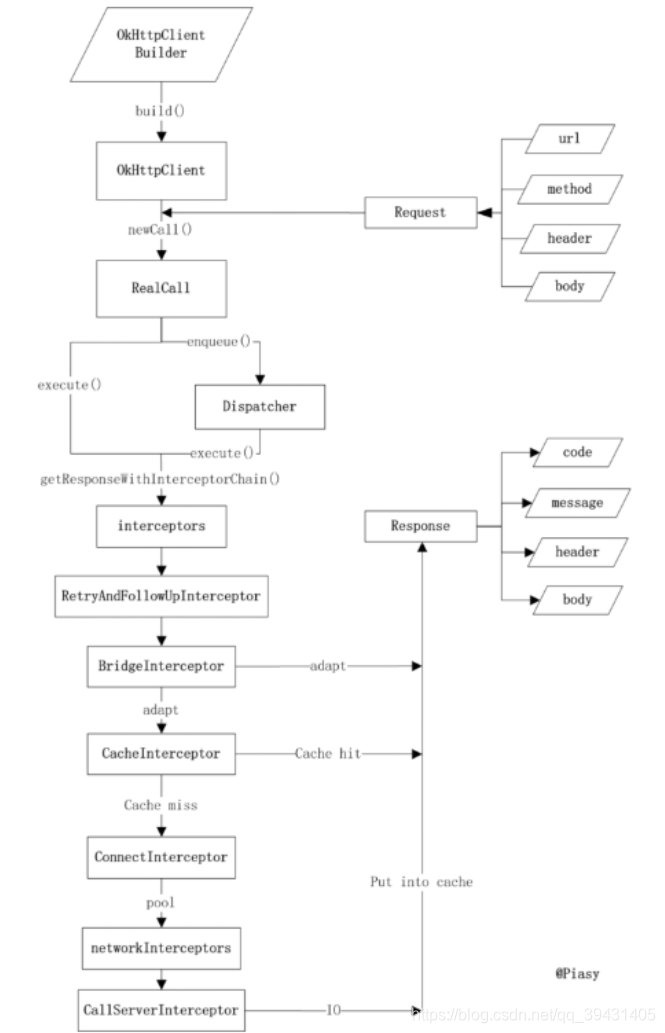
如上图所示,这是一次Http请求到响应的流程图
第一步:创建OkHttpClient对象
OkHttpClient okHttpClient = new OkHttpClient.Builder().build();
- 1
我们来看看okhttpClient的源码
public Builder() {
  dispatcher = new Dispatcher();
  protocols = DEFAULT_PROTOCOLS;
  connectionSpecs = DEFAULT_CONNECTION_SPECS;
  proxySelector = ProxySelector.getDefault();
  cookieJar = CookieJar.NO_COOKIES;
  socketFactory = SocketFactory.getDefault();
  hostnameVerifier = OkHostnameVerifier.INSTANCE;
  certificatePinner = CertificatePinner.DEFAULT;
  proxyAuthenticator = Authenticator.NONE;
  authenticator = Authenticator.NONE;
  connectionPool = new ConnectionPool();
  dns = Dns.SYSTEM;
  followSslRedirects = true;
  followRedirects = true;
  retryOnConnectionFailure = true;
  connectTimeout = 10_000;
  readTimeout = 10_000;
  writeTimeout = 10_000;
}
- 1
- 2
- 3
- 4
- 5
- 6
- 7
- 8
- 9
- 10
- 11
- 12
- 13
- 14
- 15
- 16
- 17
- 18
- 19
- 20
如果我们直接build一个OkhttpClient对象出来的,他会给必须的参数设置默认值,但是如果我们需要手动设置一些参数,根据建造者模式的链式调用,也可以很直接明了的进行设置,这也是okHttp3的优势之一,如下所示
OkHttpClient okHttpClient = new OkHttpClient.Builder()
                                    .addInterceptor()
                                    .writeTimeout(100)
                                    .readTimeout(100)
                                    .connectTimeout(100)
                                    .build();
- 1
- 2
- 3
- 4
- 5
- 6
所以此处代码主要是创建OkHttpClient对象,并对一些参数的初始化
第二步:接下来发起 HTTP 请求
 okHttpClient.newCall(request).enqueue(new okhttp3.Callback() {
            @Override
            public void onFailure(okhttp3.Call call, IOException e) {

            }

            @Override
            public void onResponse(okhttp3.Call call, okhttp3.Response response) throws IOException {

            }
        });
- 1
- 2
- 3
- 4
- 5
- 6
- 7
- 8
- 9
- 10
- 11
先来看看OkHttpClient的newCall ( )方法
public class OkHttpClient implements Cloneable, Call.Factory {
.......
 @Override public Call newCall(Request request) {
    return new RealCall(this, request);
  }
  ........
  }
- 1
- 2
- 3
- 4
- 5
- 6
- 7
okHttpClient实现了Call 接口,我们可以来看看这个接口类
/**
 * A call is a request that has been prepared for execution. A call can be canceled. As this object
 * represents a single request/response pair (stream), it cannot be executed twice.
 */

public interface Call {

  Request request();  // 返回发起此调用的原始请求。

  Response execute() throws IOException;  //同步发送请求,线程阻塞

  void enqueue(Callback responseCallback); //异步放松请求,底层利用线程池

  void cancel();  //取消请求。 已经完成的请求无法取消

  boolean isExecuted(); // 判断是否被execute或者enqueue

  bolean isCanceled();// 判断是否cancel

  interface Factory {
    Call newCall(Request request);
  }
}
- 1
- 2
- 3
- 4
- 5
- 6
- 7
- 8
- 9
- 10
- 11
- 12
- 13
- 14
- 15
- 16
- 17
- 18
- 19
- 20
- 21
- 22
- 23
接着回来看Okhttpclient实现自Call.Factory接口的 newCall()方法
public Class OkHttpClient{
......
  @Override public Call newCall(Request request) {
    return new RealCall(this, request);
  }
  .......
  }
- 1
- 2
- 3
- 4
- 5
- 6
- 7
这里创建了Call接口的实现类Realcall,所以前面发起Http请求时调用的enqueue,实际上调用的是Realcall中所实现的enqueue方法
public Class RealCall{
  @Override public void enqueue(Callback responseCallback) {
    enqueue(responseCallback, false);
  }

  void enqueue(Callback responseCallback, boolean forWebSocket) {
    synchronized (this) {
      if (executed) throw new IllegalStateException("Already Executed");
      executed = true;
    }
    client.dispatcher().enqueue(new AsyncCall(responseCallback, forWebSocket));
  }
}
- 1
- 2
- 3
- 4
- 5
- 6
- 7
- 8
- 9
- 10
- 11
- 12
- 13
这里先贴出另外一个请求方式execute( )方法
public Class RealCall{
@Override public Response execute() throws IOException {
    synchronized (this) {
      if (executed) throw new IllegalStateException("Already Executed");
      executed = true;
    }
    try {
      client.dispatcher().executed(this);
      Response result = getResponseWithInterceptorChain(false);
      if (result == null) throw new IOException("Canceled");
      return result;
    } finally {
      client.dispatcher().finished(this);
    }
  }
  }
- 1
- 2
- 3
- 4
- 5
- 6
- 7
- 8
- 9
- 10
- 11
- 12
- 13
- 14
- 15
- 16
上面说过,execute( )和 enqueue( ) 的不同之处在于是否同步,前者是同步的(线程阻塞,也就是说在改方法未执行完返回结果前,程序不会继续往下执行的),后者是异步的(线程不阻塞,程序不需要等待返回结果,直接往下执行,等方法执行完,程序会根据回调来返回结果)。现在我们来看看这两个请求方式的源码剖析,如下图
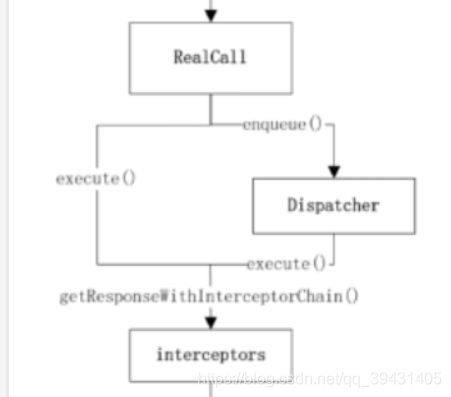
如图可以,两个方法的区别在于异步的enqueue通过了Dispatcher类的转换之后实现了异步功能,我们回到源码看enqueue ( )方法,client.dispatcher()其实返回的就是Dispathcer的引用,而这个client其实就是上面提到的okHttpClient(Dispatcher属于okHttpClient的成员变量);在剖析Dispatcher的enqueue( ) 方法之前,我们先来看看简单撸一下Dispatcher这个类,先来看看它关键的成员变量:
public final class Dispatcher {
private int maxRequests = 64;   //最大的并发请求数
  private int maxRequestsPerHost = 5; //每个主机最大的请求数

  /** Executes calls. Created lazily. */
  private ExecutorService executorService;   //线程池

  /** Ready async calls in the order they'll be run. */
  private final Deque<AsyncCall> readyAsyncCalls = new ArrayDeque<>();  //准备执行的请求

  /** Running asynchronous calls. Includes canceled calls that haven't finished yet. */
 // 正在执行的异步请求,包含已经取消但是未执行完的请求
  private final Deque<AsyncCall> runningAsyncCalls = new ArrayDeque<>();
  /** Running synchronous calls. Includes canceled calls that haven't finished yet. */
  // 正在执行的同步请求,包含已经取消但是未执行完的请求
  private final Deque<RealCall> runningSyncCalls = new ArrayDeque<>();
  }
- 1
- 2
- 3
- 4
- 5
- 6
- 7
- 8
- 9
- 10
- 11
- 12
- 13
- 14
- 15
- 16
- 17
我们来看看Dispatcher中的线程池的创建
  public synchronized ExecutorService executorService() {
    if (executorService == null) {
      executorService = new ThreadPoolExecutor(0, Integer.MAX_VALUE, 60, TimeUnit.SECONDS,
          new SynchronousQueue<Runnable>(), Util.threadFactory("OkHttp Dispatcher", false));
    }
    return executorService;
  }
- 1
- 2
- 3
- 4
- 5
- 6
- 7
由上可知,此线程池是单例的,这里给出线程池构造器ThreadPoolExecutor( ) 里的参数含义:
```java
/**
 * Creates a new {@code ThreadPoolExecutor} with the given initial
 * parameters and default rejected execution handler.
 *
 * @param corePoolSize the number of threads to keep in the pool, even
 *        if they are idle, unless {@code allowCoreThreadTimeOut} is set
 * @param maximumPoolSize the maximum number of threads to allow in the
 *        pool
 * @param keepAliveTime when the number of threads is greater than
 *        the core, this is the maximum time that excess idle threads
 *        will wait for new tasks before terminating.
 * @param unit the time unit for the {@code keepAliveTime} argument
 * @param workQueue the queue to use for holding tasks before they are
 *        executed.  This queue will hold only the {@code Runnable}
 *        tasks submitted by the {@code execute} method.
 * @param threadFactory the factory to use when the executor
 *        creates a new thread
 * @throws IllegalArgumentException if one of the following holds:<br>
 *         {@code corePoolSize < 0}<br>
 *         {@code keepAliveTime < 0}<br>
 *         {@code maximumPoolSize <= 0}<br>
 *         {@code maximumPoolSize < corePoolSize}
 * @throws NullPointerException if {@code workQueue}
 *         or {@code threadFactory} is null
 */
public ThreadPoolExecutor(int corePoolSize,      // 最小并发线程数,如果是0,则过一段时间所有线程都将销毁
                          int maximumPoolSize,  // 最大的线程数,当任务进来时,自动扩充的最大线程数,如果超过,则会根据丢弃处理机制来处理
                          long keepAliveTime,   //当线程空闲时间达到keepAliveTime时,线程会退出,直到线程数量=corePoolSize

                          TimeUnit unit,        //keepAliveTime的单位
                          BlockingQueue<Runnable> workQueue, //工作队列
                          ThreadFactory threadFactory) {  //线程工厂
    this(corePoolSize, maximumPoolSize, keepAliveTime, unit, workQueue,
         threadFactory, defaultHandler);
}
- 1
- 2
- 3
- 4
- 5
- 6
- 7
- 8
- 9
- 10
- 11
- 12
- 13
- 14
- 15
- 16
- 17
- 18
- 19
- 20
- 21
- 22
- 23
- 24
- 25
- 26
- 27
- 28
- 29
- 30
- 31
- 32
- 33
- 34
- 35
- 36
- 37
大概了解了Dispatcher类,我们在来剖析一下Dispatcher的enqueue( ) 方法
  synchronized void enqueue(AsyncCall call) {
  //如果正在异步请求的数量小于最大请求数  && 每个主机请求数 小于 主机最大请求数
    if (runningAsyncCalls.size() < maxRequests && runningCallsForHost(call) < maxRequestsPerHost) {
		// 将请求任务加入异步请求集
      runningAsyncCalls.add(call);
      //执行异步请求
      executorService().execute(call);
    } else {
      // 将请求任务放入预备异步请求集
      readyAsyncCalls.add(call);
    }
  }
- 1
- 2
- 3
- 4
- 5
- 6
- 7
- 8
- 9
- 10
- 11
- 12
看到这里可能有人会问,runningAsyncCalls和readyAsyncCalls这两个集合有什么用呢?细心的人知道,这个集合是队列,符合先进先出的原理,再来看看enqueue( )的参数AsyncCall:
public class RealCall{
.....
final class AsyncCall extends NamedRunnable {
   ......
    @Override protected void execute() {
      boolean signalledCallback = false;
      try {
        Response response = getResponseWithInterceptorChain(forWebSocket);  //  1
        if (canceled) {
          signalledCallback = true;
          responseCallback.onFailure(RealCall.this, new IOException("Canceled")); // 2
        } else {
          signalledCallback = true;
          responseCallback.onResponse(RealCall.this, response); //3
        }
      } catch (IOException e) {
        if (signalledCallback) {
          // Do not signal the callback twice!
          logger.log(Level.INFO, "Callback failure for " + toLoggableString(), e);
        } else {
          responseCallback.onFailure(RealCall.this, e);
        }
      } finally {
        client.dispatcher().finished(this);  //4
      }
    }
    .........
  }
}
- 1
- 2
- 3
- 4
- 5
- 6
- 7
- 8
- 9
- 10
- 11
- 12
- 13
- 14
- 15
- 16
- 17
- 18
- 19
- 20
- 21
- 22
- 23
- 24
- 25
- 26
- 27
- 28
- 29
- 30
AsyncCall是RealCall的内部类,继承了NameRunable类,
public abstract class NamedRunnable implements Runnable {
  protected final String name;

  public NamedRunnable(String format, Object... args) {
    this.name = String.format(format, args);
  }

  @Override public final void run() {
    String oldName = Thread.currentThread().getName();
    Thread.currentThread().setName(name);
    try {
      execute();
    } finally {
      Thread.currentThread().setName(oldName);
    }
  }

  protected abstract void execute();
}
- 1
- 2
- 3
- 4
- 5
- 6
- 7
- 8
- 9
- 10
- 11
- 12
- 13
- 14
- 15
- 16
- 17
- 18
- 19
NameRunable实现了Runnable类,到这里相信熟悉线程调用的伙伴们应该很清楚了,线程开始任务后会执行其中的run方法,而NameRunable 的run方法里执行的是execute( )方法,那么自然最终调用的将会是AsyncCall里的具体实现execute方法,我们回过头来继续看AsyncCall的execute 方法;注释1处是获得响应的关键所在,这点待会会重点分析;注释2和注释3,相信大家很熟悉了,就是异步方法的回调,相信大家不知道在那里回调的小伙伴应该清楚了;接着来看注释4,这里就是让任务队列按顺序执行的关键,任务在try/finally中调用了finished函数,控制任务队列的执行顺序,而不是采用锁,减少了编码复杂性提高性能。这里调用的是Dispatcher的finish( )方法,我们来看看:
  synchronized void finished(AsyncCall call) {
    if (!runningAsyncCalls.remove(call)) throw new AssertionError("AsyncCall wasn't running!");
    promoteCalls();
  }
- 1
- 2
- 3
- 4
接着来看promoteCalls ( ) 方法:
 private void promoteCalls() {
    if (runningAsyncCalls.size() >= maxRequests) return; // Already running max capacity.
    if (readyAsyncCalls.isEmpty()) return; // No ready calls to promote.

    for (Iterator<AsyncCall> i = readyAsyncCalls.iterator(); i.hasNext(); ) { //1
      AsyncCall call = i.next();

      if (runningCallsForHost(call) < maxRequestsPerHost) {
        i.remove();
        runningAsyncCalls.add(call);
        executorService().execute(call); //2
      }

      if (runningAsyncCalls.size() >= maxRequests) return; // Reached max capacity.
    }
  }
- 1
- 2
- 3
- 4
- 5
- 6
- 7
- 8
- 9
- 10
- 11
- 12
- 13
- 14
- 15
- 16
这里有用到了runningAsyncCalls和readyAsyncCalls了,所以在每个任务请求结束后,通过调用Dispatcher的finish方法,迭代异步任务请求集(runningAsyncCalls),在注释2处继续执行下一个任务。
相比异步请求,同步请求方式(execute ( ))显得很简单明了了,它并没有重新包装call类(异步请求会调用RealCall里的内部类AsyncCall,里面处理响应以及回调),我们来看看同步方式的代码:
public Class RealCall{
.....
  @Override public Response execute() throws IOException {
    synchronized (this) {
      if (executed) throw new IllegalStateException("Already Executed");
      executed = true;
    }
    try {
      client.dispatcher().executed(this);
      Response result = getResponseWithInterceptorChain(false); //1
      if (result == null) throw new IOException("Canceled");
      return result;
    } finally {
      client.dispatcher().finished(this); //2
    }
  }
.....
}
- 1
- 2
- 3
- 4
- 5
- 6
- 7
- 8
- 9
- 10
- 11
- 12
- 13
- 14
- 15
- 16
- 17
- 18
注释1直接得到请求的响应,注释2跟上面一样的道理。
这里粘贴了很多源码,可以小伙伴们会有点乱,这里附上上述的流程图:
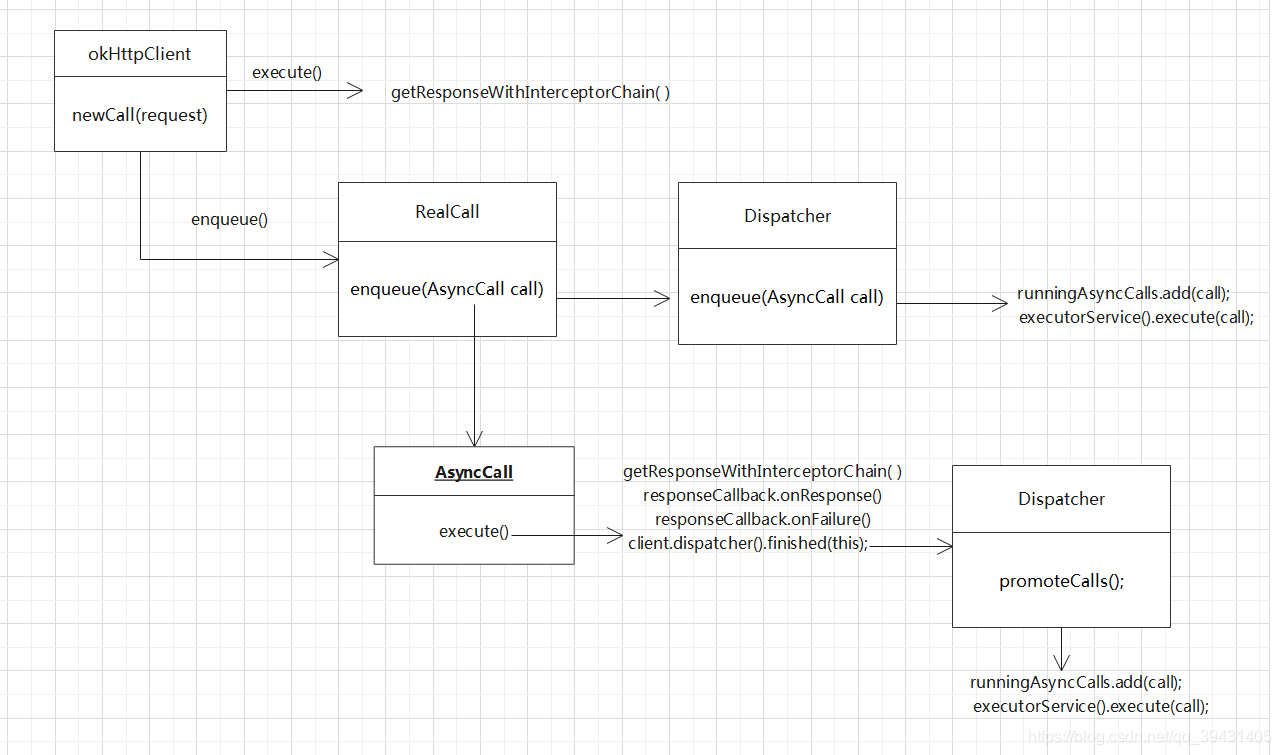
核心重点getResponseWithInterceptorChain方法
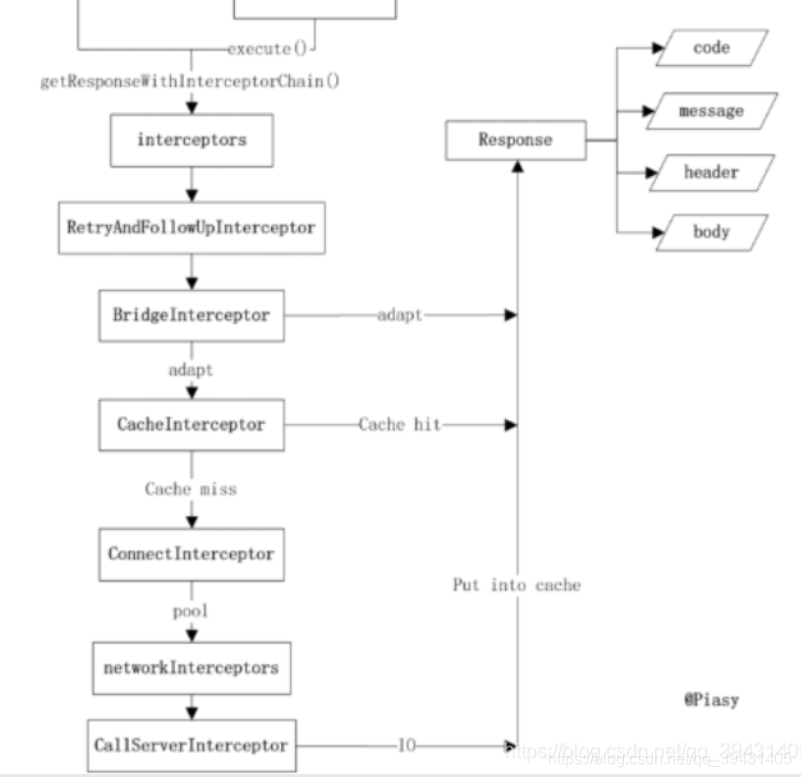
我们在来重点撸一下这个方法。先沾源码:
  private Response getResponseWithInterceptorChain(boolean forWebSocket) throws IOException {
  Response getResponseWithInterceptorChain() throws IOException {
    // Build a full stack of interceptors.
    List<Interceptor> interceptors = new ArrayList<>();
    interceptors.addAll(client.interceptors());  // 1
    interceptors.add(retryAndFollowUpInterceptor); // 2
    interceptors.add(new BridgeInterceptor(client.cookieJar()));  // 3
    interceptors.add(new CacheInterceptor(client.internalCache()));  // 4
    interceptors.add(new ConnectInterceptor(client)); // 5
    if (!forWebSocket) {
      interceptors.addAll(client.networkInterceptors());  // 6
    }
    interceptors.add(new CallServerInterceptor(forWebSocket)); // 7

    Interceptor.Chain chain = new RealInterceptorChain(
        interceptors, null, null, null, 0, originalRequest);
    return chain.proceed(originalRequest);
  }
    Interceptor.Chain chain = new ApplicationInterceptorChain(0, originalRequest, forWebSocket);
    return chain.proceed(originalRequest);
  }
- 1
- 2
- 3
- 4
- 5
- 6
- 7
- 8
- 9
- 10
- 11
- 12
- 13
- 14
- 15
- 16
- 17
- 18
- 19
- 20
- 21
注释1 :在配置 OkHttpClient 时设置的 interceptors;
注释2:负责失败重试以及重定向的 RetryAndFollowUpInterceptor;
注释3 :负责把用户构造的请求转换为发送到服务器的请求、把服务器返回的响应转换为用户友好的响应的 BridgeInterceptor;
注释4 :负责读取缓存直接返回、更新缓存的 CacheInterceptor;
注释5 :负责和服务器建立连接的 ConnectInterceptor;
注释6 :配置 OkHttpClient 时设置的 networkInterceptors;
注释7:负责向服务器发送请求数据、从服务器读取响应数据的 CallServerInterceptor。
这些拦截器的主要功能如上所述,小伙伴们如果对其感兴趣,可以自行阅读源码,我们重点来理解一下拦截器链的原理,它到底是怎么实现层层拦截的功能的,我们来看一下ApplicationInterceptorChain这个类
class ApplicationInterceptorChain implements Interceptor.Chain {
    private final int index;
    private final Request request;
    private final boolean forWebSocket;

    ApplicationInterceptorChain(int index, Request request, boolean forWebSocket) {
      this.index = index;
      this.request = request;
      this.forWebSocket = forWebSocket;
    }

    @Override public Connection connection() {
      return null;
    }

    @Override public Request request() {
      return request;
    }

    @Override public Response proceed(Request request) throws IOException {
      // If there's another interceptor in the chain, call that.
      if (index < client.interceptors().size()) {
        Interceptor.Chain chain = new ApplicationInterceptorChain(index + 1, request, forWebSocket);
        Interceptor interceptor = client.interceptors().get(index);
        Response interceptedResponse = interceptor.intercept(chain);

        if (interceptedResponse == null) {
          throw new NullPointerException("application interceptor " + interceptor
              + " returned null");
        }

        return interceptedResponse;
      }

      // No more interceptors. Do HTTP.
      return getResponse(request, forWebSocket);
    }
  }
- 1
- 2
- 3
- 4
- 5
- 6
- 7
- 8
- 9
- 10
- 11
- 12
- 13
- 14
- 15
- 16
- 17
- 18
- 19
- 20
- 21
- 22
- 23
- 24
- 25
- 26
- 27
- 28
- 29
- 30
- 31
- 32
- 33
- 34
- 35
- 36
- 37
- 38
public interface Interceptor {
  Response intercept(Chain chain) throws IOException;

  interface Chain {
    Request request();

    Response proceed(Request request) throws IOException;

    Connection connection();
  }
}
- 1
- 2
- 3
- 4
- 5
- 6
- 7
- 8
- 9
- 10
- 11
ApplicationInterceptorChain实现了Interceptor.Chain这个接口
 Interceptor.Chain chain = new ApplicationInterceptorChain(0, originalRequest, forWebSocket);
    return chain.proceed(originalRequest);
- 1
- 2
在创建ApplicationInterceptorChain实例的时候,我们重点留意一下构造器里的 0 这个参数,其含义是拦截器链的开头;我们在来看看proceed( ) 这个方法;这里首先会判断此时的index是否是小于拦截器集合的大小,如果true,说明此时还有未执行完的拦截器,需要继续给这个链条加长,如源码:
 Interceptor.Chain chain = new ApplicationInterceptorChain(index + 1, request, forWebSocket);
  Interceptor interceptor = client.interceptors().get(index);
   Response interceptedResponse = interceptor.intercept(chain);
- 1
- 2
- 3
此时index已经加1,并且利用构造器赋值给新的chain;继续往下看,这里用index为索引(注意此时的index还是等于还没有 +1的值,也就是说在这里值还是等于0),获取拦截器集合的第一个拦截器,并且以新创建的chain作为参数执行这个拦截器的intercept( ) 方法,相比自定义过拦截器的小伙伴都知道,拦截器的主要功能实现就是在这个方法中,且最后返回chain,proceed(request),这样就又回到了上述流程,再次走了ApplicationInterceptorChain的proceed( )的方法,只不过此时的index变成了1。其实这种思想就是递归调用的思想。如果index大于拦截器集合的大小的话,则会直接返回响应,源码如下:
return getResponse(request, forWebSocket);
- 1
当拦截器执行完了,这里就开始真正的Http请求了,一般小伙伴们用okHttp3框架原理到这里就可以了,当然感兴趣的小伙伴也可以继续升入探究!
4.各个拦截器的作用

RetryAndFollowUpInterceptor -重定向拦截器
1.创建streamAllocation 并填充我们请求需要的一部分信息
2.重连,默认次数为20次,超过则抛出异常,连接成功则将请求和重连结果一并传给下一个拦截器
3.接收从下一个拦截器传回的response,处理并返回给上一层,也就是我们写的client
BridgeInterceptor - 桥接拦截器
1.对请求头和请求体进行了配置参数的补充并将发起网络请求
2.对下一层适配器返回的response进行解压(gzip,简单来说就是将网络请求的数据解压成我们所需要的格式并塞进response的body里)处理并返回给上一层拦截器
CacheInterceptor - 缓存拦截器
1.cache若不为空则赋cacheCandidate对象
2.获取缓存策略,可以自己设置,默认为 CacheControl.FORCE_NETWORK(即强制使用网络请求)
CacheControl.FORCE_CACHE(即强制使用本地缓存,如果无可用缓存则返回一个code为504的响应)
3.在不为空且有缓存策略时,若返回304则直接响应缓存创建response返回
4.若无网络或无缓存时返回504
5.在有缓存策略无缓存时调用cache的put方法进行缓存
ConnectInterceptor - 连接拦截器
1.将url所在的StreamAllocaiton拿到并生成流(RealConnect)
2.将流和httpcode一并交给下一层拦截器进行请求,并返回response
CallServerInterceptor - 网络拦截器
1.发起请求
2.完成读写
3.根据返回码处理请求结果
4.关闭连接