
热门标签
热门文章
- 1计算机管理中没有vhd,防患于未然,安全体验Win11很简单
- 2MyBatis常见面试题汇总
- 3Jmeter之HTTP请求详解_jmeter http请求
- 4python爬取微博数据_Python selenium爬取微博数据代码实例
- 5ChatGPT目前的AI一哥
- 6机器学习(四)——多变量回归_多变量调整模型
- 7天天干些鸟事.自己都拿自己没办法.无奈。_色天天
- 8java switch用法_javaswitch用法
- 9安装labelme时遇到的问题及解决方案_building wheel for pyqt5-sip (pyproject.toml) did
- 10模拟a标签实现下载,文件下载通过Blob对象实现_模拟a链接下载
当前位置: article > 正文
C# 对其他窗口发送文本
作者:代码架构师 | 2024-01-29 21:14:36
赞
踩
C# 对其他窗口发送文本
- using System;
- using System.Collections.Generic;
- using System.ComponentModel;
- using System.Data;
- using System.Drawing;
- using System.Linq;
- using System.Text;
- using System.Threading.Tasks;
- using System.Windows.Forms;
- using System.Runtime.InteropServices;
-
- namespace mysend
- {
-
- public partial class Form1 : Form
- {
- const int WM_SETTEXT = 0x0C;
- IntPtr targethwnd;
-
- [DllImport("user32.dll", CharSet = CharSet.Auto)]
- public static extern IntPtr SendMessage(IntPtr hWnd, uint Msg, IntPtr wParam, IntPtr lParam);
-
- public Form1()
- {
- InitializeComponent();
- }
-
- private void button1_Click(object sender, EventArgs e)
- {
-
- IntPtr buffer = Marshal.AllocHGlobal(Marshal.SizeOf(textBox2.Text.Length+1));
- Marshal.Copy(textBox2.Text.ToCharArray(), 0, buffer, textBox2.Text.Length);
- targethwnd = (IntPtr)Int32.Parse(textBox1.Text);
- SendMessage(targethwnd , WM_SETTEXT, IntPtr.Zero, buffer);
- Marshal.FreeHGlobal(buffer);
- }
- }
- }

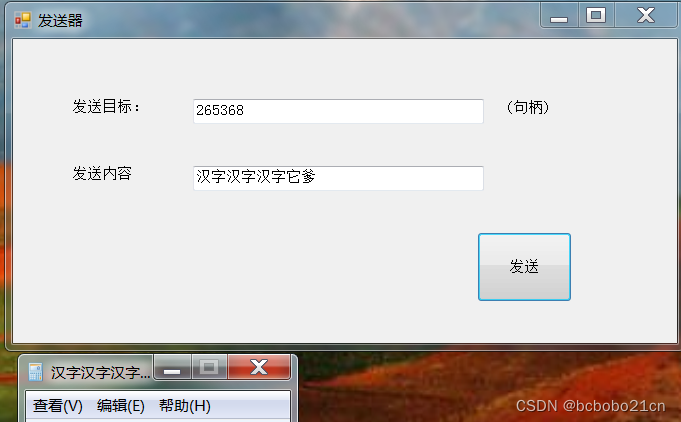
发送文本时SendMessage第四个字段是InPtr类型,要使用Marshal;
发送之后释放buffer,否则多几次就出问题;
目标句柄手动填入,发送到记事本;

更改计算器窗口的标题也是可以的;
声明:本文内容由网友自发贡献,不代表【wpsshop博客】立场,版权归原作者所有,本站不承担相应法律责任。如您发现有侵权的内容,请联系我们。转载请注明出处:https://www.wpsshop.cn/article/detail/45170
推荐阅读
相关标签

