- 1拥有有趣灵魂的程序员们,程序员访谈(一)
- 2Pytorch 入门_pytorch入门
- 3青少年蓝桥杯python组(STEMA中级组)_蓝桥杯23年steam python中级组详解
- 4技术总结---c#与java的区别【客户端使用java还是c#?】_如何看出网站后端是用java 还是用c#
- 5大模型基础之简要背景知识_大模型 基础知识
- 6(int&) 与int(&)_&int(&)
- 7详细解读DALLE 3技术报告:Improving Image Generation with Better Captions_dalle3官网
- 8ubuntu 安装MySQL8_ubuntu安装mysql8
- 9蓝桥杯C语言基础练习 龟兔赛跑预测(模拟法)_1254新龟兔赛跑
- 10如何使用Stable Diffusion的ReActor换脸插件_换脸reactor
轻松打卡:使用Spring Boot和Redis Bitmap构建高效签到系统【redis实战 四】
赞
踩

轻松打卡:使用Spring Boot和Redis Bitmap构建高效签到系统【redis实战 四】
引言(redis实战)
Redis List:打造高效消息队列的秘密武器【redis实战 一】
Redis Streams在Spring Boot中的应用:构建可靠的消息队列解决方案【redis实战 二】
Spring Boot和Redis Geo实现附近的人【redis实战 三】
前言
在数字化时代,签到系统已成为许多应用的标准功能,它不仅帮助我们追踪参与度,还激励着用户的日常活动。但如何在保证响应速度和数据准确性的同时处理成千上万的用户请求呢?这正是Spring Boot遇上Redis Bitmap的舞台。通过这篇文章,我们将踏上一个既充满挑战又充满创新的旅程,一起探索如何利用这两个强大工具打造出一个既高效又可靠的签到系统。
回顾bitmap
Redis Bitmap是一种特殊的数据结构,它使用连续的内存来存储和操作位数据(bit data),每个位可以是0或1。这种结构特别适合于那些需要处理大量布尔值的场景,比如在线状态、签到系统等。Bitmap由于其高效的存储和计算能力,在处理大规模数据时特别有优势。下面是Redis Bitmap的一些基本概念和特性:
基本概念
- 位操作:Bitmap的核心是位操作。它允许你设置、获取和计数单个位或一系列位的值。
- 存储效率:在Bitmap中,每个布尔值只占用一个位,而不是使用一个完整的字节或更多的空间,这使得它在存储大量布尔值时非常节省空间。
- 操作精确性:你可以精确地操作Bitmap中的每一位,这为处理复杂的数据结构提供了可能。
核心特性
-
SETBIT & GETBIT:
SETBIT用于在指定偏移量处设置位的值。GETBIT用于获取指定偏移量处的位的值。- 这两个命令使得单个位的读写操作变得简单快速。
-
BITCOUNT:
BITCOUNT命令用于计数Bitmap中设置为1的位的数量。- 可以对整个Bitmap或其特定范围进行计数。
- 这对于统计和分析大量数据非常有用。
-
BITOP:
BITOP命令用于对两个或多个Bitmap执行位运算(AND、OR、XOR和NOT)。- 这可以用来组合多个Bitmaps,计算交集、并集等。
-
BITFIELD:
BITFIELD命令用于对Bitmap执行更复杂的操作,如将位作为整数进行递增。- 它提供了更高级别的控制,使得Bitmap可以用于更复杂的场景。
-
性能:
- Bitmap操作通常非常快,能够处理每秒数百万次的读写。
- 它们特别适合高并发环境,如大型网站的在线状态跟踪。
-
空间效率:
- Bitmap在存储大量布尔值时极为节省空间。
- 它特别适合那些值大部分为0的场景,因为Redis内部会进行优化以减少存储需求。
使用场景
- 在线状态跟踪:跟踪数以百万计用户的在线或活跃状态。
- 签到系统:记录用户每日的签到情况。
- 访问统计:统计网站或应用的每日访问量。
- 特征标记:记录用户或事物的特定特征,如权限、喜好等。
总结来说,Redis的Bitmap提供了一种高效、灵活的方法来处理大量的位级数据。它在存储效率和性能方面都有显著优势,特别适合于那些需要处理大量布尔值的场景。
为什么使用redis中的bitmap实现?
使用Redis Bitmap相比于使用MySQL或其他关系型数据库实现签到系统有一系列的优势。这些优势不仅在于性能上的提升,还包括了存储效率、扩展性和特定场景下的操作便利性。下面详细说明这些优势:
1. 存储效率
- Bitmap结构:在Redis中,Bitmap以非常紧凑的方式存储数据。每个签到只需要一个位,而在关系型数据库中,你可能需要一个完整的表行来记录同样的信息。这在用户量庞大时尤其节省空间。
- 内存存储:Redis作为内存数据库,其读写速度远超基于磁盘的关系型数据库。
2. 性能
- 快速读写:对于Bitmap,无论是设置还是读取位值,时间复杂度都是O(1),这意味着操作的速度极快,几乎不受数据规模影响。
- 减少I/O操作:由于Redis是内存数据库,所有操作都在内存中完成,避免了磁盘I/O,这在高并发场景下尤为重要。
3. 扩展性和可用性
- 水平扩展:Redis支持主从复制、持久化、分区等多种特性,使得它可以很好地扩展并保持高可用性。
- 成熟的集群支持:Redis集群提供了一种易于扩展和具有容错能力的方式,可以在多个节点上平衡负载。
4. 位操作的优势
- 内置位操作:Redis提供了丰富的位操作命令(如
SETBIT、GETBIT、BITCOUNT等),使得处理像签到这样的布尔值数据更加方便和高效。 - 批量操作和原子性:可以原子性地对多个位进行操作,而在关系型数据库中实现同样的效果可能需要复杂的事务管理。
5. 灵活性和简易性
- 简单的数据模型:相比关系型数据库复杂的表结构和关系,Redis的数据模型简单直观,易于理解和使用。
- 快速开发和部署:对于开发人员来说,使用Redis通常意味着更少的设置和配置,可以更快速地开发和部署应用。
6. 成本效益
- 减少硬件需求:由于Redis的高效率,相同负载下可能需要更少的硬件资源。
- 降低维护成本:Redis简单的架构和少量的依赖使得维护工作相对更简单。
构思与实现逻辑
在上面提到的实现中,签到系统的基础逻辑是使用Redis的Bitmap来跟踪用户的每日签到状态。这种实现方式利用了Bitmap的高效存储和快速位操作特性,适合处理大量用户和高频率的签到事件。以下是对这个实现的基础逻辑和关键组件的详细介绍:
基础逻辑
-
每日签到:
- 每当用户签到时,系统会在Bitmap中的特定位置设置一个位(将其设为1)。
- 位置通常由日期决定,例如,可以使用年内的天数作为偏移量。
-
统计查询:
- 系统可以通过计算Bitmap中设置为1的位的数量来统计签到次数。
- 可以计算总签到次数、指定日期范围内的签到次数等。
Key的组成
在实现中,关键的是如何构造用于Bitmap的key。一个好的key设计既能确保访问的效率,又能方便与其他系统(如MySQL中的用户信息)进行交互。
-
用户标识:
- 每个用户应有唯一标识,如用户ID。这个标识会成为key的一部分,确保每个用户的签到信息是隔离的。
-
时间信息:
- 为了便于管理和查询,通常会在key中包含时间信息,如年份。这样可以每年为用户创建新的Bitmap,也便于历史数据的归档和查询。
-
前缀或命名空间:
- 为了更好的组织和区分不同的数据,可以在key前加上前缀或命名空间,如
signin:。
- 为了更好的组织和区分不同的数据,可以在key前加上前缀或命名空间,如
示例Key: signin:userId:2023
与MySQL的交互
-
用户详细信息:
- 在MySQL中维护用户的详细信息,如姓名、邮箱、注册日期等。
- 每个用户记录都有一个唯一的ID,这个ID与Redis中使用的用户ID相对应。
-
数据关联:
- 当需要获取用户的签到信息以及详细信息时,可以先从Redis获取签到数据,然后使用从Redis得到的用户ID去MySQL中查询详细信息。
- 这样的关联查询使得我们既能利用Redis的高性能,又能保持复杂数据的完整性和丰富性。
-
数据一致性:
- 确保在用户信息更新时(如用户ID变更),Redis中相应的key也同步更新,以维护数据的一致性。
优势和考虑
- 高效存储:使用Bitmap存储签到信息极大地减少了所需的存储空间。
- 快速操作:位操作的时间复杂度为O(1),即使是在大量数据面前也能保持高性能。
- 灵活扩展:通过适当的key设计,系统可以灵活地进行扩展,如按年归档数据。
- 与关系型数据库交互:通过在Redis和MySQL之间建立良好的数据关联,系统可以同时利用两者的优势。
通过以上的基础逻辑和key组成策略,你的签到系统将能够高效、灵活地处理用户的签到数据,并且能够方便地与存储在MySQL中的用户详细信息进行交互。
签到系统实现
maven依赖
<dependency>
  <groupId>org.springframework.boot</groupId>
  <artifactId>spring-boot-starter-data-redis</artifactId>
</dependency>

<dependency>
  <groupId>org.projectlombok</groupId>
  <artifactId>lombok</artifactId>
</dependency>
- 1
- 2
- 3
- 4
- 5
- 6
- 7
- 8
- 9
service实现
package fun.bo.service;

import org.springframework.data.redis.core.RedisTemplate;
import org.springframework.stereotype.Service;

import java.time.DayOfWeek;
import java.time.LocalDate;
import java.time.temporal.TemporalAdjusters;
import java.util.BitSet;

/**
 * @author xiaobo
 */
@Service
public class SignInService {
    // 这里可以不写构造方法,直接用@RequiredArgsConstructor实现,可参考<a href="https://blog.csdn.net/Mrxiao_bo/article/details/135113649">一行注解,省却百行代码:深度解析@RequiredArgsConstructor的妙用</>

    private final RedisTemplate<String, byte[]> redisTemplate;

    public SignInService(RedisTemplate<String, byte[]> redisTemplate) {
        this.redisTemplate = redisTemplate;
    }

    // 签到
    public void signIn(long userId) {
        LocalDate today = LocalDate.now();
        int dayOfYear = today.getDayOfYear();

        // 使用用户ID和年份作为key,确保每年的数据是独立的
        String key = "sign_in:" + userId + ":" + today.getYear();
        redisTemplate.opsForValue().setBit(key, dayOfYear, true);
    }

    // 获取今天签到的人数
    public long countSignInToday() {
        LocalDate today = LocalDate.now();
        return countSignInOnDate(today);
    }

    // 获取本周签到的人数
    public long countSignInThisWeek() {
        LocalDate today = LocalDate.now();
        // 获取本周的开始和结束日期
        LocalDate startOfWeek = today.with(TemporalAdjusters.previousOrSame(DayOfWeek.MONDAY));
        LocalDate endOfWeek = today.with(TemporalAdjusters.nextOrSame(DayOfWeek.SUNDAY));
        return countSignInBetweenDates(startOfWeek, endOfWeek);
    }

    // 获取本月签到的人数
    public long countSignInThisMonth() {
        // 获取本月的开始和结束日期
        LocalDate startOfMonth = LocalDate.now().with(TemporalAdjusters.firstDayOfMonth());
        LocalDate endOfMonth = LocalDate.now().with(TemporalAdjusters.lastDayOfMonth());
        return countSignInBetweenDates(startOfMonth, endOfMonth);
    }

    // 获取特定日期签到的人数
    private long countSignInOnDate(LocalDate date) {
        int dayOfYear = date.getDayOfYear();
        String keyPattern = "sign_in:*:" + date.getYear();
        return redisTemplate.keys(keyPattern).stream()
                .filter(key -> redisTemplate.opsForValue().getBit(key, dayOfYear))
                .count();
    }

    // 获取日期范围内签到的人数
    private long countSignInBetweenDates(LocalDate start, LocalDate end) {
        long count = 0;
        // 遍历日期范围
        for (LocalDate date = start; !date.isAfter(end); date = date.plusDays(1)) {
            count += countSignInOnDate(date);
        }
        return count;
    }

    // 获取用户当月签到次数
    public long countUserSignInThisMonth(long userId) {
        LocalDate startOfMonth = LocalDate.now().with(TemporalAdjusters.firstDayOfMonth());
        LocalDate endOfMonth = LocalDate.now().with(TemporalAdjusters.lastDayOfMonth());
        String key = "sign_in:" + userId + ":" + LocalDate.now().getYear();
        byte[] bitmap = redisTemplate.opsForValue().get(key);
        BitSet bitSet = BitSet.valueOf(bitmap);
        long count = 0;
        for (int day = startOfMonth.getDayOfYear(); day <= endOfMonth.getDayOfYear(); day++) {
            count += bitSet.get(day) ? 1 : 0;
        }
        return count;
    }
}

- 1
- 2
- 3
- 4
- 5
- 6
- 7
- 8
- 9
- 10
- 11
- 12
- 13
- 14
- 15
- 16
- 17
- 18
- 19
- 20
- 21
- 22
- 23
- 24
- 25
- 26
- 27
- 28
- 29
- 30
- 31
- 32
- 33
- 34
- 35
- 36
- 37
- 38
- 39
- 40
- 41
- 42
- 43
- 44
- 45
- 46
- 47
- 48
- 49
- 50
- 51
- 52
- 53
- 54
- 55
- 56
- 57
- 58
- 59
- 60
- 61
- 62
- 63
- 64
- 65
- 66
- 67
- 68
- 69
- 70
- 71
- 72
- 73
- 74
- 75
- 76
- 77
- 78
- 79
- 80
- 81
- 82
- 83
- 84
- 85
- 86
- 87
- 88
- 89
- 90
有坑注意:RedisTemplate<String, byte[]>,这里要留意,如果你的bean中序列化Value的时候用的非字节数组,可能会报错如下
2023-12-25 11:12:55.163 ERROR 56398 --- [nio-7004-exec-9] o.a.c.c.C.[.[.[/].[dispatcherServlet]    : Servlet.service() for servlet [dispatcherServlet] in context with path [] threw exception [Request processing failed; nested exception is org.springframework.data.redis.serializer.SerializationException: Could not read JSON: Illegal character ((CTRL-CHAR, code 0)): only regular white space (\r, \n, \t) is allowed between tokens
 at [Source: (byte[])"\u0000\u0000\u0000\u0000\u0000\u0000\u0000\u0000\u0000\u0000\u0000\u0000\u0000\u0000\u0000\u0000\u0000\u0000\u0000\u0000\u0000\u0000\u0000\u0000\u0000\u0000\u0000\u0000\u0000\u0000\u0000\u0000\u0000\u0000\u0000\u0000\u0000\u0000\u0000\u0000\u0000\u0000\u0000\u0000\u0001"; line: 1, column: 2]; nested exception is com.fasterxml.jackson.core.JsonParseException: Illegal character ((CTRL-CHAR, code 0)): only regular white space (\r, \n, \t) is allowed between tokens
 at [Source: (byte[])"\u0000\u0000\u0000\u0000\u0000\u0000\u0000\u0000\u0000\u0000\u0000\u0000\u0000\u0000\u0000\u0000\u0000\u0000\u0000\u0000\u0000\u0000\u0000\u0000\u0000\u0000\u0000\u0000\u0000\u0000\u0000\u0000\u0000\u0000\u0000\u0000\u0000\u0000\u0000\u0000\u0000\u0000\u0000\u0000\u0001"; line: 1, column: 2]] with root cause
- 1
- 2
- 3
controller实现
package fun.bo.controller;

import fun.bo.service.SignInService;
import org.springframework.web.bind.annotation.GetMapping;
import org.springframework.web.bind.annotation.PostMapping;
import org.springframework.web.bind.annotation.RequestParam;
import org.springframework.web.bind.annotation.RestController;

@RestController
public class SignInController {

    private final SignInService signInService;

    public SignInController(SignInService signInService) {
        this.signInService = signInService;
    }

    // ... 保留之前的signIn和count方法 ...

    @GetMapping("/signin/count/today")
    public String countSignInToday() {
        long count = signInService.countSignInToday();
        return "Total sign-ins today: " + count;
    }

    @GetMapping("/signin/count/week")
    public String countSignInThisWeek() {
        long count = signInService.countSignInThisWeek();
        return "Total sign-ins this week: " + count;
    }

    @GetMapping("/signin/count/month")
    public String countUserSignInThisMonth(@RequestParam long userId) {
        long count = signInService.countUserSignInThisMonth(userId);
        return "Total sign-ins this month for user " + userId + ": " + count;
    }
    @PostMapping("/signin")
    public String signIn(@RequestParam("userId") Long userId) {
        // 调用签到服务来处理签到
        signInService.signIn(userId);
        return "User " + userId + " signed in successfully.";
    }
}
- 1
- 2
- 3
- 4
- 5
- 6
- 7
- 8
- 9
- 10
- 11
- 12
- 13
- 14
- 15
- 16
- 17
- 18
- 19
- 20
- 21
- 22
- 23
- 24
- 25
- 26
- 27
- 28
- 29
- 30
- 31
- 32
- 33
- 34
- 35
- 36
- 37
- 38
- 39
- 40
- 41
- 42
- 43
- 44
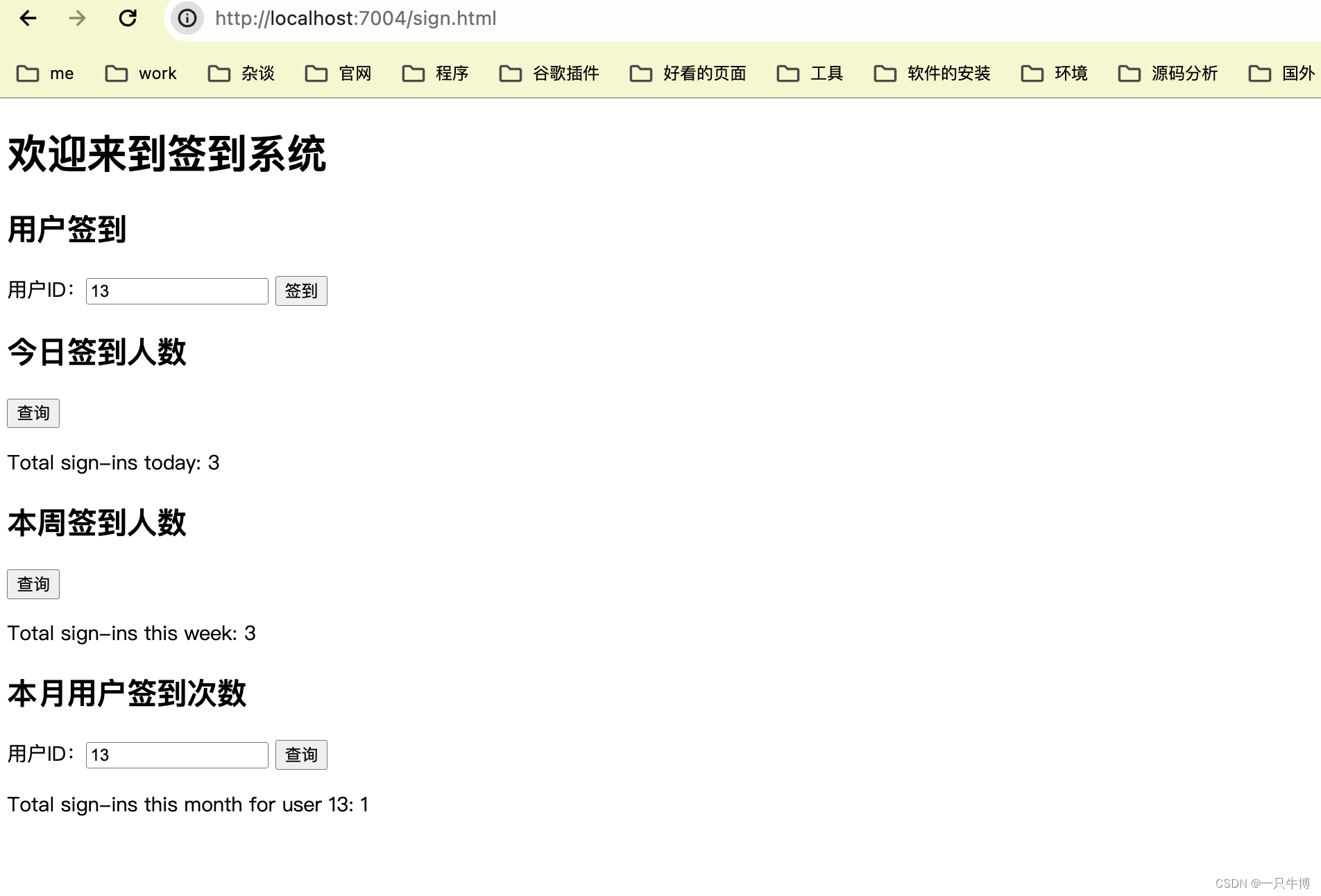
前端页面简化版
<!DOCTYPE html>
<html>
<head>
    <title>签到系统</title>
    <meta charset="UTF-8"> <!-- 指定页面字符集为UTF-8 -->
</head>
<body>
<h1>欢迎来到签到系统</h1>

<div>
    <h2>用户签到</h2>
    用户ID:<input type="number" id="userIdInput" placeholder="输入用户ID">
    <button onclick="signIn()">签到</button>
</div>

<div>
    <h2>今日签到人数</h2>
    <button onclick="countSignInToday()">查询</button>
    <p id="todayCount"></p>
</div>

<div>
    <h2>本周签到人数</h2>
    <button onclick="countSignInThisWeek()">查询</button>
    <p id="weekCount"></p>
</div>

<div>
    <h2>本月用户签到次数</h2>
    用户ID:<input type="number" id="userId">
    <button onclick="countUserSignInThisMonth()">查询</button>
    <p id="monthCount"></p>
</div>

<script>
    function signIn() {
        // 请替换为你的实际用户ID和API端点
        let userId = document.getElementById('userIdInput').value;
        if (!userId) {
            alert("请先输入用户ID!");
            return;
        }
        fetch('/signin?userId=' + userId, { method: 'POST' })
            .then(response => alert('签到成功!'))
            .catch(error => console.error('Error:', error));
    }

    function countSignInToday() {
        fetch('/signin/count/today')
            .then(response => response.text())
            .then(data => document.getElementById('todayCount').innerText = data)
            .catch(error => console.error('Error:', error));
    }

    function countSignInThisWeek() {
        fetch('/signin/count/week')
            .then(response => response.text())
            .then(data => document.getElementById('weekCount').innerText = data)
            .catch(error => console.error('Error:', error));
    }

    function countUserSignInThisMonth() {
        let userId = document.getElementById('userId').value;
        fetch('/signin/count/month?userId=' + userId)
            .then(response => response.text())
            .then(data => document.getElementById('monthCount').innerText = data)
            .catch(error => console.error('Error:', error));
    }
</script>
</body>
</html>
- 1
- 2
- 3
- 4
- 5
- 6
- 7
- 8
- 9
- 10
- 11
- 12
- 13
- 14
- 15
- 16
- 17
- 18
- 19
- 20
- 21
- 22
- 23
- 24
- 25
- 26
- 27
- 28
- 29
- 30
- 31
- 32
- 33
- 34
- 35
- 36
- 37
- 38
- 39
- 40
- 41
- 42
- 43
- 44
- 45
- 46
- 47
- 48
- 49
- 50
- 51
- 52
- 53
- 54
- 55
- 56
- 57
- 58
- 59
- 60
- 61
- 62
- 63
- 64
- 65
- 66
- 67
- 68
- 69
- 70
- 71
- 72
功能展现图