
热门标签
热门文章
- 1Elasticsearch 创建、更新、删除文档、处理冲突_elasticsearchrepository更新
- 2linux/Ubuntu系统上安装mysql数据库(附图详解)
- 3FFMPEG数据结构_ffopgtg
- 4AssertionError: Torch not compiled with CUDA enabled【pycharm/python3/pip】
- 5Docker Compose 命令详解_dockercompose命令详解
- 6adb常用命令总结_adb shell dumpsys activity
- 7Git进阶:修改上次提交 git commit --amend_git amend修改再次提交
- 8a标签下载功能(同域和跨域)_a标签跨域下载
- 9STM32CubeMX(5)—— STM32利用PWM控制42步进电机_pwm四路输出控制步进电机正反转
- 10STM32 PWM实现呼吸灯_stm32点呼吸灯
当前位置: article > 正文
抓包工具_mitmdump使用
作者:cm456 | 2024-01-29 21:22:09
赞
踩
mitmdump
1、mitmdump介绍
- mitmdump是mitmprxoy的命令行接口,可以实时监控请求,
可以对接Python对请求进行处理 - 有了它我们可以不用手动截获和分析HTTP请求和响应,只需要写好请求和响应的处理逻辑即可
- 它还可以实现数据的解析、存储等工作,这些过程都可以通过Python实现
- mitmproxy安装及设置
- 官方文档
2、mitmdump_python脚本修改请求
-
① 先准备一个py文件如scripts.py:如对请求的改写,
定义了一个request()方法,参数为flow(HTTPFlow对象),通过flow.request属性即可获取到当前的请求对象,然后打印输出了请求的请求头,如将请求头的User-Agent修改成了MitmProxy#scripts.py文件 def request(flow): flow.request.headers['User-Agent'] = 'MitmProxy' print(flow.request.headers)- 1
- 2
- 3
- 4
-
② cmd输入
mitmdump -s scripts.py,即指定脚本scripts.py来处理截获的数据;mitmdump -w 文件名(把截获的数据保存到文件中);mitmdump -p 8099(指定监听端口)mitmdump -s scripts.py -p 8080- 1
-
③
scripts.py脚本执行效果:在浏览器和手机分别打开http://httpbin.org/get- 控制台端显示如下:控制台输出了修改后的Headers内容,其User-Agent的内容时mitmproxy

- 手机端显示如下:手机端返回的结果的Headers实际上就是请求头的Headers,User-Agent被修改成了MitmProxy
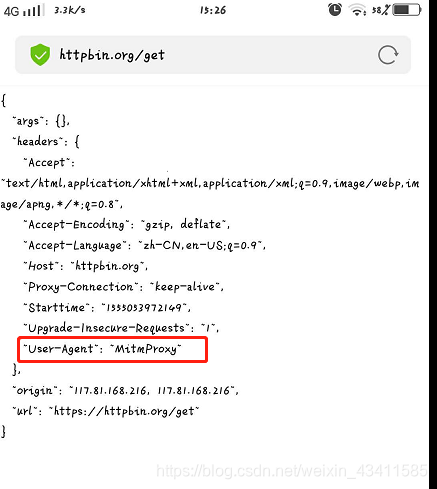
- 控制台端显示如下:控制台输出了修改后的Headers内容,其User-Agent的内容时mitmproxy
3、mitmdump_python脚本日志输出
-
mitmdump有专门的日志输出功能,可以设定不同级别以不同颜色输出结果,我们把scripts.py脚本修改成如下内容。主要调用了ctx模块的log功能(warning级别最高)
from mitmproxy import ctx def request(flow): flow.request.headers['User-Agent'] = 'MitmProxy' ctx.log.info(str(flow.request.headers)) # 白色 ctx.log.warn(str(flow.request.headers)) # 黄色 ctx.log.error(str(flow.reuquest.headers)) # 红色- 1
- 2
- 3
- 4
- 5
- 6
-
warning级别最高,如控制台打印如下
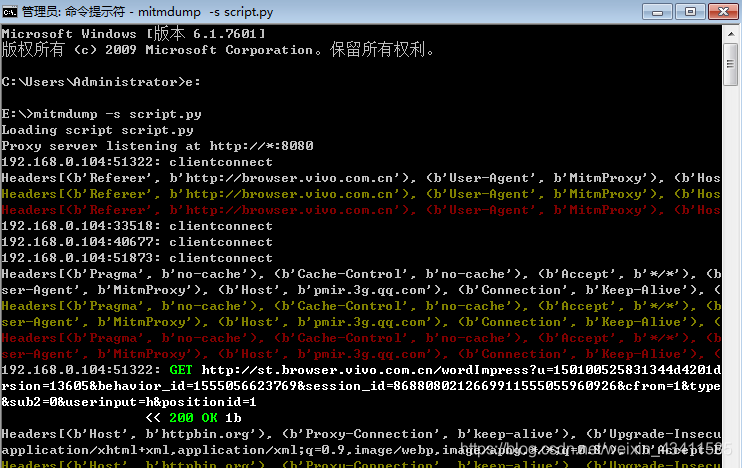
4、mitmdump_request请求常用功能
- 更多属性详见,如下编辑scripts.py脚本如下,我们可以对以下任意属性进行修改赋值
from mitmproxy import ctx def request(flow): request = flow.request # 如修改url flow.request.url = 'https:..httpbin.org/get' info = ctx.log.info info(str(request.headers)) info(str(request.cookies)) info(request.host) info(request.method) info(str(request.port)) info(request.scheme)- 1
- 2
- 3
- 4
- 5
- 6
- 7
- 8
- 9
- 10
- 11
- 12
- 控制台打印输出了Requestt的一些常见属性,如URL、Headers、Cookies、Host、Method等
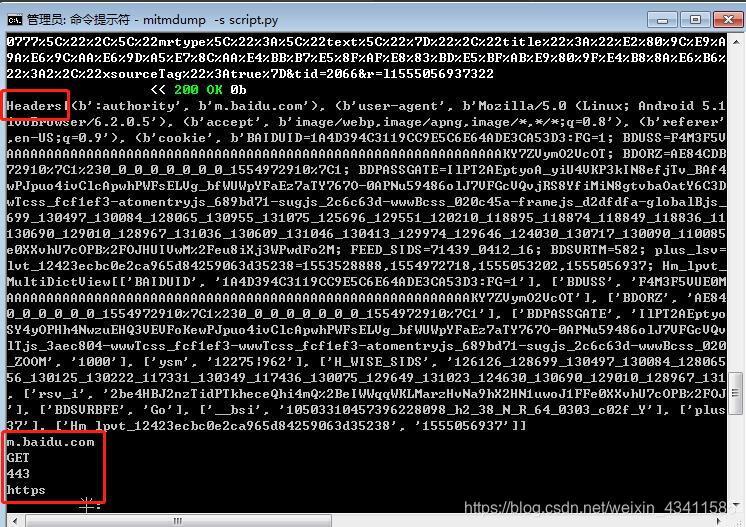
5、mitmdump_response响应常用功能
- mitmdump对应的响应处理接口是response()方法,如下新编辑的scripts.py脚本,可以获取每个请求的响应内容,并对响应的信息提取和存储,即完成爬取
from mitmproxy import ctx def response(flow): response = flow.response info = ctx.log.info info(str(response.status_code)) info(str(response.headers)) info(str(response.cookies)) info(str(response.text))- 1
- 2
- 3
- 4
- 5
- 6
- 7
- 8
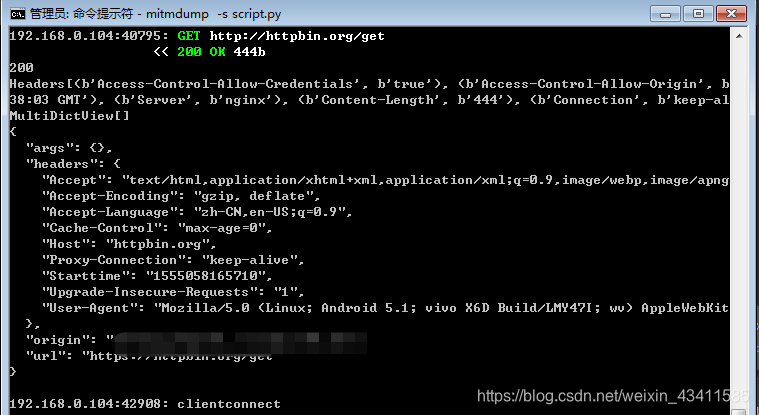
6、mitmdump_实战案例
- 应用场景:当无法进行逆向分析某个加密参数时,可以按此法拦截请求爬取数据
- 流程步骤:
- 编写处理逻辑py文件scripts.py > 后台长期启动
mitmdump -s scripts.py捕获拦截存储等 - 其中捕获数据需要自动化的操作,如果是web端可以借助selenium等长期进行翻页,然后scripts.py监控处理。
- 如果是app端,则可以借助appium等长期翻页,然后scripts.py监控处理,但是appium与手机过于麻烦,也可以借助模拟器,然后纯adb命令操作等
- 编写处理逻辑py文件scripts.py > 后台长期启动
- mitmdump_实战demo1
- mitmdump_实战demo2
声明:本文内容由网友自发贡献,不代表【wpsshop博客】立场,版权归原作者所有,本站不承担相应法律责任。如您发现有侵权的内容,请联系我们。转载请注明出处:https://www.wpsshop.cn/article/detail/45212
推荐阅读

相关标签

