
热门标签
热门文章
- 1go语言html界面,[译] sciter: 使用 HTML/CSS 构建 Golang 图形界面程序
- 2Android 通知
- 3联想拯救者Y7000P2023 Ubuntu20.04网卡驱动AX211安装_ax211驱动
- 4出现了HTTPSConnectionPool(host=‘huggingface.co‘, port=443)错误的解决方法
- 5如何使用Docker本地搭建Traefik服务并实现公网访问管理界面
- 6AI - AI绘画的精准控图(ControlNet)
- 7鲲志说:向我跌宕起伏,喜忧参半的2022致敬!_csdn鲲志说
- 8PowerBuilder中实现数据窗口打印预览通用方法_"powerbulider dw.saveas(\"temp.psr\",psreport!,tru
- 9Django使用心得(二) 使用TestCase测试接口
- 102023年最新CUDA安装教程,看完就会(windows版)。_windows cuda
当前位置: article > 正文
C# message简单实现窗口间信息接收与发送_c# wm_user 消息为空
作者:算法构造者2 | 2024-01-29 21:16:16
赞
踩
c# wm_user 消息为空
刚接触windows 不同程序 窗口消息传递,不理解IntPtr SendMessage(int hWnd, int msg, IntPtr wParam, IntPtr lParam)这函数怎么用?消息内容怎么传递过去,还遇到需要message结构体?IntPtr怎么用呢?
但实际只是用来传个数据,不需要这么复杂,就简单写了下面程序。
1.发送端
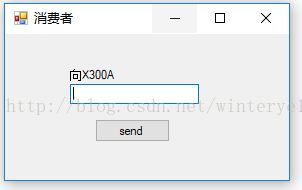
- public partial class Form1 : Form
- {
- private const int WM_USER = 0x0400; //自定义消息号一般开始于0x0400,
-
- [DllImport("User32.dll", EntryPoint = "SendMessage")]
- private static extern IntPtr SendMessage(int hWnd, int msg, IntPtr wParam, IntPtr lParam); //发送消息函数。
-
- //找出窗口句柄handler,用起来方便。有看到过返回值时IntPtr
- [DllImport("User32.dll", EntryPoint = "FindWindow")]
- private static extern int FindWindow(string lpClassName, string lpWindowName);
-
- public Form1()
- {
- InitializeComponent();
- this.Text = "消费者";
- label1.Text = "向X300A";
- }
-
- private void button1_Click(object sender, EventArgs e)
- {
- int WINDOW_HANDLER; //
- int msgNum;
-
- if(int.TryParse(textBox1.Text,out msgNum)==false) //获取用户信息内容,这里只接受数字。
- {
- return;
- }
-
- WINDOW_HANDLER = FindWindow(null, "X300A");//通过窗口标题,获得句柄
-
- SendMessage(WINDOW_HANDLER, WM_USER, new IntPtr(msgNum), IntPtr.Zero);//前面两个参数,基本固定格式。
- //后面两个参数,把需要传递的参数转为IntPtr,就好了。
- //第四个参数因为没什么传的,这里就设为空
- }
- }

2.接收端

- public partial class Form1 : Form
- {
- private const int WM_USER = 0x0400; //自定义消息号一般开始于0x0400,发送端也是设置成这个
- public Form1()
- {
- InitializeComponent();
- this.Text = "X300A";
- label1.Text = "接收消费者信息";
- }
-
- protected override void WndProc(ref Message m) //重新函数,处理接收的信息
- {
- switch (m.Msg)
- {
- case WM_USER:
- string message = m.WParam.ToString(); //转换成string类型,这样就能接收到发送端信息。
-
-
- textBox1.AppendText("接受到信息:"+message+"\n");
- Popup p1 = new Popup(); //自定义的一个窗口
- if(p1.ShowDialog()==DialogResult.OK)
- {
- p1.Dispose();
- textBox1.AppendText("启动完毕\n");
- }
- break;
- default: break;
- }
- base.WndProc(ref m);
- }
- }
3.演示图
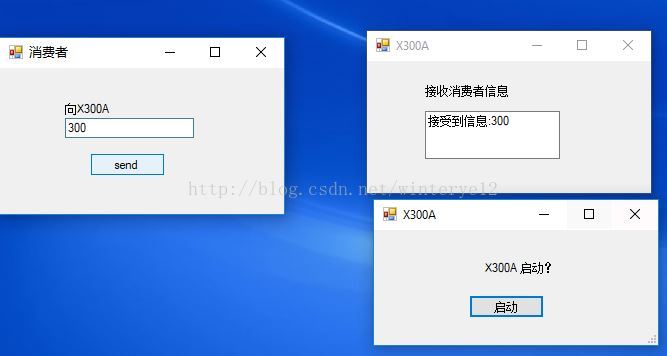
参考链接:
http://blog.sina.com.cn/s/blog_45eaa01a01013zbs.html
声明:本文内容由网友自发贡献,不代表【wpsshop博客】立场,版权归原作者所有,本站不承担相应法律责任。如您发现有侵权的内容,请联系我们。转载请注明出处:https://www.wpsshop.cn/article/detail/45181
推荐阅读
相关标签

