
热门标签
热门文章
- 1分类预测 | Matlab实现OOA-CNN-SVM鱼鹰算法优化卷积支持向量机分类预测
- 2C++ 大数组定义在main函数中不能执行,将其定义为全局变量可以执行——BSS段、数据段、代码段、堆与栈及五大内存分区——堆栈的空间大小_c++将主函数中的数组设置为全局变量
- 3Docker使用
- 4springboot整合线程池_springboot 融合 thread
- 5第一章-初识Java与Java基础_java1.6 与java11.0.16
- 6Baichuan2大模型与SAIL奖“东方.翼风”重磅发布,MindSpore SPONGE暑期学校第三季圆满收官_percnn
- 7adb查询终端键值_adb获取按键值
- 8手机壳也能散热了?
- 9在Docker Desktop中安装Kubernetes_docker desktop kubernetes
- 10ALBERT 论文笔记_微调albert时显存占用很大
当前位置: article > 正文
C#实现向手机发送验证码短信_c#短信验证码发送
作者:代码大牛 | 2024-01-29 21:17:14
赞
踩
c#短信验证码发送
效果描述
当点击button1后向textbox1中输入的号码的手机发送一条验证码短信
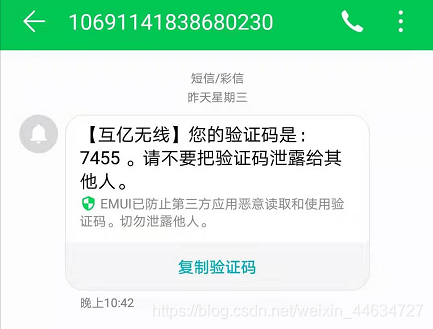
步骤
- 注册 互亿无线 账号
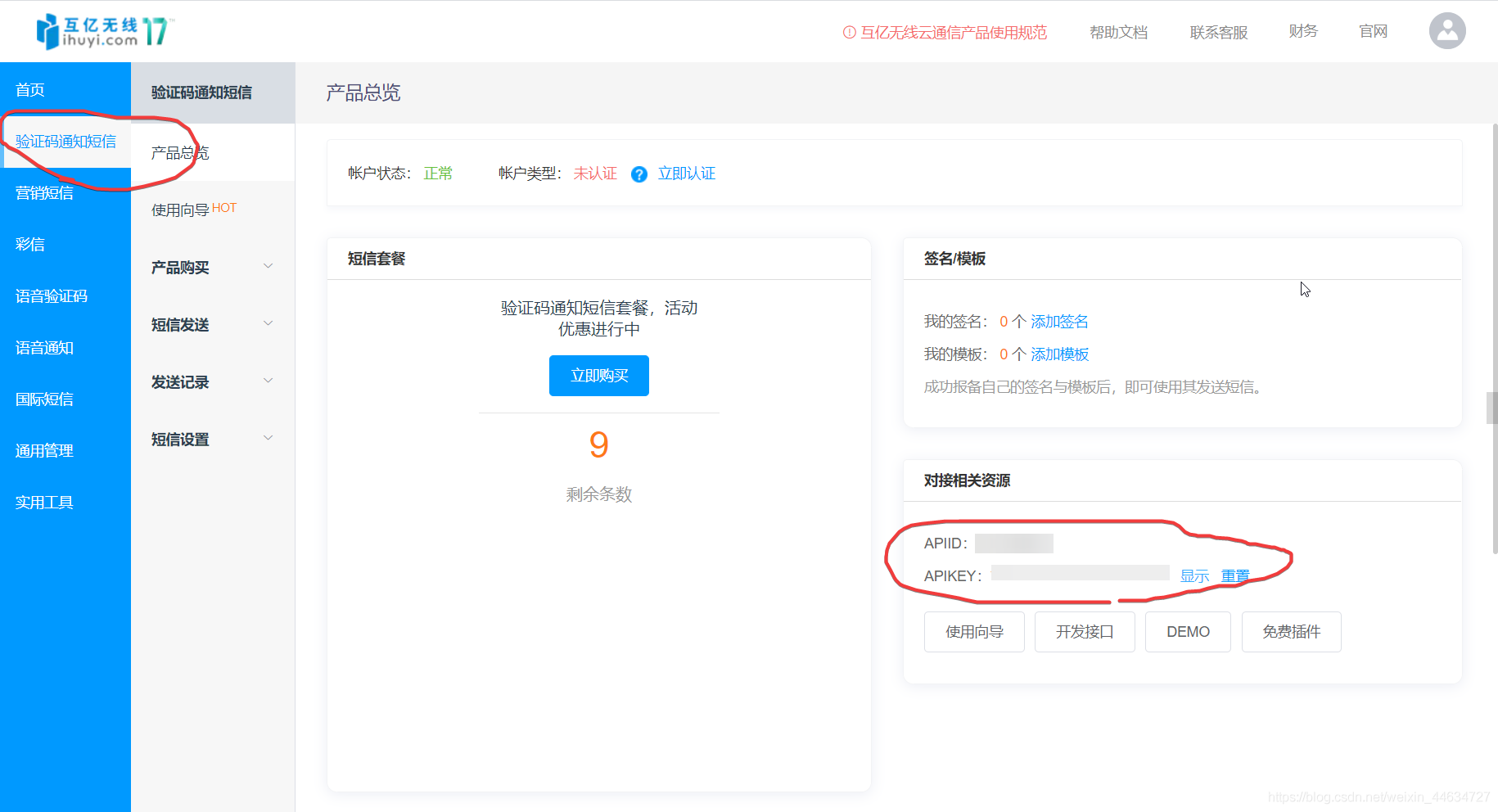
- 查找APIID和APIKEY
- 窗口布局的设计布局
- 代码的书写
- 所有代码
注册 互亿无线 账号
网站:添加链接描述
查找APIID和APIKEY
窗口布局的设计布局
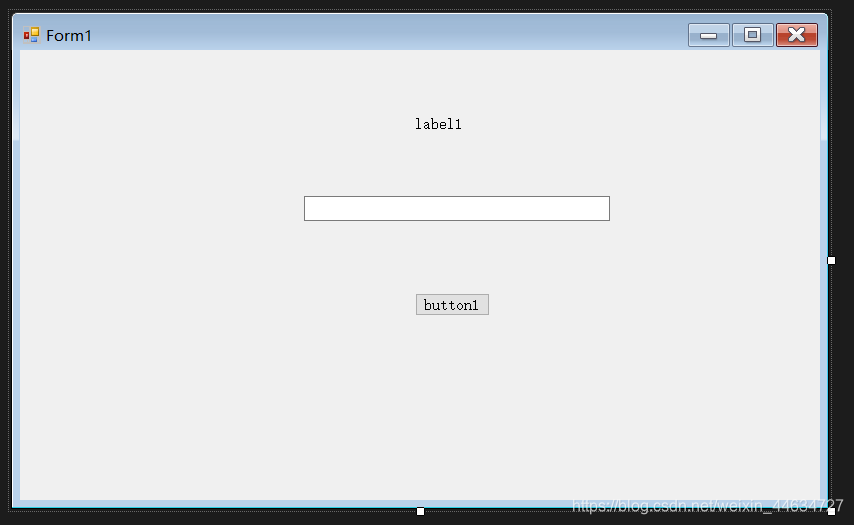
一个label一个textbox一个button
代码的书写
添加一个按钮点击事件
        private void button1_Click(object sender, EventArgs e)
        {
            if (!CallPhone(textBox1.Text.ToString()))
            {
                label1.Text = "不成功";
            }
        }
- 1
- 2
- 3
- 4
- 5
- 6
- 7
新建一个发送短信的函数叫CallPhone()
        private bool CallPhone(string Recipient_Mobile_Num)
        {
        	//
            string PostUrl = "http://106.ihuyi.com/webservice/sms.php?method=Submit";
            //登录“互亿无线网站”查看用户名 登录用户中心->验证码通知短信>产品总览->API接口信息->APIID
            string account = "你的APIID";
            //登录“互亿无线网站”查看密码 登录用户中心->验证码通知短信>产品总览->API接口信息->APIKEY
            string password = "你的APIKEY";
            //接收短信的用户的手机号码
            string mobile = Recipient_Mobile_Num;
            //随机生成四位数 可以模仿向用户发送验证码
            Random rad = new Random();
            int mobile_code = rad.Next(1000, 10000);   //生成随机数
            string content = "您的验证码是:" + mobile_code + " 。请不要把验证码泄露给其他人。";

            string postStrTpl = "account={0}&password={1}&mobile={2}&content={3}";  //用户名+密码+注册的手机号+验证码

            UTF8Encoding encoding = new UTF8Encoding();  //万国码
            //将 account, password, mobile, content 这四个内容添加到postStrTpl字符串当中
            //并利用encoding.GetBytes()将括号里面的字符串转化为二进制类型
            byte[] postData = encoding.GetBytes(string.Format(postStrTpl, account, password, mobile, content)); //将字符串postStrTpl中的格式项替换为四个个指定的 Object 实例的值的文本等效项。再转为二进制数据

            //新建一个请求对象
            HttpWebRequest myRequest = (HttpWebRequest)WebRequest.Create(PostUrl);//对统一资源标识符 (URI) 发出请求。 这是一个 abstract 类。
            myRequest.Method = "POST";
            myRequest.ContentType = "application/x-www-form-urlencoded";
            myRequest.ContentLength = postData.Length;

            Stream newStream = myRequest.GetRequestStream();
            //间postData合并到 PostUrl中去
            newStream.Write(postData, 0, postData.Length);
            newStream.Flush();
            newStream.Close();


            //以http://106.ihuyi.com/webservice/sms.php?method=Submit&account=你的APIID&password=你的APIKEY&mobile=接收短信的用户的手机号码&content=您的验证码是:" + mobile_code + " 。请不要把验证码泄露给其他人。"    发起https请求   并获取请求结果
            HttpWebResponse myResponse = (HttpWebResponse)myRequest.GetResponse();

            if (myResponse.StatusCode == HttpStatusCode.OK)
            {
                return true;
            }
            else
            {
                return false;
                //访问失败
            }


        }

- 1
- 2
- 3
- 4
- 5
- 6
- 7
- 8
- 9
- 10
- 11
- 12
- 13
- 14
- 15
- 16
- 17
- 18
- 19
- 20
- 21
- 22
- 23
- 24
- 25
- 26
- 27
- 28
- 29
- 30
- 31
- 32
- 33
- 34
- 35
- 36
- 37
- 38
- 39
- 40
- 41
- 42
- 43
- 44
- 45
- 46
- 47
- 48
- 49
- 50
- 51
所有代码
注意需要修改的地方
using System;
using System.Collections.Generic;
using System.ComponentModel;
using System.Data;
using System.Drawing;
using System.Linq;
using System.Text;
using System.Threading.Tasks;
using System.Windows.Forms;

using System.IO;
using System.Net;


namespace Sing_In
{
    public partial class Form1 : Form
    {
        public Form1()
        {
            InitializeComponent();
        }

        private void button1_Click(object sender, EventArgs e)
        {
            if (!CallPhone(textBox1.Text.ToString()))
            {
                label1.Text = "不成功";
            }
        }

        private bool CallPhone(string Recipient_Mobile_Num)
        {
            string PostUrl = "http://106.ihuyi.com/webservice/sms.php?method=Submit";
            //登录“互亿无线网站”查看用户名 登录用户中心->验证码通知短信>产品总览->API接口信息->APIID
            string account = "你的APIID";
            //登录“互亿无线网站”查看密码 登录用户中心->验证码通知短信>产品总览->API接口信息->APIKEY
            string password = "你的APIKEY";
            //接收短信的用户的手机号码
            string mobile = Recipient_Mobile_Num;
            //随机生成四位数 可以模仿向用户发送验证码
            Random rad = new Random();
            int mobile_code = rad.Next(1000, 10000);   //生成随机数
            string content = "您的验证码是:" + mobile_code + " 。请不要把验证码泄露给其他人。";

            string postStrTpl = "account={0}&password={1}&mobile={2}&content={3}";  //用户名+密码+注册的手机号+验证码

            UTF8Encoding encoding = new UTF8Encoding();  //万国码
            //将 account, password, mobile, content 这四个内容添加到postStrTpl字符串当中
            //并利用encoding.GetBytes()将括号里面的字符串转化为二进制类型
            byte[] postData = encoding.GetBytes(string.Format(postStrTpl, account, password, mobile, content)); //将字符串postStrTpl中的格式项替换为四个个指定的 Object 实例的值的文本等效项。再转为二进制数据

            //新建一个请求对象
            HttpWebRequest myRequest = (HttpWebRequest)WebRequest.Create(PostUrl);//对统一资源标识符 (URI) 发出请求。 这是一个 abstract 类。
            myRequest.Method = "POST";
            myRequest.ContentType = "application/x-www-form-urlencoded";
            myRequest.ContentLength = postData.Length;

            Stream newStream = myRequest.GetRequestStream();
            //间postData合并到 PostUrl中去
            newStream.Write(postData, 0, postData.Length);
            newStream.Flush();
            newStream.Close();


            //以http://106.ihuyi.com/webservice/sms.php?method=Submit&account=你的APIID&password=你的APIKEY&mobile=接收短信的用户的手机号码&content=您的验证码是:" + mobile_code + " 。请不要把验证码泄露给其他人。"    发起https请求   并获取请求结果
            HttpWebResponse myResponse = (HttpWebResponse)myRequest.GetResponse();

            if (myResponse.StatusCode == HttpStatusCode.OK)
            {
                return true;
            }
            else
            {
                return false;
                //访问失败
            }
        }
    }
}
- 1
- 2
- 3
- 4
- 5
- 6
- 7
- 8
- 9
- 10
- 11
- 12
- 13
- 14
- 15
- 16
- 17
- 18
- 19
- 20
- 21
- 22
- 23
- 24
- 25
- 26
- 27
- 28
- 29
- 30
- 31
- 32
- 33
- 34
- 35
- 36
- 37
- 38
- 39
- 40
- 41
- 42
- 43
- 44
- 45
- 46
- 47
- 48
- 49
- 50
- 51
- 52
- 53
- 54
- 55
- 56
- 57
- 58
- 59
- 60
- 61
- 62
- 63
- 64
- 65
- 66
- 67
- 68
- 69
- 70
- 71
- 72
- 73
- 74
- 75
- 76
- 77
- 78
- 79
- 80
- 81
声明:本文内容由网友自发贡献,不代表【wpsshop博客】立场,版权归原作者所有,本站不承担相应法律责任。如您发现有侵权的内容,请联系我们。转载请注明出处:https://www.wpsshop.cn/article/detail/45187
推荐阅读
相关标签

