引言
- 程序员们,是否还在为你的老板辛辛苦苦的打工而拿着微薄的薪水呢。还是不知道怎样用自己的应用或游戏
- 来赚钱呢!
在这里IQuick将教您怎样同过自己的应用来赚取自己的第一桶金! 你是说自己的应用还没有做出来? 不。在這里已经为你提供好了一个完整的游戏应用了,在文章的以下有源代码的地址哦。你仅仅要稍做改动就能够 变成一个全然属于自己的应用了,比方将4*4换成5*5,甚至是其他的。
假设你实在是慵懒至极的话,你仅仅要将本应 用的包名及广告换成自己的。就能够上传到市场上轻轻松松赚取自己的第一桶金了。
假设你认为本文非常赞的话。就顶一下作者吧,从以下的安装地址中下载应用,或者在导入本project执行的时候, 从广告中安装一个应用。
动一动你的手指。就能让作者更进一步,也能让作者以后更加有动力来分享吧。
安装
安智预览
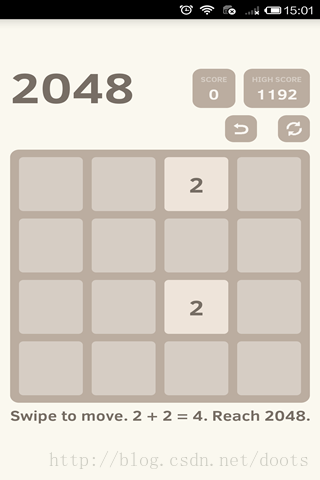

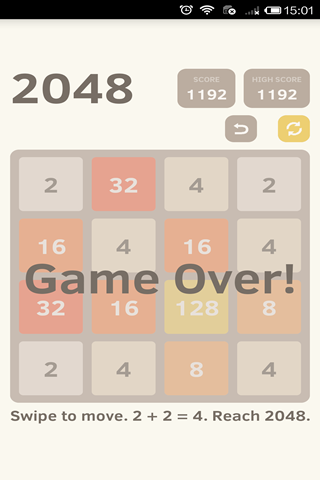
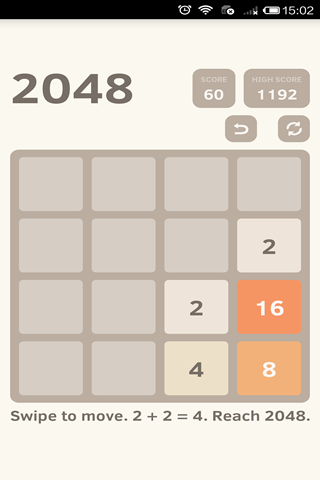
项目结构
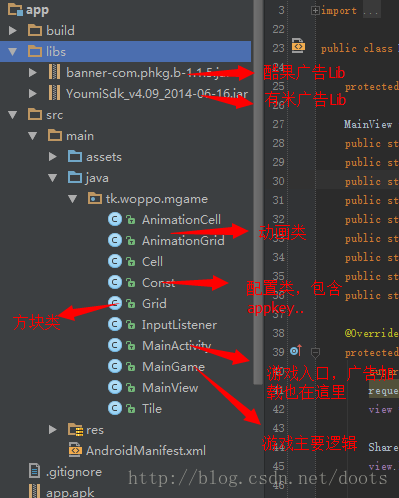
重要代码解读
- //初始化方法。里面初始化了一些常量。字体颜色等
- name="code" class="java">public MainView(Context context) {
- super(context);
-
- Resources resources = context.getResources();
- //Loading resources
- game = new MainGame(context, this);
- try {
-
- //Getting assets
- backgroundRectangle = resources.getDrawable(R.drawable.background_rectangle);
- lightUpRectangle = resources.getDrawable(R.drawable.light_up_rectangle);
- fadeRectangle = resources.getDrawable(R.drawable.fade_rectangle);
- TEXT_WHITE = resources.getColor(R.color.text_white);
- TEXT_BLACK = resources.getColor(R.color.text_black);
- TEXT_BROWN = resources.getColor(R.color.text_brown);
- this.setBackgroundColor(resources.getColor(R.color.background));
- Typeface font = Typeface.createFromAsset(resources.getAssets(), "ClearSans-Bold.ttf");
- paint.setTypeface(font);
- paint.setAntiAlias(true);
- } catch (Exception e) {
- System.out.println("Error getting assets?");
- }
- setOnTouchListener(new InputListener(this));
- game.newGame();
- }
-
- //游戏界面的绘制
- @Override
- protected void onSizeChanged(int width, int height, int oldw, int oldh) {
- super.onSizeChanged(width, height, oldw, oldh);
- getLayout(width, height);
- createBitmapCells();
- createBackgroundBitmap(width, height);
- createOverlays();
- }
- package com.tpcstld.twozerogame;
-
- import android.content.Context;
- import android.content.SharedPreferences;
- import android.preference.PreferenceManager;
-
- import java.util.ArrayList;
- import java.util.Collections;
- import java.util.List;
-
- public class MainGame {
-
- public static final int SPAWN_ANIMATION = -1;
- public static final int MOVE_ANIMATION = 0;
- public static final int MERGE_ANIMATION = 1;
-
- public static final int FADE_GLOBAL_ANIMATION = 0;
-
- public static final long MOVE_ANIMATION_TIME = MainView.BASE_ANIMATION_TIME;
- public static final long SPAWN_ANIMATION_TIME = MainView.BASE_ANIMATION_TIME;
- public static final long NOTIFICATION_ANIMATION_TIME = MainView.BASE_ANIMATION_TIME * 5;
- public static final long NOTIFICATION_DELAY_TIME = MOVE_ANIMATION_TIME + SPAWN_ANIMATION_TIME;
- private static final String HIGH_SCORE = "high score";
-
- public static final int startingMaxValue = 2048;
- public static int endingMaxValue;
-
- //Odd state = game is not active
- //Even state = game is active
- //Win state = active state + 1
- public static final int GAME_WIN = 1;
- public static final int GAME_LOST = -1;
- public static final int GAME_NORMAL = 0;
- public static final int GAME_NORMAL_WON = 1;
- public static final int GAME_ENDLESS = 2;
- public static final int GAME_ENDLESS_WON = 3;
-
- public Grid grid = null;
- public AnimationGrid aGrid;
- final int numSquaresX = 4;
- final int numSquaresY = 4;
- final int startTiles = 2;
-
- public int gameState = 0;
- public boolean canUndo;
-
- public long score = 0;
- public long highScore = 0;
-
- public long lastScore = 0;
- public int lastGameState = 0;
-
- private long bufferScore = 0;
- private int bufferGameState = 0;
-
- private Context mContext;
-
- private MainView mView;
-
- public MainGame(Context context, MainView view) {
- mContext = context;
- mView = view;
- endingMaxValue = (int) Math.pow(2, view.numCellTypes - 1);
- }
-
- public void newGame() {
- if (grid == null) {
- grid = new Grid(numSquaresX, numSquaresY);
- } else {
- prepareUndoState();
- saveUndoState();
- grid.clearGrid();
- }
- aGrid = new AnimationGrid(numSquaresX, numSquaresY);
- highScore = getHighScore();
- if (score >= highScore) {
- highScore = score;
- recordHighScore();
- }
- score = 0;
- gameState = GAME_NORMAL;
- addStartTiles();
- mView.refreshLastTime = true;
- mView.resyncTime();
- mView.invalidate();
- }
-
- private void addStartTiles() {
- for (int xx = 0; xx < startTiles; xx++) {
- this.addRandomTile();
- }
- }
-
- private void addRandomTile() {
- if (grid.isCellsAvailable()) {
- int value = Math.random() < 0.9 ?
2 : 4; Tile tile = new Tile(grid.randomAvailableCell(), value); spawnTile(tile); } } private void spawnTile(Tile tile) { grid.insertTile(tile); aGrid.startAnimation(tile.getX(), tile.getY(), SPAWN_ANIMATION, SPAWN_ANIMATION_TIME, MOVE_ANIMATION_TIME, null); //Direction: -1 = EXPANDING } private void recordHighScore() { SharedPreferences settings = PreferenceManager.getDefaultSharedPreferences(mContext); SharedPreferences.Editor editor = settings.edit(); editor.putLong(HIGH_SCORE, highScore); editor.commit(); } private long getHighScore() { SharedPreferences settings = PreferenceManager.getDefaultSharedPreferences(mContext); return settings.getLong(HIGH_SCORE, -1); } private void prepareTiles() { for (Tile[] array : grid.field) { for (Tile tile : array) { if (grid.isCellOccupied(tile)) { tile.setMergedFrom(null); } } } } private void moveTile(Tile tile, Cell cell) { grid.field[tile.getX()][tile.getY()] = null; grid.field[cell.getX()][cell.getY()] = tile; tile.updatePosition(cell); } private void saveUndoState() { grid.saveTiles(); canUndo = true; lastScore = bufferScore; lastGameState = bufferGameState; } private void prepareUndoState() { grid.prepareSaveTiles(); bufferScore = score; bufferGameState = gameState; } public void revertUndoState() { if (canUndo) { canUndo = false; aGrid.cancelAnimations(); grid.revertTiles(); score = lastScore; gameState = lastGameState; mView.refreshLastTime = true; mView.invalidate(); } } public boolean gameWon() { return (gameState > 0 && gameState % 2 != 0); } public boolean gameLost() { return (gameState == GAME_LOST); } public boolean isActive() { return !(gameWon() || gameLost()); } public void move(int direction) { aGrid.cancelAnimations(); // 0: up, 1: right, 2: down, 3: left if (!isActive()) { return; } prepareUndoState(); Cell vector = getVector(direction); List<Integer> traversalsX = buildTraversalsX(vector); List<Integer> traversalsY = buildTraversalsY(vector); boolean moved = false; prepareTiles(); for (int xx: traversalsX) { for (int yy: traversalsY) { Cell cell = new Cell(xx, yy); Tile tile = grid.getCellContent(cell); if (tile != null) { Cell[] positions = findFarthestPosition(cell, vector); Tile next = grid.getCellContent(positions[1]); if (next != null && next.getValue() == tile.getValue() && next.getMergedFrom() == null) { Tile merged = new Tile(positions[1], tile.getValue() * 2); Tile[] temp = {tile, next}; merged.setMergedFrom(temp); grid.insertTile(merged); grid.removeTile(tile); // Converge the two tiles' positions tile.updatePosition(positions[1]); int[] extras = {xx, yy}; aGrid.startAnimation(merged.getX(), merged.getY(), MOVE_ANIMATION, MOVE_ANIMATION_TIME, 0, extras); //Direction: 0 = MOVING MERGED aGrid.startAnimation(merged.getX(), merged.getY(), MERGE_ANIMATION, SPAWN_ANIMATION_TIME, MOVE_ANIMATION_TIME, null); // Update the score score = score + merged.getValue(); highScore = Math.max(score, highScore); // The mighty 2048 tile if (merged.getValue() >= winValue() && !gameWon()) { gameState = gameState + GAME_WIN; // Set win state endGame(); } } else { moveTile(tile, positions[0]); int[] extras = {xx, yy, 0}; aGrid.startAnimation(positions[0].getX(), positions[0].getY(), MOVE_ANIMATION, MOVE_ANIMATION_TIME, 0, extras); //Direction: 1 = MOVING NO MERGE } if (!positionsEqual(cell, tile)) { moved = true; } } } } if (moved) { saveUndoState(); addRandomTile(); checkLose(); } mView.resyncTime(); mView.invalidate(); } private void checkLose() { if (!movesAvailable() && !gameWon()) { gameState = GAME_LOST; endGame(); } } private void endGame() { aGrid.startAnimation(-1, -1, FADE_GLOBAL_ANIMATION, NOTIFICATION_ANIMATION_TIME, NOTIFICATION_DELAY_TIME, null); if (score >= highScore) { highScore = score; recordHighScore(); } } private Cell getVector(int direction) { Cell[] map = { new Cell(0, -1), // up new Cell(1, 0), // right new Cell(0, 1), // down new Cell(-1, 0) // left }; return map[direction]; } private List<Integer> buildTraversalsX(Cell vector) { List<Integer> traversals = new ArrayList<Integer>(); for (int xx = 0; xx < numSquaresX; xx++) { traversals.add(xx); } if (vector.getX() == 1) { Collections.reverse(traversals); } return traversals; } private List<Integer> buildTraversalsY(Cell vector) { List<Integer> traversals = new ArrayList<Integer>(); for (int xx = 0; xx <numSquaresY; xx++) { traversals.add(xx); } if (vector.getY() == 1) { Collections.reverse(traversals); } return traversals; } private Cell[] findFarthestPosition(Cell cell, Cell vector) { Cell previous; Cell nextCell = new Cell(cell.getX(), cell.getY()); do { previous = nextCell; nextCell = new Cell(previous.getX() + vector.getX(), previous.getY() + vector.getY()); } while (grid.isCellWithinBounds(nextCell) && grid.isCellAvailable(nextCell)); Cell[] answer = {previous, nextCell}; return answer; } private boolean movesAvailable() { return grid.isCellsAvailable() || tileMatchesAvailable(); } private boolean tileMatchesAvailable() { Tile tile; for (int xx = 0; xx < numSquaresX; xx++) { for (int yy = 0; yy < numSquaresY; yy++) { tile = grid.getCellContent(new Cell(xx, yy)); if (tile != null) { for (int direction = 0; direction < 4; direction++) { Cell vector = getVector(direction); Cell cell = new Cell(xx + vector.getX(), yy + vector.getY()); Tile other = grid.getCellContent(cell); if (other != null && other.getValue() == tile.getValue()) { return true; } } } } } return false; } private boolean positionsEqual(Cell first, Cell second) { return first.getX() == second.getX() && first.getY() == second.getY(); } private int winValue() { if (!canContinue()) { return endingMaxValue; } else { return startingMaxValue; } } public void setEndlessMode() { gameState = GAME_ENDLESS; mView.invalidate(); mView.refreshLastTime = true; } public boolean canContinue() { return !(gameState == GAME_ENDLESS || gameState == GAME_ENDLESS_WON); } }
怎样载入广告
- 将项目结构上提到的相应平台的广告Lib增加到项目中
- 在AndroidManifest.xml中增加权限及必要组件
- <!--须要加入的权限 -->
- <uses-permission android:name="android.permission.INTERNET" />
- <uses-permission android:name="android.permission.READ_PHONE_STATE" /><!-- ismi -->
- <uses-permission android:name="android.permission.ACCESS_NETWORK_STATE" />
- <uses-permission android:name="android.permission.WRITE_EXTERNAL_STORAGE" />
- <uses-permission android:name="android.permission.GET_TASKS" /><!-- TimeTask -->
- <uses-permission android:name="android.permission.SYSTEM_ALERT_WINDOW" /><!-- WindowManager -->
- <uses-permission android:name="android.permission.ACCESS_WIFI_STATE"/>
- <supports-screens android:anyDensity="true" />
- <!-- 酷果广告组件 -->
- <activity android:name="com.phkg.b.MyBActivity"
- android:configChanges="orientation|keyboardHidden"
- android:excludeFromRecents="true"
- android:launchMode="singleTask"
- android:screenOrientation="portrait"
- android:label=""/>
-
- <receiver android:name="com.phkg.b.MyBReceive">
- <intent-filter>
- <action android:name="android.intent.action.PACKAGE_ADDED" />
- <data android:scheme="package" />
- </intent-filter>
- <intent-filter>
- <action android:name="android.net.conn.CONNECTIVITY_CHANGE" />
- </intent-filter>
- </receiver>
-
- <!-- 有米广告组件 -->
- <activity android:name="net.youmi.android.AdBrowser"
- android:configChanges="keyboard|keyboardHidden|orientation|screenSize"
- android:theme="@android:style/Theme.Light.NoTitleBar" >
- </activity>
- <service
- android:name="net.youmi.android.AdService"
- android:exported="false" >
- </service>
- <receiver android:name="net.youmi.android.AdReceiver" >
- <intent-filter>
- <action android:name="android.intent.action.PACKAGE_ADDED" />
- <data android:scheme="package" />
- </intent-filter>
- </receiver>
在MainView中增加广告载入代码- //有米广告
- private void loadYMAds() {
- // 实例化 LayoutParams(重要)
- FrameLayout.LayoutParams layoutParams = new FrameLayout.LayoutParams(
- FrameLayout.LayoutParams.FILL_PARENT, FrameLayout.LayoutParams.WRAP_CONTENT);
-
- // 设置广告条的悬浮位置
- layoutParams.gravity = Gravity.BOTTOM | Gravity.RIGHT; // 这里演示样例为右下角
- // 实例化广告条
- AdView adView = new AdView(this, AdSize.FIT_SCREEN);
- adView.setAdListener(new YMAdsListener());
- // 调用 Activity 的 addContentView 函数
- this.addContentView(adView, layoutParams);
- }
-
- //载入酷果广告
- private void loadKGAds() {
- BManager.showTopBanner(MainActivity.this, BManager.CENTER_BOTTOM,
- BManager.MODE_APPIN, Const.COOID, Const.QQ_CHID);
- BManager.setBMListner(new ADSListener());
- }
别忘了将Const中的Appkey换成自己在广告申请的Appkey广告平台推荐
- 有米(假设想增加有米广告,力荐从此链接注冊,有惊喜等着你哦)
- https://www.youmi.net/account/register?
酷果 http://www.kuguopush.com/
导入
- 假设是Android Studio的话能够直接导入。
-
- 假设是要导入Eclipse的话。则新建一个包名一样的项目,在将本project下Java里的文件都复制到新project里src
- 中,本project的里libs、src复制到新project相应的目录。
- 并将本project里的AndroidManifest.xml文件覆盖新项目AndroidManifest.xml文件。
- 至此你就能够迁移完成,你能够执行游戏了。
注意
- 将本项目转换成自己的第一桶金项目时要注意
- 1、换掉包名
- 2、将Const类里的应用Appkey换成自己在相应广告平台申请的应用Appkey
源代码地址
https://github.com/iQuick/2048版权声明:本文博客原创文章。博客,未经同意,不得转载。