
热门标签
热门文章
- 1【无捆绑,可修改主页】系统之家 win7 32位&64位极度纯净版系统(每月更新)_win764位无捆绑
- 2wslg 中idea全局搜索框无法打开,闪退的问题_wsl2 idea全局搜索打不开
- 3Mac上修改host_mac上host
- 4HanLP 基于SVM支持向量机 训练 文本分类_搜狗文本分类语料库迷你版
- 5React学习:状态(State) 和 属性(Props)
- 6python pdf 转换成txt,csv,doc 及doc转换为pdf初级_把csv文件转为txt再转word再转pdf,需要用到哪些包?
- 7JPA多数据源配置_继承jparepository接口时qualifier数据源
- 8C++入门day2
- 9看漫画学python!终于有人把python整理成漫画书了,让人茅塞顿开_漫画python
- 10Github 2024-01-28 开源项目日报Top10
当前位置: article > 正文
div的contenteditable属性(及鼠标位置问题)
作者:AI算法诗人 | 2024-01-29 14:17:27
赞
踩
div的contenteditable
contenteditable属性
- 全局属性 contenteditable 是一个枚举属性,表示元素是否可被用户编辑。 如果可以,浏览器会修改元素的部件以允许编辑。
- 该属性是一个枚举属性,而非布尔属性。这意味着必须显式设置其值为 true、false 或空字符串中的一个,并且不允许简写为
<label contenteditable>Example Label</label>正确的用法是<label contenteditable="true">Example Label</label>
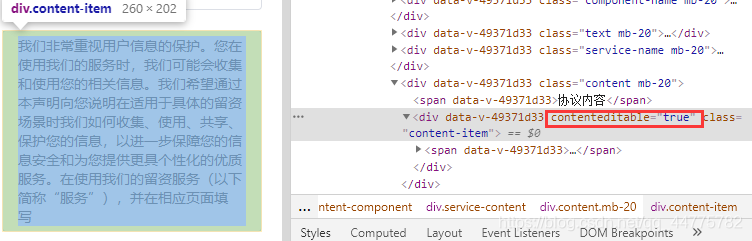
大概就是用div实现类似input
<div :contenteditable="true" class="content-item" ref="content-item" @input="changeServiceContent">
   	<span>{{props.setting.serviceContentConfig.text}}</span>
</div>
- 1
- 2
- 3
changeServiceContent(e) {
	//解决删除鼠标位置问题
    this.$refs["content-item"].focus();
    document.execCommand("selectAll", false, null);
    document.getSelection().collapseToEnd();
    //赋值双向绑定
    this.props.setting.serviceContentConfig.text = e.target.textContent;
},
- 1
- 2
- 3
- 4
- 5
- 6
- 7
- 8
注意:div中的内容如果不用span包裹,鼠标位置可能会有问题
使用contenteditable不能使用change事件,但是可以用input事件和blur事件等。
声明:本文内容由网友自发贡献,不代表【wpsshop博客】立场,版权归原作者所有,本站不承担相应法律责任。如您发现有侵权的内容,请联系我们。转载请注明出处:https://www.wpsshop.cn/article/detail/43206
推荐阅读
相关标签

