
热门标签
热门文章
- 1Python安装.whl文件_python sonwnlp .whl
- 2java 将时间戳(毫秒ms)转为对应的日期格式,将毫秒转为时分秒等格式,及获取多少天之前的日期_毫秒转换为年月日时分秒
- 3随机信号处理----实验一:利用MATLAB生成均匀分布,二项分布,正态分布的概率密度曲线,并求期望和方差_均匀分布的概率密度 matlab
- 4Java的命名规范_java 枚举命名规范
- 5vue+echarts——实现3D地图+3D柱状图 效果——粗糙代码记录——技能提升_echarts3d地图
- 6龟兔赛跑预测
- 7[论文笔记] 2019-AAAI-Hypergraph Neural Networks
- 8R语言:spdep包(空间数据分析与R语言实践)
- 9python的环境变量配置方法 详细教程_python 环境变量
- 10初涉三元环
当前位置: article > 正文
Vue实现图片预览,侧边栏懒加载,不用任何插件,简单好用
作者:数据可视化灵魂 | 2024-01-29 14:11:18
赞
踩
Vue实现图片预览,侧边栏懒加载,不用任何插件,简单好用
实现样式
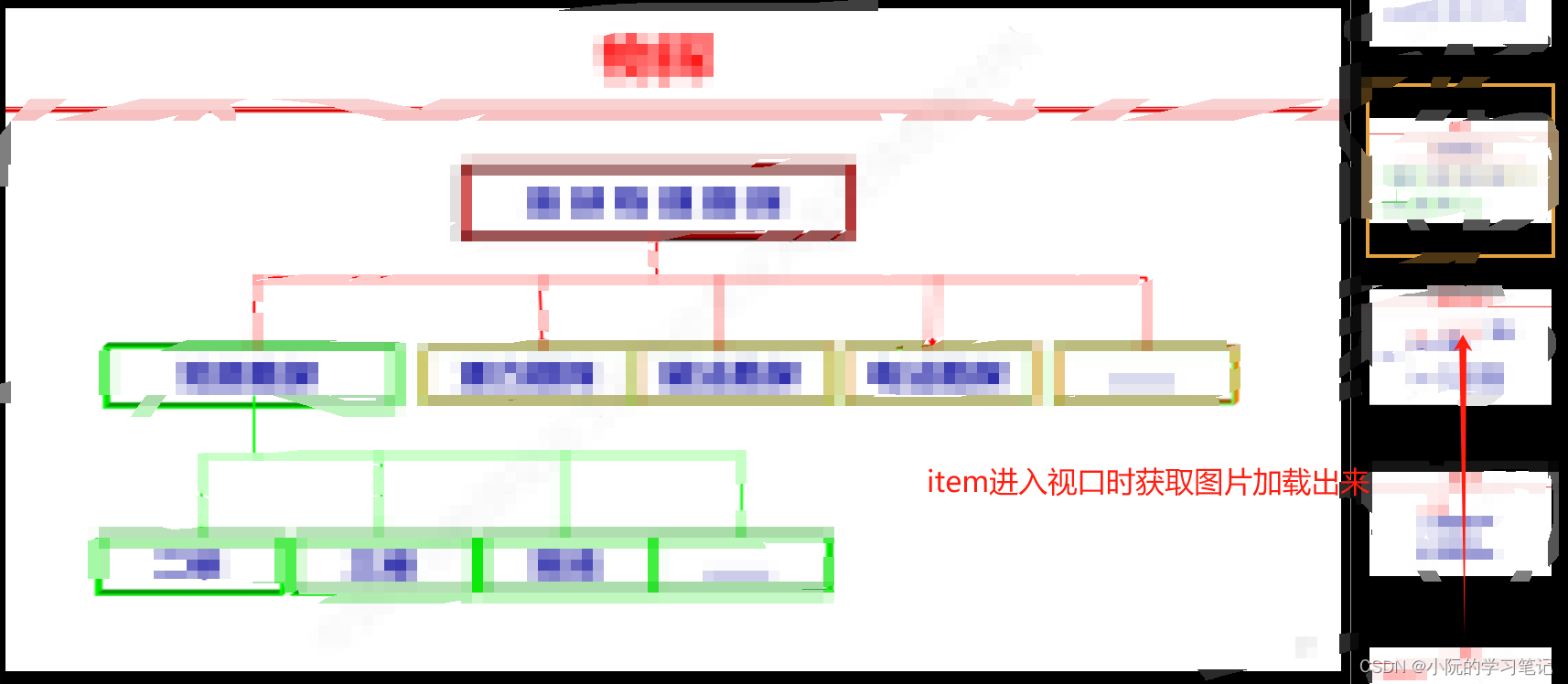
需求
实现PDF上传预览,并且不能下载
第一次实现:用vue-pdf,将上传的文件用base64传给前端展示
问题:
- 水印第一次加载有后面又没有了。
- 当上传大的pdf文件后,前端获取和渲染又长又慢,甚至不能用
修改实现模式
- 前端上传PDF,后端将PDF转化成一页一页的图片
- 前端根据page去获取一页一页的PDF图片,类似于百度文库
实现思路
配合后端实现思路
- 获取全部页数,先把侧边栏的元素画出来占个位置
- 获取已经看到的页数,没有默认1
- 渲染上次看到的页数,同时侧边栏滚动到相同的index位置,通过监听元素是否进入视口去获取base64图片
- 已经获取回来的图片不再去请求
主要重点难点是侧边栏懒加载、定位、等比例展示图片
 <div class="pdf-viewer">
   <div class="pdf-main">
     <canvas id="pdf-view"></canvas>
   </div>
   <div class="pdf-list" :class="{ collapse: collapse }">
     <div
       class="pdf-item"
       :class="{ active: currentPage === index }"
       v-for="index in pageTotalNum"
       :key="index"
       @click="changePage(index)"
       :data-index="index"
     >
       <img :src="imgList[index - 1]" alt="" />
     </div>
   </div>
 </div>

<script>
let observer = null;
export default {
  name: "PDFView",
  data() {
    return {
      currentPage: 1, //当前页数
      pageTotalNum: 1, //总页数
      imgList: [], //base64图片列表
      updateTimer: null
    };
  },
  watch: {
    /**
     * @description 监听当前页变化 滚动列表到顶部
     */
    currentPage() {
      this.$nextTick(() => {
        const activeEl = document.querySelector(".pdf-list .active");
        if (activeEl) {
          document.querySelector(".pdf-list").scrollTo({
            top: activeEl.offsetTop - 20,
            behavior: "smooth",
          });
          // 解决进来会请求当前页数 前面所有图片
          setTimeout(() => {
            if (observer) {
              observer.disconnect();
            }
            this.isEnter();
          }, 500);
        }
        // 切换页面 将查看区域滚动到最上面
        const mainEl = document.querySelector(".pdf-main");
        mainEl.scrollTo({
          top: 0,
        });
      });
    },
  },
  mounted() {
    this.getPageTotal();
  },
  beforeDestroy() {
    if (observer) {
      observer.disconnect();
    }
  },
  methods: {
    /**
     * @description 获取pdf总页数
     */
    getPageTotal() {
      const params = {
        id: this.$route.query.id,
      };
      apiGetViewPdfPageTotal(params).then((response) => {
        this.pageTotalNum = response.data;
        this.updateStudy(true);
      });
    },
    /**
     * @description 切换当前页
     */
    changePage(index) {
      this.currentPage = index;
      this.updateStudy();
      if (this.imgList[index - 1]) {
        this.drawImage(this.imgList[index - 1]);
      } else {
        this.getPdf();
      }
    },
    /**
     * @description 上一页
     */
    prePage() {
      let page = this.currentPage;
      if (page !== 1) {
        page = page > 1 ? page - 1 : this.pageTotalNum;
        this.currentPage = page;
        this.updateStudy();
        if (this.imgList[page - 1]) {
          this.drawImage(this.imgList[page - 1]);
        } else {
          this.getPdf();
        }
      }
    },
    /**
     * @description 下一页
     */
    nextPage() {
      let page = this.currentPage;
      if (page !== this.pageTotalNum) {
        page = page < this.pageTotalNum ? page + 1 : 1;
        this.currentPage = page;
        this.updateStudy();
        if (this.imgList[page - 1]) {
          this.drawImage(this.imgList[page - 1]);
        } else {
          this.getPdf();
        }
      }
    },
    /**
     * @description 更新学习 flag=true第一次进入
     */
    updateStudy(flag = false) {
      const params = {
        courseId: this.$route.query.id,
        pageRate: this.currentPage,
        flag,
        totalPageRate: this.pageTotalNum,
      };
      apiUpdateStudy(params)
        .then((response) => {
          this.currentPage = response.data.pageRate;
          if (flag) {
            this.updateTimer = setInterval(() => {
              this.updateStudy();
            }, 1000 * 10);
          }
          if (flag) {
            this.getPdf();
            // 解决第一页进来不请求的问题,一页大概能展示4-5张
            if (this.currentPage < 5) {
              this.isEnter();
            }
          }
        })
    },
    /**
     * @description 查看资料
     */
    getPdf() {
      const params = {
        id: this.$route.query.id,
        page: this.currentPage,
      };
      apiGetPdf(params).then((response) => {
        let base64 = "data:image/png;base64," + response.data;
        this.drawImage(base64);
      });
    },
    /**
     * @description 将base64图片 画到canvas上
     */
    drawImage(base64) {
      const canvas = document.getElementById("pdf-view");
      const context = canvas.getContext("2d");
      const image = new Image();
      image.src = base64;
      image.onload = () => {
        const proportion = image.width / image.height;
        // 获取style设置width:100% 的canvas宽度
        const canvasWidth = canvas.offsetWidth;
        // 图片宽度与canvas宽度比例
        const canvasWidthProportion = image.width / canvasWidth;
        // canvas宽度设置为宽度
        canvas.width = image.width;
        // 根据图片比例和宽度比例计算出canvas高度
        canvas.height = (canvasWidth / proportion) * canvasWidthProportion;
        context.drawImage(image, 0, 0);
      };
    },
    /**
     * @description 监听元素进入视口
     */
    isEnter() {
      observer = new IntersectionObserver((entries) => {
        entries.forEach((entry) => {
          const target = entry.target;
          const index = target.dataset.index;
          if (entry.isIntersecting) {
            if (!this.imgList[index - 1]) {
              this.getImgList(index);
            }
          } else {
            // console.log("元素离开视口", index);
          }
        });
      });
      this.$nextTick(() => {
      //将所有侧边栏的元素进行监听
        const els = document.querySelectorAll(".pdf-item");
        Array.from(els).forEach((el) => {
          observer.observe(el);
        });
      });
    },
    /**
     * @description 滚动获取图片
     */
    getImgList(index) {
      const params = {
        id: this.$route.query.id,
        page: index,
      };
      apiGetPdf(params).then((response) => {
        let base64 = "data:image/png;base64," + response.data;
        this.imgList[index - 1] = base64;
        // 解决请求回来页面没更新的问题
        this.$forceUpdate();
      });
    },
  },
};
</script>

<style lang="scss" scoped>
.pdf-container {
  width: 100%;
  height: 100%;
  color: #999;
}
.pdf-viewer {
  width: 100%;
  height: calc(100vh - 50px - 30px - 60px - 6px);
  position: relative;
  display: flex;
}
.pdf-list {
  width: 240px;
  overflow-y: auto;
  display: flex;
  flex-direction: column;
  padding: 20px;
  background: #000;
  box-sizing: border-box;
  // transition: all 0.3s ease-in-out;
  border-left: 1px solid #999;
  &::-webkit-scrollbar {
    width: 0px;
  }
  .pdf-item {
    height: 183px;
    min-height: 183px;
    display: inline-flex;
    justify-content: center;
    align-items: center;
    cursor: pointer;
    overflow: hidden;
    &:hover {
      ::v-deep img {
        transition: all 0.5s ease-in-out;
        transform: scale(1.1);
      }
    }
    &.active {
      box-shadow: 0px 0px 0px 4px #e6a23c;
    }
    &:not(:last-child) {
      margin-bottom: 10px;
    }
    img {
      pointer-events: none;
      width: 100%;
      // height: 100%;
    }
  }
  &.collapse {
    width: 0;
    padding: 0;
  }
}
.pdf-main {
  flex: 1;
  // width: 100%;
  // height: 100%;
  overflow-y: auto;
  background: #000;
  position: relative;
  padding: 10px 0;
  &::-webkit-scrollbar {
    width: 0px;
  }
}
.handle-btn {
  background: #000;
  display: flex;
  font-size: 12px;
  position: relative;
  height: 60px;
  padding: 0 6px;
  border-bottom: 1px solid #999;
  .right {
    width: 240px;
    display: flex;
    align-items: center;
    justify-content: flex-end;
    font-size: 32px;
  }
  .main {
    flex: 1;
    display: flex;
    align-items: center;
    justify-content: center;
    font-size: 32px;
    margin-left: 250px;
    .pagination {
      display: flex;
      align-items: center;
      margin: 0 10px;
      .pagination-info {
        font-size: 14px;
        margin: 0 8px;
      }
    }
    .zoom {
      display: flex;
      align-items: center;
      margin: 0 10px;
      .scale {
        font-size: 14px;
        margin: 0 8px;
      }
    }
  }
  .tips {
    color: #e6a23c;
    font-size: 12px;
  }
  .start-test {
    display: flex;
    align-items: center;
  }
  .time {
    position: absolute;
    left: 6px;
    top: 50%;
    transform: translateY(-50%);
    > span {
      display: inline-block;
      margin-left: 10px;
    }
  }
}
i {
  cursor: pointer;
  &:hover {
    color: #fff;
  }
}
#pdf-view {
  width: 100%;
  // height: 100%;
  padding: 10px;
}
</style>

- 1
- 2
- 3
- 4
- 5
- 6
- 7
- 8
- 9
- 10
- 11
- 12
- 13
- 14
- 15
- 16
- 17
- 18
- 19
- 20
- 21
- 22
- 23
- 24
- 25
- 26
- 27
- 28
- 29
- 30
- 31
- 32
- 33
- 34
- 35
- 36
- 37
- 38
- 39
- 40
- 41
- 42
- 43
- 44
- 45
- 46
- 47
- 48
- 49
- 50
- 51
- 52
- 53
- 54
- 55
- 56
- 57
- 58
- 59
- 60
- 61
- 62
- 63
- 64
- 65
- 66
- 67
- 68
- 69
- 70
- 71
- 72
- 73
- 74
- 75
- 76
- 77
- 78
- 79
- 80
- 81
- 82
- 83
- 84
- 85
- 86
- 87
- 88
- 89
- 90
- 91
- 92
- 93
- 94
- 95
- 96
- 97
- 98
- 99
- 100
- 101
- 102
- 103
- 104
- 105
- 106
- 107
- 108
- 109
- 110
- 111
- 112
- 113
- 114
- 115
- 116
- 117
- 118
- 119
- 120
- 121
- 122
- 123
- 124
- 125
- 126
- 127
- 128
- 129
- 130
- 131
- 132
- 133
- 134
- 135
- 136
- 137
- 138
- 139
- 140
- 141
- 142
- 143
- 144
- 145
- 146
- 147
- 148
- 149
- 150
- 151
- 152
- 153
- 154
- 155
- 156
- 157
- 158
- 159
- 160
- 161
- 162
- 163
- 164
- 165
- 166
- 167
- 168
- 169
- 170
- 171
- 172
- 173
- 174
- 175
- 176
- 177
- 178
- 179
- 180
- 181
- 182
- 183
- 184
- 185
- 186
- 187
- 188
- 189
- 190
- 191
- 192
- 193
- 194
- 195
- 196
- 197
- 198
- 199
- 200
- 201
- 202
- 203
- 204
- 205
- 206
- 207
- 208
- 209
- 210
- 211
- 212
- 213
- 214
- 215
- 216
- 217
- 218
- 219
- 220
- 221
- 222
- 223
- 224
- 225
- 226
- 227
- 228
- 229
- 230
- 231
- 232
- 233
- 234
- 235
- 236
- 237
- 238
- 239
- 240
- 241
- 242
- 243
- 244
- 245
- 246
- 247
- 248
- 249
- 250
- 251
- 252
- 253
- 254
- 255
- 256
- 257
- 258
- 259
- 260
- 261
- 262
- 263
- 264
- 265
- 266
- 267
- 268
- 269
- 270
- 271
- 272
- 273
- 274
- 275
- 276
- 277
- 278
- 279
- 280
- 281
- 282
- 283
- 284
- 285
- 286
- 287
- 288
- 289
- 290
- 291
- 292
- 293
- 294
- 295
- 296
- 297
- 298
- 299
- 300
- 301
- 302
- 303
- 304
- 305
- 306
- 307
- 308
- 309
- 310
- 311
- 312
- 313
- 314
- 315
- 316
- 317
- 318
- 319
- 320
- 321
- 322
- 323
- 324
- 325
- 326
- 327
- 328
- 329
- 330
- 331
- 332
- 333
- 334
- 335
- 336
- 337
- 338
- 339
- 340
- 341
- 342
- 343
- 344
- 345
- 346
- 347
- 348
- 349
- 350
- 351
- 352
- 353
- 354
- 355
- 356
- 357
- 358
- 359
- 360
- 361
- 362
- 363
- 364
- 365
- 366
- 367
- 368
- 369
声明:本文内容由网友自发贡献,不代表【wpsshop博客】立场,版权归原作者所有,本站不承担相应法律责任。如您发现有侵权的内容,请联系我们。转载请注明出处:https://www.wpsshop.cn/article/detail/43194
推荐阅读

相关标签

