- 1校园网免认证登录的方法-利用udp53端口_校园网可以实现不用验证登录吗
- 2【微服务】Ribbon负载均衡_修改ribbon负载均衡的规则
- 3LeetCode 114. 二叉树展开为链表(一题三吃)
- 4【愚公系列】2023年12月 HarmonyOS教学课程 043-Stage模型(ExtensionAbility组件)
- 5HarmonyOS 应用开发配置—Stage模型以及应用/组件级配置详解【鸿蒙专栏-18】
- 6【愚公系列】2023年12月 HarmonyOS应用开发者基础认证(完美答案)
- 7Java开发 - Elasticsearch初体验_java 写 es
- 8C/C++程序设计课程设计[2023-02-15]_c++网吧管理系统课程设计
- 9亚马逊云科技中国峰会:Amazon DeepRacer——载着 AI 梦想向前奔跑
- 10【ERROR】chaincode install failed with status: 500 - failed to invoke backing implementation xxx
Scrapy与redis的结合(Scrapy 分布式)_scrapy+redis
赞
踩
一 ,Scrapy-分布式
(1)什么是scrapy_redis
- scrapy_redis:Redis-based components for scrapy
- github地址:https://github.com/rmax/scrapy-redis
(2)Scrapy和Scrapy-redis 有什么区别?
1.Scrapy是爬虫的一个框架 爬取效率非常高 具有高度的可定制性 不支持分布式
2.Scrapy-redis 它是基于redis数据库 运行在scrapy框架之上的一个组件 可以让scrapy支持分布式策略 支持主从同步
二,回顾scrapy⼯作流程
 ------------------------------\ .scrapy工作流程.\------------------
三,scrapy_redis⼯作流程
 ----------------------------------\ .scrapy工作流程.\----------------------
四、scrapy_redis下载
(一)下载源码文件,以此为参照
clone github scrapy_redis源码⽂件
git clone https://github.com/rolando/scrapy-redis.git
(二)scrapy_redis中的settings⽂件
# Scrapy settings for example project
2 #
3 # For simplicity, this file contains only the most important sett ings by
4 # default. All the other settings are documented here:
5 #
6 # http://doc.scrapy.org/topics/settings.html
7 #
8 SPIDER_MODULES = ['example.spiders']
9 NEWSPIDER_MODULE = 'example.spiders'
10
11 USER_AGENT = 'scrapy-redis (+https://github.com/rolando/scrapy-re dis)'
12
13 DUPEFILTER_CLASS = "scrapy_redis.dupefilter.RFPDupeFilter" # 指定那个去重⽅法给request对象去重
14 SCHEDULER = "scrapy_redis.scheduler.Scheduler" # 指定Scheduler 队列
15 SCHEDULER_PERSIST = True # 队列中的内容是否持久保存,为false的时 候在关闭Redis的时候,清空Redis
16 #SCHEDULER_QUEUE_CLASS = "scrapy_redis.queue.SpiderPriorityQueue"
17 #SCHEDULER_QUEUE_CLASS = "scrapy_redis.queue.SpiderQueue"
18 #SCHEDULER_QUEUE_CLASS = "scrapy_redis.queue.SpiderStack"
19
20 ITEM_PIPELINES = {
21 'example.pipelines.ExamplePipeline': 300, 22 'scrapy_redis.pipelines.RedisPipeline': 400, # scrapy_redi s实现的items保存到redis的pipline
23 }
24
25 LOG_LEVEL = 'DEBUG' 2627 # Introduce an artifical delay to make use of parallelism. to spe ed up the
28 # crawl.
29 DOWNLOAD_DELAY = 1

- 1
- 2
- 3
- 4
- 5
- 6
- 7
- 8
- 9
- 10
- 11
- 12
- 13
- 14
- 15
- 16
- 17
- 18
- 19
- 20
- 21
- 22
- 23
- 24
- 25
- 26
五、scrapy_redis运⾏
(一)爬取网页起始设置(运行github中下载的py实例文件)
1 allowed_domains = [‘dmoztools.net’]
2 start_urls = [‘http://www.dmoztools.net/’]
3
4 scrapy crawl dmoz
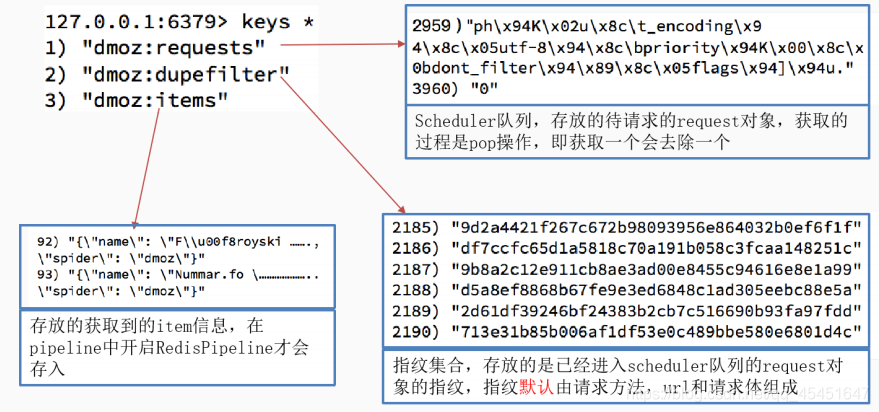
(二)运⾏结束后redis中多了三个键
dmoz:requests #存放的是待爬取的requests对象
dmoz:item #爬取到的信息
dmoz:dupefilter #爬取的requests的指纹 ```
- 1
- 2
- 3
六、如何改写分布式爬虫
(一)在原有的scrapy基础上进行更改
如何把普通的爬虫文件改写成分布式爬虫文件 普通的爬虫 1. 创建Scrapy项目/爬虫项目 2. 明确爬取的目标 3. 保存数据 改写成分布式 1. 改写爬虫文件 1.1 导入模块 1.2 继承类 1.3 把start_urs --> redis_key 2. 改写配置文件 #将以下内容添加到setting # #-------- # USER_AGENT = 'scrapy-redis (+https://github.com/rolando/scrapy-redis)' # 去重过滤 DUPEFILTER_CLASS = "scrapy_redis.dupefilter.RFPDupeFilter" # 指定Scheduler队列 SCHEDULER = "scrapy_redis.scheduler.Scheduler" SCHEDULER_PERSIST = True ITEM_PIPELINES = { 'example.pipelines.ExamplePipeline': 300, 'scrapy_redis.pipelines.RedisPipeline': 400, } #-------
- 1
- 2
- 3
- 4
- 5
- 6
- 7
- 8
- 9
- 10
- 11
- 12
- 13
- 14
- 15
- 16
- 17
- 18
- 19
- 20
- 21
- 22
- 23
- 24
- 25
- 26
- 27
- 28
- 29
- 30
- 31
七、案例演示
(一)需求:
1.抓取当当图书的大标题,中标题,以及小标题。
2.通过跳转小标题链接进行抓取图书的图片,以及链接


(二) 代码实现
1.前期准备
- 创建scrapy 项目
。scrapy startproject xxx
。cd xxx
。scrapy genspider dangdang dangdang.com
(进入爬虫文件后先去改 start_urls 起始url)
2.分析页面
a.大分类
- 在 div class="con flq_body"下面 class=“level_one” dl dt span文本
注意 span标签没有 (在源码中没有) 有的大标题是多个 通过//找到所有 用extract()
b.中分类
- 中分类的内容 都在div class=“inner_dl” dt 中分类 注意 中分类 dt标签下面也有一个a标签 所有这里也用//找文本数据
c. 小分类
- dd a 注意 span标签没有 (在源码中没有)
d.图片,图书名称
小分类的页面结构 图书的名字以及图片的src 所有的数据都是在ul标签里面 。
下面的li 图片的src a img @src 图书的名字 p a text() 注意 在网页的源码当
中 src =‘images/model/guan/url_none.png’ 我们要找的是 data-original 注意 网页源码 和elements选项当中的数据
总结:
1.先爬取所有大标签,通过遍历,在从中爬取中标签,以及小标签
2.通过一层层遍历进行反复爬取
3.然后通过小标签进行跳转到另一个函数,将爬取图片,与数名的任务交给另一个函数
注意
在网页的源码当中 src = ‘images/model/guan/url_none.png’ 我们要找的是 data-original
注意 网页源码 和 elements选项当中的数据
3.实现逻辑
看代码
4.改写程序
- 改写爬虫文件
1.1 导入模块
1.2 继承类
1.3 把start_urs --> redis_key- 改写配置文件
5.代码(改写后)
- 爬虫文件
import scrapy
from copy import deepcopy
from scrapy_redis.spiders import RedisSpider
import redis


'''
改写成分布式
1. 改写爬虫文件
1.1 导入模块
1.2 继承类
1.3 把start_urs --> redis_key
2. 改写配置文件
'''

# https://pypi.douban.com/simple
class DangdangSpider(RedisSpider):
    name = 'dangdang'
    allowed_domains = ['dangdang.com']
    #start_urls = ['http://book.dangdang.com/']
    redis_key = 'dangdang'

    def parse(self, response):
        div_list=response.xpath('//div[@class="con flq_body"]/div')
        for div in div_list:
            item={}
            item['b_cate']=div.xpath('./dl/dt//text()').extract()
            item['b_cate']=[i.strip() for i in item['b_cate'] if len(i.strip())>0]

            # if  item['b_cate']:
            #     item['b_cate'] = [i.strip() for i in item['b_cate'] if len(i.strip()) > 0]


            dl_list=div.xpath('.//dl[@class="inner_dl"]')
            for dl in dl_list:
                #获取中分类
                item['m_cate']=dl.xpath('./dt//text()').extract()
                item['m_cate'] = [i.strip() for i in item['m_cate'] if len(i.strip()) > 0]


                # 获取小分类
                a_list=dl.xpath('./dd/a')
                for a in a_list:
                    item['s_cate']=a.xpath('./text()').extract_first()
                    #获取列表页面url
                    item['s_href'] = a.xpath('./@href').extract_first()
                    if item['s_href'] is not None:
                        yield scrapy.Request(
                            url=item['s_href'],
                            callback=self.parse_book_list,
                            meta={"item":deepcopy(item)}
                        )
                    print(item)

    def parse_book_list(self,response):
        item=response.meta.get('item')
        li_list=response.xpath('//ul[@class="list_aa "]/li')
        for li in li_list:
            #获取图片的url
            item['book_img'] = li.xpath('./a[@class="img"]/img/@src').extract_first()
            if item['book_img']=="images/model/guan/url_none.png": #当前页源码与网页源码不同,需要以网页源码为准
                item['book_img']=li.xpath('./a[@class="img"]/img/@data-original').extract_first()
            #获取图片的名字

            item['book_name']=li.xpath('./p[@class="name"]/a/@title').extract_first()
            #print(item)
            yield item
- 1
- 2
- 3
- 4
- 5
- 6
- 7
- 8
- 9
- 10
- 11
- 12
- 13
- 14
- 15
- 16
- 17
- 18
- 19
- 20
- 21
- 22
- 23
- 24
- 25
- 26
- 27
- 28
- 29
- 30
- 31
- 32
- 33
- 34
- 35
- 36
- 37
- 38
- 39
- 40
- 41
- 42
- 43
- 44
- 45
- 46
- 47
- 48
- 49
- 50
- 51
- 52
- 53
- 54
- 55
- 56
- 57
- 58
- 59
- 60
- 61
- 62
- 63
- 64
- 65
- 66
- 67
- 68
- setting页面
# -*- coding: utf-8 -*-

# Scrapy settings for book project
#
# For simplicity, this file contains only settings considered important or
# commonly used. You can find more settings consulting the documentation:
#
#     https://docs.scrapy.org/en/latest/topics/settings.html
#     https://docs.scrapy.org/en/latest/topics/downloader-middleware.html
#     https://docs.scrapy.org/en/latest/topics/spider-middleware.html

BOT_NAME = 'book'

SPIDER_MODULES = ['book.spiders']
NEWSPIDER_MODULE = 'book.spiders'
# LOG_LEVEL = 'WARNING'


# 去重过滤
DUPEFILTER_CLASS = "scrapy_redis.dupefilter.RFPDupeFilter"
# 指定Scheduler队列
SCHEDULER = "scrapy_redis.scheduler.Scheduler"
SCHEDULER_PERSIST = True

# Crawl responsibly by identifying yourself (and your website) on the user-agent
#USER_AGENT = 'book (+http://www.yourdomain.com)'

# Obey robots.txt rules
ROBOTSTXT_OBEY = False

# Configure maximum concurrent requests performed by Scrapy (default: 16)
#CONCURRENT_REQUESTS = 32

# Configure a delay for requests for the same website (default: 0)
# See https://docs.scrapy.org/en/latest/topics/settings.html#download-delay
# See also autothrottle settings and docs
#DOWNLOAD_DELAY = 3
# The download delay setting will honor only one of:
#CONCURRENT_REQUESTS_PER_DOMAIN = 16
#CONCURRENT_REQUESTS_PER_IP = 16

# Disable cookies (enabled by default)
#COOKIES_ENABLED = False

# Disable Telnet Console (enabled by default)
#TELNETCONSOLE_ENABLED = False

# Override the default request headers:
DEFAULT_REQUEST_HEADERS = {
  'user-agent': 'Mozilla/5.0 (Windows NT 10.0; Win64; x64) AppleWebKit/537.36 (KHTML, like Gecko) Chrome/87.0.4280.141 Safari/537.36',
  'Accept': 'text/html,application/xhtml+xml,application/xml;q=0.9,*/*;q=0.8',
  'Accept-Language': 'en',
}

# Enable or disable spider middlewares
# See https://docs.scrapy.org/en/latest/topics/spider-middleware.html
#SPIDER_MIDDLEWARES = {
#    'book.middlewares.BookSpiderMiddleware': 543,
#}

REDIS_HOST = '127.0.0.1'
REDIS_PORT = 6379
# Enable or disable downloader middlewares
# See https://docs.scrapy.org/en/latest/topics/downloader-middleware.html
#DOWNLOADER_MIDDLEWARES = {
#    'book.middlewares.BookDownloaderMiddleware': 543,
#}

# Enable or disable extensions
# See https://docs.scrapy.org/en/latest/topics/extensions.html
#EXTENSIONS = {
#    'scrapy.extensions.telnet.TelnetConsole': None,
#}

# Configure item pipelines
# See https://docs.scrapy.org/en/latest/topics/item-pipeline.html
ITEM_PIPELINES = {
   'book.pipelines.BookPipeline': 300,
   'scrapy_redis.pipelines.RedisPipeline': 400,
}

# Enable and configure the AutoThrottle extension (disabled by default)
# See https://docs.scrapy.org/en/latest/topics/autothrottle.html
#AUTOTHROTTLE_ENABLED = True
# The initial download delay
#AUTOTHROTTLE_START_DELAY = 5
# The maximum download delay to be set in case of high latencies
#AUTOTHROTTLE_MAX_DELAY = 60
# The average number of requests Scrapy should be sending in parallel to
# each remote server
#AUTOTHROTTLE_TARGET_CONCURRENCY = 1.0
# Enable showing throttling stats for every response received:
#AUTOTHROTTLE_DEBUG = False

# Enable and configure HTTP caching (disabled by default)
# See https://docs.scrapy.org/en/latest/topics/downloader-middleware.html#httpcache-middleware-settings
#HTTPCACHE_ENABLED = True
#HTTPCACHE_EXPIRATION_SECS = 0
#HTTPCACHE_DIR = 'httpcache'
#HTTPCACHE_IGNORE_HTTP_CODES = []
#HTTPCACHE_STORAGE = 'scrapy.extensions.httpcache.FilesystemCacheStorage'
- 1
- 2
- 3
- 4
- 5
- 6
- 7
- 8
- 9
- 10
- 11
- 12
- 13
- 14
- 15
- 16
- 17
- 18
- 19
- 20
- 21
- 22
- 23
- 24
- 25
- 26
- 27
- 28
- 29
- 30
- 31
- 32
- 33
- 34
- 35
- 36
- 37
- 38
- 39
- 40
- 41
- 42
- 43
- 44
- 45
- 46
- 47
- 48
- 49
- 50
- 51
- 52
- 53
- 54
- 55
- 56
- 57
- 58
- 59
- 60
- 61
- 62
- 63
- 64
- 65
- 66
- 67
- 68
- 69
- 70
- 71
- 72
- 73
- 74
- 75
- 76
- 77
- 78
- 79
- 80
- 81
- 82
- 83
- 84
- 85
- 86
- 87
- 88
- 89
- 90
- 91
- 92
- 93
- 94
- 95
- 96
- 97
- 98
- 99
- 100
- 101
- 102
- 执行页面
from scrapy import cmdline
cmdline.execute(['scrapy','crawl','dangdang'])
- 1
- 2
6.后续内容
- 1.此时爬虫程序进入一个在阻塞状态

- 2.我们需要在redis中 PUSH redis_key start_url,这时阻塞状态解除。