
热门标签
热门文章
- 1win11出现安全中心空白和IT管理员已限制对此应用的某些区域的访问_win11被it管理员限制的原因
- 2Docker部署MinIO对象存储服务器结合内网穿透实现远程访问
- 3【愚公系列】2023年12月 Java教学课程 213-ElasticSearch(数据聚合、数据补全、数据同步)
- 4【2023 英特尔On技术创新大会直播 |我与英特尔的初次相遇】—— AIPC探索下一代的物联网时代
- 5计算机教师招聘笔试总结_大专计算机老师笔试
- 6基于Python的Selenium详细教程_pycharm安装selenium
- 7鸿蒙(HarmonyOS)应用开发——从网络获取数据(题目答案)_web组件onconfirm(callback: (event?: { url: string; m
- 8MacBook安装Golang Oracle数据库驱动程序_“libclntsh.dylib.19.1”不是来自app store的app。
- 9【记录】vue-cli+element-ui 制作一个侧边栏组件(抽屉Drawer)_vue3+抽屉
- 10基于Elasticsearch + Fluentd + Kibana(EFK)搭建日志收集管理系统_kibana fluentd
当前位置: article > 正文
uniapp微信小程序获取屏幕宽高,胶囊按钮的位置以及Vue3.2在css层获取逻辑层的数据_uniapp 获取屏幕宽度
作者:思考机器5 | 2024-01-29 10:44:28
赞
踩
uniapp 获取屏幕宽度
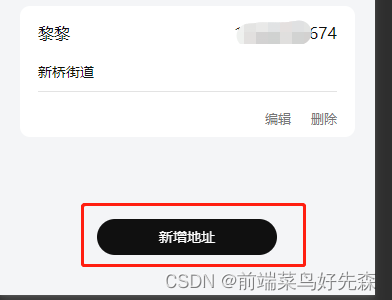
场景:在开发小程序时需要把使用了固定定位的按钮放在屏幕的中间,考虑了用 vw vh % 但是还要减去按钮宽的一半,所以在这里不适用。以下是uniapp中自带的获取屏幕的高宽等数据,我在这里顺便记录一些其他小知识
1.使用uni.getWindowInfo()
uniapp官网介绍: uni.getWindowInfo()
uni.getWindowInfo() 使用:
- // 获取窗口信息
- let getWindowInfo = uni.getWindowInfo()
- console.log(getWindowInfo.screenHeight);//屏幕高度
- console.log(getWindowInfo.screenWidth);//屏幕宽度
- console.log(getWindowInfo.windowHeight);//可操作页面高度
- console.log(getWindowInfo.windowWidth);//可操作页面宽度
- console.log(getWindowInfo);
- console.log('获取窗口信息');
uni.getSystemInfo() 使用:
- // 系统信息的概念
- uni.getSystemInfo({
- success: res => {
- console.log(res);
- console.log(res.screenHeight);//屏幕高度
- console.log(res.screenWidth);//屏幕宽度
- console.log(res.windowHeight);//可操作页面高度
- console.log(res.windowWidth);//可操作页面宽度
- }
- })
项目中应用场景还原:
逻辑层代码:
const screenWidths = ref<string>(uni.getWindowInfo().screenWidth - 180 + 'rpx')css层代码:
- .add-address {
- position: fixed;
- bottom: 80rpx;
- left: v-bind(screenWidths);
- width: 360rpx;
- height: 72rpx;
- background: #101010;
- border-radius: 36rpx;
- font-size: 28rpx;
- font-family: PingFang SC-Medium, PingFang SC;
- font-weight: 500;
- color: #FFFFFF;
- line-height: 72rpx;
- text-align: center;
- }
实现效果:
v-bind介绍
是vue3.2中增加了一个style v-bind的特性,简单来说就是把我们script中的数据可以在style标签中使用
2.获取胶囊按钮的位置信息 getMenuButtonBoundingClientRect()
uniapp官网介绍: getMenuButtonBoundingClientRect()
getMenuButtonBoundingClientRect() 使用
- let menuButtonInfo = uni.getMenuButtonBoundingClientRect()
- console.log(menuButtonInfo.width) //宽度,单位:px
- console.log(menuButtonInfo.height) //高度,单位:px
- console.log(menuButtonInfo.top) //上边界坐标,单位:px
- console.log(menuButtonInfo.right) //右边界坐标,单位:px
- console.log(menuButtonInfo.bottom) //下边界坐标,单位:px
- console.log(menuButtonInfo.left) //左边界坐标,单位:px
-
-
声明:本文内容由网友自发贡献,不代表【wpsshop博客】立场,版权归原作者所有,本站不承担相应法律责任。如您发现有侵权的内容,请联系我们。转载请注明出处:https://www.wpsshop.cn/article/detail/42731
推荐阅读

相关标签

