
热门标签
热门文章
- 1Retrofit基础讲解(上)_call
- 2嵌入式培训机构四个月实训课程笔记(完整版)-Linux ARM平台编程第一天-嵌入式系统概述(物联技术666)
- 3CentOS7 安装配置FTP服务器详解_centos7 ftp
- 42023最新版Android逆向教程——第1天:Android Studio的安装与配置_安卓逆向
- 5【Springboot系列】SpringBoot整合Jpa
- 6《数据库原理》课程设计-mysql_数据库原理课程设计
- 7Qt开发(七)Qt 开发中编译报错:QIODevice::read: device not open_qiodevice::read device not open
- 8【AI】ChatGPT和文心一言那个更好用
- 9自动化测试现状的思考
- 10RT-Thread: 串口操作、增加串口、串口函数
当前位置: article > 正文
uniapp ios 授权弹窗 uniapp弹出框怎么实现_uniapp 自定义操作系统权限弹框
作者:算法创新者 | 2024-01-28 23:16:57
赞
踩
uniapp 自定义操作系统权限弹框
新版本的信息弹窗组件
可以弹出很多条信息,并单独控制消失时间、点击消失。
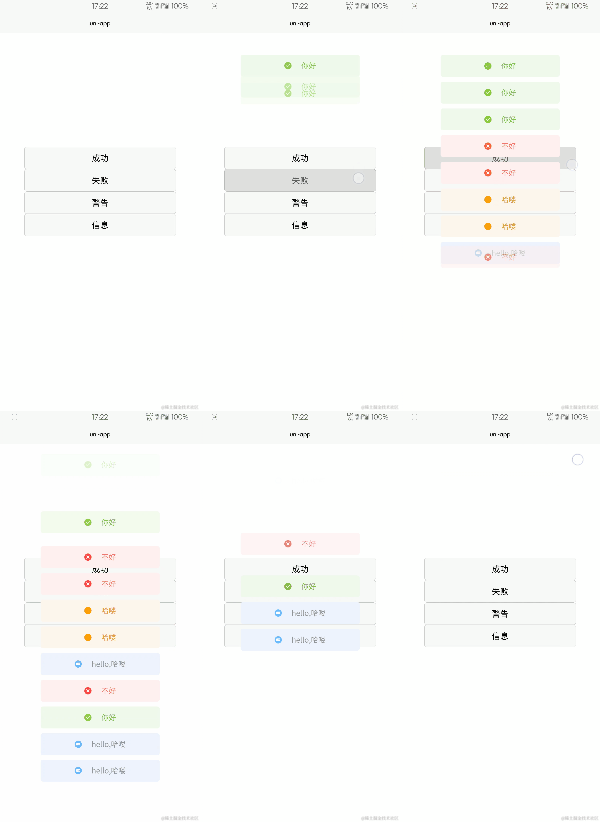
用循环来生成很多个弹窗,用this.$refs来传值,并添加数组。
1.布局
2.js
具体流程。需要一个弹窗,基本信息传入组件,处理后添加入数组,显示弹窗,过几秒消失,从数组移除元素。
methods:{
       //初始化一些数据
            init:function(list){
                if (list.type == 'success') {
                    list.icon = '../../static/xuan-popup/success.png';
                    list.typeClass='mpopup-success';
                    return list;
                }
                if (list.type == 'warn') {
                    list.icon = '../../static/xuan-popup/warn.png';
                    list.typeClass='mpopup-warn';
                    return list;
                }
                if (list.type == 'info') {
                    list.icon = '../../static/xuan-popup/info.png';
                    list.typeClass='mpopup-info';
                    return list;
                }
                if (list.type == 'err') {
                    list.icon = '../../static/xuan-popup/err.png';
                    list.typeClass='mpopup-err';
                    return list;
                }
            },
            open:function(list){
                if(!this.isdistance){this.distance=0}
                let uuid=this.guid();
                //初始化
                let new_list=this.init(list);
                new_list.uuid=uuid;
                //添加进数组
                this.popup_list.push(new_list);
                if(typeof(new_list.isClick)!='boolean'){new_list.isClick=false;}
                //可消失
                if(!new_list.isClick){
                    this.close(uuid,new_list.timeout);
                }

            },
            close:function(uuid,timeout){
                //退出动画之后,短暂延迟后移除本元素
                this.fade_out_animator(uuid,timeout).then(res=>{
                    setTimeout(()=>{
                        for(let i=0;i<this.popup_list.length;i++){
                            if(this.popup_list[i].uuid==res){
                                //移除本元素
                                this.popup_list.splice(i,1);
                                this.$forceUpdate()
                            }
                        }
                    },250)
                });
            },
            fade_out_animator:function(uuid,timeout){
                //timeout秒后退出
                if(!timeout||typeof(timeout)!='number'){timeout=3000;}
                return new Promise(res=>{
                    setTimeout(()=>{
                        for(let i=0;i<this.popup_list.length;i++){
                            if(this.popup_list[i].uuid==uuid){
                                //添加退出动画
                                this.popup_list[i].animator='fade_Top';
                                res(uuid);
                            }
                        }
                    },timeout)
                })
            },
            //可点击关闭的弹出框
            remove_popup:function(target){
                console.log(target)
                if(this.popup_list[target].isClick){
                    this.popup_list[target].animator='fade_Top';
                    setTimeout(()=>{
                        this.popup_list.splice(target,1);
                        this.$forceUpdate();
                    },250)
                }
            },
            //生成uuid
            guid:function() {
                return 'xxxxxxxx-xxxx-4xxx-yxxx-xxxxxxxxxxxx'.replace(/[xy]/g, function(c) {
                    var r = Math.random()*16|0, v = c == 'x' ? r : (r&0x3|0x8);
                    return v.toString(16);
                });
            }
        }
1.2.3.4.5.6.7.8.9.10.11.12.13.14.15.16.17.18.19.20.21.22.23.24.25.26.27.28.29.30.31.32.33.34.35.36.37.38.39.40.41.42.43.44.45.46.47.48.49.50.51.52.53.54.55.56.57.58.59.60.61.62.63.64.65.66.67.68.69.70.71.72.73.74.75.76.77.78.79.80.81.82.83.84.85.86.87.

- 1
- 2
- 3
- 4
- 5
- 6
- 7
- 8
- 9
- 10
- 11
- 12
- 13
- 14
- 15
- 16
- 17
- 18
- 19
- 20
- 21
- 22
- 23
- 24
- 25
- 26
- 27
- 28
- 29
- 30
- 31
- 32
- 33
- 34
- 35
- 36
- 37
- 38
- 39
- 40
- 41
- 42
- 43
- 44
- 45
- 46
- 47
- 48
- 49
- 50
- 51
- 52
- 53
- 54
- 55
- 56
- 57
- 58
- 59
- 60
- 61
- 62
- 63
- 64
- 65
- 66
- 67
- 68
- 69
- 70
- 71
- 72
- 73
- 74
- 75
- 76
- 77
- 78
- 79
- 80
- 81
- 82
- 83
- 84
- 85
- 86
- 87
- 88
3.用法
import mpopup from '../../components/xuan-popup/xuan-popup.vue'
    import Popup from '../../components/xuan-popup/popup.js'
    export default {
        components:{
            mpopup
        },
        data() {
            return {
                title: 'Hello'
            }
        },
        methods: {
            //  *数组形式传值
            //  *type,类型 success warn info err(string)
            //  *content,内容(string)
            //  *timeout,消失时间(Number)
            //  *isClick,是否点击消失(Boolean)
            pop:function(){
                this.$refs.mpopup.open(Popup.setPopup('success','我可以',false));
            },
            popp:function(){
                this.$refs.mpopup.open(Popup.setPopup('err','错误',false));
            },
            poppp:function(){
                this.$refs.mpopup.open(Popup.setPopup('warn','警告',1000,false));
            },
            popppp:function(){
          //需要点击消失时,消失时间填0就好
                this.$refs.mpopup.open(Popup.setPopup('info','信息',0,true));
            }
        }
    }
1.2.3.4.5.6.7.8.9.10.11.12.13.14.15.16.17.18.19.20.21.22.23.24.25.26.27.28.29.30.31.32.
- 1
- 2
- 3
- 4
- 5
- 6
- 7
- 8
- 9
- 10
- 11
- 12
- 13
- 14
- 15
- 16
- 17
- 18
- 19
- 20
- 21
- 22
- 23
- 24
- 25
- 26
- 27
- 28
- 29
- 30
- 31
- 32
- 33
1.0(2019-08-09)
前面写android混编学到了很多,没有时间全部积累起来,后面会慢慢记录的。
最近很久没有记录了,因为一个新的uniapp的项目。最近在做这个。
看了智慧团建上的弹窗很喜欢,我也要整一套(简易版)
今天兴致大发居然布了插件:** http://ext.dcloud.net.cn/plugin?id=672
很简单的组件化,我们来看一看吧
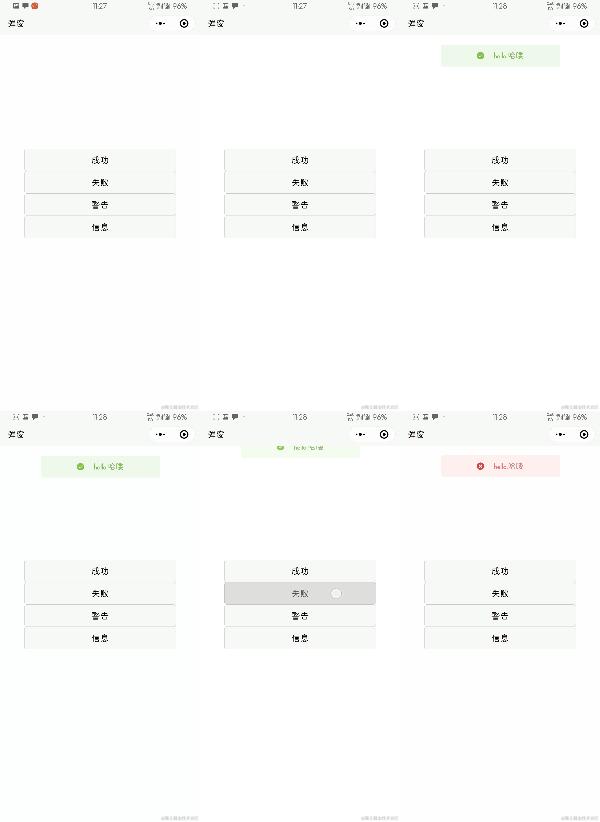
一、写布局
一个大容器一张图片一个文本
css就不贴上来了,看的眼花。可以下载来看。
二、js
定义一些属性,用来决定弹什么样的窗口,显示一些什么内容
export default{
        data() {
            return {
                icon: '',//图标
                content: '',//内容
                color: '',//背景颜色
                colortext: '',//文本颜色
                coloricon: '',//图标颜色
                isshow: false,//是否显示
                activeClass:'mpopup',//class
                animator:'fade_Down'//动画class
            };
        },
        //属性
        props: {
            //什么类型的弹窗
            types: {
                type: String,
                value: 'success'
            },
            //弹窗的内容
            span: {
                type: String,
                value: '这是一个土司'
            },
            //是否显示
            show: {
                type: String,
                value: ''
            }
        },
        computed: {
            newshow() {
                return this.show;
            }
        },
        watch: {
            //监听属性传入的值的变化
            newshow(val) {
                if (val == 'true') {
                    this.open();//显示弹窗
                } else {
                    this.close();//隐藏弹窗
                }
            }
        },
        onLoad() {},
        methods: {
            init: function() {
                this.content = this.span;
                //成功类型
                if (this.types == 'success') {
                    this.icon = '../../static/images/success.png';
                    this.color = '#F0F9EB';
                    this.colortext = '#67C23A';
                    this.coloricon = '#67C23A';
                }
                //警告类型
                if (this.types == 'warn') {
                    this.icon = '../../static/images/warn.png';
                    this.color = '#FDF6EC';
                    this.colortext = '#E6A23C';
                    this.coloricon = '#E6A23C';
                }
                //信息类型
                if (this.types == 'info') {
                    this.icon = '../../static/images/info.png';
                    this.color = '#EDF2FC';
                    this.colortext = '#909399';
                    this.coloricon = '#909399';
                }
                //错误类型
                if (this.types == 'err') {
                    this.icon = '../../static/images/err.png';
                    this.color = '#FEF0F0';
                    this.colortext = '#F56C6C';
                    this.coloricon = '#F56C6C';
                }
            },
            open: function() {
                this.animator='fade_Down';//进入动画
                this.init();
                this.isshow = true;
            },
            close: function() {
                this.animator='fade_Top';//退出动画

            }
        }
    }
1.2.3.4.5.6.7.8.9.10.11.12.13.14.15.16.17.18.19.20.21.22.23.24.25.26.27.28.29.30.31.32.33.34.35.36.37.38.39.40.41.42.43.44.45.46.47.48.49.50.51.52.53.54.55.56.57.58.59.60.61.62.63.64.65.66.67.68.69.70.71.72.73.74.75.76.77.78.79.80.81.82.83.84.85.86.87.88.89.90.
- 1
- 2
- 3
- 4
- 5
- 6
- 7
- 8
- 9
- 10
- 11
- 12
- 13
- 14
- 15
- 16
- 17
- 18
- 19
- 20
- 21
- 22
- 23
- 24
- 25
- 26
- 27
- 28
- 29
- 30
- 31
- 32
- 33
- 34
- 35
- 36
- 37
- 38
- 39
- 40
- 41
- 42
- 43
- 44
- 45
- 46
- 47
- 48
- 49
- 50
- 51
- 52
- 53
- 54
- 55
- 56
- 57
- 58
- 59
- 60
- 61
- 62
- 63
- 64
- 65
- 66
- 67
- 68
- 69
- 70
- 71
- 72
- 73
- 74
- 75
- 76
- 77
- 78
- 79
- 80
- 81
- 82
- 83
- 84
- 85
- 86
- 87
- 88
- 89
- 90
- 91
好了我们来看看怎么使用
三、使用
在需要用到的界面引入组件或者全局引入都可以
有三个属性我们需要用js来控制,每次赋值太繁琐
所以就写了个方法,每次调用就好
引入刚才的两个js
import Popup from ‘@/static/js/popup.js’;
import mpopup from ‘…/…/components/popup/popup.vue’;
export default {
    data() {
        return {
            ispop:"",//是否显示弹窗
            types:"err",//弹窗类型
            span:"这是一个土司",//弹窗内容
            poptime:2000
        };
    },
    components:{
        mpopup
    },
    onLoad() {},
    methods: {
        pop:function(){
            Popup.setPopup(this,"success","hello,哈喽",this.poptime);
        },
        popp:function(){
            Popup.setPopup(this,"err","hello,哈喽",this.poptime);
        },
        poppp:function(){
            Popup.setPopup(this,"warn","hello,哈喽",this.poptime);
        },
        popppp:function(){
            Popup.setPopup(this,"info","hello,哈喽",this.poptime);
        }
    }
};
1.2.3.4.5.6.7.8.9.10.11.12.13.14.15.16.17.18.19.20.21.22.23.24.25.26.27.28.
- 1
- 2
- 3
- 4
- 5
- 6
- 7
- 8
- 9
- 10
- 11
- 12
- 13
- 14
- 15
- 16
- 17
- 18
- 19
- 20
- 21
- 22
- 23
- 24
- 25
- 26
- 27
- 28
- 29
布局:
这样就OK了
当时思路就是用属性来控制弹窗,组件就监听传来的属性值的变化做出改变。
用class来控制弹窗的进入和退出动画
声明:本文内容由网友自发贡献,不代表【wpsshop博客】立场,版权归原作者所有,本站不承担相应法律责任。如您发现有侵权的内容,请联系我们。转载请注明出处:https://www.wpsshop.cn/article/detail/42143
推荐阅读

相关标签

