
热门标签
热门文章
- 1php反序列化之pop链构造(基于重庆橙子科技靶场)
- 2阿里云服务部署docker容器
- 3HDFS相关API操作
- 4编译和链接(1)
- 5Go Client 核心解析
- 6【Ubuntu】ubuntu22.04使用VNC链接服务器远程桌面_ubuntu vnc客户端
- 7kubernetes--pod的生命周期管理(PostStart,PreStop)
- 8PMP 2022-10-10 (每日一练)_manfrit和frank是两个项目经理,在他们的职业生涯中一直相互支持。在一次偶然的午
- 9决策树算法预测NBA赛事结果_篮球比赛得分预测分析算法
- 10使用Kubernetes进行CI/CD的最佳实践_k8s cicd流程简答
当前位置: article > 正文
阿里云服务器 ECS 新建用户_ecs-usery账号用户创建
作者:算法设计者 | 2024-01-16 15:07:54
赞
踩
ecs-usery账号用户创建
阿里云服务器 ECS 新建用户

- 添加用户:dy
adduser dy
- 1
root@ding:~# adduser dy
Adding user `dy' ...
Adding new group `dy' (1000) ...
Adding new user `dy' (1000) with group `dy' ...
Creating home directory `/home/dy' ...
Copying files from `/etc/skel' ...
Enter new UNIX password:
Retype new UNIX password:
passwd: password updated successfully
Changing the user information for dy
Enter the new value, or press ENTER for the default
        Full Name []:
        Room Number []:
        Work Phone []:
        Home Phone []:
        Other []:
Is the information correct? [Y/n] y
root@ding:~# root@ding:~# adduser dy
Adding user `dy' ...
Adding new group `dy' (1000) ...
Adding new user `dy' (1000) with group `dy' ...
Creating home directory `/home/dy' ...
Copying files from `/etc/skel' ...
Enter new UNIX password:
Retype new UNIX password:
passwd: password updated successfully
root@ding:~#

- 1
- 2
- 3
- 4
- 5
- 6
- 7
- 8
- 9
- 10
- 11
- 12
- 13
- 14
- 15
- 16
- 17
- 18
- 19
- 20
- 21
- 22
- 23
- 24
- 25
- 26
- 27
- 增加dy运行sudo命令的权限
visudo
- 1
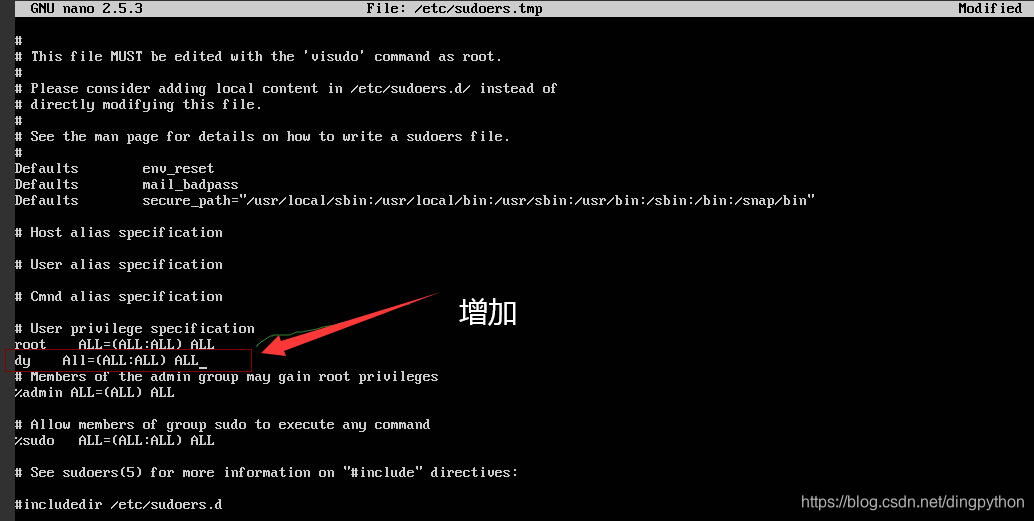
鼠标不好用,只能用光标;修改完成后,Ctrl+Shift+o保存,再来个回车;Ctrl+Shift+x退出。
su dy
- 1
删除用户
deluser dy
- 1
声明:本文内容由网友自发贡献,不代表【wpsshop博客】立场,版权归原作者所有,本站不承担相应法律责任。如您发现有侵权的内容,请联系我们。转载请注明出处:https://www.wpsshop.cn/article/detail/40481
推荐阅读

相关标签

