
热门标签
热门文章
- 1Node.js Express框架 写后台接口API_node express 写后端api
- 2【Pytorch】利用PyTorch实现图像识别_pytorch图像识别
- 3CSS中强大的EM(转)_写一个公用的em转换 css
- 4Docker笔记之DockerCompose+yaml详解_docker-compose.yaml
- 5S3C2440驱动开发(四)_s3c2440蜂鸣器驱动原理
- 6SpringSecurity - WebFlux环境下动态角色权限_resouceconfig reactiveauthorizationmanager
- 7【备考05组02号】第一届蓝桥杯高职组省赛题解_蓝桥杯专科院校题目
- 8( python )OpenCV特征匹配函数错误cv2.xfeatures2d_SURF.create()_python cv2提取特征不成功
- 9汇编语言 统计一组16位二进制数据中的正负数个数并显示结果_汇编语言统计x中正数个数送y,负数个数送z,零的个数送w,并显示y,z,w
- 10python代码雨_pygame实现烟雨蒙蒙下彩虹雨
当前位置: article > 正文
HDFS相关API操作
作者:infabc | 2024-01-16 15:01:33
赞
踩
HDFS相关API操作
API文档
HDFS API官方文档:https://hadoop.apache.org/docs/r3.3.1/api/index.html
环境配置
将Hadoop的Jar包解压到非中文路径(例如D:\hadoop\hadoop-2.7.2)
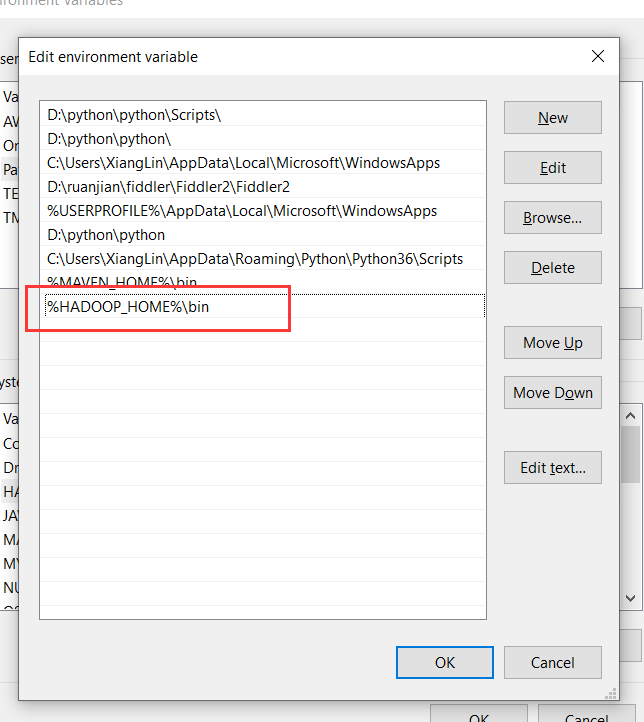
配置HADOOP_HOME环境变量

配置Path环境变量
API操作
准备工作
创建一个[Maven]工程HdfsClientDemo
引入hadoop-client依赖
<dependencies>
        <dependency>
            <grupId>org.apache.hadoop</groupId>
            <artifactId>hadoop-client</artifactId>
            <version>2.7.2</version>
        </dependency>
        <dependency>
            <groupId>junit</groupId>
            <artifactId>junit</artifactId>
            <version>4.12</version>
        </dependency>
        <dependency>
            <groupId>org.slf4j</groupId>
            <artifactId>slf4j-log4j12</artifactId>
            <version>1.7.30</version>
        </dependency>
    </dependencies>

- 1
- 2
- 3
- 4
- 5
- 6
- 7
- 8
- 9
- 10
- 11
- 12
- 13
- 14
- 15
- 16
- 17
创建HdfsClient 类
创建文件夹
public class HdfsClient {
    //创建目录
    @Test
    public void testMkdir() throws URISyntaxException, IOException, InterruptedException {
        //连接的集群nn地址
        URI uri = new URI("hdfs://node1:8020");
        //创建一个配置文件
        Configuration configuration = new Configuration();
        //用户
        String user = "atguigu";
        //1、获取到了客户端对象
        FileSystem fileSystem = FileSystem.get(uri, configuration, user);
        //2、创建一个文件夹
        fileSystem.mkdirs(new Path("/xiyou/huaguoshan"));
        //3、关闭资源
        fileSystem.close();
    }
}
- 1
- 2
- 3
- 4
- 5
- 6
- 7
- 8
- 9
- 10
- 11
- 12
- 13
- 14
- 15
- 16
- 17
- 18
上面这样写代码有点冗余,我们通过AOP切面将初始化和关流的操作拆分出来,后续只需要关注核心逻辑就可以了。
实际开发中这样设计也不太好,建议搞个工厂类
public class HdfsClient {
    private FileSystem fs;

    @Before
    public void init() throws URISyntaxException, IOException, InterruptedException {
        // 连接的集群nn地址
        URI uri = new URI("hdfs://node1:8020");
        // 创建一个配置文件
        Configuration configuration = new Configuration();
        configuration.set("dfs.replication", "2");
        // 用户
        String user = "atguigu";

        // 1、获取到了客户端对象
        fs = FileSystem.get(uri, configuration, user);
    }

     @Test
    public void testMkdir() throws URISyntaxException, IOException, InterruptedException {
        //创建一个文件夹
        fs.mkdirs(new Path("/xiyou/huaguoshan2"));
    }


    @After
    public void close() throws IOException {
        // 3、关闭资源
        fs.close();
    }
 }
- 1
- 2
- 3
- 4
- 5
- 6
- 7
- 8
- 9
- 10
- 11
- 12
- 13
- 14
- 15
- 16
- 17
- 18
- 19
- 20
- 21
- 22
- 23
- 24
- 25
- 26
- 27
- 28
- 29
- 30
- 31
- 32
文件上传
@Test
 public void testPut() throws IOException {
    // 参数解读,参数1:表示删除原数据、参数2:是否允许覆盖、参数3:原数据路径、参数4:目的地路径
    fs.copyFromLocalFile(false, true, new Path("D:\\bigData\\file\\sunwukong.txt"), new Path("hdfs://node1/xiyou/huaguoshan"));
 }
- 1
- 2
- 3
- 4
- 5
- 6
文件下载
    //文件下载
    @Test
    public void testGet() throws IOException {
        //参数的解读,参数一:原文件是否删除、参数二:原文件路径HDFS、参数三:Windows目标地址路径、参数四:crc校验
//        fs.copyToLocalFile(false, new Path("hdfs://node1/xiyou/huaguoshan2/sunwukong.txt"), new Path("D:\\bigData\\file\\download"), false);
        fs.copyToLocalFile(false, new Path("hdfs://node1/xiyou/huaguoshan2/"), new Path("D:\\bigData\\file\\download"), false);
//      fs.copyToLocalFile(false, new Path("hdfs://node1/a.txt"), new Path("D:\\"), false);
    }
- 1
- 2
- 3
- 4
- 5
- 6
- 7
- 8
文件删除
//删除
@Test
public void testRm() throws IOException {
    //参数解读,参数1:要删除的路径、参数2:是否递归删除
    //删除文件
    //fs.delete(new Path("/jdk-8u212-linux-x64.tar.gz"),false);

    //删除空目录
    //fs.delete(new Path("/xiyou"), false);

    //删除非空目录
    fs.delete(new Path("/jinguo"), true);
}
- 1
- 2
- 3
- 4
- 5
- 6
- 7
- 8
- 9
- 10
- 11
- 12
- 13
文件的更名和移动
//文件的更名和移动
@Test
public void testmv() throws IOException {
    //参数解读,参数1:原文件路径、参数2:目标文件路径
    //对文件名称的修改
    fs.rename(new Path("/input/word.txt"), new Path("/input/ss.txt"));

    //文件的移动和更名
    fs.rename(new Path("/input/ss.txt"), new Path("/cls.txt"));

    //目录更名
    fs.rename(new Path("/input"), new Path("/output"));
}
- 1
- 2
- 3
- 4
- 5
- 6
- 7
- 8
- 9
- 10
- 11
- 12
- 13
获取文件详细信息
    //获取文件详细信息
    @Test
    public void fileDetail() throws IOException {
        //获取所有文件信息
        RemoteIterator<LocatedFileStatus> listFiles = fs.listFiles(new Path("/"), true);

        //遍历文件
        while (listFiles.hasNext()) {
            LocatedFileStatus fileStatus = listFiles.next();
            System.out.println(fileStatus.getPath());
            System.out.println(fileStatus.getPermission());
            System.out.println(fileStatus.getOwner());
            System.out.println(fileStatus.getGroup());
            System.out.println(fileStatus.getLen());
            System.out.println(fileStatus.getModificationTime());
            System.out.println(fileStatus.getReplication());
            System.out.println(fileStatus.getBlockSize());
            System.out.println(fileStatus.getPath().getName());
            //获取块信息
            BlockLocation[] blockLocations = fileStatus.getBlockLocations();
            System.out.println(Arrays.toString(blockLocations));
        }
    }
- 1
- 2
- 3
- 4
- 5
- 6
- 7
- 8
- 9
- 10
- 11
- 12
- 13
- 14
- 15
- 16
- 17
- 18
- 19
- 20
- 21
- 22
- 23
声明:本文内容由网友自发贡献,不代表【wpsshop博客】立场,版权归原作者所有,本站不承担相应法律责任。如您发现有侵权的内容,请联系我们。转载请注明出处:https://www.wpsshop.cn/article/detail/40458
推荐阅读


相关标签

