
- 1【Node JS环境搭建及sublime Text 3配置Node Js环境】_sublime text 3 nodejs v2.0.6
- 2Maven提示Failure to find com.oracle:ojdbc14:jar:10.2.0.4.0
- 3mfc edit只允许输入数字
- 4vue项目中各文件说明_vue2 public中都有什么文件
- 5上期2D子弹跟随大受欢迎,想要个3D版本的?
- 6含掩膜mask的单通道灰度图转化为COCO数据集格式标签的json文件(python)_mask to json
- 7Unity编辑器扩展-拖拽调整区域大小_限制unity在编辑器中拖拽物体的移动单位
- 8记一次使用yum安装xtrabackup和/etc/my.cnf冲突报错_yum install percona-xtrabackup-24 my.cnf 冲突
- 9mariadb不能导入与mysql可以_MariaDB/MySQL备份和恢复(一):mysqldump工具用法详述
- 10小红书内容营销3.0趋势拆解+新锐品牌增长案例_营销3.0案例
关于‘ Mybatis中的动态SQL语句 ‘解析
赞
踩
1、什么是动态SQL
MyBatis中的动态SQL是一种可以根据不同条件生成不同SQL语句的技术。它允许我们在映射文件中编写灵活的SQL语句,以便根据参数的不同情况来动态生成SQL语句。这种灵活性使得我们能够根据应用程序的需求来构建动态的查询语句。
2、动态SQL的作用
动态SQL是根据不同条件和需求,动态生成SQL语句的一种技术。它的作用主要有以下几点:
-
条件灵活:使用动态SQL可以根据不同的条件生成不同的SQL语句,使得查询、更新或删除数据时能够根据具体情况进行灵活的处理。
-
查询优化:有时候在编写静态SQL语句时难以预料到查询条件的变化,而使用动态SQL可以根据运行时的条件动态调整查询语句,从而更好地适应实际情况,提高查询性能。
-
动态表名和字段名:有时候需要根据不同的场景来操作不同的表或字段,这时候就可以利用动态SQL来动态构建表名和字段名,实现灵活性和扩展性。
-
防止SQL注入:通过使用参数化查询或者绑定变量的方式来构建动态SQL,可以有效防止SQL注入攻击,提升系统的安全性。
3、动态SQL的常用标签
- if
- where
- choose
- foreach
- set
- trim
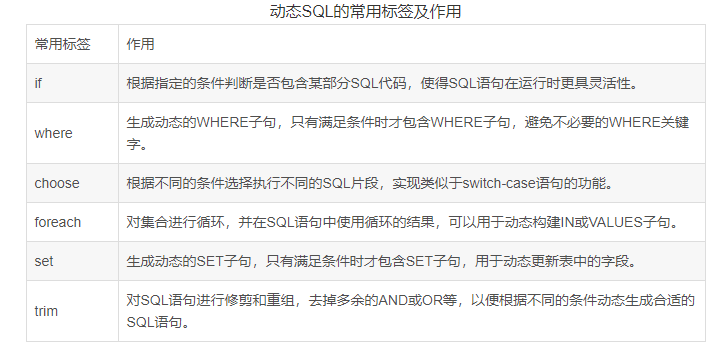
4、if 标签:条件判断
- <select id="getSuppliersAll" resultType="pojo.Supplier" parameterType="Map">
- select supCode,supName,supContact,supPhone,supFax,createdTime from t_supplier
- where
- <if test="supCode!=null and supCode!=''">
- and supCode like #{supCode}
- </if>
- <if test="supName!=null and supName!=''">
- and supName like #{supName}
- </if>
- </select>
而上面的语句中 where 关键后直接跟 and 关键字,这就是一条错误的SQL语句。这个就可以使用 where1=1或者where标签了。
- <select id="getSuppliersAll" resultType="pojo.Supplier" parameterType="Map">
- select supCode,supName,supContact,supPhone,supFax,createdTime from t_supplier
- where 1=1
- <if test="supCode!=null and supCode!=''">
- and supCode like #{supCode}
- </if>
- <if test="supName!=null and supName!=''">
- and supName like #{supName}
- </if>
- </select>
使用where1=1可以执行成功
5、where
作用:
- 替换where关键字
- 会动态的去掉第一个条件前的 and
- 如果所有的参数没有值则不加where关键字
- <select id="getSuppliersAll" resultType="pojo.Supplier" parameterType="Map">
- select supCode,supName,supContact,supPhone,supFax,createdTime from t_supplier
- <where>
- <if test="supCode!=null and supCode!=''">
- and supCode like #{supCode}
- </if>
- <if test="supName!=null and supName!=''">
- and supName like #{supName}
- </if>
- </where>
- </select>
使用wehre标签也可以实现。
注意:需要给每个条件前都加上 and 关键字。
6、choose
条件分支:
-
when:用于定义条件成立时执行的代码块。它包含一个 test 属性,用于指定该条件分支的判断条件
-
otherwise:用于定义默认的代码块,当所有的 条件都不成立时,将行 中定义的代码块
- <select id="getSuppliersAll" resultType="pojo.Supplier">
- select supCode,supName,supContact,supPhone,supFax,createdTime from t_supplier
- <where>
- <choose> <!--相当于Switch-->
- <when test="supCode!=null and supCode!=''"> <!--相当于case-->
- and supCode like #{supCode}
- </when>
- <when test="supName!=null and supName!=''"> <!--相当于case-->
- and supName like #{supName}
- </when>
- </choose>
- </where>
- </select>
7、foreach
用来迭代任何可迭代的对象(如数组,集合)。
- collection 属性:
mybatis会将数组参数,封装为一个Map集合。
默认:array = 数组
使用@Param注解改变map集合的默认key的名称 - item 属性:本次迭代获取到的元素。
- separator 属性:集合项迭代之间的分隔符。 foreach 标签不会错误地添加多余的分隔符。也就是最后一次迭代不会加分隔符。
- open 属性:该属性值是在拼接SQL语句之前拼接的语句,只会拼接一次
- close 属性:该属性值是在拼接SQL语句拼接后拼接的语句,只会拼接一次
(1)实现批量新增(List集合)
- 接口定义方法
- /**
- * 批量新增
- */
- int insertManySupplier(@Param("Supplier") List<Supplier> Supplier);
- xml文件中编写SQL
- <!--批量新增-->
- <insert id="insertManySupplier">
- insert into t_supplier(supCode,supName) values
- <foreach collection="Supplier" item="supplier" separator=",">
- (#{supplier.supCode},#{supplier.supName})
- </foreach>
- </insert>
- 测试类中调用方法
- /**
- * 批量新增
- */
- @Test
- public void insertManySupplier() throws Exception {
- InputStream is = Resources.getResourceAsStream("mybatis-config.xml");
- SqlSessionFactory factory = new SqlSessionFactoryBuilder().build(is);
- SqlSession sqlSession = factory.openSession();
- List<Supplier> supplierList = new ArrayList<Supplier>();
- Supplier supplier = new Supplier();
- supplier.setSupCode("CD_9969");
- supplier.setSupName("小王");
- Supplier supplier1 = new Supplier();
- supplier1.setSupCode("CD_9970");
- supplier1.setSupName("小红");
- Supplier supplier2 = new Supplier();
- supplier2.setSupCode("CD_9971");
- supplier2.setSupName("小强");
- supplierList.add(supplier);
- supplierList.add(supplier1);
- supplierList.add(supplier2);
- int i = sqlSession.getMapper(supplierMapper.class).insertManySupplier(supplierList);
- System.out.println("新增了---->"+i);
- sqlSession.commit();
- }

(2)实现批量删除(数组)
- 接口定义方法
- /**
- * 批量删除
- */
- int deleteManySupplier(@Param("ids") int [] ids);
- xml文件中编写SQL
- <!--批量删除-->
- <delete id="deleteManySupplier">
- delete from t_supplier where id in
- <foreach collection="ids" item="id" separator="," open="(" close=")">
- #{id}
- </foreach>
- </delete>
- 测试类中调用方法
- /**
- * 批量删除
- */
- @Test
- public void deleteManySupplier() throws Exception{
- int ids[]={25,26,27};
- InputStream is = Resources.getResourceAsStream("mybatis-config.xml");
- SqlSessionFactory factory = new SqlSessionFactoryBuilder().build(is);
- SqlSession sqlSession = factory.openSession();
- int i = sqlSession.getMapper(supplierMapper.class).deleteManySupplier(ids);
- System.out.println("删除了---->"+i);
- sqlSession.commit();
- }
8、set
实现动态修改
如果用户在进行数据修改时,注意一 点,如果哪个输入框没有输入内容,我们是将表中数据对应字段值替换为空白还是保留字段之前的值?答案肯定是保留之前的数据。
接下来我们就具体实现
- 接口定义方法
- /**
- * 动态修改
- */
- int UpdateManySupplier(Supplier Supplier);
上述方法参数 Supplier就是封装了需要修改的数据,而id肯定是有数据的,这也是和添加方法的区别。
- xml文件中编写SQL
- <!--动态修改-->
- <update id="UpdateManySupplier">
- update t_supplier
- <set>
- <if test="supCode!=null and supCode!=''">
- supCode=#{supCode},
- </if>
- <if test="supName!=null and supName!=''">
- supName=#{supName},
- </if>
- <if test="supPhone!=null and supPhone!=''">
- supPhone=#{supPhone},
- </if>
- </set>
- where id=#{id}
- </update>
set 标签可以用于动态包含需要更新的列,忽略其它不更新的列。
- /**
- * 动态修改
- */
- @Test
- public void UpdateManySupplier() throws Exception{
- Supplier supplier = new Supplier();
- supplier.setSupCode("DQ_6989");
- supplier.setSupName("地球有限公司");
- supplier.setId(17);
- InputStream is = Resources.getResourceAsStream("mybatis-config.xml");
- SqlSessionFactory factory = new SqlSessionFactoryBuilder().build(is);
- SqlSession sqlSession = factory.openSession();
- int i = sqlSession.getMapper(supplierMapper.class).UpdateManySupplier(supplier);
- System.out.println("修改了---"+i);
- sqlSession.commit();
- }
从结果中SQL语句可以看出,只修改了 supCode,supName字段值,因为我们给的数据中只给Supplier 实体对象的 supCode,supName属性设置值了。这就是 set 标签的作用。
9、trim
trim 标签允许你在模板引擎或XML处理器中对字符串进行修剪操作,包括去除空白字符、去除指定的前缀和后缀,以及根据条件进行修剪。它提供了一种方便和灵活的方式来处理和清理字符串数据。
- 属性及作用

- 动态查询
- <!--动态查询-->
- <select id="getSuppliersAll" resultType="pojo.Supplier">
- select supCode,supName,supContact,supPhone,supFax,createdTime from t_supplier
- <trim prefix="where" prefixOverrides="and|or" suffix=" LIMIT #{index},#{pageSize}">
- <if test="supCode!=null and supCode!=''">
- and supCode like #{supCode}
- </if>
- <if test="supName!=null and supName!=''">
- and supName like #{supName}
- </if>
- <if test="supPhone!=null and supPhone!=''">
- and supPhone like #{supPhone}
- </if>
- </trim>
- </select>
- 动态修改
- <update id="UpdateManySupplier">
- update t_supplier
- <trim prefix="set" suffixOverrides="," suffix="where id=#{id}">
- <if test="supCode!=null and supCode!=''">
- supCode=#{supCode},
- </if>
- <if test="supName!=null and supName!=''">
- supName=#{supName},
- </if>
- <if test="supPhone!=null and supPhone!=''">
- supPhone=#{supPhone},
- </if>
- </trim>
- </update>
需要注意的是,prefix 和 suffix 属性是可选的,可以根据需要选择性地添加前缀和后缀。而 prefixOverrides 和 suffixOverrides 属性则提供了更加灵活的方式来根据条件进行字符串修剪操作。

