
热门标签
热门文章
- 1分组后数据 分页_Excel数据怎么进行分组分页打印设置
- 2springcloud+nacos+gateway案例_springcloud gateway nacos
- 3Docker fille实例讲解_dockerfile run cat
- 4钢管订购和运输_第12讲 钢管订购和运输代码
- 5SpringCloud Gateway整合Spring Security实现用户权限管理_springcloud gateway security
- 6SpringSecurity基本原理_springsecurity原理
- 7Dockerfile中的COPY与ADD命令详解_dockerfile详解add与copy
- 8Windows如何后台运行bat文件_bat 后台运行
- 9基础算法 + 数据结构_算法与数据结构 蓝桥
- 10Jmeter介绍及发送请求(一)_jmeter post请求
当前位置: article > 正文
华为云服务之弹性云服务器ECS的深度使用和云端实践【华为云至简致远】_我买的华为云为什么不是弹性云服务器 ecs
作者:算法优化者 | 2024-01-16 15:09:36
赞
踩
我买的华为云为什么不是弹性云服务器 ecs
【摘要】 什么是弹性云服务器ECS?ECS的产品架构是什么?它有哪些优势和有应用场景?弹性云服务器ECS的使用流程是怎样的?如何运用弹性云服务器ECS搭建微信公众号后台并收发文本消息?让我们带着这些疑问,去弹性云服务器ECS的世界里一探究竟,玩转ECS!!
一、弹性云服务器 ECS 简介
① 什么是弹性云服务器 ECS ?
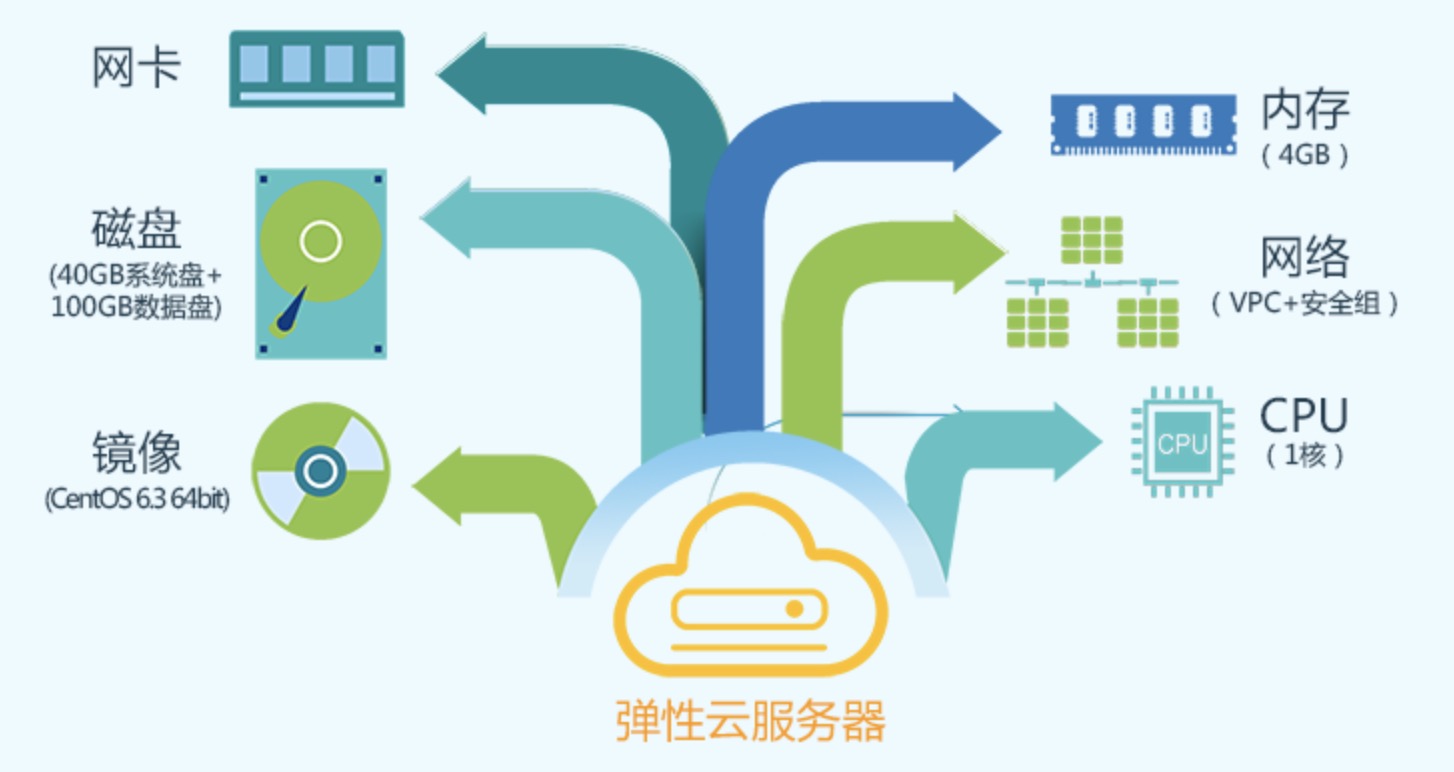
- 弹性云服务器(Elastic Cloud Server,ECS)是由 CPU、内存、操作系统、云硬盘组成的基础的计算组件。弹性云服务器创建成功后,就可以像使用自己的本地 PC 或物理服务器一样,在云上使用弹性云服务器。
- 弹性云服务器的开通是自助完成的,只需要指定 CPU、内存、操作系统、规格、登录鉴权方式即可,同时也可以根据您的需求随时调整弹性云服务器的规格,打造可靠、安全、灵活、高效的计算环境。
② ECS 的架构设计
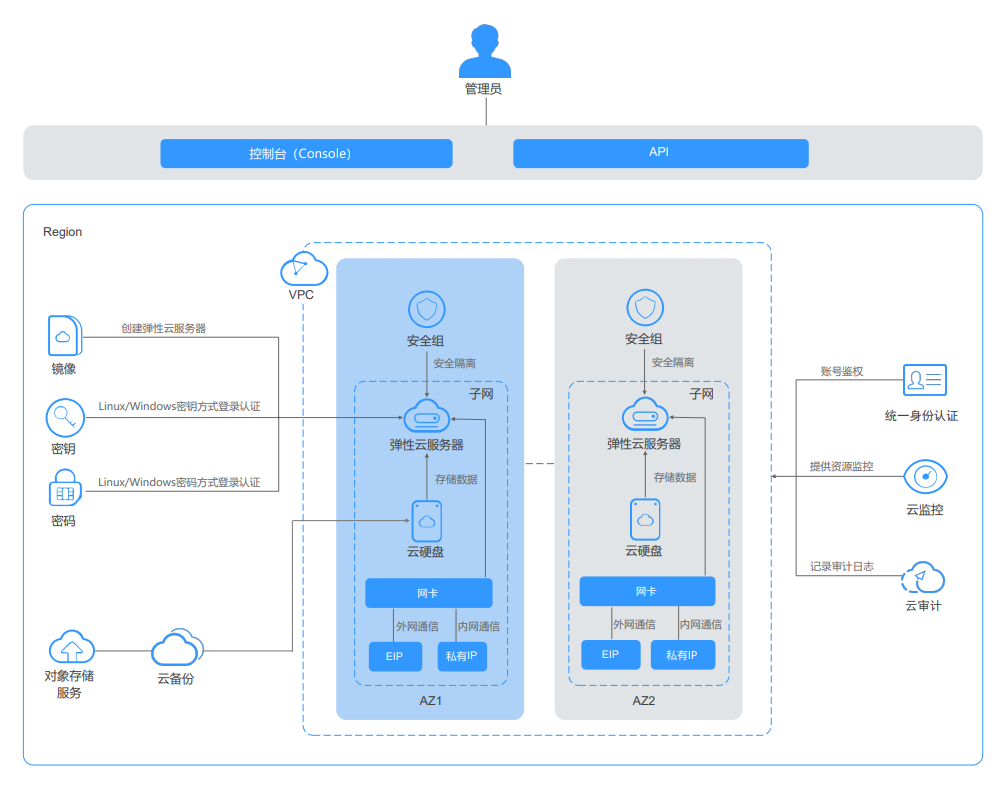
- ECS 通过和其他产品、服务组合,弹性云服务器可以实现计算、存储、网络、镜像安装等功能;

- 弹性云服务器在不同可用区中部署(可用区之间通过内网连接),部分可用区发生故障后不会影响同一区域内的其它可用区;
- 可以通过虚拟私有云建立专属的网络环境,设置子网、安全组,并通过弹性公网IP实现外网链接(需带宽支持);
- 通过镜像服务,可以对弹性云服务器安装镜像,也可以通过私有镜像批量创建弹性云服务器,实现快速的业务部署;
- 通过云硬盘服务实现数据存储,并通过云硬盘备份服务实现数据的备份和恢复。
- 云监控是保持弹性云服务器可靠性、可用性和性能的重要部分,通过云监控,用户可以观察弹性云服务器资源;
- 云备份(Cloud Backup and Recovery,CBR)提供对云硬盘和弹性云服务器的备份保护服务,支持基于快照技术的备份服务,并支持利用备份数据恢复服务器和磁盘的数据。
- 与其它服务的关系:
③ ECS 的优势
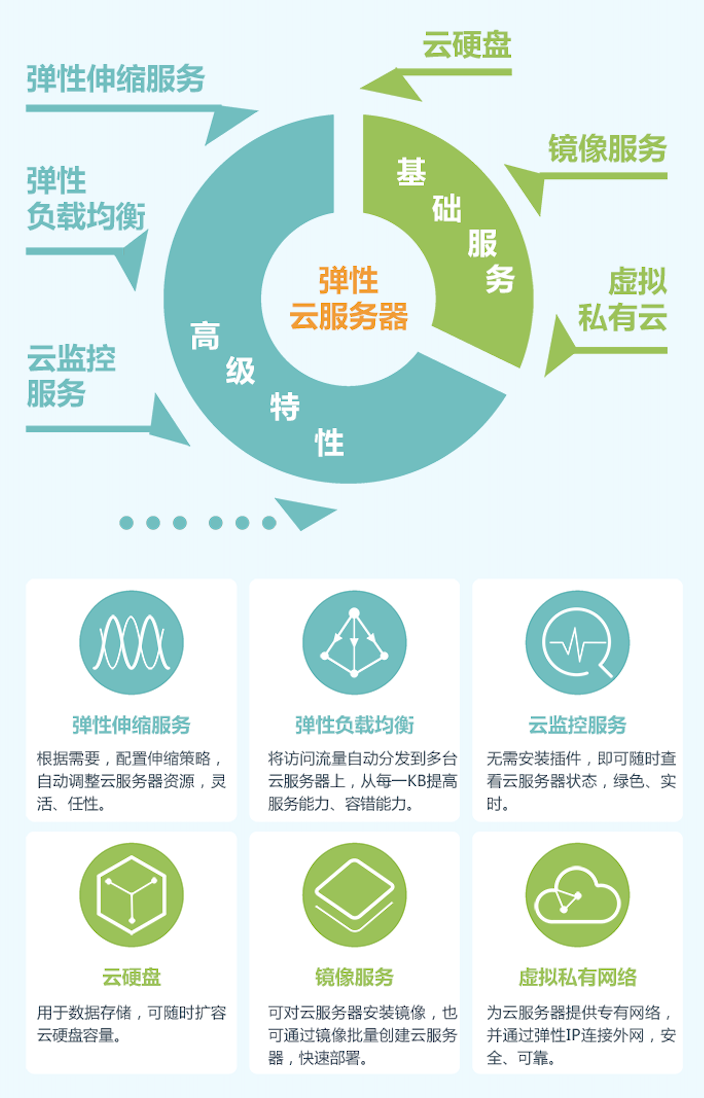
- 稳定可靠:丰富的磁盘种类,提供普通 IO、高 IO、通用型 SSD、超高 IO、极速型 SSD 类型的云硬盘,可以支持云服务器不同业务场景需求;高数据可靠性:故障自动迁移且服务可用性达 99.95%,数据多副本且数据持久性达 99.99995%;并支持云服务器和云硬盘的备份及恢复,可预先设置好自动备份策略,实现在线自动备份,也可以根据需要随时通过控制台或 API,备份云服务器和云硬盘指定时间点的数据;
- 安全保障:多种安全服务与多维度防护、安全评估、智能化进程管理、漏洞扫描,100% 网络隔离,安全组规则保护;
- 弹性伸缩:自动调整计算资源、灵活调整云服务器配置、灵活的计费模式,主机规格和宽带可随时调整“云服务器+物理机”混合组网;
- 软硬结合:弹性云服务器搭载在专业的硬件设备上,能够深度进行虚拟化优化技术,用户无需自建机房;可随时从虚拟资源池中获取并独享资源,并根据业务变化弹性扩展或收缩;
- 简单易用:统一的管理控制平台,简化运维管理,可以一站式开通和部署;
- 性价比高:基础社网络搭建,维护成本几乎为 0,自主选择包年/包月和按需计费。
④ ECS 的应用场景
- 网站应用:使用通用型弹性云服务器,主要提供均衡的计算、内存和网络资源,适用于业务负载压力适中的应用场景,满足企业或个人普通业务搬迁上云需求;
- 企业电商:使用内存优化型弹性云服务器,主要提供高内存实例,同时可以配置超高 IO 的云硬盘和合适的带宽;
- 图形渲染:使用 GPU 图形加速型弹性云服务器,G1 型弹性云服务器基于 NVIDIA Tesla M60 硬件虚拟化技术,提供较为经济的图形加速能力,能够支持 DirectX、OpenGL,可以提供最大显存 1GiB、分辩率为 4096×2160 的图形图像处理能力;
- 数据分析:使用磁盘增强型弹性云服务器,主要适用于需要对本地存储上的极大型数据集进行高性能顺序读写访问的工作负载,主要的数据存储是基于 HDD 的存储实例,默认配置最高 10GE 网络能力,提供较高的 PPS 性能和网络低延迟;
- 高性能计算:使用高性能计算型弹性云服务器,主要使用在受计算限制的高性能处理器的应用程序上,适合要求提供海量并行计算资源、高性能的基础设施服务,需要达到高性能计算和海量存储,对渲染的效率有一定保障的场景。
二、弹性云服务器 ECS 的使用流程
① 准备环境,购买 ECS
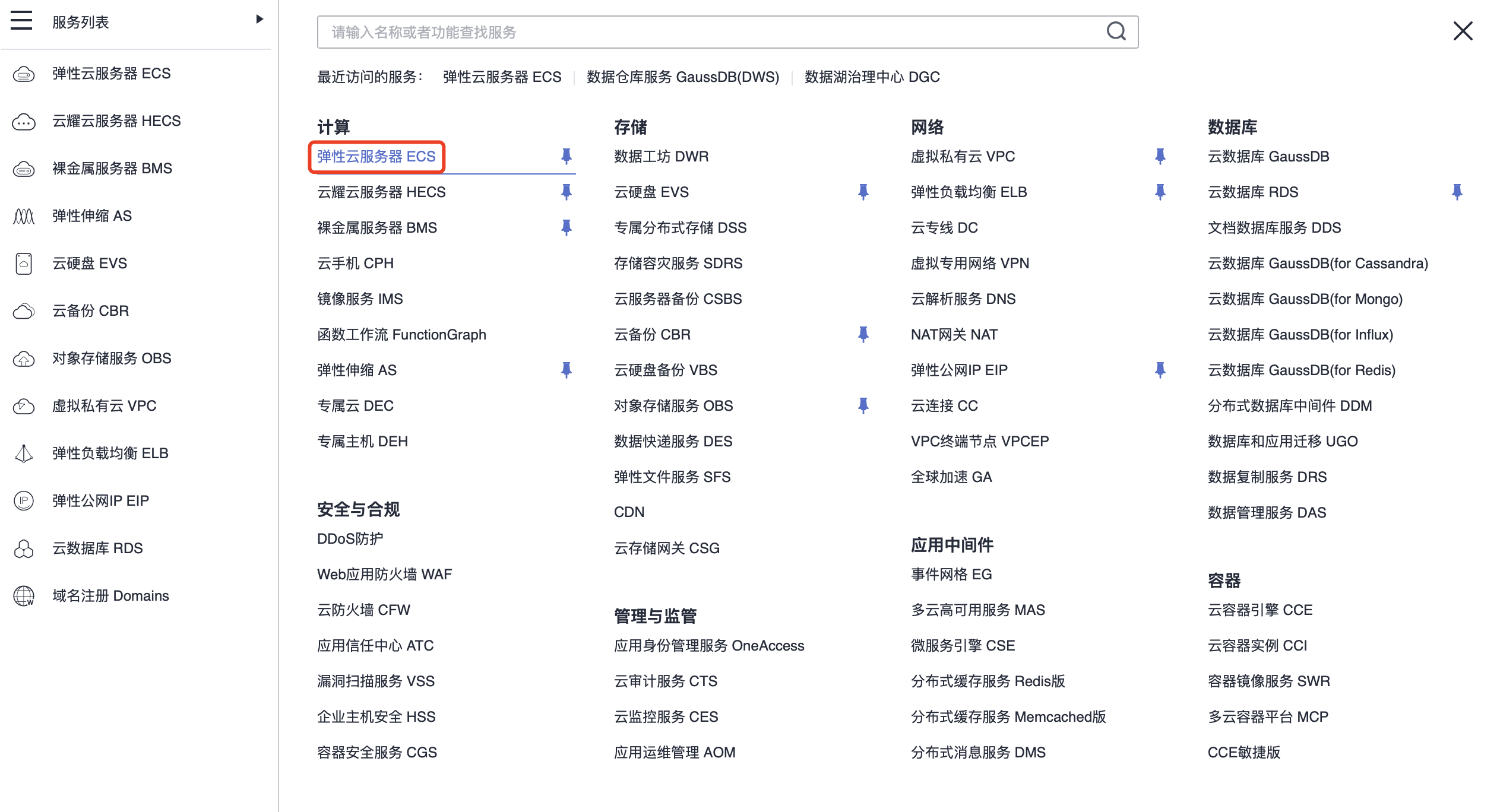
- 登录 华为云控制台,展开“所有服务”,选择“计算 > 弹性云服务器”:
- 再选择“购买弹性云服务器”:

② 配置 ECS 规格
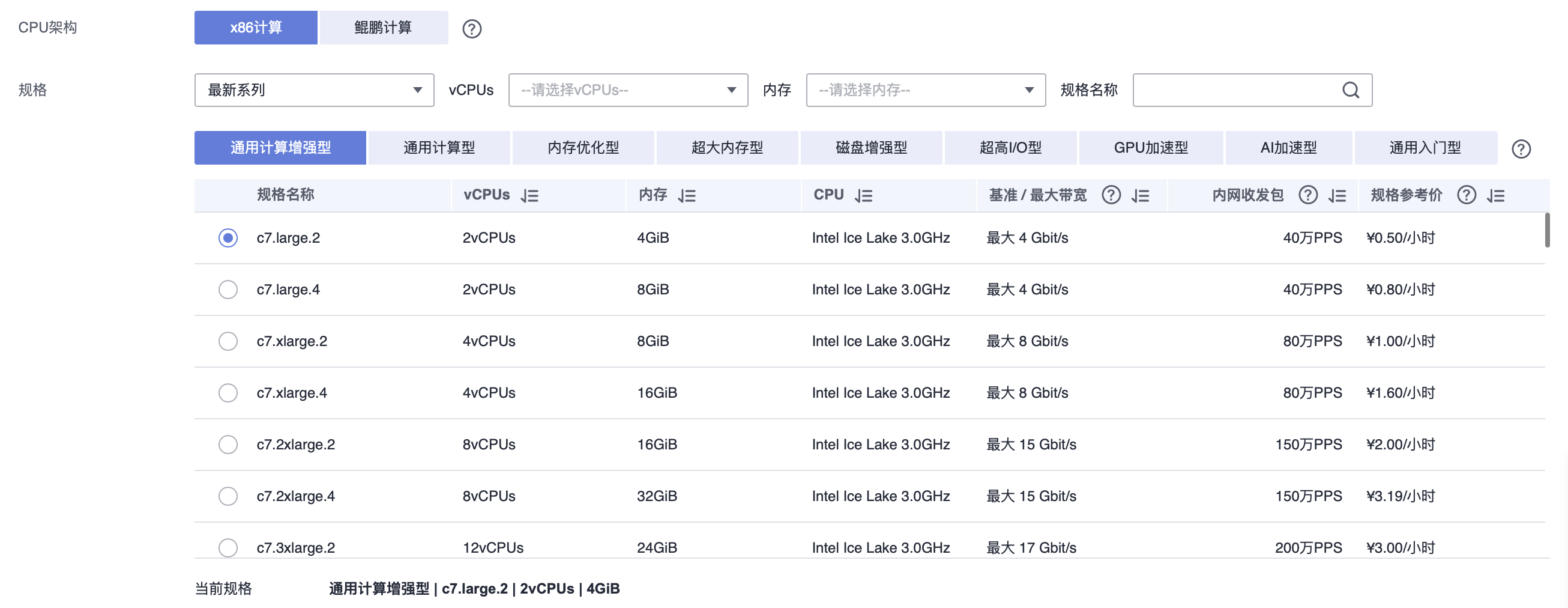
- 选择弹性云服务器的“计费模式”和“规格”,我们现在选择“按需付费”、“通用计算型”,该类型云服务器提供均衡的计算、存储以及网络配置,适用于大多数的使用场景。
- 选择计费模式:

- 选择规格:
③ 选择镜像并创建磁盘
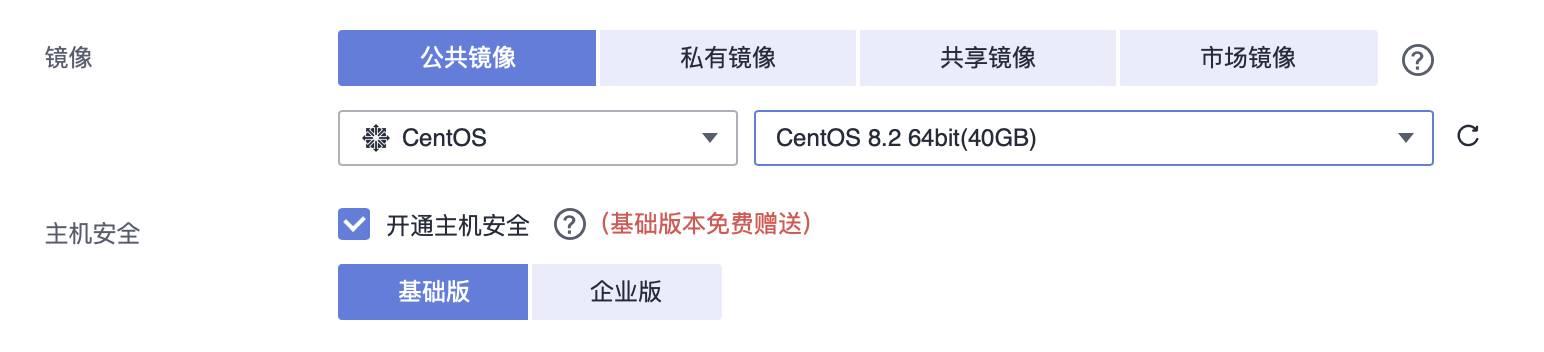
- 选择 Linux 操作系统的“公共镜像”,公共镜像是华为云默认提供的镜像:
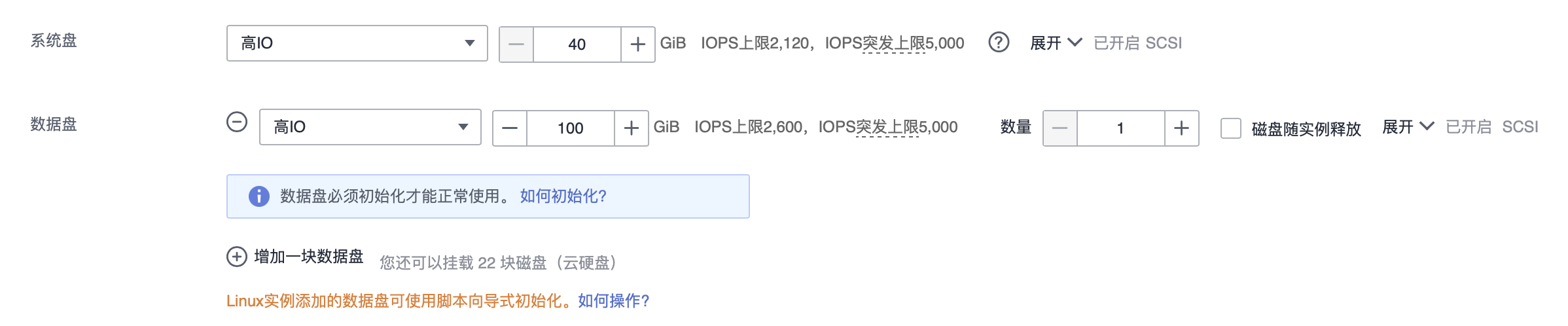
- 系统盘保持默认值,单击“增加一块数据盘”,添加一块“100 GB”的“高 IO”数据盘:
④ 配置网络
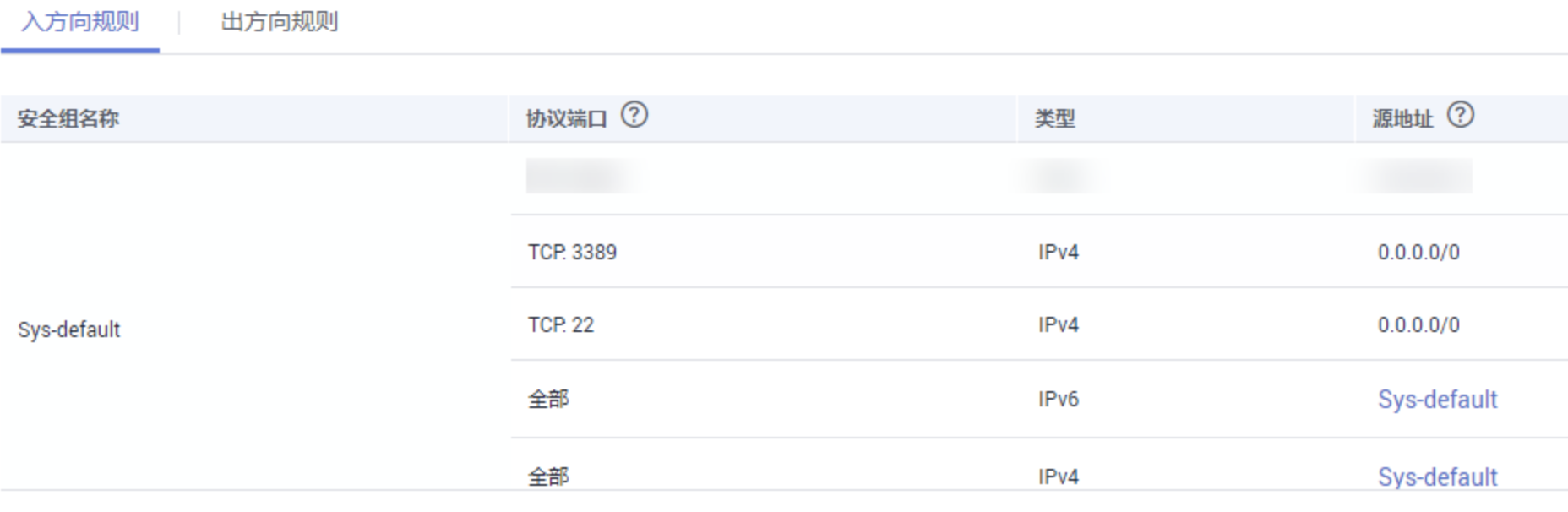
- 首次使用时,请选择华为云提供的默认 VPC、默认安全组,默认安全组规则如下:
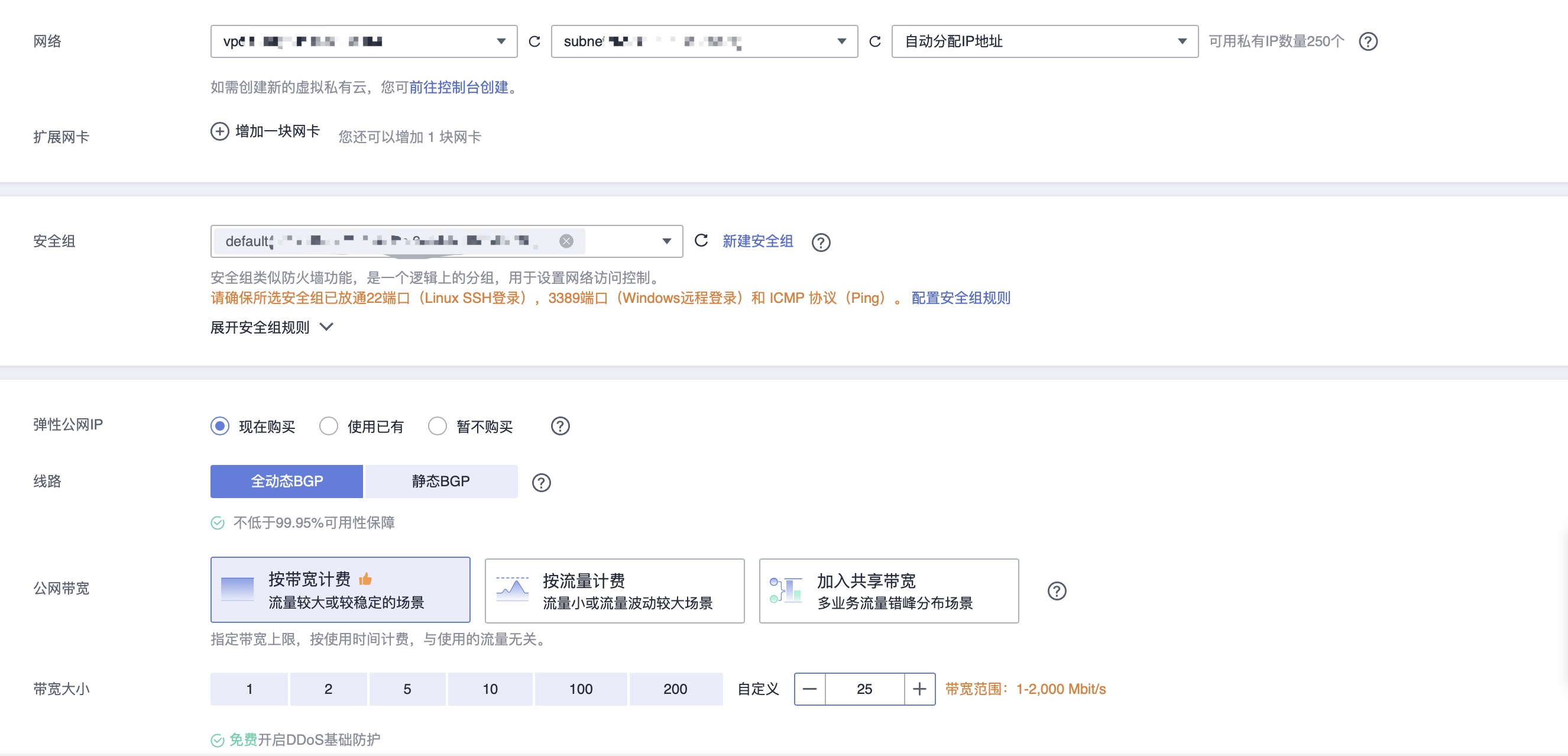
- 如果有访问互联网的需求,弹性云服务器需绑定弹性公网 IP,单击“现在购买”,系统将自动分配弹性公网 IP 给云服务器:
⑤ 选择登录方式
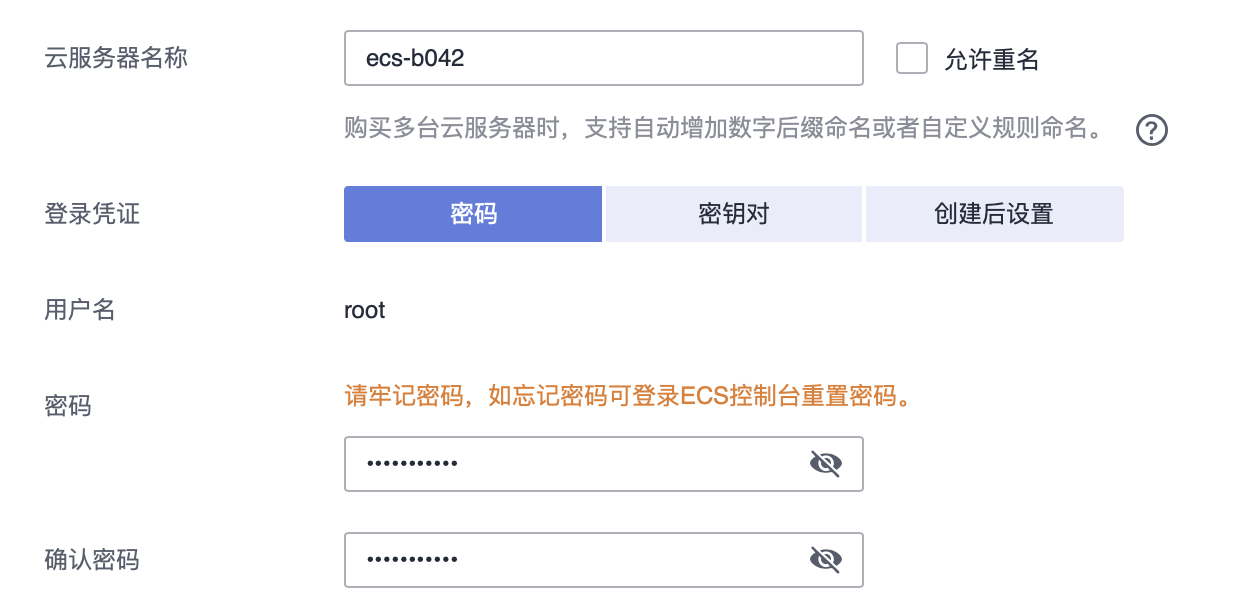
- 弹性云服务器创建成功后,通过“密钥对”或“密码”登录。
- 以“密码”为例:
⑥ 设置云备份
- 云备份提供申请即用的备份服务,使数据更加安全可靠,当云服务器或磁盘出现故障或者人为错误导致数据误删时,可以自助快速恢复数据。
- 在下拉列表中选择已有的云备份存储库,设置备份策略:

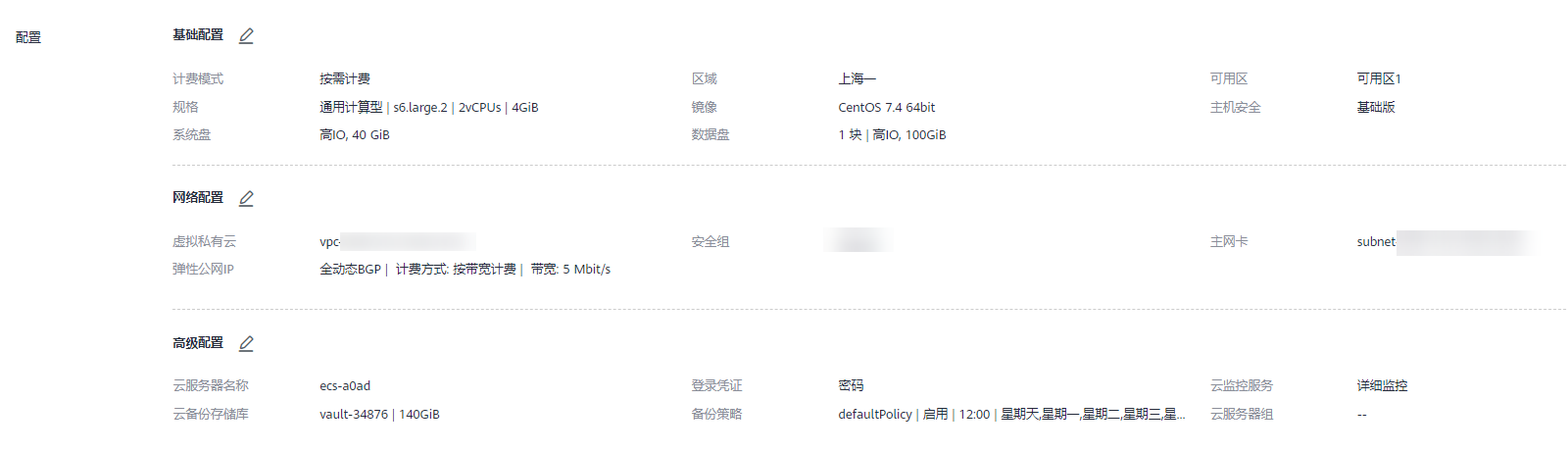
⑦ 确认配置并购买
- 单击右侧“当前配置”栏的“立即购买”;
- 检查订单信息,确认无误后,请勾选协议,并单击“提交”;
- 订单支付完成后,系统将会自动为您创建弹性云服务器,创建弹性云服务器需要几分钟时间。
⑧ (可选)绑定弹性公网 IP
- 通过 SSH 密钥方式登录 Linux 弹性云服务器时,弹性云服务器必须绑定弹性公网 IP(EIP)。
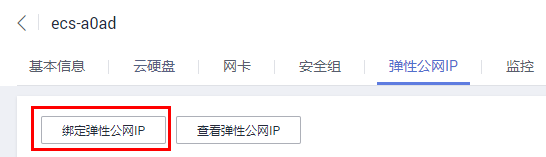
- 如果购买弹性云服务器时已经绑定 EIP,请跳过本步骤;如果没有绑定,请执行以下操作:
-
- 单击待绑定 EIP 的弹性云服务器名称,系统进入云服务器详情页;
-
- 选择“弹性公网 IP”页签;
-
- 单击“绑定弹性公网 IP”;
-
- 选择主网卡与弹性公网 IP,并单击“确定”。
⑨ 登录 ECS 云服务器
(A)使用 CloudShell 登录云服务器
- 在云服务器列表页选择要登录的云服务器,单击“操作”列下的“远程登录”;
- 在弹出的“登录 Linux 云服务器”窗口中,单击“CloudShell 登录”;
- 在 CloudShell 界面配置云服务器信息,默认已自动选择弹性公网 IP、使用 22 端口、用户名为 root;
- 输入密码,即在购买阶段设置的密码;
- 单击“连接”登录云服务器。
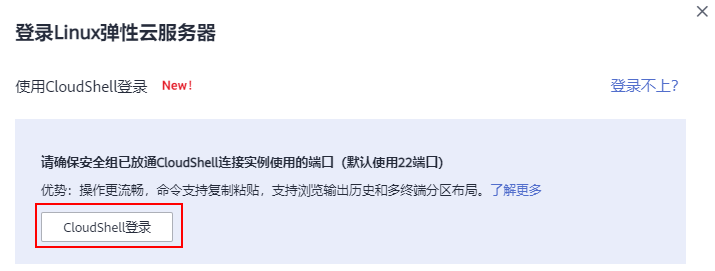
(B)使用 PuTTY 工具登录 ECS
- 双击“PUTTY.EXE”,选择“Session”;
- Host Name (or IP address):输入弹性云服务器的弹性公网 IP;
- Connection Type:选择 SSH;
- Saved Sessions:任务名称,在下一次使用 putty 时就可以单击保存的任务名称,即可打开远程连接;
- 单击“Window”,在“Translation”下的“Received data assumed to be in which character set:”选择“UTF-8”;
- 单击“Open”,建立到云服务器的 SSH 连接后,根据提示输入用户名和密码登录弹性云服务器。

⑩ 初始化数据盘
(A)使用 fdisk 分区工具初始化数据盘
划分分区并挂载磁盘
- 当云服务器挂载了一块新的数据盘时,使用 fdisk 分区工具将该数据盘设为主分区,分区形式默认设置为 MBR,文件系统设为 ext4 格式,挂载在 “/mnt/sdc” 下,并设置开机启动自动挂载。
- 查看新增数据盘:
fdisk -l
- 结果如下(表示当前的云服务器有两块磁盘,“/dev/vda” 是系统盘, “/dev/vdb” 是新增数据盘):
- [root@ecs-test-0001 ~]# fdisk -l
-
- Disk /dev/vda: 42.9 GB, 42949672960 bytes, 83886080 sectors
- Units = sectors of 1 * 512 = 512 bytes
- Sector size (logical/physical): 512 bytes / 512 bytes
- I/O size (minimum/optimal): 512 bytes / 512 bytes
- Disk label type: dos
- Disk identifier: 0x000bcb4e
-
- Device Boot Start End Blocks Id System
- /dev/vda1 * 2048 83886079 41942016 83 Linux
-
- Disk /dev/vdb: 107.4 GB, 107374182400 bytes, 209715200 sectors
- Units = sectors of 1 * 512 = 512 bytes
- Sector size (logical/physical): 512 bytes / 512 bytes
- I/O size (minimum/optimal): 512 bytes / 512 bytes

- 进入 fdisk 分区工具,开始对新增数据盘执行分区操作:
- fdisk 新增数据盘
-
- // 以新挂载的数据盘“/dev/vdb”为例:
- fdisk /dev/vdb
- 结果如下:
- [root@ecs-test-0001 ~]# fdisk /dev/vdb
- Welcome to fdisk (util-linux 2.23.2).
-
- Changes will remain in memory only, until you decide to write them.
- Be careful before using the write command.
-
- Device does not contain a recognized partition table
- Building a new DOS disklabel with disk identifier 0x38717fc1.
-
- Command (m for help):
- 输入 n,按 Enter,开始新建分区:
- // 表示磁盘有两种分区类型:p 表示主分区,e 表示扩展分区
- Command (m for help): n
- Partition type:
- p primary (0 primary, 0 extended, 4 free)
- e extended
- 以创建一个主要分区为例,输入 p,按 Enter,开始创建一个主分区:
- // Partition number 表示主分区编号,可以选择 1-4
- Select (default p): p
- Partition number (1-4, default 1):
- 以分区编号选择 1 为例,输入主分区编号 1 ,按 Enter:
- // First sector 表示起始磁柱值,可以选择 2048-209715199,默认为 2048
- Partition number (1-4, default 1): 1
- First sector (2048-209715199, default 2048):
- 以选择默认起始磁柱值 2048 为例,按 Enter,系统会自动提示分区可用空间的起始磁柱值和截止磁柱值,可以在该区间内自定义,或者使用默认值。起始磁柱值必须小于分区的截止磁柱值:
- // Last sector 表示截止磁柱值,可以选择 2048-209715199,默认为209715199
- First sector (2048-209715199, default 2048):
- Using default value 2048
- Last sector, +sectors or +size{K,M,G} (2048-209715199, default 209715199):
- 以选择默认截止磁柱值 209715199 为例,按 Enter,系统会自动提示分区可用空间的起始磁柱值和截止磁柱值,可以在该区间内自定义,或者使用默认值,起始磁柱值必须小于分区的截止磁柱值:
- // 表示分区完成,即为数据盘新建 1 个分区
- Last sector, +sectors or +size{K,M,G} (2048-209715199, default 209715199):
- Using default value 209715199
- Partition 1 of type Linux and of size 100 GiB is set
-
- Command (m for help):
- 输入 p,按 Enter,查看新建分区的详细信息(新建分区 “/dev/vdb1” 的详细信息):
- Command (m for help): p
-
- Disk /dev/vdb: 107.4 GB, 107374182400 bytes, 209715200 sectors
- Units = sectors of 1 * 512 = 512 bytes
- Sector size (logical/physical): 512 bytes / 512 bytes
- I/O size (minimum/optimal): 512 bytes / 512 bytes
- Disk label type: dos
- Disk identifier: 0x38717fc1
-
- Device Boot Start End Blocks Id System
- /dev/vdb1 2048 209715199 104856576 83 Linux
-
- Command (m for help):
- 输入 w,按 Enter,将分区结果写入分区表中:
- Command (m for help): w
- The partition table has been altered!
-
- Calling ioctl() to re-read partition table.
- Syncing disks.
- 将新的分区表变更同步至操作系统:
partprobe
- 将新建分区文件系统设为系统所需格式:
- mkfs -t 文件系统格式 /dev/vdb1
- // 以设置文件系统为“ext4”为例:
- mkfs -t ext4 /dev/vdb1
- 结果如下:
- [root@ecs-test-0001 ~]# mkfs -t ext4 /dev/vdb1
- mke2fs 1.42.9 (28-Dec-2013)
- Filesystem label=
- OS type: Linux
- Block size=4096 (log=2)
- Fragment size=4096 (log=2)
- Stride=0 blocks, Stripe width=0 blocks
- 6553600 inodes, 26214144 blocks
- 1310707 blocks (5.00%) reserved for the super user
- First data block=0
- Maximum filesystem blocks=2174746624
- 800 block groups
- 32768 blocks per group, 32768 fragments per group
- 8192 inodes per group
- Superblock backups stored on blocks:
- 32768, 98304, 163840, 229376, 294912, 819200, 884736, 1605632, 2654208,
- 4096000, 7962624, 11239424, 20480000, 23887872
-
- Allocating group tables: done
- Writing inode tables: done
- Creating journal (32768 blocks): done
- Writing superblocks and filesystem accounting information: done
- 新建挂载目录:
- mkdir 挂载目录
- // 以新建挂载目录“/mnt/sdc”为例:
- mkdir /mnt/sdc
- 将新建分区挂载到 12 中创建的目录下:
- mount 磁盘分区 挂载目录
- // 以挂载新建分区“/dev/vdb1”至“/mnt/sdc”为例:
- mount /dev/vdb1 /mnt/sdc
- 查看挂载结果(新建分区“/dev/vdb1”已挂载至“/mnt/sdc”):
- df -TH
-
- [root@ecs-test-0001 ~]# df -TH
- Filesystem Type Size Used Avail Use% Mounted on
- /dev/vda1 ext4 43G 1.9G 39G 5% /
- devtmpfs devtmpfs 2.0G 0 2.0G 0% /dev
- tmpfs tmpfs 2.0G 0 2.0G 0% /dev/shm
- tmpfs tmpfs 2.0G 9.1M 2.0G 1% /run
- tmpfs tmpfs 2.0G 0 2.0G 0% /sys/fs/cgroup
- tmpfs tmpfs 398M 0 398M 0% /run/user/0
- /dev/vdb1 ext4 106G 63M 101G 1% /mnt/sdc
设置开机自动挂载磁盘分区
- 可以通过配置 fstab 文件,设置云服务器系统启动时自动挂载磁盘分区,已有数据的云服务器也可以进行设置,该操作不会影响现有数据,那么如何在 fstab 文件中使用 UUID 来设置自动挂载磁盘分区呢?
- 查询磁盘分区的 UUID:
- blkid 磁盘分区
- // 以查询磁盘分区 “/dev/vdb1” 的 UUID 为例:
- blkid /dev/vdb1
- 结果如下:
- [root@ecs-test-0001 ~]# blkid /dev/vdb1
- /dev/vdb1: UUID="0b3040e2-1367-4abb-841d-ddb0b92693df" TYPE="ext4"
- 使用 VI 编辑器打开 fstab 文件:
vi /etc/fstab
- 按 i 进入编辑模式,将光标移至文件末尾,按 Enter 添加如下内容:
UUID=0b3040e2-1367-4abb-841d-ddb0b92693df /mnt/sdc ext4 defaults 0 2
- 按 ESC 后,输入“:wq”,按 Enter,保存设置并退出编辑器;
- 执行以下步骤,验证自动挂载功能:
-
- 卸载已挂载的分区:
- umount 磁盘分区
- // 命令示例
- umount /dev/vdb1
-
- 将 “/etc/fstab” 文件所有内容重新加载:
mount -a
-
- 查询文件系统挂载信息:
- mount | grep 挂载目录
- // 命令示例
- mount | grep /mnt/sdc
- 结果如下,说明自动挂载功能生效:
- root@ecs-test-0001 ~]# mount | grep /mnt/sdc
- /dev/vdb1 on /mnt/sdc type ext4 (rw,relatime,data=ordered)
(B)使用脚本初始化新挂载的磁盘
- 获取自动初始化磁盘脚本:
wget https://ecs-instance-driver.obs.cn-north-1.myhuaweicloud.com/datadisk/LinuxVMDataDiskAutoInitialize.sh
- 修改自动初始化磁盘脚本权限:
chmod +x LinuxVMDataDiskAutoInitialize.sh
- 执行初始化脚本自动检测待初始化的数据盘(脚本将自动检测当前在服务器上除系统盘之外的盘符并显示出来,如 /dev/vdb,然后需要输入要执行的盘符,例如 /dev/vdb):
./LinuxVMDataDiskAutoInitialize.sh
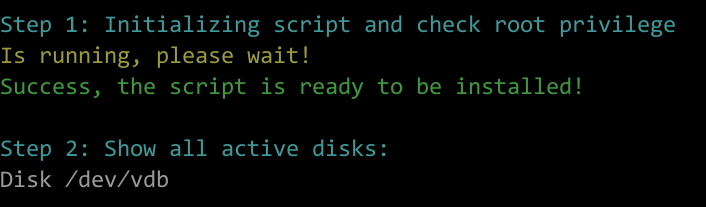
- 输入盘符并回车后,脚本将自动执行硬盘的创建分区与格式化:
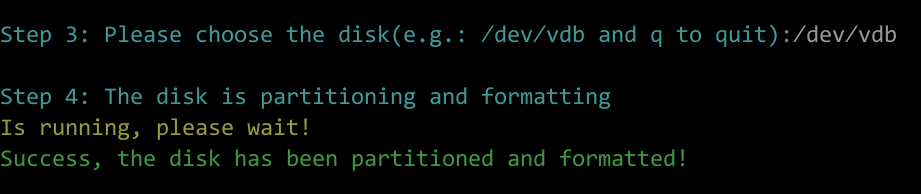
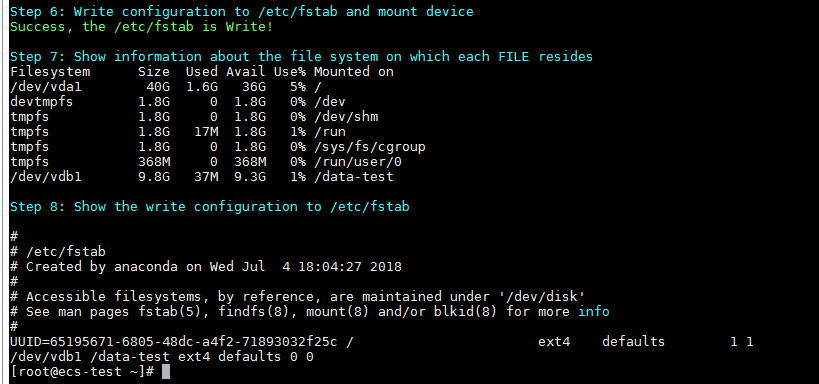
- 根据提示输入磁盘需要挂载的路径,比如 /data-test:

- 等待脚本自动挂载并设置为开机自动挂载后,就完成了磁盘创建分区格式化和挂载磁盘的工作:

(C)使用脚本初始化已使用的磁盘
- 获取自动初始化磁盘脚本:
wget https://ecs-instance-driver.obs.cn-north-1.myhuaweicloud.com/datadisk/LinuxVMDataDiskAutoInitialize.sh
- 修改自动初始化磁盘脚本权限:
chmod -x LinuxVMDataDiskAutoInitialize.sh
- 执行初始化脚本自动检测待初始化的数据盘:
sh LinuxVMDataDiskAutoInitialize.sh
- 脚本会自动检测出选择的磁盘已经被挂载并显示出挂载的位置,根据提示选择是否卸载磁盘,输入 y 为确定卸载,输入 n 则退出脚本,此处选择 y 继续后续的初始化操作:

- 成功卸载磁盘后根据提示选择是否开始格式化磁盘,输入 y 为确定格式化,输入 n 则退出脚本:

- 成功格式化磁盘后将会自动执行磁盘的创建分区与格式化,根据提示输入这个磁盘需要挂载的位置,比如 /data-test:

- 等待脚本自动挂载并设置为开机自动挂载后,就完成了磁盘创建分区格式化和挂载磁盘的工作:
三、使用弹性云服务器 ECS 搭建微信公众号后台并收发文本消息
① 整体流程
- 使用 ECS 搭建微信公众号处理后台,并使用 Python 语言编写对应的微信消息处理逻辑代码,接收从微信服务端转发过来的消息,并返回处理结果给最终用户:

- 需要熟悉 CentOS(Linux)操作系统、Python 语言、Web.py 框架、HTTP/XML 协议。
② 准备工作
- 申请微信公众号:微信公众号申请地址;
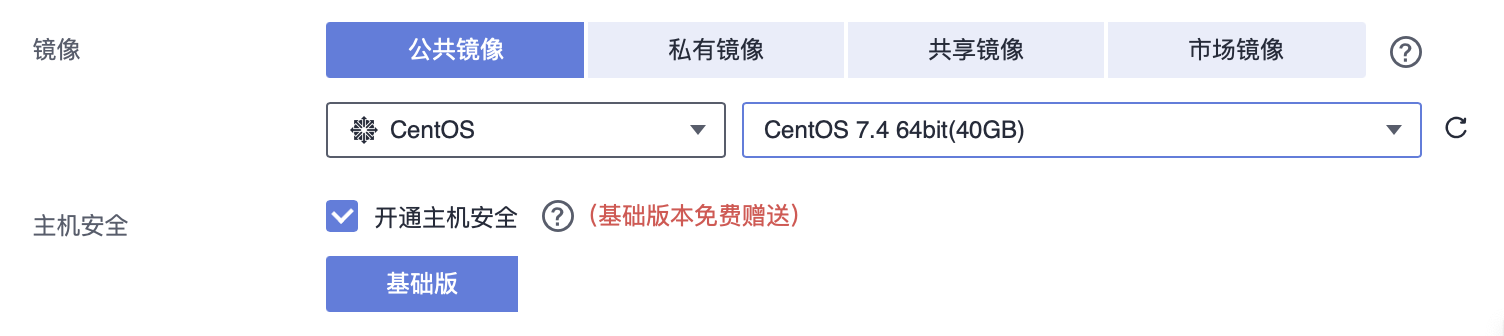
- 按照上文的使用流程购买华为弹性云服务,配置使用公共镜像 CentOS 7.4;
- 购买弹性公网 IP,同时购买弹性公网 IP,后面需要在微信公众号上配置公网 IP 的地址:

③ 环境配置
(A)升级默认 Python 版本
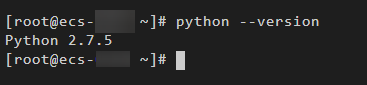
- CentOS 7.4 自带 Python 版本比较老,建议升级到 Python3,查看 Python 版本:
python --version
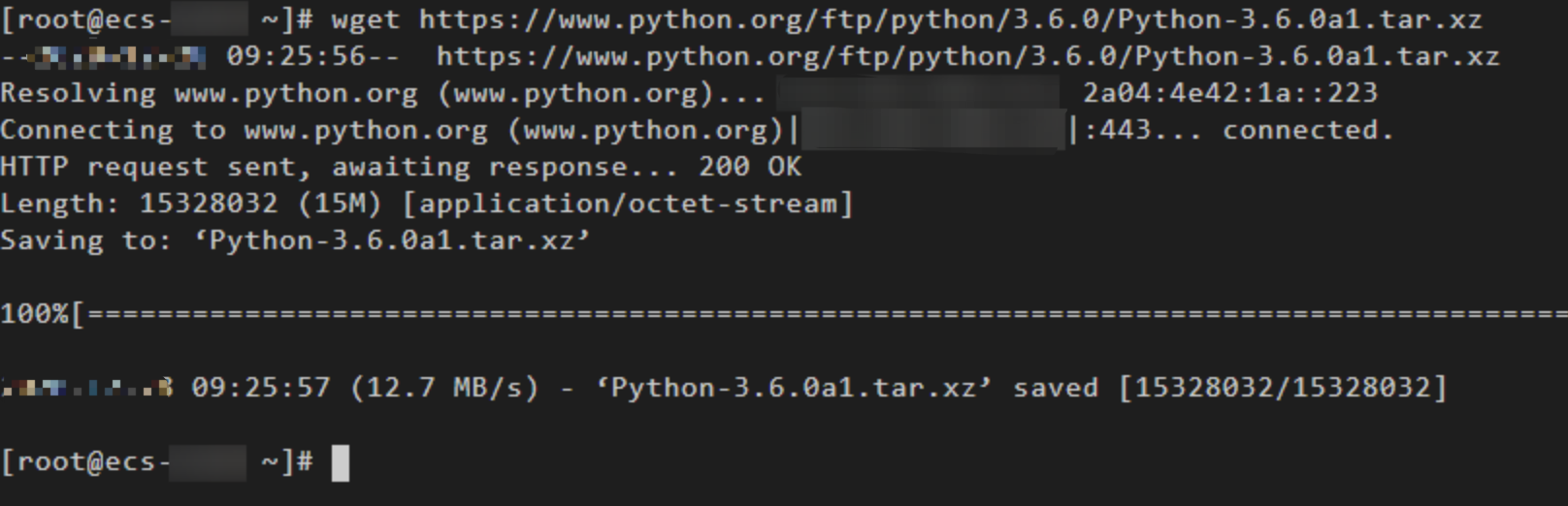
- 下载 Python 安装包:
wget https://www.python.org/ftp/python/3.6.0/Python-3.6.0a1.tar.xz
- 解压安装包:
tar xvf Python-3.6.0a1.tar.xz
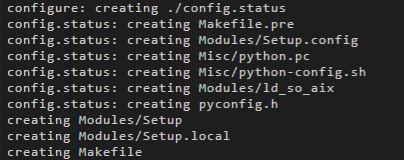
- 执行命令:
- cd Python-3.6.0a1
- ./configure
- 执行成功如下所示:
- 如果出现“configure: error: no acceptable C compiler found in $PATH”异常提示,是因为未安装合适的编译器。执行以下命令,安装/升级 gcc 及其他依赖的包,并在随后提示安装包是否 OK 时,输入 y 并回车:
sudo yum install gcc-c++
- # -*- coding: utf-8 -*-
- # filename: main.py
- import web
- from handle import Handle
-
- urls = (
- '/wx', 'Handle',
- )
-
- if __name__ == '__main__':
- app = web.application(urls, globals())
- app.run()
声明:本文内容由网友自发贡献,不代表【wpsshop博客】立场,版权归原作者所有,本站不承担相应法律责任。如您发现有侵权的内容,请联系我们。转载请注明出处:https://www.wpsshop.cn/article/detail/40488
推荐阅读

相关标签

