
热门标签
热门文章
- 1Educational Codeforces Round 161 (Rated for Div. 2)补题
- 2SpringBoot - @InitBinder注解详解
- 3我的wsl不见了_wsl突然找不到了
- 4MYSQL之错误代码----mysql错误代码与JAVA实现
- 5Ubuntu 20.04 ROS Noetic及Realsense-ROS的安装和多机通信_noetic realsense
- 6JAVA开发(AOP之ProceedingJoinPoint)_proceedingjoinpoint 获取参数
- 7【硬核】源码 + 案例分享 JDK8 新特性中的四大函数式接口_jdk8四大函数
- 8美团BERT的探索和实践 | CSDN原力计划
- 9力扣 707. 设计链表_力扣 设计链表
- 10opencv学习 特征提取
当前位置: article > 正文
RealSense T265环境配置_intel realsense t265 在ubuntu下的环境配置
作者:编程挑战者 | 2024-02-04 19:15:28
赞
踩
intel realsense t265 在ubuntu下的环境配置
RealSense T265环境配置
二进制安装SDK2.0
官网的指导
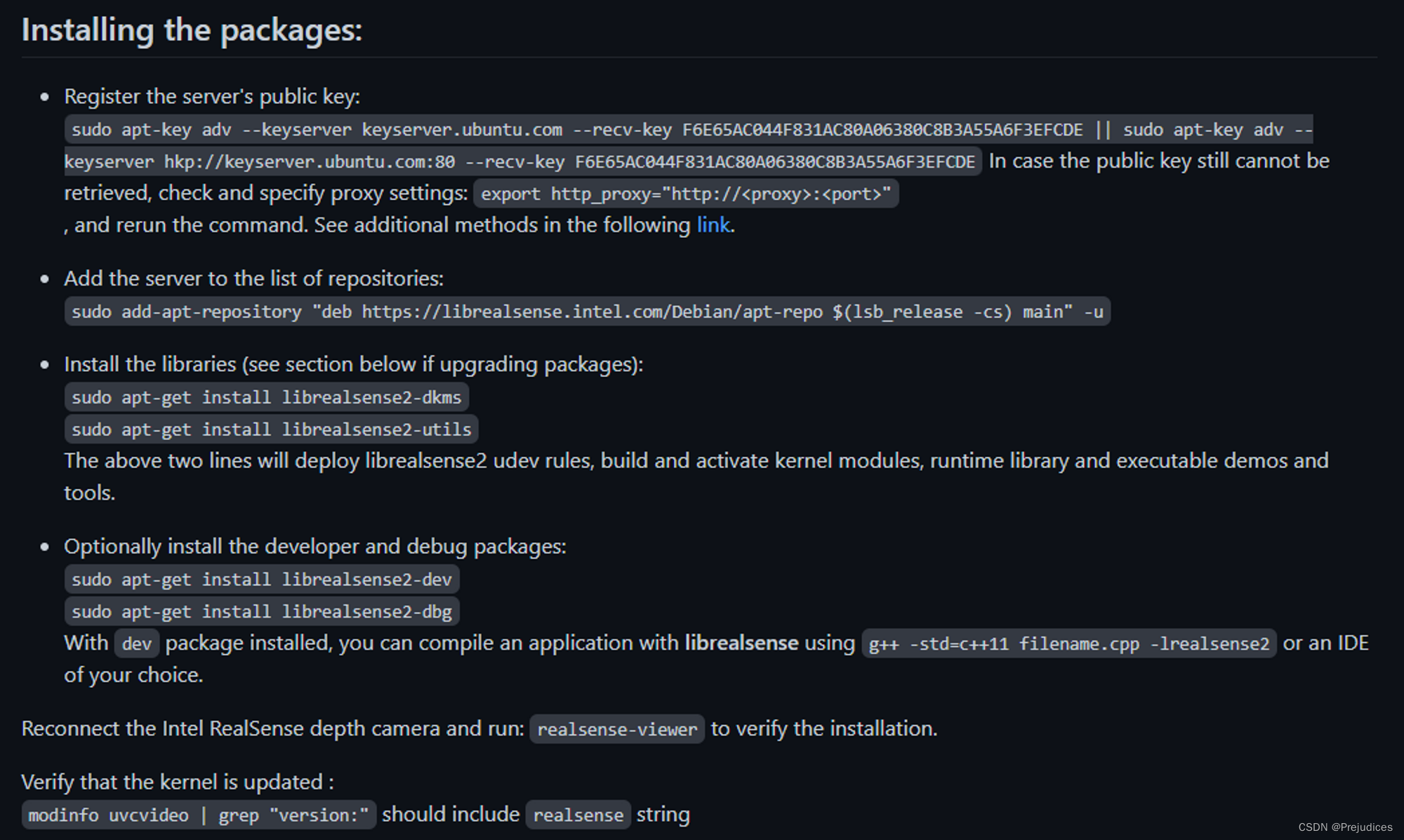
RealSense-ROS
一些博客
Ubuntu 18.04 ———(Intel RealSense D435i)安装相机的驱动librealsense + realsense-ros
二进制装添加软件库的时候会报错说没有数字签名
redwall@redwall-G3-3500:~$ sudo add-apt-repository "deb http://realsense-hw-public.s3.amazonaws.com/Debian/apt-repo bionic main" -u
命中:1 http://mirrors.aliyun.com/ubuntu bionic InRelease
命中:2 http://mirrors.ustc.edu.cn/ros/ubuntu bionic InRelease
命中:3 http://mirrors.aliyun.com/ubuntu bionic-updates InRelease
命中:4 http://mirrors.aliyun.com/ubuntu bionic-backports InRelease
命中:5 http://mirrors.aliyun.com/ubuntu bionic-security InRelease
命中:6 http://packages.microsoft.com/repos/code stable InRelease
错误:7 http://realsense-hw-public.s3.amazonaws.com/Debian/apt-repo bionic InRelease
  403  Forbidden [IP: 52.218.92.66 80]
E: 无法下载 http://realsense-hw-public.s3.amazonaws.com/Debian/apt-repo/dists/xenial/InRelease  403  Forbidden [IP: 52.218.92.66 80]
E: 仓库 “http://realsense-hw-public.s3.amazonaws.com/Debian/apt-repo xenial InRelease” 没有数字签名。
N: 无法安全地用该源进行更新,所以默认禁用该源。
N: 参见 apt-secure(8) 手册以了解仓库创建和用户配置方面的细节。
- 1
- 2
- 3
- 4
- 5
- 6
- 7
- 8
- 9
- 10
- 11
- 12
- 13
RealSense的issue上也没有解决无法添加软件库的问题
https://github.com/IntelRealSense/librealsense/issues/10197
所以还是用源码安装吧
源码安装SDK2.0
按下面的博客操作,Ubuntu18.04可以正常安装SDK,不过下载的时候稍微有点费时
Ubuntu 18.04 ———(Intel RealSense D435i)安装相机的驱动librealsense + realsense-ros
realsense-ros安装
https://github.com/IntelRealSense/realsense-ros
跟着README.md做就行了,二进制和源码安装都很简单
二进制安装
sudo apt-get install ros-$ROS_DISTRO-realsense2-camera

sudo apt-get install ros-$ROS_DISTRO-realsense2-description
- 1
- 2
- 3
源码安装
要先装ddynamic_reconfigure
sudo aptitude install ddynamic_reconfigure
- 1
然后
cd ~/catkin_ws/src/
git clone https://github.com/IntelRealSense/realsense-ros.git
catkin_make -DCMAKE_BUILD_TYPE=Release
catkin_make install
- 1
- 2
- 3
- 4
这里要注意处理好其它包,比如ZED相机的包,先编zed_ros_wrapper,再把zed_ros_examples和realsense-ros放进来一起编
安装完成后
roslaunch realsense2_camera rs_t265.launch
- 1
查看话题
redwall@redwall-G3-3500:~$ rostopic list
/camera/accel/imu_info
/camera/accel/metadata
/camera/accel/sample
/camera/gyro/imu_info
/camera/gyro/metadata
/camera/gyro/sample
/camera/odom/metadata
/camera/odom/sample
/camera/realsense2_camera_manager/bond
/camera/tracking_module/parameter_descriptions
/camera/tracking_module/parameter_updates
/diagnostics
/rosout
/rosout_agg
/tf
/tf_static

- 1
- 2
- 3
- 4
- 5
- 6
- 7
- 8
- 9
- 10
- 11
- 12
- 13
- 14
- 15
- 16
- 17
声明:本文内容由网友自发贡献,不代表【wpsshop博客】立场,版权归原作者所有,本站不承担相应法律责任。如您发现有侵权的内容,请联系我们。转载请注明出处:https://www.wpsshop.cn/article/detail/59683
推荐阅读
相关标签

