
热门标签
热门文章
- 1Spring Cloud Gateway整合OAuth2思路分享
- 2springmvc入门_works only for 1.2 or
- 3关于RabbitMQ常见的十道面试题
- 4探索未来:2023云计算发展趋势_2023年云计算的市场价值
- 5【Springboot】参数校验 spring-boot-starter-validation
- 6QT项目移植到VS+QT(RTI-DDS)_qt rti connext dds
- 7vue中点击查看更多实现_vue实现点击加载更多
- 83D Gaussian Splatting的使用_训练3d gaussian splatting模型步骤
- 9linux无线网卡monitor模式,ubuntu下开启无线网卡的monitor mode
- 10Docker Compose 容器编排
当前位置: article > 正文
前端实现动态路由(后端返回权限路由)_vue路由后端返回
作者:键盘狂人 | 2024-02-04 14:21:37
赞
踩
vue路由后端返回
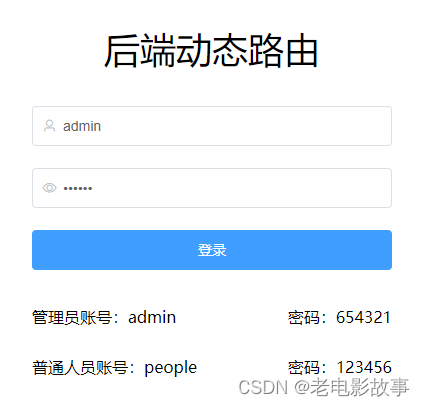
实现思路
1、前端定义静态路由(login登录页这种不需要权限的默认路由)
2、用户登陆时调接口获取用户信息,然后登录到首页
3、前后端定义好路由返回的格式
4、在路由导航钩子beforeEach中去调接口获取动态路由,递归处理该数据为前端可用的路由数据,使用router.addRouters()添加路由
步骤一:前端定义静态路由(login登录页这种不需要权限的默认路由)
router/index.js
import Vue from 'vue'
import VueRouter from 'vue-router'

Vue.use(VueRouter)

// 解决重复点击路由报错的BUG
// 下面这段代码主要解决这个问题 :Uncaught (in promise) Error: Redirected when going from "/login" to "/index" via a navigation guard.
const originalPush = VueRouter.prototype.push
VueRouter.prototype.push = function push(location) {
  return originalPush.call(this, location).catch(err => err)
}

// 定义好静态路由
const routes = [
  {
    path: '/login',
    name: 'login',
    component: () => import('../views/login'),
    hidden: true,
  },
]

const router = new VueRouter({
  mode: 'history',
  base: process.env.BASE_URL,
  routes,
})

export default router

- 1
- 2
- 3
- 4
- 5
- 6
- 7
- 8
- 9
- 10
- 11
- 12
- 13
- 14
- 15
- 16
- 17
- 18
- 19
- 20
- 21
- 22
- 23
- 24
- 25
- 26
- 27
- 28
- 29
步骤二:用户登陆时调接口获取用户信息,然后登录到首页
login/index.vue
methods: {
    login () {
      this.$refs.userForm.validate((valid) => {
        if (valid) {
          // 模拟登录接口去请求用户数据
          setTimeout(() => {
            // 这里的res就是模拟后台返回的用户数据
            const res = dynamicUserData.filter((item) => item.username === this.user.username)[0]
            console.log(res)
            // 存储用户的信息及token到vuex,并做sessionStorage持久化处理
            this.$store.commit('User/saveUserInfo',res)
            Message({ type: 'success', message: "登录成功", showClose: true, duration: 3000 })
            this.$router.push({ path: "/index" })
          }, 1000)
        } else return false
      })
    }
  }
- 1
- 2
- 3
- 4
- 5
- 6
- 7
- 8
- 9
- 10
- 11
- 12
- 13
- 14
- 15
- 16
- 17
- 18
附:vuex持久化处理:使用vuex-persistedstate插件将User仓库的内容存储到sessionStorage中
import Vue from 'vue'
import Vuex from 'vuex'
import User from './modules/user'
import permission from './modules/permission'
import createPersistedState from 'vuex-persistedstate'
Vue.use(Vuex)

export default new Vuex.Store({
  state: {},
  mutations: {},
  actions: {},
  modules: {
    User,
    permission,
  },
  plugins: [
    createPersistedState({
      storage: window.sessionStorage, // 可选sessionStorage localStorage
      reducer(val) {
        return {
          User: val.User,
        }
      },
    }),
  ],
})
- 1
- 2
- 3
- 4
- 5
- 6
- 7
- 8
- 9
- 10
- 11
- 12
- 13
- 14
- 15
- 16
- 17
- 18
- 19
- 20
- 21
- 22
- 23
- 24
- 25
- 26
步骤三:前后端定义好路由返回的格式
// 后台返回的数据结构
const dynamicUser = [
  {
    name: '管理员',
    avatar: 'https://sf3-ttcdn-tos.pstatp.com/img/user-avatar/ccb565eca95535ab2caac9f6129b8b7a~300x300.image',
    desc: '管理员 - admin',
    username: 'admin',
    password: '654321',
    token: 'rtVrM4PhiFK8PNopqWuSjsc1n02oKc3f',
    routes: [
      {
        id: 1,
        name: '/',
        path: '/',
        component: 'Layout',
        redirect: '/index',
        hidden: false,
        children: [{ name: 'index', path: '/index', meta: { title: 'index' }, component: 'index/index' }],
      },
      {
        id: 2,
        name: '/form',
        path: '/form',
        component: 'Layout',
        redirect: '/form/index',
        hidden: false,
        children: [{ name: '/form/index', path: '/form/index', meta: { title: 'form' }, component: 'form/index' }],
      },
      {
        id: 3,
        name: '/example',
        path: '/example',
        component: 'Layout',
        redirect: '/example/tree',
        meta: { title: 'example' },
        hidden: false,
        children: [
          { name: '/tree', path: '/example/tree', meta: { title: 'tree' }, component: 'tree/index' },
          { name: '/copy', path: '/example/copy', meta: { title: 'copy' }, component: 'tree/copy' },
        ],
      },
      {
        id: 4,
        name: '/table',
        path: '/table',
        component: 'Layout',
        redirect: '/table/index',
        hidden: false,
        children: [{ name: '/table/index', path: '/table/index', meta: { title: 'table' }, component: 'table/index' }],
      },
      {
        id: 5,
        name: '/admin',
        path: '/admin',
        component: 'Layout',
        redirect: '/admin/index',
        hidden: false,
        children: [{ name: '/admin/index', path: '/admin/index', meta: { title: 'admin' }, component: 'admin/index' }],
      },
      {
        id: 6,
        name: '/people',
        path: '/people',
        component: 'Layout',
        redirect: '/people/index',
        hidden: false,
        children: [{ name: '/people/index', path: '/people/index', meta: { title: 'people' }, component: 'people/index' }],
      },
    ],
  },
  {
    name: '普通用户',
    avatar: 'https://sf1-ttcdn-tos.pstatp.com/img/user-avatar/6364348965908f03e6a2dd188816e927~300x300.image',
    desc: '普通用户 - people',
    username: 'people',
    password: '123456',
    token: '4es8eyDwznXrCX3b3439EmTFnIkrBYWh',
    routes: [
      {
        id: 1,
        name: '/',
        path: '/',
        component: 'Layout',
        redirect: '/index',
        hidden: false,
        children: [{ name: 'index', path: '/index', meta: { title: 'index' }, component: 'index/index' }],
      },
      {
        id: 2,
        name: '/form',
        path: '/form',
        component: 'Layout',
        redirect: '/form/index',
        hidden: false,
        children: [{ name: '/form/index', path: '/form/index', meta: { title: 'form' }, component: 'form/index' }],
      },
      {
        id: 3,
        name: '/example',
        path: '/example',
        component: 'Layout',
        redirect: '/example/tree',
        meta: { title: 'example' },
        hidden: false,
        children: [
          { name: '/tree', path: '/example/tree', meta: { title: 'tree' }, component: 'tree/index' },
          { name: '/copy', path: '/example/copy', meta: { title: 'copy' }, component: 'tree/copy' },
        ],
      },
      {
        id: 4,
        name: '/table',
        path: '/table',
        component: 'Layout',
        redirect: '/table/index',
        hidden: false,
        children: [{ name: '/table/index', path: '/table/index', meta: { title: 'table' }, component: 'table/index' }],
      },
      {
        id: 6,
        name: '/people',
        path: '/people',
        component: 'Layout',
        redirect: '/people/index',
        hidden: false,
        children: [{ name: '/people/index', path: '/people/index', meta: { title: 'people' }, component: 'people/index' }],
      },
    ],
  },
]

export default dynamicUser
- 1
- 2
- 3
- 4
- 5
- 6
- 7
- 8
- 9
- 10
- 11
- 12
- 13
- 14
- 15
- 16
- 17
- 18
- 19
- 20
- 21
- 22
- 23
- 24
- 25
- 26
- 27
- 28
- 29
- 30
- 31
- 32
- 33
- 34
- 35
- 36
- 37
- 38
- 39
- 40
- 41
- 42
- 43
- 44
- 45
- 46
- 47
- 48
- 49
- 50
- 51
- 52
- 53
- 54
- 55
- 56
- 57
- 58
- 59
- 60
- 61
- 62
- 63
- 64
- 65
- 66
- 67
- 68
- 69
- 70
- 71
- 72
- 73
- 74
- 75
- 76
- 77
- 78
- 79
- 80
- 81
- 82
- 83
- 84
- 85
- 86
- 87
- 88
- 89
- 90
- 91
- 92
- 93
- 94
- 95
- 96
- 97
- 98
- 99
- 100
- 101
- 102
- 103
- 104
- 105
- 106
- 107
- 108
- 109
- 110
- 111
- 112
- 113
- 114
- 115
- 116
- 117
- 118
- 119
- 120
- 121
- 122
- 123
- 124
- 125
- 126
- 127
- 128
- 129
- 130
- 131
- 132
- 133
步骤四:路由导航钩子beforeEach处理
路由钩子逻辑:
是否为白名单:
	是:  直接进入
	不是:判断是否有token
		无token:跳转到login登录页
		有token:判断用户路由状态(是否有路由)
			有路由: 直接进入
			无路由: 调接口获取动态路由
					递归处理返回的路由
					将递归处理好的路由存储到vuex,设置用户路由状态为true
					使用router.addRouters()添加路由
- 1
- 2
- 3
- 4
- 5
- 6
- 7
- 8
- 9
- 10
路由导航守卫:
import router from './index'
import Layout from '../layout/index'
import NProgress from 'nprogress' // progress bar
import store from '@/store'
import menu from '@/mock/menu.js'

// 路由拼接
function loadView(view) {
  return () => import(`@/views/${view}`)
}
// 路由过滤   遍历路由 转换为组件对象和路径
function filterASyncRoutes(data) {
  // console.log(data)
  const routes = data.filter(item => {
    if (item['component'] === 'Layout') {
      item.component = Layout
    } else {
      item['component'] = loadView(item['component'])
    }
    // 路由递归,转换组件对象和路径
    if (item['children'] && item['children'].length > 0) {
      item['children'] = filterASyncRoutes(item.children)
    }
    return true
  })
  // 排序
  routes.sort((a, b) => a['id'] - b['id'])
  return routes
}

NProgress.configure({ showSpinner: false }) // NProgress Configuration

// 白名单页面直接进入
const whiteList = ['/login']

router.beforeEach((to, from, next) => {
  NProgress.start()
  // 白名单页面,不管是否有token,是否登录都直接进入
  if (whiteList.indexOf(to.path) !== -1) {
    next()
    return false
  }
  // 有token(代表了有用户信息,但是不确定有没有路由信息)
  if (store.state.User.token) {
    // 判断当前用户是否是登录状态, 是登录状态则一定有路由,直接放行,不是登录状态则去获取路由菜单登录
    // 刷新时store.state.routerList.hasRoutes会重置为false,重新去获取 异步路由
    if (!store.state.routerList.hasRoutes) {
      setTimeout(() => {
        const res = menu.filter(item => item.token === store.state.User.token)[0].routes
        const asyncRouter = filterASyncRoutes(res) // 递归处理后台返回的路由
        store.commit('routerList/setRouterList', asyncRouter) // 存储到异步的路由到vuex
        store.commit('routerList/setHasRoutes', true) // 设置登录状态为true
        router.addRoutes(asyncRouter) // 动态添加可访问路由表
        next({ ...to, replace: true }) // hack方法 router.addRoutes之后的next()可能会失效,可能next()的时候路由并没有完全add完成 通过next(to)解决
      }, 500)
    } else {
      next() //当有用户权限的时候,说明所有可访问路由已生成 如访问没权限的全面会自动进入404页面
    }
  }else {
    next({path:'/login'})
  }
})

router.afterEach(() => {
  // finish progress bar
  NProgress.done()
})
- 1
- 2
- 3
- 4
- 5
- 6
- 7
- 8
- 9
- 10
- 11
- 12
- 13
- 14
- 15
- 16
- 17
- 18
- 19
- 20
- 21
- 22
- 23
- 24
- 25
- 26
- 27
- 28
- 29
- 30
- 31
- 32
- 33
- 34
- 35
- 36
- 37
- 38
- 39
- 40
- 41
- 42
- 43
- 44
- 45
- 46
- 47
- 48
- 49
- 50
- 51
- 52
- 53
- 54
- 55
- 56
- 57
- 58
- 59
- 60
- 61
- 62
- 63
- 64
- 65
- 66
- 67
- 68
注意
这里将异步路由和路由状态的数据放到了routerList.js里面,但是这里是没做缓存的
原因:让用户刷新时这里的数据重置,然后重新走路由钩子的时候就会去调接口获取路由信息。
(为什么不把路由放到sessionStorage中? 原因是路由数组中的component无法保存到sessionStorage中,() => import(@/views/${userAuth.component}) 这种保存不到sessionStorage中 )
获取的用户信息需要存储在vuex并做持久化处理,但是获取的菜单存在vuex中不做持久化处理,让用户在刷新时会清空,重新走获取菜单的接口,也就是下面这段代码
if (!store.state.routerList.hasRoutes) {
 setTimeout(() => {
    const res = menu.filter(item => item.token === store.state.User.token)[0].routes
    const asyncRouter = filterASyncRoutes(res) // 递归处理后台返回的路由
    store.commit('routerList/setRouterList', asyncRouter) // 存储到异步的路由到vuex
    store.commit('routerList/setHasRoutes', true) // 设置登录状态为true
    router.addRoutes(asyncRouter) // 动态添加可访问路由表
    next({ ...to, replace: true }) // hack方法 router.addRoutes之后的next()可能会失效,可能next()的时候路由并没有完全add完成 通过next(to)解决
  }, 500)
}
- 1
- 2
- 3
- 4
- 5
- 6
- 7
- 8
- 9
- 10
我公司目前就是采用后端返回路由做的权限管理
希望能帮到你哦
声明:本文内容由网友自发贡献,转载请注明出处:【wpsshop博客】
推荐阅读
相关标签

