
- 1【Docker】Docker的部署含服务和应用、多租环境、Linux内核的详细介绍_什么应用适合容器部署
- 2什么是ddos攻击,如何低成本防御ddos攻击?
- 3php反序列化之pop链构造(基于重庆橙子科技靶场)
- 4AI与区块链的完美交融创新时代的双重引擎
- 5【Spring Boot 3】【数据源】自定义多数据源
- 6Android 13 - Media框架(19)- ACodec(一)_acodec定义的状态机
- 7支持向量机回归预测SVR——MATLAB超详细代码实现过程_支持向量机回归预测模型
- 8软考 | 2010年上半年 软件设计师 下午试卷_杌明, 某大型企业的数据中心为了集中管理、控制用户对数据的访问并支持大量的连接
- 9windows服务器限制特定ip访问指定端口(服务器ip白名单)_windows限制ip地址访问
- 10python中的装饰器,继承与抽象类_python 子类新装饰器会调用父类的装饰器吗
vue项目开发目录架构_vue项目一般目录结构
赞
踩
一.整体的目录介绍
1.目录架构
- - mock mock可以不需要后台,自动拦截ajax返回测试数据
-
- - public 公共目录
-
- - src
-
- api 用于存放网络请求文件的目录
-
- index.ts
-
- xxx目录
- assets 存放静态文件的目录
- components 存放自定义组件的目录
- filter 过滤器的使用(例如时间data格式化)
- index.ts
- icons 图标库引入
- svg
- index.ts
- lang 语言包引入(用于项目中多语言切换)
- en.js
- zh.js
- layout 每个页面的框架
- router 路由设置
- index.ts
- modules 可以减少router下index整体的大小
- store vuex的目录
- modules 相应的文件存放
- getters 获取vuex变量get方式
- index.ts
- utils 工具目录
- views 页面目录
- App.vue
- main.ts
- permisson.ts 权限文件
- - .env.development 本地的环境变量
-
- - .env.production 线上的环境变量
-
- - vue.config.js 配置整体的vue项目
-
- - package.json 所有下载的依赖统一管理文件
-
- - README.md 项目介绍文档(一般上传源码管理器使用)

二.具体的代码
1. Vuex具体代码
1) vuex具体架构
- const state = {
- isRefresh:false //初始化刷新 为false
- }
-
- const mutations = {
-
- SET_IS_REFRESH:(state: any, isRefresh: Boolean)=>{
- state.isRefresh=isRefresh
- }
- }
-
- const actions = {
- setRefresh: ({ commit }: any, isRefresh: Boolean) => {
-
- commit("SET_IS_REFRESH", isRefresh)
- }
-
- }
-
- export default {
- namespaced: true,
- state,
- mutations,
- actions
- }
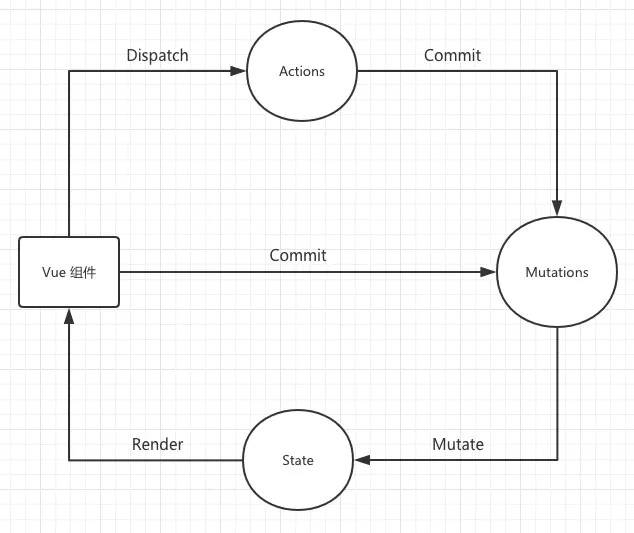
2)vuex的getters
- const getters = {
- isRefresh:(state:any)=>state.refresh.isRefresh
- }
- export default getters
3)vuex注册
index.ts文件 在main.ts记住引入store
- import Vue from 'vue'
- import Vuex from 'vuex'
- import getters from './getters'
-
-
- Vue.use(Vuex)
-
-
- // https://webpack.js.org/guides/dependency-management/#requirecontext
- const modulesFiles = require.context('./modules', true, /\.ts$/)
-
-
-
- const modules = modulesFiles.keys().reduce((modules: any, modulePath) => {
- // set './app.js' => 'app'
-
- const moduleName = modulePath.replace(/^\.\/(.*)\.\w+$/, '$1')
-
- const value = modulesFiles(modulePath)
- modules[moduleName] = value.default
- return modules
- }, {})
-
- const store = new Vuex.Store({
- modules,
- getters,
-
- })
-
- export default store
2.permisson路由问题
permisson.ts 页面会反复调用 beforeEach,直到调用next()
router.beforeEach(to,from,next) to 代表将要访问的路径 from 当前路径 next用于跳转页面
next({"path":"/"})指向路径后代表重定向 会再次访问beforeEach
- import router from './router'
- import { getToken, removeToken, setToken } from '@/utils/auth';
- import { Dialog } from 'vant';
- import store from './store';
-
-
-
- const whiteList = ['/login']
-
- const env = process.env.NODE_ENV
- if(env === "production") {
- // 应将layout中navList的to添加到此
- const navList = ['/socialRela', '/childrenStatus', '/work', '/education', '/info']
- router.beforeEach(async (to, from, next) => {
- const userId = getToken()
- if (userId) {
-
- } else {
- if (whiteList.indexOf(to.path) != -1) {
- next()
- } else {
- next({ path: '/login' })
- }
- }
- })
-
-
- }
在路由权限这块,有一个笔记就是对于菜单权限的分配,判断角色是否存在,不存在的话获取角色后通过角色获取动态菜单,代码如下(代码仅供参考)
- 、、、路由判断代码
- const hasRoles = store.getters.roles && store.getters.roles.length > 0
- if (hasRoles) {
- next()
- } else {
- try {
- // get user info
- // note: roles must be a object array! such as: ['ROLE_ADMIN'] or ,['ROLE_DEVELOPER','ROLE_EDITOR']
- const { roles } = await store.dispatch('user/getInfo')
-
- // generate accessible routes map based on roles
- const accessRoutes = await store.dispatch('permission/generateRoutes', roles)
-
- // dynamically add accessible routes
- router.addRoutes(accessRoutes)
-
- // hack method to ensure that addRoutes is complete
- // set the replace: true, so the navigation will not leave a history record
- next({ ...to, replace: true })
- } catch (error) {
- // remove token and go to login page to re-login
- await store.dispatch('user/resetToken')
- Message.error(error || 'Has Error')
- next(`/login?redirect=${to.path}`)
- NProgress.done()
- }
- }
- 、、、路由添加参考
- import { asyncRoutes, constantRoutes } from '@/router'
-
- /**
- * Use meta.role to determine if the current user has permission
- * @param roles
- * @param route
- */
- function hasPermission(roles, route) {
- if (route.meta && route.meta.roles) {
- return roles.some(role => route.meta.roles.includes(role))
- } else {
- return true
- }
- }
-
- /**
- * Filter asynchronous routing tables by recursion
- * @param routes asyncRoutes
- * @param roles
- */
- export function filterAsyncRoutes(routes, roles) {
- const res = []
-
- routes.forEach(route => {
- const tmp = { ...route }
- if (hasPermission(roles, tmp)) {
- if (tmp.children) {
- tmp.children = filterAsyncRoutes(tmp.children, roles)
- }
- res.push(tmp)
- }
- })
-
- return res
- }
-
- const state = {
- routes: [],
- addRoutes: []
- }
-
- const mutations = {
- SET_ROUTES: (state, routes) => {
- state.addRoutes = routes
- state.routes = constantRoutes.concat(routes)
- }
- }
-
- const actions = {
- generateRoutes({ commit }, roles) {
- return new Promise(resolve => {
- let accessedRoutes
- if (roles.includes('ADMIN')) {
- accessedRoutes = asyncRoutes || []
- } else {
- accessedRoutes = filterAsyncRoutes(asyncRoutes, roles)
- }
- commit('SET_ROUTES', accessedRoutes)
- resolve(accessedRoutes)
- })
- }
- }
-
- export default {
- namespaced: true,
- state,
- mutations,
- actions
- }
3.首先是svg引入
在src目录创建icon目录
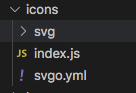
icon目录分为svg(目录下是svg图片)、svgo.yml 、index.js
svgo.yml
- # replace default config
-
- # multipass: true
- # full: true
-
- plugins:
-
- # - name
- #
- # or:
- # - name: false
- # - name: true
- #
- # or:
- # - name:
- # param1: 1
- # param2: 2
-
- - removeAttrs:
- attrs:
- - 'fill'
- - 'fill-rule'
index.js 加载svg目录下文件 ,不需要一次次加载,对于代码解释,收藏里require.context
- import Vue from 'vue'
- import SvgIcon from '@/components/SvgIcon'// svg component
-
- // register globally
- Vue.component('svg-icon', SvgIcon)
-
- const req = require.context('./svg', false, /\.svg$/)
- const requireAll = requireContext => requireContext.keys().map(requireContext)
- requireAll(req)
在vue.config中
- chainWebpack(config) {
- config.plugins.delete('preload') // TODO: need test
- config.plugins.delete('prefetch') // TODO: need test
-
- // set svg-sprite-loader
- config.module
- .rule('svg')
- .exclude.add(resolve('src/assets/icons'))
- .end()
- config.module
- .rule('icons')
- .test(/\.svg$/)
- .include.add(resolve('src/assets/icons'))
- .end()
- .use('svg-sprite-loader')
- .loader('svg-sprite-loader')
- .options({
- symbolId: 'icon-[name]'
- })
- .end()
- }
然后全局注册SvgIcon组件
那么组件代码(组件定义完整后,最后记得在main.ts引入icon目录 但不需要vue对象里声明,lang需要)
- <template>
- <div v-if="isExternal" :style="styleExternalIcon" class="svg-external-icon svg-icon" v-on="$listeners" />
- <svg v-else :class="svgClass" aria-hidden="true" v-on="$listeners">
- <use :xlink:href="iconName" />
- </svg>
- </template>
-
- <script>
- // doc: https://panjiachen.github.io/vue-element-admin-site/feature/component/svg-icon.html#usage
- import { isExternal } from '@/utils/validate'
-
- export default {
- name: 'SvgIcon',
- props: {
- iconClass: {
- type: String,
- required: true
- },
- className: {
- type: String,
- default: ''
- }
- },
- computed: {
- isExternal() {
- return isExternal(this.iconClass)
- },
- iconName() {
- return `#icon-${this.iconClass}`
- },
- svgClass() {
- if (this.className) {
- return 'svg-icon ' + this.className
- } else {
- return 'svg-icon'
- }
- },
- styleExternalIcon() {
- return {
- mask: `url(${this.iconClass}) no-repeat 50% 50%`,
- '-webkit-mask': `url(${this.iconClass}) no-repeat 50% 50%`
- }
- }
- }
- }
- </script>
-
- <style scoped>
- .svg-icon {
- width: 1em;
- height: 1em;
- vertical-align: -0.15em;
- fill: currentColor;
- overflow: hidden;
- }
-
- .svg-external-icon {
- background-color: currentColor;
- mask-size: cover!important;
- display: inline-block;
- }
- </style>
4.lang 语言包
在src创建lang文件目录
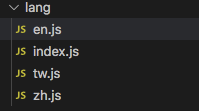
en.js tw.js zh.js
其中一个文件的代码
- export default {
- route: {
- "language":"汉语"
- }
- }
index.js需要下载vue-i18n
- import Vue from 'vue'
- import VueI18n from 'vue-i18n'
- //import Cookies from 'js-cookie'
- import elementEnLocale from 'element-ui/lib/locale/lang/en' // element-ui lang
- import elementZhLocale from 'element-ui/lib/locale/lang/zh-CN'// element-ui lang
- import elementTwLocale from 'element-ui/lib/locale/lang/zh-TW'// element-ui lang
- import enLocale from './en'
- import zhLocale from './zh'
- import twLocale from './tw'
-
- Vue.use(VueI18n)
-
- const messages = {
- en: {
- ...enLocale,
- ...elementEnLocale
- },
- zh: {
- ...zhLocale,
- ...elementZhLocale
- },
- tw: {
- ...twLocale,
- ...elementTwLocale
- }
- }
- export function getLanguage() {
- //此处代码如果有选择可以加
- //const chooseLanguage = Cookies.get('language')
- //if (chooseLanguage) return chooseLanguage
-
- // if has not choose language
- const language = (navigator.language || navigator.browserLanguage).toLowerCase()
- const locales = Object.keys(messages)
- for (const locale of locales) {
- if (language.indexOf(locale) > -1) {
- return locale
- }
- }
- return 'en'
- }
- const i18n = new VueI18n({
- // set locale
- // options: en | zh | es
- locale: getLanguage(),
- // set locale messages
- messages
- })
-
- export default i18n
在main.ts(由于i18n使用到了elementui)
- import i81n from './lang'
-
- Vue.use(Element, {
-
- size: Cookies.get('size') || 'medium', // set element-ui default size
-
- i18n: (key, value) => i18n.t(key, value)
-
- })
-
-
-
- new Vue({
-
- i18n,
-
- })
在使用页面中 $t('login.title') 判断页面是否有字段this.$te('route.' + title)
5.filter的使用
<span>{{ new Date(row.createTime) | parseTime('{y}-{m}-{d} {h}:{i}:{s}') }}</span>
-
- /**
- * @param {number} time
- * @param {string} option
- * @returns {string}
- */
- export function formatTime(time, option) {
- if (('' + time).length === 10) {
- time = parseInt(time) * 1000
- } else {
- time = +time
- }
- const d = new Date(time)
- const now = Date.now()
-
- const diff = (now - d) / 1000
-
- if (diff < 30) {
- return '刚刚'
- } else if (diff < 3600) {
- // less 1 hour
- return Math.ceil(diff / 60) + '分钟前'
- } else if (diff < 3600 * 24) {
- return Math.ceil(diff / 3600) + '小时前'
- } else if (diff < 3600 * 24 * 2) {
- return '1天前'
- }
- if (option) {
- return parseTime(time, option)
- } else {
- return (
- d.getMonth() +
- 1 +
- '月' +
- d.getDate() +
- '日' +
- d.getHours() +
- '时' +
- d.getMinutes() +
- '分'
- )
- }
- }
全局注册在main.ts
- import * as filters from './filters'
-
- Object.keys(filters).forEach(key => {
-
- Vue.filter(key, filters[key])
-
- })
-
6.api网络请求
1)封装axios
首先安装axios框架,
api->index.ts文件 (封装axios)
- import axios from 'axios'
- import { Dialog } from 'vant';
- import store from '@/store';
-
- // create an axios instance
- const service = axios.create({
- baseURL: process.env.VUE_APP_BASE_API, // url = base url + request url
- timeout: 8000 // request timeout
- })
-
- // request interceptor
- service.interceptors.request.use(
- config => {
- //do something before request is sent
- if (store.getters.token) {
-
- config.headers['Authorization'] = 'Bearer ' + store.getters.token
- }
- return config
- },
- error => {
- // do something with request error
- console.log(error) // for debug
- return Promise.reject(error)
- }
- )
-
- // response interceptor
- service.interceptors.response.use(
-
- response => {
-
- const res = response.data
- // if the custom code is not 200, it is judged as an error.
- if (res.status && res.status !== 200) {
- Dialog.alert({
- message: res.message ,
- title: "提示"
- })
-
- return Promise.reject(new Error(res.message || 'Error'))
- } else {
- return res
- }
- },
- error => {
- Dialog.alert({
- message: error,
- title: "服务器提示"
- })
- return Promise.reject(error)
- }
- )
-
- export default service
2)具体的方法网络请求实现
api下新建多个目录,存放网络请求的方法,如
- import request from '@/utils/request'
- import qs from 'qs'
-
-
- export function getUserId(query: any) {
- return request({
- url: "/consumer/user",
- method: 'get',
-
- params: query
- })
- }
-
- // 新增用户基本信息
- export function Add(data: any) {
- return request({
- url: '/consumer/baseInfo/add',
- method: 'post',
- data: qs.stringify(data)
- })
- }
以下axios提交方式Content-type:form-data
在使用axios时,注意到配置选项中包含params和data两者因为params是添加到url的请求字符串中的,用于get请求。 (后台@RequestParam)
而data是添加到请求体(body)中的, 用于post请求;(后台@RequestBody)
使用qs:qs的作用将json用&相连并序列化处理,那么需要字符特殊处理的可以使用qs
7.mock的使用
1)mock的注册
mock下的index.ts,将所有mock文件注册,如果确认使用就在主目录下的main.ts引入(require('../mock');)
- // 首先引入Mock
- const Mock = require('mockjs');
-
- // 设置拦截ajax请求的相应时间
- Mock.setup({
- timeout: '200-600'
- });
-
- let configArray = [];
-
- // 使用webpack的require.context()遍历所有mock文件
- const files = require.context('./modules', true, /\.ts$/);
- files.keys().forEach((key) => {
-
- configArray = configArray.concat(files(key).default);
- });
-
- // 注册所有的mock服务
- configArray.forEach((item) => {
- for (let [path, target] of Object.entries(item)) {
- let protocol = path.split('|');
- Mock.mock(new RegExp('^' + protocol[1]), protocol[0], target);
- }
- });
2)mock的查找
modules下的xx,例如(具体的mock格式Home · nuysoft/Mock Wiki · GitHub):
- let demoList =
- {
- status: 200,
- message: 'success',
- 'data|10': [{
-
- clientId:'@id',
- clientName: '@cname',
- contactsPhone: '@email',
-
- }]
- }
- export default {
- 'get|/consumer/clientele/queryByAccount': demoList
- }
三.组件构造对象通过js调用
- import Vue from 'vue';
- import tipVue from './Tip.vue';
-
- //将组件转换成对象
- const TipVueConstructor = Vue.extend(tipVue);
-
-
- const initInstance = () => {
- //实例化
- instance = new TipVueConstructor({
- el: document.createElement('div')
- });
-
- };
-
-
- const TipBox = function (options) {
- if (!instance) {
- initInstance();
- }
- instance.action = '';
- if (!instance.visible && options) {
- document.body.appendChild(instance.$el);
- var closeTime = options.closeTime || 1000;
- Vue.nextTick(() => {
- instance.visible = true;
- instance.isTip = options.isTip;//isTip为true显示错误提示小黑框
- instance.message = options.message
- setTimeout(() => {
- TipBox.close();
- if (typeof options.func == "function") {
- options.func();
- }
-
- }, closeTime);
- });
- }
- };
-
-
- export default TipBox;
main.js或全局
Vue.prototype.$tip = TipBox
调用案例:
this.$tip({
isTip: true,
message: "验证码发送成功",
});

