
热门标签
热门文章
- 17个银行的软件测试项目实战,别再说简历项目不知道怎么写了_软件测试银行项目
- 2嵌入式硬件基础知识——1
- 3在探索创意中进一步了解生成式人工智能:PartyRock —— re:Invent 2023 产品测评
- 4Python项目打包, docker build构建docker镜像, Docker Compose (Docker编配)_docker打包python项目
- 5代码实现对selenium的驱动器WebDrive的配置
- 6IM通信技术快速入门:短轮询、长轮询、SSE、WebSocket
- 7在 Mac 中卸载 Node.js_mac node卸载
- 8【小吉带你学Git】Git分支
- 9Web3.0的五大趋势,你是否已经了解?
- 10利用OGG实现PostgreSQL实时同步
当前位置: article > 正文
如何利用Java获取系统的信息(CPU、内存、各盘符使用情况)_java 获取系统盘信息
作者:alg789 | 2024-02-04 13:53:57
赞
踩
java 获取系统盘信息
- /***********************************************************************
- * Project: gpsAdapter
- * Note: Console Application
- **********************************************************************/
-
- /**
- *
- * @author HuangHaifeng 1.0
- * @date 2016-1-12
- * @copyright CCompass
- * 增加用于监控系统cpu,memory的工具类
- */
- package com.hhf.test;
-
- import java.io.File;
- import java.io.InputStreamReader;
- import java.io.LineNumberReader;
- import java.lang.management.ManagementFactory;
- import java.util.ArrayList;
- import java.util.List;
-
- import javax.management.MBeanServerConnection;
- import javax.management.remote.JMXConnector;
- import javax.management.remote.JMXConnectorFactory;
- import javax.management.remote.JMXServiceURL;
-
- import com.sun.management.OperatingSystemMXBean;
-
- public class WindowsInfoUtil {
-
- private static final int CPUTIME = 500;
- private static final int PERCENT = 100;
- private static final int FAULTLENGTH = 10;
-
- // 获取内存使用率
- public static String getMemery() {
-
- OperatingSystemMXBean osmxb = ManagementFactory.getPlatformMXBean(OperatingSystemMXBean.class);
- long totalvirtualMemory = osmxb.getTotalSwapSpaceSize(); // 剩余的物理内存
- long freePhysicalMemorySize = osmxb.getFreePhysicalMemorySize();
- Double compare = (Double) (1 - freePhysicalMemorySize * 1.0 / totalvirtualMemory) * 100;
-
- String str = compare.intValue() + "%";
- return str;
-
- }
-
- // 获取文件系统使用率
- public static List<String> getDisk() {
-
- // 操作系统
- List<String> list = new ArrayList<String>();
-
- for (char c = 'A'; c <= 'Z'; c++) {
- String dirName = c + ":/";
- File win = new File(dirName);
- if (win.exists()) {
- long total = (long) win.getTotalSpace();
- long free = (long) win.getFreeSpace();
- Double compare = (Double) (1 - free * 1.0 / total) * 100;
- String str = c + ":盘已使用" + compare.intValue() + "%";
- list.add(str);
- }
- }
- return list;
-
- }
-
- // 获得cpu使用率
- public static String getCpuRatioForWindows() {
-
- try {
- String procCmd = System.getenv("windir")
- + "\\system32\\wbem\\wmic.exe process get Caption,CommandLine,KernelModeTime,ReadOperationCount,ThreadCount,UserModeTime,WriteOperationCount";
- // 取进程信息
- long[] c0 = readCpu(Runtime.getRuntime().exec(procCmd));
- Thread.sleep(CPUTIME);
- long[] c1 = readCpu(Runtime.getRuntime().exec(procCmd));
-
- if (c0 != null && c1 != null) {
- long idletime = c1[0] - c0[0];
- long busytime = c1[1] - c0[1];
- return Double.valueOf(PERCENT * (busytime) * 1.0 / (busytime + idletime)).intValue() + "%";
- } else {
- return 0 + "%";
- }
-
- } catch (Exception ex) {
- ex.printStackTrace();
- return 0 + "%";
- }
- }
-
- private static long[] readCpu(final Process proc) {
- long[] retn = new long[2];
- try {
- proc.getOutputStream().close();
- InputStreamReader ir = new InputStreamReader(proc.getInputStream());
- LineNumberReader input = new LineNumberReader(ir);
- String line = input.readLine();
- if (line == null || line.length() < FAULTLENGTH) {
- return null;
-
- }
-
- int capidx = line.indexOf("Caption");
- int cmdidx = line.indexOf("CommandLine");
- int rocidx = line.indexOf("ReadOperationCount");
- int umtidx = line.indexOf("UserModeTime");
- int kmtidx = line.indexOf("KernelModeTime");
- int wocidx = line.indexOf("WriteOperationCount");
- long idletime = 0;
- long kneltime = 0;
- long usertime = 0;
- while ((line = input.readLine()) != null) {
- if (line.length() < wocidx) {
-
- continue;
-
- }
- // 字段出现顺序:Caption,CommandLine,KernelModeTime,ReadOperationCount,
- //ThreadCount,UserModeTime,WriteOperation
- String caption = Bytes.substring(line, capidx, cmdidx - 1).trim();
- String cmd = Bytes.substring(line, cmdidx, kmtidx - 1).trim();
- if (cmd.indexOf("wmic.exe") >= 0) {
- continue;
- }
- String s1 = Bytes.substring(line, kmtidx, rocidx - 1).trim();
- String s2 = Bytes.substring(line, umtidx, wocidx - 1).trim();
- if (caption.equals("System Idle Process") || caption.equals("System")) {
-
- if (s1.length() > 0)
-
- idletime += Long.valueOf(s1).longValue();
- if (s2.length() > 0)
- idletime += Long.valueOf(s2).longValue();
- continue;
- }
- if (s1.length() > 0)
-
- kneltime += Long.valueOf(s1).longValue();
- if (s2.length() > 0)
- usertime += Long.valueOf(s2).longValue();
- }
- retn[0] = idletime;
- retn[1] = kneltime + usertime;
- return retn;
- } catch (Exception ex) {
- ex.printStackTrace();
- } finally {
- try {
- proc.getInputStream().close();
-
- } catch (Exception e) {
- e.printStackTrace();
- }
-
- }
- return null;
-
- }
- static class Bytes {
- public static String substring(String src, int start_idx, int end_idx) {
- byte[] b = src.getBytes();
- String tgt = "";
- for (int i = start_idx; i <= end_idx; i++) {
- tgt += (char) b[i];
- }
-
- return tgt;
- }
- }
- public static void main(String[] args) throws Exception {
-
- System.out.println("cpu占有率=" + WindowsInfoUtil.getCpuRatioForWindows());
- System.out.println("可使用内存=" + WindowsInfoUtil.getMemery());
- System.out.println("各盘占用情况:" + WindowsInfoUtil.getDisk());
-
- }
- }

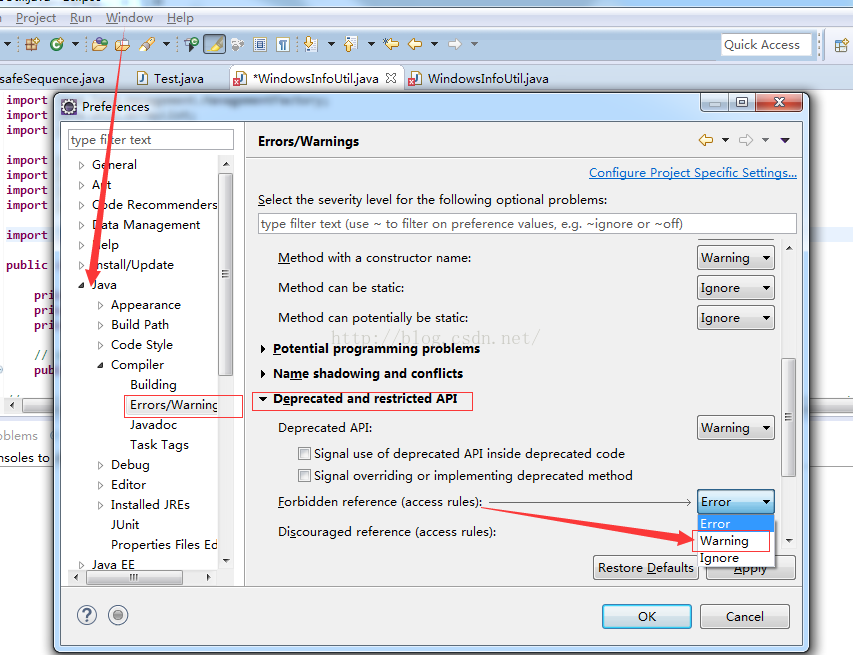
这时就会出现com.sun.management.OperatingSystemMXBean这个类找不到!
这里的工程需要用到rt.jar,当我们额外下载导入rt.jar就可以解决这个问题,但是对于jdk来说本身是具有jar包的,原因是eclipse将这些访问受限制的API设置成了错误,导致不能import。
声明:本文内容由网友自发贡献,不代表【wpsshop博客】立场,版权归原作者所有,本站不承担相应法律责任。如您发现有侵权的内容,请联系我们。转载请注明出处:https://www.wpsshop.cn/article/detail/58878
推荐阅读
![[ 云计算 | AWS 实践 ] Java 如何重命名 Amazon S3 中的文件和文件夹_jav](https://img-blog.csdnimg.cn/direct/f6b4b45ef01445aa9a147e7c5f1a8f15.png?x-oss-process=image/resize,m_fixed,h_300,image/format,png)
相关标签

