- 1SpringCloud基础2——Nacos配置、Feign、Gateway_nacos feign配置
- 2JavaScript高级:构造函数
- 3Flink在流处理上常见的Source和sink操作
- 4[python爬虫] Selenium爬取新浪微博内容及用户信息
- 52022 网络安全人才市场状况研究报告_中国网络安全人才建设报告(2022年)
- 6mongodb 在centos7里用systemctl起不来_systemctl /etc/rc.d/init.d/mongod
- 7【Linux】nc 网络诊断 | 文件传输 命令详解
- 8jar包下载网站_jar包下载地址
- 9Java 随机生成一个五位以内的数,然后输出该数共有多少位,每位分别是什么_java 5以内的随机数
- 10leetcode 接雨水二
EF Core入门例子(以SqLite为数据库)
赞
踩
测试环境:
visual studio 2017
.net core 2.1
具体步骤如下:
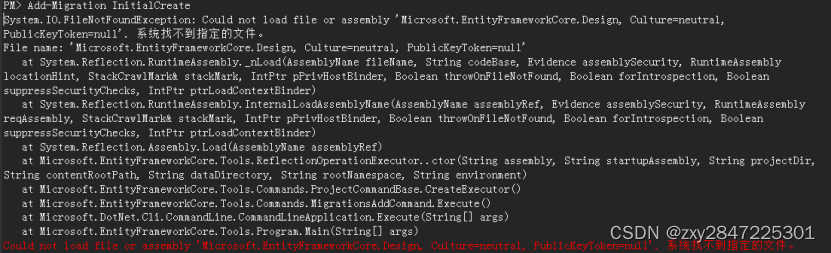
1 新增名称为EFCoreDemo的.net core控制台程序,版本选择.net core 2.1,项目不能放到带中文的目录下,不然到后面执行Add-Migration命令时会报如下的错误

同时,如果这个解决方案有多个项目,一定要把当前项目设为启动项目,且程序包管理器控制台默认项目一定要选对,不然到后面执行Add-Migration命令时会报如下的错误:

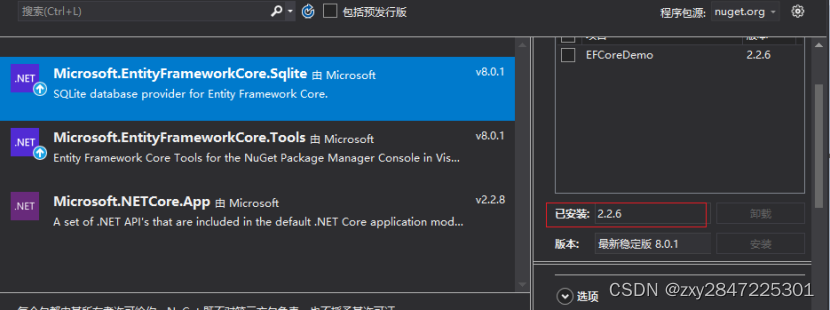
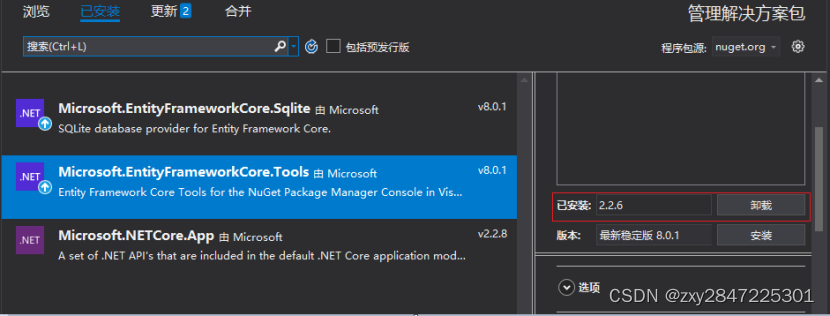
2 利用Nuget安装Microsoft.EntityFrameworkCore.Sqlite,版本选择2.2.6及安装Microsoft.EntityFrameworkCore.Tools,版本选择2.2.6,如下图:
(注意:安装Microsoft.EntityFrameworkCore.Sqlite时,会把EF Core对应的依赖包Microsoft.EntityFrameworkCore等都自动安装上,不用再单独安装 ,如果数据库是Sql Server,则安装Microsoft.EntityFrameworkCore.SqlServer)
3 新增实体类Student,并编辑如下:
- using System;
- using System.Collections.Generic;
- using System.Text;
-
- namespace EFCoreDemo
- {
- public class Student
- {
- public long Id { set; get; }
-
- public string Name { set; get; }
- }
- }
4 新增Student类对应的配置类StudentConfig,并编辑如下:
- using Microsoft.EntityFrameworkCore;
- using Microsoft.EntityFrameworkCore.Metadata.Builders;
- using System;
- using System.Collections.Generic;
- using System.Text;
-
- namespace EFCoreDemo
- {
- public class StudentConfig : IEntityTypeConfiguration<Student>
- {
- public void Configure(EntityTypeBuilder<Student> builder)
- {
- builder.ToTable("Student");
- }
- }
- }

5 新增上下文类MyDbContext,并编辑如下:
- using Microsoft.EntityFrameworkCore;
- using System;
- using System.Collections.Generic;
- using System.Text;
-
- namespace EFCoreDemo
- {
- public class MyDbContext:DbContext
- {
- public DbSet<Student> Students { set; get; }
-
- protected override void OnConfiguring(DbContextOptionsBuilder optionsBuilder)
- {
- base.OnConfiguring(optionsBuilder);
- optionsBuilder.UseSqlite("Data Source=KnowledgeDataBase.sqlite;");
- }
-
- protected override void OnModelCreating(ModelBuilder modelBuilder)
- {
- base.OnModelCreating(modelBuilder);
- modelBuilder.ApplyConfigurationsFromAssembly(this.GetType().Assembly);
- }
- }
- }
上面的的KnowledgeDataBase.sqlite为SqLite的数据库文件名称
6 打开程序包管理控制台,
6.1 输入命令:Add-Migration Init,如下图:
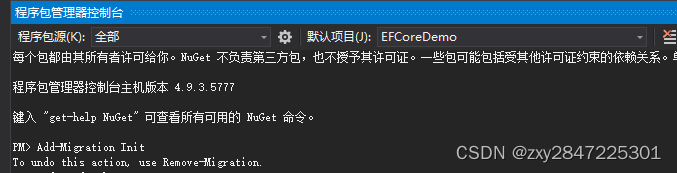
然后会在项目中自动生成目录Migrations,并自动3个类,不要动它们,如下图:

6.2 输入命令:Update-database,会执行更新,如下图:

由于用的是SqLite数据库,会在项目中生成一个名为
KnowledgeDataBase.sqlite的数据库文件,并设置为"始终复制",如下图:

7 主程序编辑如下:
- using System;
- using System.Linq;
-
- namespace EFCoreDemo
- {
- class Program
- {
- static void Main(string[] args)
- {
- Student stu = new Student();
- stu.Name = "zxy";
- MyDbContext myDbContext = new MyDbContext();
- myDbContext.Add(stu);
- myDbContext.SaveChanges();
-
- var students=myDbContext.Students.Where(a => a.Name == "zxy");
- foreach (var item in students)
- {
- Console.WriteLine($"Id:{item.Id} Name:{item.Name}");
- }
- Console.WriteLine("执行完毕");
- Console.ReadLine();
- }
- }
- }
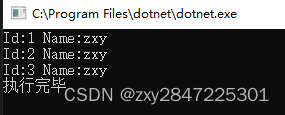
运行结果如下:
好了,本文的内容到此结束