
热门标签
当前位置: article > 正文
C# 使用WMI监听进程的启动和关闭
作者:算法研究专家 | 2024-02-04 00:09:58
赞
踩
C# 使用WMI监听进程的启动和关闭
写在前面
Windows Management Instrumentation(WMI)是用于管理基于 Windows 操作系统的数据和操作的基础结构。具体的API可以查看 WMI编程手册。
WMIC 是WMI的命令行管理工具,使用 WMIC,不但可以管理本地计算机,还可以管理同一Windows域内的所有远程计算机(需要必要的权限),而被管理的远程计算机可以不预先安装WMIC,只需要支持WMI即可。WMIC 通过 WMIC.exe 实现了分析、解释并执行来自命令行的参数别名(Alias)的引擎,这个文件通常位于 "C:\Windows\System32\wbem"文件夹中(支持Windows XP和Windows2003及以后的系统)。
命令行示例:wmic cpu get name 查看CPU信息

在.net core中使用需要从NuGet安装 System.Management 包,而在.net framework直接引用即可。
代码实现
-
- using System.Management;
-
- public class Program
- {
- public static void Main(string[] args)
- {
- //创建WQL事件查询,监视进程开启
- var qCreate = new WqlEventQuery("__InstanceCreationEvent", TimeSpan.FromSeconds(1), "TargetInstance ISA 'Win32_Process'");
- //创建WQL事件查询,监视进程关闭
- var qDelete = new WqlEventQuery("__InstanceDeletionEvent", TimeSpan.FromSeconds(1), "TargetInstance ISA 'Win32_Process'");
-
- // 指定名称的查询语句
- // "TargetInstance ISA 'Win32_Process' AND TargetInstance.Name = 'Notepad.exe'"
-
- //创建事件查询的侦听器(ManagementEventWatcher)
- var wCreate = new ManagementEventWatcher(qCreate);
- var wDelete = new ManagementEventWatcher(qDelete);
-
- // 注册启动事件
- wCreate.EventArrived += (sender, e) =>
- {
- Console.WriteLine("开启进程:{0}", GetInfo(e.NewEvent));
- };
- // 注册关闭事件
- wDelete.EventArrived += (sender, e) =>
- {
- Console.WriteLine("关闭进程:{0}", GetInfo(e.NewEvent));
- };
-
- //开始异步侦听
- wCreate.Start();
- wDelete.Start();
-
- Console.ReadLine();
- }
-
- /// <summary>
- /// 输出事件对应的ManagementBaseObject(本例中的Win32_Process实例)的信息
- /// </summary>
- private static string GetInfo(ManagementBaseObject obj)
- {
- var instance = (ManagementBaseObject)obj["TargetInstance"];
- return string.Format("{0} - {1} - {2}", instance["Name"], instance["ProcessId"], DateTime.Now);
- }
-
- }

调用示例
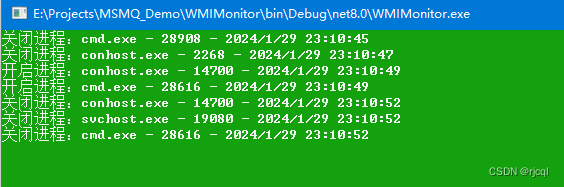
稍加修改一下就可以用来实现一个守护进程,具体用途应该都懂得。
声明:本文内容由网友自发贡献,不代表【wpsshop博客】立场,版权归原作者所有,本站不承担相应法律责任。如您发现有侵权的内容,请联系我们。转载请注明出处:https://www.wpsshop.cn/article/detail/58474
推荐阅读
相关标签

