
- 1LLama2 本地部署_llama2本地部署
- 2antd vue 动态添加表单项_antd vue form动态添加表单项
- 3[Unity3D]Lua中使用协程coroutine和计时器timer_lua协程里面可以用wait吗?
- 4vue从入门到精通_vue入门到精通
- 5unity 中 AssetBundle打包及使用总结(WebGL)_unity webgl assetbundle
- 6Java常用类库之StringBuffer_stringbuffer sb = new stringbuffer()
- 7解决SpringBoot集成分页插件pagehelper出现的循环依赖问题_springboot中pagehelper没有依赖项
- 8three.js移除对象`.remove()`_threejs scene删除对象
- 9spring-boot高版本集成com.github.pagehelper出现循环依赖的问题
- 10论文笔记(七):DFS--Learning of Image Dehazing Models for Segmentation Tasks_towards perceptual image dehazing by physics-based
【ArcGIS Pro二次开发】(48):三调土地利用现状分类面积汇总统计_arcgis勘测定界图斑分类面积
赞
踩
之前做了一个三调三大类面积统计,有小伙伴反映太粗糙,想要一个完整的地类面积汇总表。
【ArcGIS Pro二次开发】(35):三调三大类面积统计
本质上并没有多少难度,之前也做过类似的用地用海汇总表,于是拿出来改一改就好了。
一、要实现的功能

如上图所示,点击【三调】下的【统计三调地类】工具。
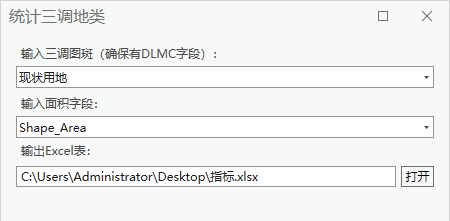
在弹出的工具框中,分别输入三调图斑,要统计的面积字段,以及要输出Excel表格的位置。
三调图层注意要确保图层中有【DLMC】字段,这是三调自带的字段。
面积字段,以投影面积为例,选择【shape_area】,如果要统计椭球面积,就选择相应的面积字段。
点击执行即可,生成结果如下:
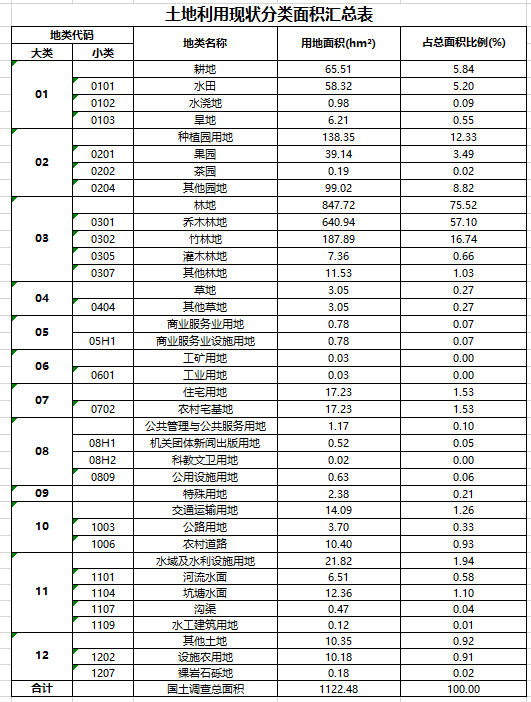
二、实现流程
这里表格中的地类我是按【TDT 1055-2019 第三次全国国土调查技术规程】中的用地表录入的。但是实际使用过程中,发现有些用地在规范之外,比如【1104A养殖坑塘】等,目前我只能按自己碰到的情况先做一个修正,比如【1104A养殖坑塘】就归类到【1104坑塘水面】。
我对三调业务不熟,如果有熟悉业务的请多指导。
- // 打开GDB数据库
- using Geodatabase gdb = new Geodatabase(new FileGeodatabaseConnectionPath(new Uri(gdb_path)));
- // 获取要素类
- using FeatureClass featureClasse = gdb.OpenDataset<FeatureClass>("fc_sd");
- // 逐行游标
- using (RowCursor rowCursor = featureClasse.Search(null, false))
- {
- while (rowCursor.MoveNext())
- {
- using (Row row = rowCursor.Current)
- {
- var mc = row["DLMC"].ToString();
- // 赋值
- if (mc == "养殖坑塘")
- {
- row["DLMC"] = "坑塘水面";
- }
- else if (mc.Contains("可调整"))
- {
- row["DLMC"] = mc.Replace("可调整", "");
- }
- // 保存
- row.Store();
- }
- }
- }

然后还要归纳一下大类,这里不像用地用海,可以从小类或中类直接取编码前两位归纳大类,只能做一个对照表,然后属性映射。
- // 属性映射
- public static void AttributeMapper(string in_data, string in_field, string map_field, string map_tabel)
- {
- // 获取连接表的2个字段名
- string exl_field01 = GetCellFromExcel(map_tabel, "A1");
- string exl_field02 = GetCellFromExcel(map_tabel, "B1");
- List<string> fields = new List<string>() { exl_field02 };
- // 连接字段
- Arcpy.JoinField(in_data, in_field, map_tabel, exl_field01, fields);
- // 计算字段
- Arcpy.CalculateField(in_data, map_field, "!" + exl_field02 + "!");
- // 删除多余字段
- Arcpy.DeleteField(in_data, fields);
- }
表格像这样:
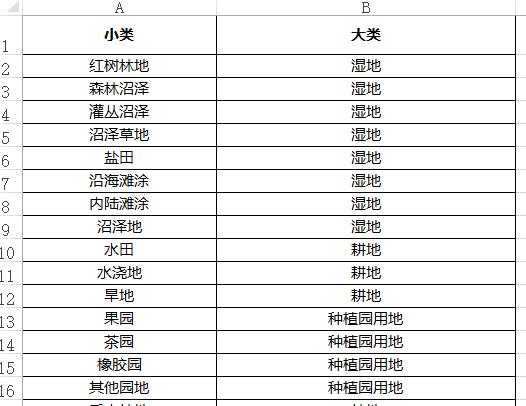
然后汇总一下【DLMC】和映射后的大类面积:
- // 汇总统计加强版
- public static void MultiStatistics(string in_table, string out_table, string statistics_fields, List<string> case_fields, string total_field = "合计", int unit = 0, bool is_output = false)
- {
- try
- {
- List<string> list_table = new List<string>();
- for (int i = 0; i < case_fields.Count; i++)
- {
- Arcpy.Statistics(in_table, out_table + i.ToString(), statistics_fields, case_fields[i]); // 调用GP工具【汇总】
- Arcpy.AlterField(out_table + i.ToString(), case_fields[i], @"分组字段", @"分组字段"); // 调用GP工具【更改字段】
- list_table.Add(out_table + i.ToString());
- }
- Arcpy.Statistics(in_table, out_table + "_total", statistics_fields, ""); // // 调用GP工具【汇总】
- Arcpy.AddField(out_table + "_total", @"分组字段", "TEXT"); // 调用GP工具【更改字段】
- Arcpy.CalculateField(out_table + "_total", @"分组字段", "\"" + total_field + "\""); // 调用GP工具【计算字段】
- list_table.Add(out_table + "_total"); // 加入列表
- // 合并汇总表
- Arcpy.Merge(list_table, out_table, is_output); // 调用GP工具【合并】
- // 转换为公顷
- if (unit > 0)
- {
- ChangeUnit(out_table, "SUM_Shape_Area", unit); // 单位转换
- }
- }
- catch (Exception ee)
- {
- MessageBox.Show(ee.Message + ee.StackTrace);
- return;
- }
- }
-
- // 调用
- List<string> list_bm = new List<string>() { "DLMC", "mc_dl" };
- ToolManager.MultiStatistics(gdb_path + @"\fc_sd", gdb_path + @"\statistic_sd", bm_field + " SUM", list_bm, "国土调查总面积", 1, true);
最后属性映射到Excel表格中,再删除0值行,这部分详细的可以看之前的用地用海汇总表,这里就不展开放代码了:
- // 将映射属性表中获取字典Dictionary
- Dictionary<string, string> dict = ToolManager.GetDictFromTable("statistic_sd", @"分组字段", "SUM_" + bm_field);
- // 属性映射大类
- ToolManager.ExcelAttributeMapper(excel_path + @"\sheet1$", 4, 5, dict, 5);
-
- pw.AddProcessMessage(20, time_base, "删除0值行");
-
- // 删除0值行
- ToolManager.Delete0Row(excel_path + @"\sheet1$", 5, 5, true);
以上便是工具的核心代码。
三、工具文件分享
我把工具都集合成工具箱,不再单独放单个工具,可以到这里下载完整工具箱,会不断更新:
【ArcGIS Pro二次开发】:CC工具箱 https://blog.csdn.net/xcc34452366/article/details/131506345PS:可以直接点击...bin\Debug\net6.0-windows\下的.esriAddinX文件直接安装。

