
热门标签
热门文章
- 1dubbo负载均衡-RandomLoadBalance
- 2机器学习笔记(4)——多变量线性回归
- 3Android Studio App开发实战项目之实现淘宝电商App首页界面(附源码,可用于大作业参考)_android 淘宝代码
- 4鸿蒙harmonyOS 在DevEco Studio 安装应用时出现 INSTALL_PARSE_FAILED_USESDK_ERROR
- 5Tool-X 工具汇总
- 6STM32学习记录——光敏传感器的使用_stm32光敏传感器
- 7关于目标检测中按照比例将数据集随机划分成训练集和测试集
- 8yolov5 部署jetson nano(通用) 保姆级教学_yolov5部署到nano保姆级教程
- 9Android开发-网络请求框架okhttp3的使用_android okhttp3
- 10【物联网】液滴即信息:雨滴探测传感器实验解析降雨的密码_ps2操作杆实验目的
当前位置: article > 正文
【ArcGIS Pro二次开发】(76):面积平差工具_arcgis平差工具
作者:dbjkl | 2024-02-04 00:03:40
赞
踩
arcgis平差工具
之前做过一个【三调土地利用现状分类面积汇总】的工具,在流程中使用了面积平差的方法。
考虑了在其它场合可能也需要进行面积平差,因此单独提取出来作为一个工具。
平差实现的方法如下图:
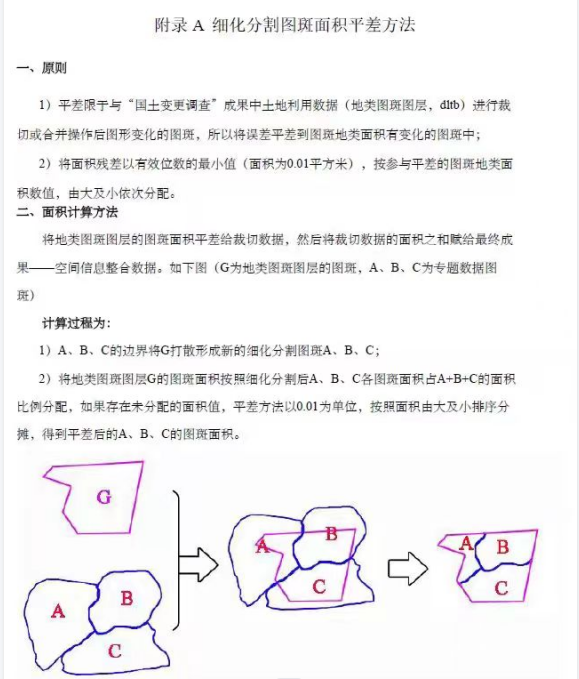
主要的计算过程如上图所示,算出总面积差值后,就开始平差计算。
平差计算也分2步。
第一步按比例分配。
如果还有剩下的未分配值,则再进行第二步按面积由大到小排序分摊。
一、要实现的功能
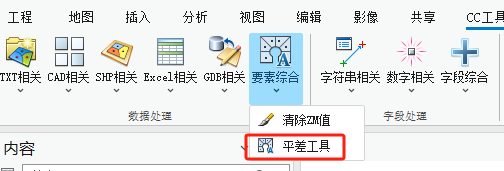
如上图所示,在【数据处理】组—【要素综合】面板下,点击【平差工具】工具。

在弹出的工具框中,分别输入参数:
1、输入地块要素图层。
2、输入用来计算面积平差计算字段。必须是可编辑的双精度字段
3、输入范围图层。这个范围必须和图斑的范围一致,简单的验算方法,两个要素互相擦除得到的是空值。
4,5,6、面积的几个参数设置。
生成结果如下:
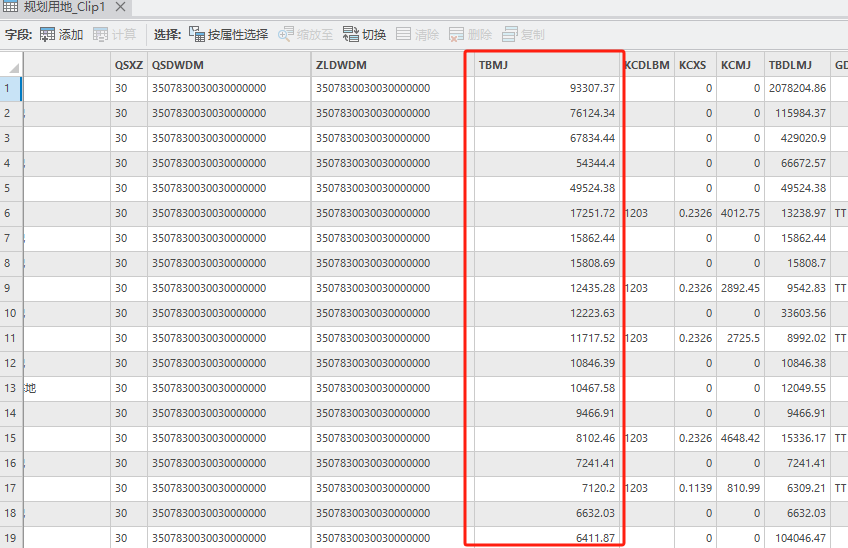
汇总统计一下:
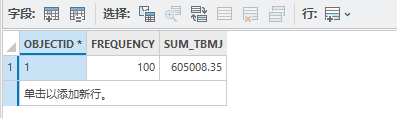
对照一下范围要素计算出来的面积:
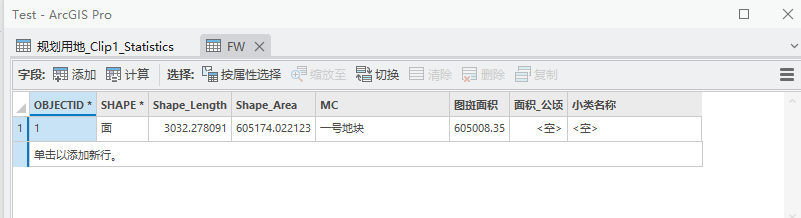
完全一致,完美。
二、实现流程
直接上代码。
代码中存在例如【Arcpy.FeatureToLine(area, area_line);】等代码块,这是预封装好的arcpy地理处理方法,具体写法可以参看:
【ArcGIS Pro二次开发】(9):GeoProcessing工具和自定义工具的调用-CSDN博客
- // 裁剪平差计算
- public static string Adjustment(string yd, string area, string clipfc_sort, string area_type = "投影面积", string unit = "平方米", int digit = 2)
- {
- string def_gdb = Project.Current.DefaultGeodatabasePath;
- string area_line = def_gdb + @"\area_line";
- string clipfc = def_gdb + @"\clipfc";
- string clipfc_sta = def_gdb + @"\clipfc_sta";
- string clipfc_updata = def_gdb + @"\clipfc_updata";
-
- // 单位系数设置
- double unit_xs = 0;
- if (unit == "平方米") { unit_xs = 1; }
- else if (unit == "公顷") { unit_xs = 10000; }
- else if (unit == "平方公里") { unit_xs = 1000000; }
- else if (unit == "亩") { unit_xs = 666.66667; }
-
- // 计算图斑的投影面积和图斑面积
- Arcpy.Clip(yd, area, clipfc);
-
- Arcpy.AddField(clipfc, area_type, "DOUBLE");
- Arcpy.AddField(area, area_type, "DOUBLE");
-
- if (area_type == "投影面积")
- {
- Arcpy.CalculateField(clipfc, "投影面积", $"round(!shape_area!/{unit_xs},{digit})");
- Arcpy.Statistics(clipfc, clipfc_sta, area_type, ""); // 汇总
- // 计算范围的投影面积和图斑面积
- Arcpy.CalculateField(area, area_type, $"round(!shape_area!/{unit_xs},{digit})");
- }
- else if (area_type == "图斑面积")
- {
- Arcpy.CalculateField(clipfc, area_type, $"round(!shape.geodesicarea!/{unit_xs},{digit})");
- Arcpy.Statistics(clipfc, clipfc_sta, area_type, ""); // 汇总
- // 计算范围的投影面积和图斑面积
- Arcpy.CalculateField(area, area_type, $"round(!shape.geodesicarea!/{unit_xs},{digit})");
- }
-
- // 获取投影面积,图斑面积
- double mj_fc = double.Parse(GisTool.GetCellFromPath(clipfc_sta, $"SUM_{area_type}", ""));
- double mj_area = double.Parse(GisTool.GetCellFromPath(area, area_type, ""));
-
- // 面积差值
- double dif_mj = Math.Round(Math.Round(mj_area, digit) - Math.Round(mj_fc, digit), digit);
-
- // 空间连接,找出变化图斑(即需要平差的图斑)
- Arcpy.FeatureToLine(area, area_line);
- Arcpy.SpatialJoin(clipfc, area_line, clipfc_updata);
- Arcpy.AddField(clipfc_updata, "平差", "TEXT");
- Arcpy.CalculateField(clipfc_updata, "平差", "''");
- // 排序
- Arcpy.Sort(clipfc_updata, clipfc_sort, "Shape_Area DESCENDING", "UR");
- double area_total = 0;
-
- // 获取Table
- using Table table = clipfc_sort.TargetTable();
-
- // 汇总变化图斑的面积
- using (RowCursor rowCursor = table.Search())
- {
- while (rowCursor.MoveNext())
- {
- using (Row row = rowCursor.Current)
- {
- var va = int.Parse(row["Join_Count"].ToString());
- if (va == 1) // 如果是变化图斑
- {
- area_total += double.Parse(row[area_type].ToString());
- }
- }
- }
- }
- // 第一轮平差
- double area_pc_1 = 0;
- using (RowCursor rowCursor1 = table.Search())
- {
- while (rowCursor1.MoveNext())
- {
- using (Row row = rowCursor1.Current)
- {
- var va = int.Parse(row["Join_Count"].ToString());
- if (va == 1)
- {
- double area_1 = double.Parse(row[area_type].ToString());
- // 单个图斑需要平差的值
- double area_pc = Math.Round(area_1 / area_total * dif_mj, digit);
- area_pc_1 += area_pc;
- // 面积平差
- row[area_type] = area_1 + area_pc;
- }
- row.Store();
- }
- }
- }
- // 计算剩余平差面积,进行第二轮平差
- double area_total_next = Math.Round(dif_mj - area_pc_1, digit);
- using (RowCursor rowCursor2 = table.Search())
- {
- while (rowCursor2.MoveNext())
- {
- using (Row row = rowCursor2.Current)
- {
- // 最小平差值
- double diMin = Math.Round(Math.Pow(0.1, digit), digit);
-
- var va = int.Parse(row["Join_Count"].ToString());
- if (va == 1)
- {
- double area_2 = double.Parse(row[area_type].ToString());
- // 面积平差
- if (area_total_next > 0)
- {
- row[area_type] = area_2 + diMin;
- area_total_next -= diMin;
- }
- else if (area_total_next < 0)
- {
- row[area_type] = area_2 - diMin;
- area_total_next += diMin;
- }
- row.Store();
- }
- }
- }
- }
- // 删除中间要素
- List<string> all = new List<string>() { "area_line", "clipfc", "clipfc_sta", "clipfc_updata" };
- foreach (var item in all)
- {
- Arcpy.Delect(def_gdb + @"\" + item);
- }
- // 返回值
- return clipfc_sort;
- }

除去前半部分的业务流程。重点在后面的两轮平差计算,需仔细阅读。
三、工具文件分享
我把工具都集合成工具箱,不再单独放单个工具,可以到这里下载完整工具箱,会不断更新:
【ArcGIS Pro二次开发】:CC工具箱 https://blog.csdn.net/xcc34452366/article/details/131506345
声明:本文内容由网友自发贡献,转载请注明出处:【wpsshop】
推荐阅读
相关标签

