- 1Django 小实例S1 简易学生选课管理系统 —— 二、新建项目(project)、设置、运行_django+sqlite实现一个报名选课网站
- 2AIGC被ChatGPT带火!底层基础算力有望爆发式增长_aigc中间层 例子
- 3开源IPad Pro应用IDE:使用SSH远程连接服务器进行云端编程开发
- 4模拟算法刷题笔记【蓝桥杯】_小明有 n 颗石子,按顺序摆成一排,他准备用胶水将这些石子粘在一起。每颗石子有自
- 5Gitee版本控制
- 6口述面试题思路_口述算法题一般考什么
- 7Python反编译exe获取封装源代码
- 8Rancher入门到精通-nginx-ingress配置性能优化_rancher ingress timeout
- 9怎样通过本地电脑搭建SFTP服务器,并实现公网访问?_freeftpd不能创建目录
- 10Dubbo框架学习-负载均衡_dubbo 轮训 随机
docker部署redis集群并与springboot整合_redis cluster集群springboot高可用配置
赞
踩
一、redis集群部署方案
哨兵模式(Redis Sentinel)
Redis Sentinel 是 Redis 官方提供的高可用性方案,它通过对 Redis 的主从复制功能进行扩展,实现了 Redis 集群的高可用性。
哨兵模式的优点包括:
自动故障转移:当 Redis 主节点出现故障时,哨兵模式可以自动将一个从节点升级为主节点,从而实现自动故障转移。
自动恢复:当 Redis 主节点恢复正常时,哨兵模式可以自动将其重新加入到集群中,从而实现自动恢复。
监控功能:哨兵模式可以监控 Redis 集群中所有节点的状态,包括主节点和从节点,从而实现对 Redis 集群的全面监控。
哨兵模式的缺点包括:
性能损失:哨兵模式需要对 Redis 集群进行频繁的状态检查和故障转移操作,这会对 Redis 集群的性能产生一定的影响。
部署复杂:哨兵模式需要部署多个哨兵节点来实现高可用性,这会增加部署的复杂度。
因此,哨兵模式适用于对 Redis 集群的高可用性要求比较高的场景,但需要注意其对性能和部署复杂度的影响。如果对性能和部署复杂度要求较高,可以考虑使用其他的 Redis 集群方案,比如 Redis Cluster。
在项目中最常用的 Redis 集群部署方式是 Redis Cluster。Redis Cluster 是 Redis 官方提供的 Redis 集群方案,它通过对 Redis 的源码进行修改,实现了 Redis 集群的分布式功能。在 Redis Cluster 中,每个节点都可以处理读写请求,同时还可以将数据自动分片到不同的节点上,从而实现了 Redis 集群的高可用性和扩展性。
Redis Cluster 的优点包括:
高可用性:Redis Cluster 可以将数据自动分片到不同的节点上,从而实现了 Redis 集群的高可用性。当某个节点出现故障时,Redis Cluster 可以自动将请求转发到其他节点上,从而实现自动故障转移。
扩展性:Redis Cluster 可以将数据自动分片到不同的节点上,从而实现了 Redis 集群的扩展性。当需要扩展 Redis 集群的容量时,只需要增加节点即可,无需对现有节点进行修改。
性能:Redis Cluster 可以将读写请求分散到不同的节点上,从而实现了 Redis 集群的负载均衡。同时,Redis Cluster 还可以将数据自动分片到不同的节点上,从而实现了 Redis 集群的并行处理能力,从而提高了 Redis 集群的性能。
Redis Cluster 的缺点包括:
部署复杂:Redis Cluster 需要部署多个节点来实现高可用性和扩展性,这会增加部署的复杂度。
数据一致性:Redis Cluster 采用的是无中心化的分布式架构,因此在节点之间进行数据同步时,可能会出现数据不一致的情况。Redis Cluster 采用了 Gossip 协议来解决数据同步的问题。
二、docker部署Redis Cluster集群
我使用的是CentOS-7-x86_64-DVD-2009.iso
关闭防火墙
- systemctl stop firewalld
- systemctl disable firewalld
设置固定ip
- cd /etc/sysconfig/network-scripts
- ll
- vim ifcfg-ens33
修改(有的修改,没有的添加)
- BOOTPROTO=static
- IPADDR="192.168.10.11"
- NETMASK="255.255.255.0"
- GATEWAY="192.168.10.1"
- DNS1="114.114.114.114"
重启网关
systemctl restart network拉取镜像
docker pull redis:6.2.10
主节点 | 从节点 | |
第一集群 | 192.168.10.11:6379 | 192.168.10.12:6380 |
第二集群 | 192.168.10.12:6379 | 192.168.10.13:6380 |
第三集群 | 192.168.10.13:6379 | 192.168.10.11:6380 |
编写docker-compose.yml文件
主节点
- version: '3.1'
- services:
- redis-master:
- image: redis:6.2.10 # 创建容器时所需的镜像
- container_name: redis-master # 服务名称
- restart: always # 容器总是重新启动
- network_mode: "host" # host 网络模式
- command: redis-server /usr/local/etc/redis/redis.conf # 覆盖容器启动后默认执行的命令
- volumes: # 数据卷,目录挂载
- - ./redis.conf:/usr/local/etc/redis/redis.conf
- - ./data:/data
- ports:
- - "6379:6379"
- - "16379:16379"
准备redis.conf文件
可自行在官网下载,需要修改的属性有如下:
- port 6379 #端口,默认是6379
- bind 0.0.0.0 #监听的IP,默认是本地127.0.0.1
- protected-mode no #保护模式默认是开启状态,需要修改为no
- cluster-enabled yes #开启集群
- cluster-config-file nodes.conf #集群的配置
- cluster-node-timeout 5000 #请求超时默认15秒,可自行设置
- appendonly yes #开启aof持久化
- requirepass ****** #密码
- masterauth *****
- daemonize no #开启守护线程,默认为no,可不开启
执行docker compose up -d

从节点
- version: '3.1'
- services:
- redis-master:
- image: redis:6.2.10 # 创建容器时所需的镜像
- container_name: redis-slave # 服务名称
- restart: always # 容器总是重新启动
- network_mode: "host" # host 网络模式
- command: redis-server /usr/local/etc/redis/redis.conf # 覆盖容器启动后默认执行的命令
- volumes: # 数据卷,目录挂载
- - ./redis.conf:/usr/local/etc/redis/redis.conf
- - ./data:/data
- ports:
- - "6380:6380"
- - "16380:16380"
准备redis.conf文件
可自行在官网下载,需要修改的属性有如下:
- port 6380 #端口,默认是6379
- bind 0.0.0.0 #监听的IP,默认是本地127.0.0.1
- protected-mode no #保护模式默认是开启状态,需要修改为no
- cluster-enabled yes #开启集群
- cluster-config-file nodes.conf #集群的配置
- cluster-node-timeout 5000 #请求超时默认15秒,可自行设置
- appendonly yes #开启aof持久化
- requirepass ****** #密码
- masterauth *****
- daemonize no #开启守护线程,默认为no,可不开启
执行docker compose up -d

请先确保你的两台机器可以互相通信,然后随便进入一个容器节点,并进入 /usr/local/bin/ 目录:
- # 进入容器
- docker exec -it redis-master bash
- # 切换至指定目录
- cd /usr/local/bin/
接下来我们就可以通过以下命令实现 Redis Cluster 集群的创建
redis-cli -a ***** --cluster create 192.168.10.11:6379 192.168.10.11:6380 192.168.10.12:6379 192.168.10.12:6380 192.168.10.13:6379 192.168.10.13:6380 --cluster-replicas 1*****对应密码
出现选择提示信息,输入 yes,结果如下所示:
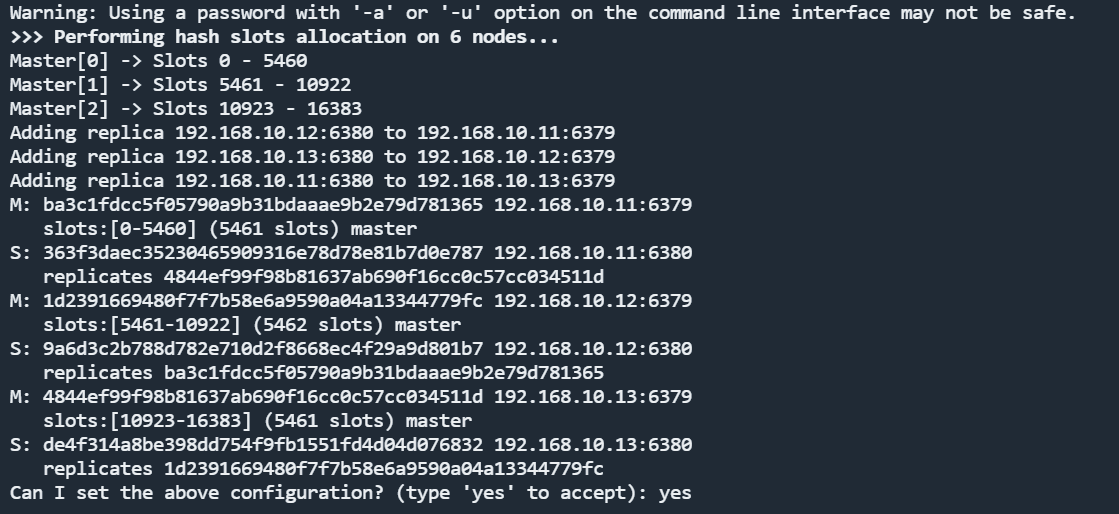
成功后显示

可参考:https://www.cnblogs.com/pgyLang/p/16253803.html
三、springboot整合Redis Cluster集群
引入Redis依赖
- <dependency>
- <groupId>org.springframework.boot</groupId>
- <artifactId>spring-boot-starter-data-redis</artifactId>
- </dependency>
- <!-- redis依赖commons-pool 这个依赖一定要添加 -->
- <dependency>
- <groupId>org.apache.commons</groupId>
- <artifactId>commons-pool2</artifactId>
- </dependency>
编写配置文件
- spring:
- redis:
- password: ****** #密码
- lettuce: #lettuce连接池配置
- pool:
- max-active: 8
- max-idle: 8
- min-idle: 0
- max-wait: 1000
- shutdown-timeout: 100
- cluster: #集群配置
- nodes: 192.168.10.11:6379,192.168.10.11:6380,192.168.10.12:6379,192.168.10.12:6380,192.168.10.13:6379,192.168.10.13:6380
- max-redirects: 3
编写启动项
- @Configuration
- public class RedisCacheAutoConfiguration extends CachingConfigurerSupport {
-
- @Value("${spring.redis.cluster.nodes}")
- private String nodes;
-
- @Value("${spring.redis.password}")
- private String password;
-
- //redis集群配置,6个ip以,分割,然后再以:分割
- @Bean
- public RedisClusterConfiguration redisClusterConfiguration(){
- RedisClusterConfiguration redisClusterConfiguration = new RedisClusterConfiguration();
- String[] cNodes = nodes.split(",");
- Set<RedisNode> hp = new HashSet<>();
- for (String node : cNodes) {
- String[] split = node.split(":");
- hp.add(new RedisNode(split[0].trim(),Integer.parseInt(split[1])));
- }
- redisClusterConfiguration.setPassword(password);
- redisClusterConfiguration.setClusterNodes(hp);
- return redisClusterConfiguration;
- }
-
- /**
- * 注入RedisTemplate
- * tips:泛型可以适用于各种类型的注入
- */
- @Bean
- public <T> RedisTemplate<String, T> redisTemplate(RedisConnectionFactory factory, RedisSerializer<?> redisSerializer) {
- // 指定序列化方式
- RedisTemplate<String, T> redisTemplate = new RedisTemplate<>();
- redisTemplate.setKeySerializer(RedisSerializer.string());
- redisTemplate.setHashKeySerializer(RedisSerializer.string());
- redisTemplate.setValueSerializer(redisSerializer);
- redisTemplate.setHashValueSerializer(redisSerializer);
- redisTemplate.setConnectionFactory(factory);
- return redisTemplate;
- }
-
- /**
- * 初始化Redis序列器,使用jackson
- */
- @Bean
- public RedisSerializer<Object> redisSerializer() {
- ObjectMapper objectMapper = new ObjectMapper();
- // jdk8日期格式支持
- DateTimeFormatter dateFormatter = DateTimeFormatter.ofPattern("yyyy-MM-dd");
- DateTimeFormatter timeFormatter = DateTimeFormatter.ofPattern("yyyy-MM-dd HH:mm:ss");
- Module timeModule = new JavaTimeModule()
- .addDeserializer(LocalDate.class, new LocalDateDeserializer(dateFormatter))
- .addDeserializer(LocalDateTime.class, new LocalDateTimeDeserializer(timeFormatter))
- .addSerializer(LocalDate.class, new LocalDateSerializer(dateFormatter))
- .addSerializer(LocalDateTime.class, new LocalDateTimeSerializer(timeFormatter));
- objectMapper.registerModule(timeModule);
- Jackson2JsonRedisSerializer<Object> jackson2JsonRedisSerializer = new Jackson2JsonRedisSerializer<>(Object.class);
- jackson2JsonRedisSerializer.setObjectMapper(objectMapper);
- return jackson2JsonRedisSerializer;
- }
-
- }

编写工具类
- @Component
- public final class RedisClient {
- @Autowired
- private RedisTemplate<String, Object> redisTemplate;
-
-
- /**
- * 指定缓存失效时间
- * (命令EXPIRE)
- *
- * @param key 键
- * @param time 时间(秒)
- * @param timeUnit 时间单位
- * @return true / false
- */
- public boolean expire(String key, long time, TimeUnit timeUnit) {
- if (time > 0) {
- return redisTemplate.expire(key, time, timeUnit);
- }
- return false;
- }
-
- /**
- * 根据 key 获取过期时间
- * (命令TTL)
- *
- * @param key 键
- * @return 秒
- */
- public long ttl(String key) {
- return redisTemplate.getExpire(key, TimeUnit.SECONDS);
- }
-
- /**
- * 判断 key 是否存在
- * (命令EXISTS)
- *
- * @param key 键
- * @return true / false
- */
- public boolean exists(String key) {
- return redisTemplate.hasKey(key);
- }
-
- /**
- * 删除缓存(不存在key不会抛异常)
- * (命令 DEL)
- *
- * @param keys 集合
- */
- public long delete(Collection<String> keys) {
- return redisTemplate.delete(keys);
- }
-
- /**
- * 删除缓存
- * (命令DEL)
- *
- * @param key 键(一个或者多个)
- */
- public boolean delete(String... key) {
-
- if (key != null && key.length > 0) {
- if (key.length == 1) {
- return redisTemplate.delete(key[0]);
- } else {
- return redisTemplate.delete(Arrays.asList(key)) > 0;
- }
- }
- return true;
- }
-
- /**
- * 按表达式删除缓存,使用scan命令实现,不会有太多性能影响
- *
- * @param pattern 表达式
- */
- public long deleteAll(String pattern) {
- if (pattern == null || pattern.length() == 0) {
- throw new IllegalArgumentException("参数不正确");
- }
- return redisTemplate.delete(scan(pattern));
- }
-
- /**
- * 查询所有满足表达式的key
- * (命令KEYS,实际是利用SCAN命令实现,不会产生阻塞)
- *
- * @param pattern 表达式
- * @return 符合表达式的key的集合
- * @complexity O(n)
- */
-
- public Set<String> scan(String pattern) {
- if (pattern == null || pattern.length() == 0) {
- throw new IllegalArgumentException("参数不正确");
- }
- return redisTemplate.execute((RedisCallback<Set<String>>) connection -> {
- Set<String> keys = new HashSet<>();
- Cursor<byte[]> cursor = connection.scan(ScanOptions.scanOptions().match(pattern).count(1000).build());
- while (cursor.hasNext()) {
- keys.add(new String(cursor.next()));
- }
- return keys;
- }
- );
- }
-
-
- // ============================== String ==============================
-
- /**
- * 放入缓存
- * (命令 SET)
- *
- * @param key 键
- * @param value 值
- */
- public void set(String key, Object value, long timeout, TimeUnit timeUnit) {
- redisTemplate.opsForValue().set(key, value, timeout, timeUnit);
- }
-
- /**
- * 放入缓存
- * (命令 SET)
- *
- * @param key 键
- * @param value 值
- */
- public void set(String key, Object value) {
- redisTemplate.opsForValue().set(key, value);
- }
-
- /**
- * 获取缓存(string数据结构) 通过泛型T指定缓存数据类型
- * (命令 GET)
- *
- * @param key 键
- * @return 值
- * @see #hGetAll
- */
- public <T> T get(String key) {
- return key == null ? null : (T) redisTemplate.opsForValue().get(key);
- }
-
- /**
- * 获取缓存(string数据结构) 通过泛型T指定缓存数据类型
- * (命令 GETSET)
- *
- * @param key 键
- * @return 值
- * @see #hGetAll
- */
- public <T> T getSet(String key, T newValue) {
- return key == null ? null : (T) redisTemplate.opsForValue().getAndSet(key, newValue);
- }
-
-
- /**
- * 缓存普通键值对,并设置失效时间
- *
- * @param key 键
- * @param value 值
- * @param seconds 时间(秒),如果 time <= 0 则不设置失效时间
- */
- public void set(String key, Object value, int seconds) {
- if (seconds > 0) {
- redisTemplate.opsForValue().set(key, value, seconds, TimeUnit.SECONDS);
- } else {
- redisTemplate.opsForValue().set(key, seconds);
- }
- }
-
- /**
- * 当key不存在时放入键值对
- * 如果已经存在key返回false
- *
- * @param key 键
- * @param value 值
- * @return true/false
- */
- public boolean setNx(String key, Object value) {
- return redisTemplate.opsForValue().setIfAbsent(key, value);
- }
-
-
- /**
- * 当key不存在时放入键值对,并在指定时间后自动删除
- * 如果已经存在key返回false
- *
- * @param key 键
- * @param value 值
- * @param time 时间
- * @param timeUnit 时间单位
- * @return true/false
- */
- public boolean setNx(String key, Object value, long time, TimeUnit timeUnit) {
- return redisTemplate.opsForValue().setIfAbsent(key, value, time, timeUnit);
- }
-
- /**
- * 递增
- * 如果不存在key将自动创建
- * (命令INCR)
- *
- * @param key 键
- * @param increment 递增大小
- * @return 递增后的值
- */
- @SuppressWarnings("unchecked")
- public <T extends Number> T increment(String key, T increment) {
- return (T) redisTemplate.opsForValue().increment(key, increment.doubleValue());
- }
-
- /**
- * 递增1
- * 如果不存在key将自动创建
- * (命令INCR)
- *
- * @param key 键
- * @return 递增后的值
- */
- public long increment(String key) {
- return redisTemplate.opsForValue().increment(key, 1);
- }
-
- /**
- * 递减
- * 如果不存在key将自动创建
- * (命令DECR)
- *
- * @param key 键
- * @param decrement 递减大小
- * @return 递减后的值
- */
- @SuppressWarnings("unchecked")
- public <T extends Number> T decrement(String key, T decrement) {
- return (T) redisTemplate.opsForValue().increment(key, -decrement.longValue());
- }
-
- /**
- * 递减1
- * 如果不存在key将自动创建
- * (命令DECR)
- *
- * @param key 键
- * @return 递减后的值
- */
- public long decrement(String key) {
- return decrement(key, 1L);
- }
-
- // ============================== Map ==============================
-
- /**
- * 往指定HashMap中添加一对键值对,key不存在将自动创建
- * (命令HSET)
- *
- * @param name HashMap的名字
- * @param key 添加的键
- * @param value 添加的值
- */
- public void hSet(String name, String key, Object value) {
- redisTemplate.opsForHash().put(name, key, value);
- }
-
- /**
- * 往指定HashMap中添加另一个map
- * (命令HSET)
- *
- * @param name HashMap的名字
- * @param map 值
- */
- public void hSet(String name, Map<String, ?> map) {
- redisTemplate.opsForHash().putAll(name, map);
- }
-
- /**
- * 从指定HashMap中获取指定key的值
- * (命令HGET)
- *
- * @param mapName HashMap的名字(no null)
- * @param key HashMap中的键(no null)
- * @param <T> 根据实际类型自定义
- * @return 值
- */
- @SuppressWarnings("unchecked")
- public <T> T hGet(String mapName, String key) {
- return (T) redisTemplate.opsForHash().get(mapName, key);
- }
-
- /**
- * 从指定HashMap中获取多个key的值
- * (命令HMGET)
- *
- * @param mapName HashMap的名字(no null)
- * @param key HashMap中的键,传多个(no null)
- * @param <T> 根据实际类型自定义
- * @return list
- */
- public <T> List<T> hMultiGet(String mapName, String... key) {
- return redisTemplate.<String, T>opsForHash().multiGet(mapName, Arrays.asList(key));
- }
-
- /**
- * 获取指定的HashMap
- * (命令HGETALL)
- *
- * @param mapName HashMap的名字(no null)
- * @return HashMap
- */
- public <T> Map<String, T> hGetAll(String mapName) {
- return redisTemplate.<String, T>opsForHash().entries(mapName);
- }
-
-
- /**
- * 删除 HashMap 中的值
- * (命令HDEL)
- *
- * @param mapName HashMap的名字
- * @param keys HashMap中的key(可以多个,no null)
- * @return 成功删除个数
- */
- public long hDelete(String mapName, Object... keys) {
- return redisTemplate.opsForHash().delete(mapName, keys);
- }
-
- /**
- * map 递增1
- * (命令 HINCRBY)
- *
- * @param hashMapName HashMap的名字(no null)
- * @param key HashMap中的key(no null)
- * @return true / false
- */
- public long hIncrement(String hashMapName, String key) {
- return redisTemplate.opsForHash().increment(hashMapName, key, 1);
- }
-
- /**
- * map 递增指定值
- * (命令 HINCRBY)
- *
- * @param hashMapName HashMap的名字(no null)
- * @param key HashMap中的key(no null)
- * @return true / false
- */
- public Long hIncrementBy(String hashMapName, String key, long delta) {
- return redisTemplate.opsForHash().increment(hashMapName, key, delta);
- }
-
- /**
- * 是否存在hashkey
- * (命令 HEXISTS)
- *
- * @param hashMapName HashMap的名字(no null)
- * @param hashKey HashMap中的key(no null)
- * @return true / false
- */
- public boolean hExists(String hashMapName, Object hashKey) {
- return redisTemplate.opsForHash().hasKey(hashMapName, hashKey);
- }
-
- /**
- * 设置map中的值,只有当key不存在时,才能设置成功
- * (命令 HSETNX)
- *
- * @param hashMapName HashMap的名字
- * @param value value(no null)
- * @return true / false
- */
- public boolean hSetNx(String hashMapName, String key, Object value) {
- return redisTemplate.opsForHash().putIfAbsent(hashMapName, key, value);
- }
-
- /**
- * 获取map的大小
- * (命令 HLEN)
- *
- * @param hashMapName HashMap的名字
- * @return map size
- */
- public Long hSize(String hashMapName) {
- return redisTemplate.opsForHash().size(hashMapName);
- }
-
- /**
- * 获取map中的所有key
- * (命令 HKEYS)
- *
- * @param hashMapName HashMap的名字
- * @return all keys
- */
- public Set<String> hKeys(String hashMapName) {
- return redisTemplate.<String, Object>opsForHash().keys(hashMapName);
- }
-
- /**
- * 获取map中的所有value
- * (命令 HVALS)
- *
- * @param hashMapName HashMap的名字
- * @return all values
- */
- public <T> List<T> hValues(String hashMapName) {
- return redisTemplate.<String, T>opsForHash().values(hashMapName);
- }
-
-
- // ============================== zset ==============================
-
- /**
- * 添加zset元素 有则覆盖
- *
- * @param key
- * @param v
- * @param score
- * @return
- */
- public <T> boolean zAdd(String key, T v, long score) {
- return redisTemplate.opsForZSet().add(key, v, score);
- }
-
- /**
- * 批量添加zset元素
- * (命令 ZADD)
- *
- * @param key
- * @param tuples
- * @return
- */
- public Long zAdd(String key, Set<ZSetOperations.TypedTuple<Object>> tuples) {
- return redisTemplate.opsForZSet().add(key, tuples);
- }
-
- /**
- * 移除指定位置的zset元素
- * (命令 ZREVRANGE)
- *
- * @param key
- * @param start
- * @param end
- * @return
- */
- public Long zRemoveRange(String key, long start, long end) {
- return redisTemplate.opsForZSet().removeRange(key, start, end);
- }
-
- /**
- * 添加zset元素 有则覆盖
- * (命令 ZREM)
- *
- * @param key
- * @return
- */
- public Long zRemove(String key, Object... vs) {
- return redisTemplate.opsForZSet().remove(key, vs);
- }
-
- /**
- * zset 元素个数
- * (命令 ZCARD)
- *
- * @param key
- * @return
- */
- public Long zSize(String key) {
- return redisTemplate.opsForZSet().size(key);
- }
-
-
- /**
- * zset中是否存在对应元素
- *
- * @param key
- * @param v
- * @return
- */
- public <T> boolean zExists(String key, T v) {
- return redisTemplate.opsForZSet().rank(key, v) != null;
- }
-
- /**
- * 自增zset score
- * (命令 ZINCRBY)
- *
- * @param key
- * @param v
- * @param delta
- * @return
- */
- public <T> Double zIncrementBy(String key, T v, Double delta) {
- return redisTemplate.opsForZSet().incrementScore(key, v, delta);
- }
-
- /**
- * 获取指定key的所有元素
- *
- * @param key
- * @param <T>
- * @return
- */
- public <T> LinkedHashSet<T> zAll(String key) {
- return (LinkedHashSet<T>) redisTemplate.opsForZSet().range(key, 0, -1);
- }
-
- /**
- * 获取指定位置元素
- *
- * @param key
- * @param index
- * @param <T>
- * @return
- */
- public <T> T zGet(String key, int index) {
- Set<Object> objects = redisTemplate.opsForZSet().range(key, index, index + 1);
- return (T) objects.iterator().next();
- }
-
- /**
- * zset返回指定元素的索引
- * (命令 ZRANK)
- *
- * @param key
- * @param v
- * @return
- */
- public Long zRank(String key, Object v) {
- return redisTemplate.opsForZSet().rank(key, v);
- }
-
- /**
- * zset通过索引区间获取指定区间内的元素
- * (命令 ZRANGE)
- *
- * @param key
- * @param start 开始索引
- * @param end 结束索引
- * @return 元素集合
- */
- public <T> Set<T> zRange(String key, long start, long end) {
- return (Set<T>) redisTemplate.opsForZSet().range(key, start, end);
- }
-
- /**
- * zset查询元素分数值
- * (命令 ZSCORE)
- *
- * @param key
- * @param v
- * @return 元素分数值
- */
- public Double zScore(String key, Object v) {
- return redisTemplate.opsForZSet().score(key, v);
- }
-
- /**
- * zset查询指定元素排名
- * (命令 ZREVRANK)
- *
- * @param key
- * @param v
- * @return 排名
- */
- public Long zReverseRank(String key, Object v) {
- return redisTemplate.opsForZSet().reverseRank(key, v);
- }
-
- /**
- * 通过分数返回zset指定区间内的元素
- * (命令 ZRANGEBYSCORE)
- *
- * @param key
- * @param min 最小分数值
- * @param max 最大分数值
- * @return 元素集合
- */
- public <T> Set<T> zRangeByScore(String key, double min, double max) {
- return (Set<T>) redisTemplate.opsForZSet().rangeByScore(key, min, max);
- }
-
- /**
- * 移除zset中指定分数区间的元素
- * (命令 ZREMRANGEBYRANK)
- *
- * @param key
- * @param min 最小分数值
- * @param max 最大分数值
- * @return 删除元素个数
- */
- public Long zRemoveRangeByScore(String key, double min, double max) {
- return redisTemplate.opsForZSet().removeRangeByScore(key, min, max);
- }
-
- /**
- * 获取zset中指定分数区间的元素数量
- * (命令 ZCOUNT)
- *
- * @param key
- * @param min 最小分数值
- * @param max 最大分数值
- * @return 删除元素个数
- */
- public Long zCount(String key, double min, double max) {
- return redisTemplate.opsForZSet().count(key, min, max);
- }
-
- /**
- * 获取指定范围分数的元素
- * (命令 ZREVRANGEBYSCORE )
- *
- * @param key
- * @param min 最小分数值
- * @param max 最大分数值
- * @param offset 偏移量
- * @param count 最大元素集合
- * @return 元素集合
- */
- public <T> Set<T> zReverseRangeByScore(String key, double min, double max, long offset, long count) {
- return (Set<T>) redisTemplate.opsForZSet().reverseRangeByScore(key, min, max, offset, count);
- }
-
- /**
- * zset根据得分范围获取元素(倒序)
- * 命令:ZREVRANGEBYSCORE key max min [WITHSCORES] [LIMIT offset count]
- * 时间复杂度:O(log(N)+M) N是zest长度,M是返回数量
- *
- * @param key redis key
- * @param min 最小分数(含)
- * @param max 最大分数(含)
- * @param offset 偏移量
- * @param count 返回数量
- * @param <T>
- * @return 包含元素和分数的TypedTuple集合
- * @see <a href="https://redis.io/commands/zrevrangebyscore">Redis Documentation: ZREVRANGEBYSCORE</a>
- */
- public <T> Set<ZSetOperations.TypedTuple<T>> zReverseRangeByScoreWithScores(String key, double min, double max, long offset, long count) {
- return ((RedisTemplate<String, T>) redisTemplate).opsForZSet().reverseRangeByScoreWithScores(key, min, max, offset, count);
- }
-
- // ============================== set ==============================
-
- /**
- * 新增set 元素
- *
- * @param key
- * @param v
- * @return
- */
- public <T> Long sAdd(String key, T v) {
- return redisTemplate.opsForSet().add(key, v);
- }
-
- /**
- * 获取set所有元素
- * (命令 SMEMBERS )
- *
- * @param key
- * @return
- */
- public <T> Set<T> sMembers(String key) {
- return (Set<T>) redisTemplate.opsForSet().members(key);
- }
-
- /**
- * 新增set元素
- *
- * @param key
- * @param values
- */
- public <T> void sAdd(String key, T... values) {
- redisTemplate.opsForSet().add(key, values);
- }
-
- /**
- * 批量移除set元素
- *
- * @param key
- * @param values
- * @return 删除元素数量
- */
- public Long sRemove(String key, Object... values) {
- return redisTemplate.opsForSet().remove(key, values);
- }
-
- /**
- * 获取set的元素数量
- * (命令 SCARD)
- *
- * @param key
- * @return 元素数量
- */
- public Long sSize(String key) {
- return redisTemplate.opsForSet().size(key);
- }
-
- /**
- * set判断元素是否存在
- * (命令 SISMEMBER)
- *
- * @param key
- * @return true / false
- */
- public boolean sExists(String key, Object v) {
- return redisTemplate.opsForSet().isMember(key, v);
- }
-
- /**
- * set判断元素是否存在
- * (命令 SISMEMBER)
- *
- * @param key
- * @return true / false
- */
- public boolean sIsMember(String key, Object v) {
- return redisTemplate.opsForSet().isMember(key, v);
- }
-
- /**
- * 移除并返回set中的一个随机元素
- * (命令 SPOP)
- *
- * @param key
- * @return 元素
- */
- public <T> T sPop(String key) {
- return (T) redisTemplate.opsForSet().pop(key);
- }
-
- /**
- * 随机返回set中的一个或者多个元素(不移除)
- * (命令 SRANDMEMBER)
- *
- * @param key
- * @param count 元素数量
- * @return 元素集合
- */
- public <T> List<T> sRandomMembers(String key, long count) {
- return (List<T>) redisTemplate.opsForSet().randomMembers(key, count);
- }
-
- /**
- * 获取第一个set和其他set的差集
- * (命令 SDIFF)
- *
- * @param key
- * @param otherKey
- * @return 元素集合
- */
- public <T> Set<T> sDifference(String key, String otherKey) {
- return (Set<T>) redisTemplate.opsForSet().difference(key, otherKey);
- }
-
- /**
- * 获取第一个set和其他set的差集
- * (命令 SDIFF)
- *
- * @param key
- * @param otherKeys
- * @return 元素集合
- */
- public <T> Set<T> sDifference(String key, Collection<String> otherKeys) {
- return (Set<T>) redisTemplate.opsForSet().difference(key, otherKeys);
- }
-
- /**
- * 获取第一个set和其他set的并集
- * (命令 SUNION)
- *
- * @param key
- * @param otherKey
- * @return 元素集合
- */
- public <T> Set<T> sUnion(String key, String otherKey) {
- return (Set<T>) redisTemplate.opsForSet().union(key, otherKey);
- }
-
- /**
- * 获取第一个set和其他set的并集
- * (命令 SUNION)
- *
- * @param key
- * @param otherKeys
- * @return 元素集合
- */
- public <T> Set<T> sUnion(String key, Collection<String> otherKeys) {
- return (Set<T>) redisTemplate.opsForSet().union(key, otherKeys);
- }
-
- /**
- * 获取第一个set和其他set的交集
- * (命令 SINTER)
- *
- * @param key
- * @param otherKey
- * @return 元素集合
- */
- public <T> Set<T> sIntersect(String key, String otherKey) {
- return (Set<T>) redisTemplate.opsForSet().intersect(key, otherKey);
- }
-
- /**
- * 获取第一个set和其他set的交集
- * (命令 SINTER)
- *
- * @param key
- * @param otherKeys
- * @return 元素集合
- */
- public <T> Set<T> sIntersect(String key, Collection<String> otherKeys) {
- return (Set<T>) redisTemplate.opsForSet().intersect(key, otherKeys);
- }
-
-
- // ============================== list ==============================
-
- /**
- * 查询list中指定位置元素
- * (命令 LINDEX)
- *
- * @param key key
- * @param index 位置
- */
- public <T> T lIndex(String key, long index) {
- return (T) redisTemplate.opsForList().index(key, index);
- }
-
- /**
- * 从左边塞入元素
- *
- * @param key
- * @param v
- */
- public <T> Long lPush(String key, T v) {
- return redisTemplate.opsForList().leftPush(key, v);
- }
-
- /**
- * 从左边塞入元素
- *
- * @param key
- * @param values
- */
- public Long lPushAll(String key, Collection<Object> values) {
- return redisTemplate.opsForList().leftPushAll(key, values);
- }
-
- /**
- * 从右边取出元素
- * (命令 LRANGE)
- *
- * @param key
- * @param start
- * @param end
- * @param <T>
- * @return
- */
- public <T> List<T> lRange(String key, long start, long end) {
- return (List<T>) redisTemplate.opsForList().range(key, start, end);
- }
-
- /**
- * 做左边拉元素
- * 命令 (LPOP)
- *
- * @param key
- * @param <T>
- * @return
- */
- public <T> T lPop(String key) {
- return (T) redisTemplate.opsForList().rightPop(key);
- }
-
-
- /**
- * 从右边批量塞入元素
- *
- * @param key
- * @param vs
- */
- public <T> Long rPushAll(String key, T... vs) {
- return redisTemplate.opsForList().rightPushAll(key, vs);
- }
-
- /**
- * 从右边批量塞入元素
- *
- * @param key
- * @param vs
- */
- public <T> Long rPush(String key, T t) {
- return redisTemplate.opsForList().rightPush(key, t);
- }
-
- /**
- * 删除右边的元素
- *
- * @param key
- * @param removeCount
- */
- public void rRemove(String key, Long removeCount) {
- redisTemplate.opsForList().trim(key, 0, lSize(key) - removeCount);
- }
-
- /**
- * list集合中元素个数
- * 命令 (LLEN)
- *
- * @param key
- */
- public Long lSize(String key) {
- return redisTemplate.opsForList().size(key);
- }
-
- /**
- * list集合中元素个数
- * 命令 (LLEN)
- *
- * @param key
- */
- public Long lLen(String key) {
- return redisTemplate.opsForList().size(key);
- }
-
- /**
- * 移除list集合中元素
- * 命令 (LMOVE)
- *
- * @param k
- * @param v
- */
- public Long lRemove(String k, Object v) {
- return redisTemplate.opsForList().remove(k, 0, v);
- }
-
- /**
- * 批量查询
- *
- * @param key
- */
- public <T> List<T> lAll(String key) {
- return (List<T>) redisTemplate.opsForList().range(key, 0, -1);
- }
-
- /**
- * list截取列表
- * (命令 LTRIM)
- *
- * @param key key
- * @param start
- * @param end
- */
- public void lTrim(String key, long start, long end) {
- redisTemplate.opsForList().trim(key, start, end);
- }
-
- /**
- * list设置指定位置的元素
- * (命令 LSET)
- *
- * @param key key
- * @param index 位置
- * @param v value
- */
- public void lSet(String key, long index, Object v) {
- redisTemplate.opsForList().set(key, index, v);
- }
-
- // ============================== pipelined ==============================
-
- /**
- * 管道操作
- * 一次性提交多个命令,提升效率,适用于批量操作
- *
- * @param consumer
- * @param <T>
- * @return 命令结果
- */
- public <T> List<T> pipelined(Consumer<RedisOperations<String, Object>> consumer) {
- return (List<T>) redisTemplate.executePipelined(new SessionCallback<Object>() {
- @Override
- public Object execute(RedisOperations operations) throws DataAccessException {
- consumer.accept(operations);
- return null;
- }
- });
- }
-
- // ============================== hyperLogLogAdd ==============================
- /**
- * HyperLogLog是用来做基数统计的算法,它提供不精确的去重计数方案(这个不精确并不是非常不精确),标准误差是0.81%,
- * 对于UV这种统计来说这样的误差范围是被允许的。HyperLogLog的优点在于,输入元素的数量或者体积非常大时,
- * 基数计算的存储空间是固定的。在Redis中,每个HyperLogLog键只需要花费12KB内存,就可以计算接近2^64个不同的基数。
- * ————————————————
- * HyperLogLog指令都是pf(PF)开头,这是因为HyperLogLog的发明人是Philippe Flajolet,pf是他的名字的首字母缩写。
- */
-
- /**
- * hyperLogLogAdd 加入元素
- * (命令 PFADD)
- *
- * @param key key
- * @param value value
- */
- public void pfAdd(String key, Object value) {
- redisTemplate.opsForHyperLogLog().add(key, value);
- }
-
- /**
- * hyperLogLogAdd 获取元素数量
- * (命令 PFCOUNT)
- *
- * @param key key
- */
- public Long pfCount(String key) {
- return redisTemplate.opsForHyperLogLog().size(key);
- }
-
- // ============================== bitmap ==============================
-
- /**
- * bitmap设置指定位置 为 1或0
- * (命令 SETBIT)
- *
- * @param key key
- * @param offset 偏移量
- * @param v true / false
- */
- public boolean setBit(String key, long offset, boolean value) {
- return redisTemplate.opsForValue().setBit(key, offset, value);
- }
-
- /**
- * bitmap获取指定位置结果
- * (命令 GETBIT)
- *
- * @param key key
- * @param offset 偏移量
- * @return true / false
- */
- public boolean getBit(String key, long offset) {
- return redisTemplate.opsForValue().getBit(key, offset);
- }
-
- /**
- * bitmap 统计和,所有位置为1的总数量
- * (命令 BITCOUNT)
- *
- * @param key key
- */
- public long bitCount(String key) {
- return redisTemplate.execute((RedisCallback<Long>) con -> con.bitCount(key.getBytes()));
- }
-
- /**
- * bitField
- * (命令 BITFIELD)
- *
- * @param key key
- * @param bitFieldSubCommands demo: BitFieldSubCommands bitFieldSubCommands =BitFieldSubCommands.create().get(BitFieldSubCommands.BitFieldType.UINT_16).valueAt(0);
- */
- public List<Long> bitField(String key, BitFieldSubCommands bitFieldSubCommands) {
- return redisTemplate.opsForValue().bitField(key, bitFieldSubCommands);
- }
- }
-
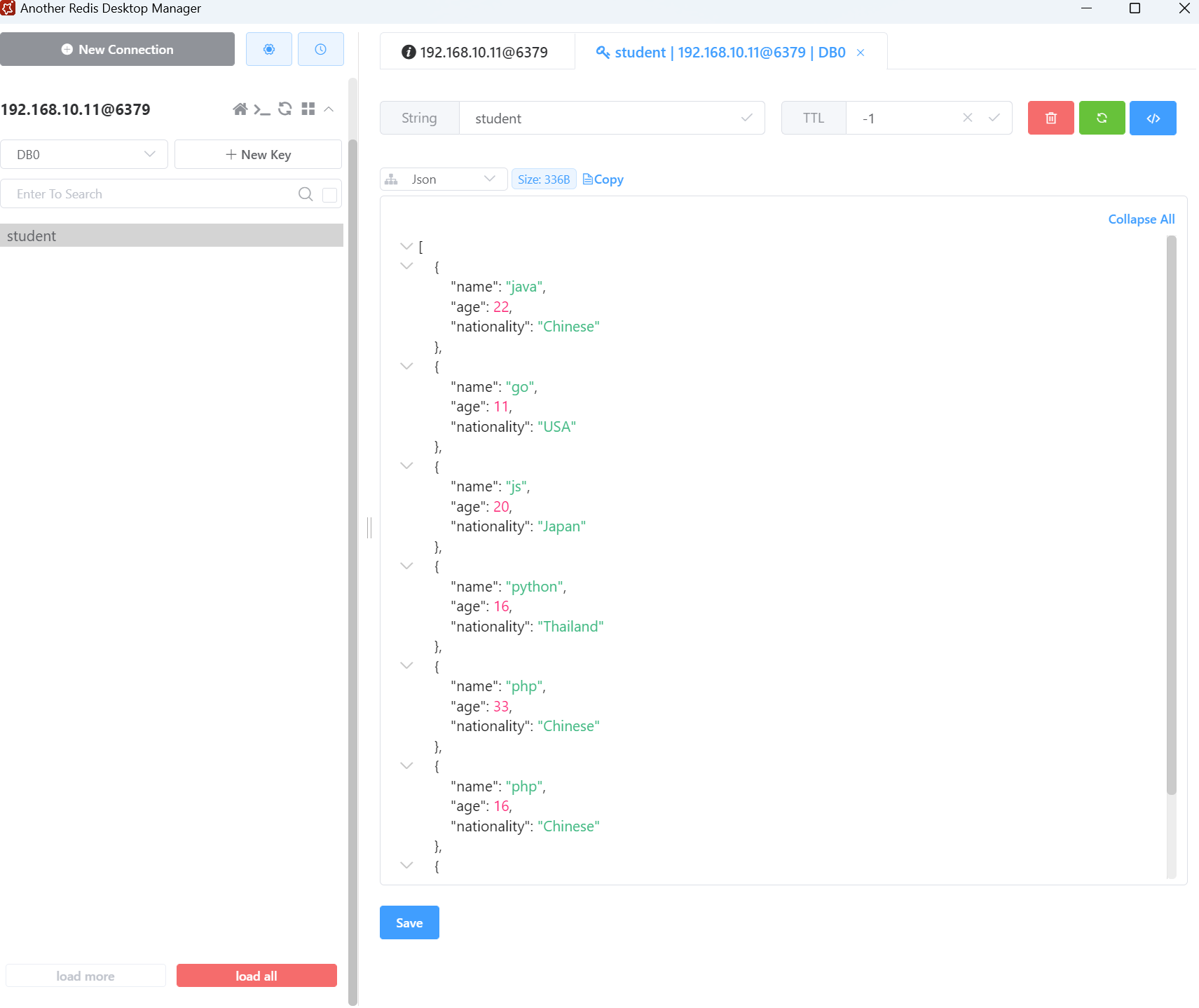
测试
- @SpringBootTest
- class TestApplicationTests {
- @Autowired
- private RedisClient redisClient;
-
- @Test
- void contextLoads() {
- List<Student> students = new ArrayList<>();
- Student student1 = new Student("java", 22, "Chinese");
- Student student2 = new Student("go", 11, "USA");
- Student student3 = new Student("js", 20, "Japan");
- Student student4 = new Student("python", 16, "Thailand");
- Student student5 = new Student("php", 33, "Chinese");
- Student student6 = new Student("php", 16, "Chinese");
- Student student7 = new Student("java", 16, "Thailand");
- students.add(student1);
- students.add(student2);
- students.add(student3);
- students.add(student4);
- students.add(student5);
- students.add(student6);
- students.add(student7);
- redisClient.set("student", students);
- }
- }
结果显示