
热门标签
热门文章
- 1【ACDC数据集】:预处理ACDC心脏3D MRI影像数据集到VOC数据集格式,nii转为jpg,label转为png
- 2【“云计算”的初识,从无到有的第一步积累】_公有云是指外部客户提供服务的云
- 3R语言ggplot2改变坐标轴的顺序或者方向:改变字体、颜色、旋转刻度标签、轴刻度 log、sqrt 等转换、设置和隐藏刻度标记、反转轴方向、设定范围和反转轴方向、x 与 y 轴固定的比例_ggplot 更改y轴排序
- 4ATSHA204A(二)——基本特性
- 5ABAP - 内表行数统计的三种方法_abap 取内表中符合条件的行数
- 6Topaz Video Enhance AI(ai视频画质增强软件)官方正式版V2.2.0 | AI视频放大软件下载 | 视频画质怎么变清晰?
- 7修改elementui 里面input的placeholder字体颜色_element-plus 选择器 placeholder颜色
- 8win服务器系统2019和2016区别,Windows Server 2019和Windows Server, Version 1909的区别是什么?...
- 9Js字符串操作函数大全_js instr
- 10使用腾讯云快速完成网站备案的详细过程_腾讯云网站备案
当前位置: article > 正文
深度学习系列4:onnx_onnx variable
作者:程序安全守护者 | 2024-02-03 18:37:49
赞
踩
onnx variable
1. onnx介绍
onnxruntime:https://github.com/Microsoft/onnxruntime
onnx: https://github.com/onnx/onnx
可以参考这篇:https://github.com/NVIDIA/TensorRT/tree/master/samples/opensource/sampleOnnxMNIST
ONNX 是微软与Facebook和AWS共同开发的深度学习和传统机器学习模型的开放格式。
ONNX Runtime是基于ONNX规范实现的推理引擎。ONNX Runtime 可以自动调用各种硬件加速器,例如NV CUDA、TensorRT 和Intel的 MKL-DNN、nGraph。如下所示,ONNX格式的模型可以传入到蓝色部分的 Runtime,并自动完成计算图分割及并行化处理,最后我们只需要如橙色所示的输入数据和输出结果就行了。
ONNX目的使算法开发人员可以为算法任务选择合适的机器学习框架,推理框架作者可以集中精力推出创新、提高框架的性能。对于硬件供应商来说,也可以简化神经网络计算的复杂度,实现优化算法。
目前ONNX Runtime支持CUDA、MLAS(Microsoft Linear Algebra Subprograms)、MKL-DNN、MKL-ML和TensorRT用于计算加速。
下面是简单使用的案例:
import onnxruntime as rt

sess = rt.InferenceSession("model.onnx")
input_name = sess.get_inputs()[0].name

X = numpy.random.random((3, 4, 5)).astype(numpy.float32)
pred_onnx = sess.run(None, {input_name: X})

print(pred_onnx)
- 1
- 2
- 3
- 4
- 5
- 6
- 7
- 8
- 9
2. onnx graph
2.1 创建variable
import onnx_graphsurgeon as gs
import numpy as np
import onnx

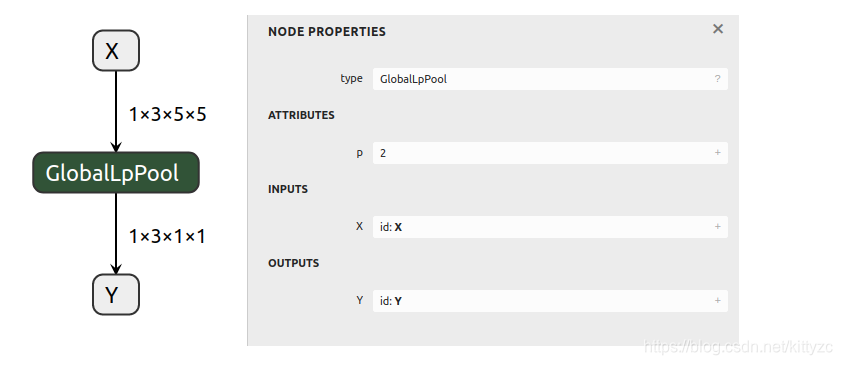
X = gs.Variable(name="X", dtype=np.float32, shape=(1, 3, 5, 5))
Y = gs.Variable(name="Y", dtype=np.float32, shape=(1, 3, 1, 1))
node = gs.Node(op="GlobalLpPool", attrs={"p": 2}, inputs=[X], outputs=[Y])

graph = gs.Graph(nodes=[node], inputs=[X], outputs=[Y])
onnx.save(gs.export_onnx(graph), "test_globallppool.onnx")
- 1
- 2
- 3
- 4
- 5
- 6
- 7
- 8
- 9
- 10
2.2 添加constant
import onnx_graphsurgeon as gs
import numpy as np
import onnx

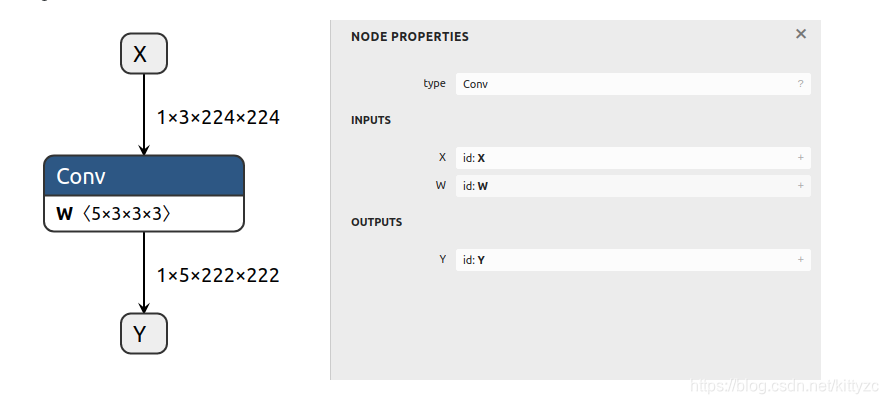
X = gs.Variable(name="X", dtype=np.float32, shape=(1, 3, 224, 224))
# Since W is a Constant, it will automatically be exported as an initializer
W = gs.Constant(name="W", values=np.ones(shape=(5, 3, 3, 3), dtype=np.float32))

Y = gs.Variable(name="Y", dtype=np.float32, shape=(1, 5, 222, 222))

node = gs.Node(op="Conv", inputs=[X, W], outputs=[Y])

# Note that initializers do not necessarily have to be graph inputs
graph = gs.Graph(nodes=[node], inputs=[X], outputs=[Y])
onnx.save(gs.export_onnx(graph), "test_conv.onnx")
- 1
- 2
- 3
- 4
- 5
- 6
- 7
- 8
- 9
- 10
- 11
- 12
- 13
- 14
- 15
2.3 保存子模型
import onnx_graphsurgeon as gs
import numpy as np
import onnx
model = onnx.load("model.onnx")
graph = gs.import_onnx(model)
tensors = graph.tensors()
graph.inputs = [tensors["x1"].to_variable(dtype=np.float32)]
graph.outputs = [tensors["add_out"].to_variable(dtype=np.float32)]
graph.cleanup()
onnx.save(gs.export_onnx(graph), "subgraph.onnx")
- 1
- 2
- 3
- 4
- 5
- 6
- 7
- 8
- 9
- 10
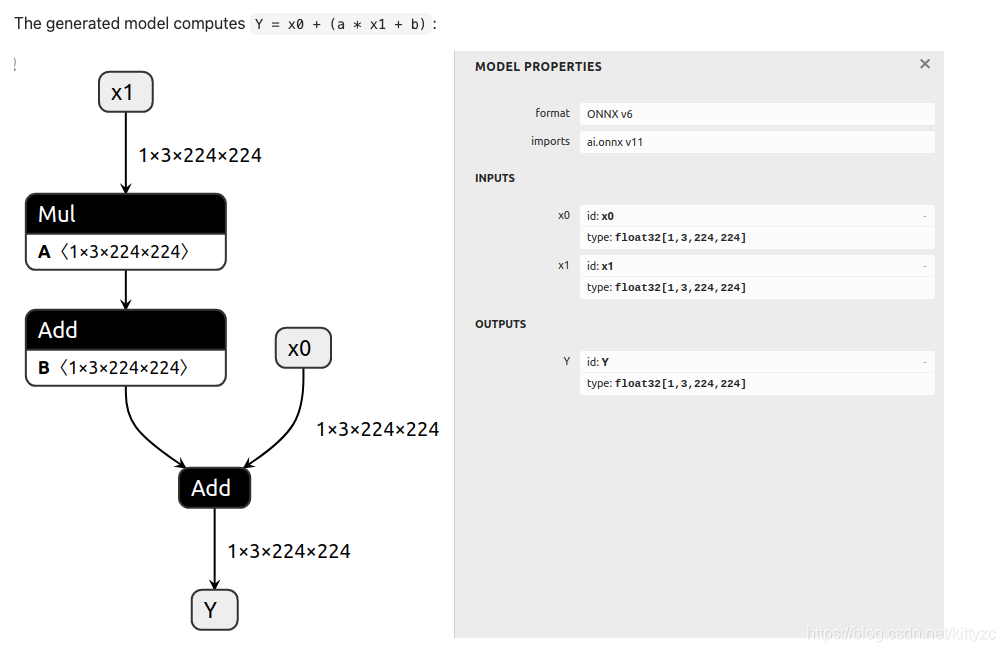
原模型为:
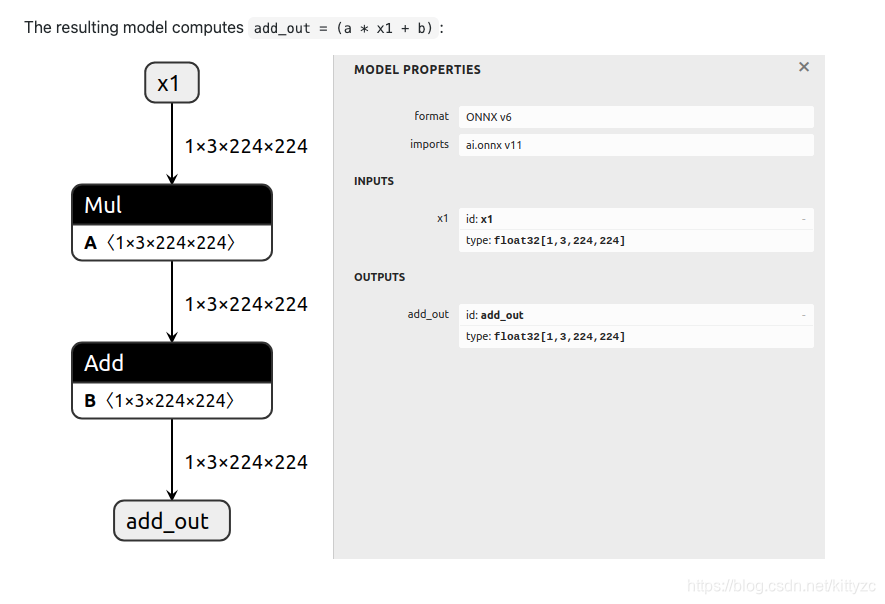
子模型保存下来为:
2.4 修改模型
还是上面的模型,我们要改成:
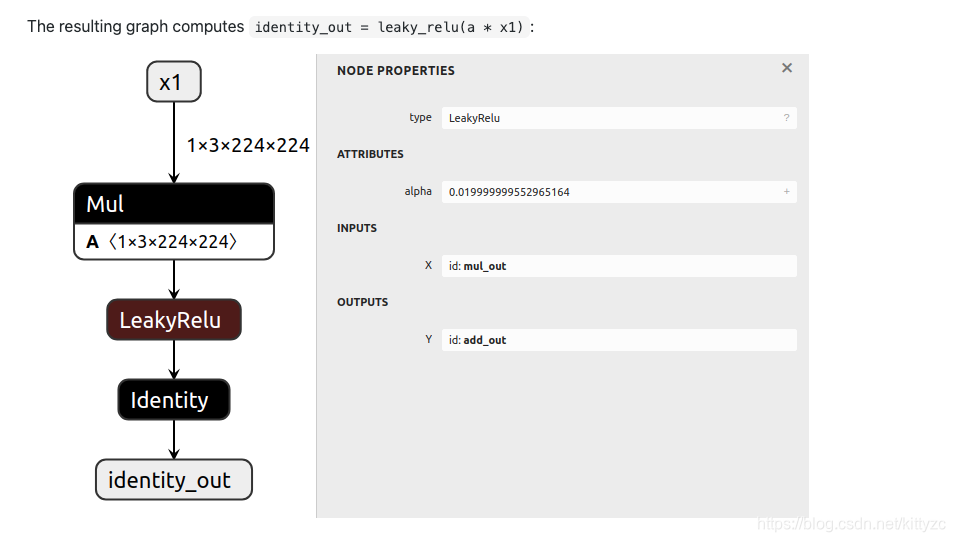
代码为:
import onnx_graphsurgeon as gs
import numpy as np
import onnx

graph = gs.import_onnx(onnx.load("model.onnx"))

# 1. Remove the `b` input of the add node
first_add = [node for node in graph.nodes if node.op == "Add"][0]
first_add.inputs = [inp for inp in first_add.inputs if inp.name != "b"]

# 2. Change the Add to a LeakyRelu
first_add.op = "LeakyRelu"
first_add.attrs["alpha"] = 0.02

# 3. Add an identity after the add node
identity_out = gs.Variable("identity_out", dtype=np.float32)
identity = gs.Node(op="Identity", inputs=first_add.outputs, outputs=[identity_out])
graph.nodes.append(identity)

# 4. Modify the graph output to be the identity output
graph.outputs = [identity_out]

# 5. Remove unused nodes/tensors, and topologically sort the graph
# ONNX requires nodes to be topologically sorted to be considered valid.
# Therefore, you should only need to sort the graph when you have added new nodes out-of-order.
# In this case, the identity node is already in the correct spot (it is the last node,
# and was appended to the end of the list), but to be on the safer side, we can sort anyway.
graph.cleanup().toposort()

onnx.save(gs.export_onnx(graph), "modified.onnx")

- 1
- 2
- 3
- 4
- 5
- 6
- 7
- 8
- 9
- 10
- 11
- 12
- 13
- 14
- 15
- 16
- 17
- 18
- 19
- 20
- 21
- 22
- 23
- 24
- 25
- 26
- 27
- 28
- 29
- 30
3. 示例
3.1 在结尾添加全连接层:
import onnx
import onnx_graphsurgeon as gs
import numpy as np
import onnxruntime as rt

graph = gs.import_onnx(onnx.load("model.onnx"))
pca_w = gs.Constant(name="pca_w", values=np.random.randn(512, 256).astype(np.float32))
pca_b = gs.Constant(name="pca_b", values=np.zeros(shape=(bs, 256), dtype=np.float32))
Y = gs.Variable(name="Y", dtype=np.float32, shape=(bs, 256))
pca_node = gs.Node(op='Gemm',inputs=[graph.nodes[-1].outputs[0], pca_w,pca_b], outputs=[Y])
graph.nodes.append(pca_node)
graph.outputs = [Y]
onnx.save(gs.export_onnx(graph), "add_gemm.onnx")

session = rt.InferenceSession('add_gemm.onnx')
inp = session.get_inputs()[0].name
out = session.get_outputs()[0].name
session.run([out],{inp:input1.numpy()})
- 1
- 2
- 3
- 4
- 5
- 6
- 7
- 8
- 9
- 10
- 11
- 12
- 13
- 14
- 15
- 16
- 17
- 18
3.2 添加nms层
import argparse
import logging
import json
import numpy as np
import onnx_graphsurgeon as gs
import onnx


streamhandler = logging.StreamHandler()
logger = logging.getLogger('')
logger.setLevel(logging.INFO)
logger.addHandler(streamhandler)

@gs.Graph.register()
def trt_batched_nms(self, boxes_input, scores_input, nms_output, config, layer_name):
    boxes_input.outputs.clear()
    scores_input.outputs.clear()
    for node in nms_output:
      node.inputs.clear()
    attrs = {
        "shareLocation": config["shareLocation"],
        "backgroundLabelId": config["backgroundLabelId"],
        "numClasses": config["numClasses"],
        "topK": config["topK"],
        "keepTopK": config["keepTopK"],
        "scoreThreshold": config["scoreThreshold"],
        "iouThreshold": config["iouThreshold"],
        "isNormalized": config["isNormalized"],
        "clipBoxes": True,
        # etc.
    }
    return self.layer(op="BatchedNMS_TRT", attrs=attrs,
                      inputs=[boxes_input, scores_input],
                      outputs=nms_output, name=layer_name)

@gs.Graph.register()
def add_op_by_type(self, input_tensor, output_tensor, config, layer_name, op_type):
    input_tensor.inputs.clear()
    shape = list(input_tensor.shape)
    shape[3]=1
    shape[2]=1
    print(input_tensor.shape)
    val = np.array(config['val'], np.float32).reshape(shape)
    return self.layer(op=op_type,
                      inputs=[input_tensor, val],
                      outputs=[output_tensor], name=layer_name)

def parse_args():
    parser = argparse.ArgumentParser(
        description='Add NMS op with box and score nodes after detection onnx.')
    parser.add_argument('model', type=str,
                        help='model to use.')
    parser.add_argument('config', type=str,
                        help='plugin json file path.')
    parser.add_argument('--save', type=str, default="result.onnx",
                        help='saving model path.')
    opt = parser.parse_args()
    return opt
def main():
    opt = parse_args()
    logger.info(opt)
    graph = gs.import_onnx(onnx.load(opt.model))
    with open(opt.config) as f:
        config = json.load(f)
    tmap = graph.tensors()
    for i in range(len(config['plugins'])):
      plugin_conf = config['plugins'][i]
      layer_conf = config['layers'][i]
      batch_size = tmap[layer_conf['inputs'][0]].shape[0]
      logger.info("add layer:{} with inputs:{}".format(plugin_conf['type'], layer_conf['inputs']))
      if plugin_conf['type']=='NMS':
        num_detections = gs.Variable(name=layer_conf['outputs'][0], dtype=np.int32, shape=(batch_size, 1))
        boxes =  gs.Variable(name=layer_conf['outputs'][1], dtype=np.float32, shape=(batch_size, plugin_conf['keepTopK'], 4))
        scores = gs.Variable(name=layer_conf['outputs'][2], dtype=np.float32, shape=(batch_size, plugin_conf["keepTopK"]))
        classes = gs.Variable(name=layer_conf['outputs'][3], dtype=np.float32, shape=(batch_size, plugin_conf["keepTopK"]))
        graph.trt_batched_nms(tmap[layer_conf['inputs'][0]], tmap[layer_conf['inputs'][1]],
            [num_detections, boxes, scores, classes], plugin_conf, layer_conf["name"])
        graph.outputs = [num_detections, boxes, scores, classes]
      elif plugin_conf['type'].lower()=="add" or plugin_conf['type'].lower()=="mul":
        input_tensor = tmap[layer_conf['inputs'][0]]
        new_input =  gs.Variable(name=layer_conf['name'], dtype=np.float32, shape=input_tensor.shape)
        input_tensor.outputs[0].inputs[0] = new_input
        graph.add_op_by_type(input_tensor, new_input, plugin_conf, layer_conf['name'], plugin_conf['type'].capitalize())
      else:
        logger.warning("not support yet")
    graph.cleanup().toposort()
    graph.fold_constants().cleanup()
    onnx.save(gs.export_onnx(graph), opt.save)

if __name__ == '__main__':
    main()
- 1
- 2
- 3
- 4
- 5
- 6
- 7
- 8
- 9
- 10
- 11
- 12
- 13
- 14
- 15
- 16
- 17
- 18
- 19
- 20
- 21
- 22
- 23
- 24
- 25
- 26
- 27
- 28
- 29
- 30
- 31
- 32
- 33
- 34
- 35
- 36
- 37
- 38
- 39
- 40
- 41
- 42
- 43
- 44
- 45
- 46
- 47
- 48
- 49
- 50
- 51
- 52
- 53
- 54
- 55
- 56
- 57
- 58
- 59
- 60
- 61
- 62
- 63
- 64
- 65
- 66
- 67
- 68
- 69
- 70
- 71
- 72
- 73
- 74
- 75
- 76
- 77
- 78
- 79
- 80
- 81
- 82
- 83
- 84
- 85
- 86
- 87
- 88
- 89
- 90
- 91
然后是用于配置的文件:
{
    "plugins": [
        {
            "name": "nms",
            "type": "NMS",
            "shareLocation": false,
            "backgroundLabelId": -1,
            "numClasses": 6,
            "topK": 400,
            "keepTopK": 100,
            "scoreThreshold": 0.5,
            "iouThreshold": 0.5,
            "isNormalized": false
        },
        {
            "type": "add",
            "val": [-102.9801,-115.9465,-122.7717]
        }
    ],
    "layers": [
        {
            "name": "nms",
            "inputs": ["boxes", "scores"],
            "outputs": ["num_detections", "nmsed_boxes", "nmsed_scores", "nmsed_classes"]
        },
        {
            "name": "mean",
            "inputs": ["input_image"]
        }
    ]
}
- 1
- 2
- 3
- 4
- 5
- 6
- 7
- 8
- 9
- 10
- 11
- 12
- 13
- 14
- 15
- 16
- 17
- 18
- 19
- 20
- 21
- 22
- 23
- 24
- 25
- 26
- 27
- 28
- 29
- 30
- 31
然后执行python onnx-modifier.py model.onnx plugin.json就可以输出带nms的模型啦~
声明:本文内容由网友自发贡献,不代表【wpsshop博客】立场,版权归原作者所有,本站不承担相应法律责任。如您发现有侵权的内容,请联系我们。转载请注明出处:https://www.wpsshop.cn/article/detail/57611
推荐阅读
相关标签

