- 1Tomcat怎么优化
- 2【深度学习】训练时现Interal Error:Blas GEMM launch failed._internal: blas gemm launch failed
- 3java中的switch用法,循环,方法,数组以及类_java switch
- 4vue 访问第三方 跨域, 配置vue.config.js_vue调用第三方接口跨域
- 5国际服务贸易期末考试复习资料_gats的具体义务和特定义务是一样吗?
- 6用DIV+CSS技术设计的个人电影网站(web前端网页制作课作业)_网页设计与制作电影网站
- 7查询电脑配置:CPU信息、内存信息、服务器信息、Java虚拟机、磁盘信息。
- 8ROS回调函数的类方法实现,both in Python 和 C++_ros 回调函数 怎么写
- 9Building wheel for pycocotools (pyproject.toml) ... error错误解决_building wheel for pycrypto (pyproject.toml) did n
- 10Java程序设计入门教程-- switch选择语句
SpringCloud GateWay与Nacos使用_springcloud gateway nacos
赞
踩
网关就相当于一个内网与外网的出入口,起着 安全、验证的功能,如果没有网关,那么如果需要实现验证的功能,除非
SpringCloud GateWay 作为微服务的网关,起着如下作用
① 作为所有API接口服务请求的接入点
② 作为所有后端业务服务的聚合点,所有业务服务都可以在这里被调用
③ 实现安全、验证、路由、过滤、流控等策略,进行一些必要的中介处理
④ 统一管理: 提供配置管理工具,对所有API服务的调用生命周期和相应的中介策略进行统一的管理
(当然 由于多了一次中间转发,所以 QPS 就会下降)
下面就总结一下 SpringCloud GateWay 与 Nacos 的整合与使用
一、基础项目搭建
① 启动nacos 服务,这里是以单击的形式启动(nacos 下载地址可以自己百度)
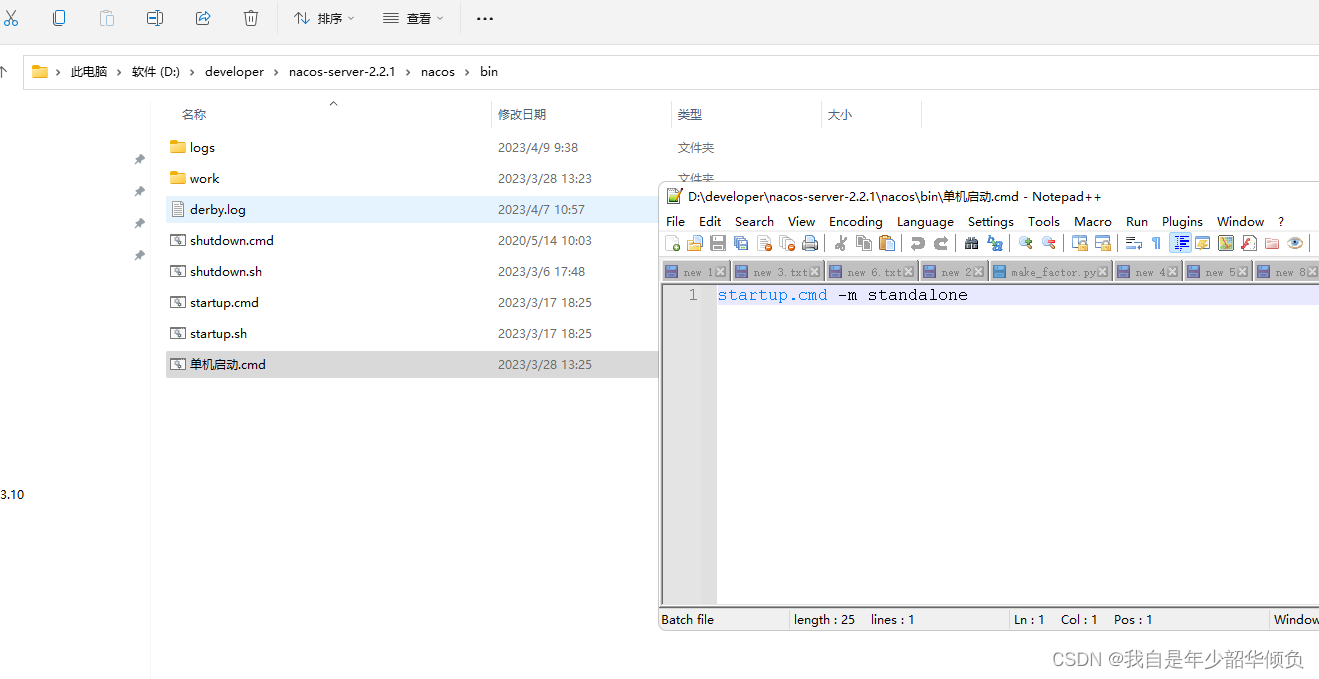
其默认端口为8848 账户名为nacos 密码为nacos
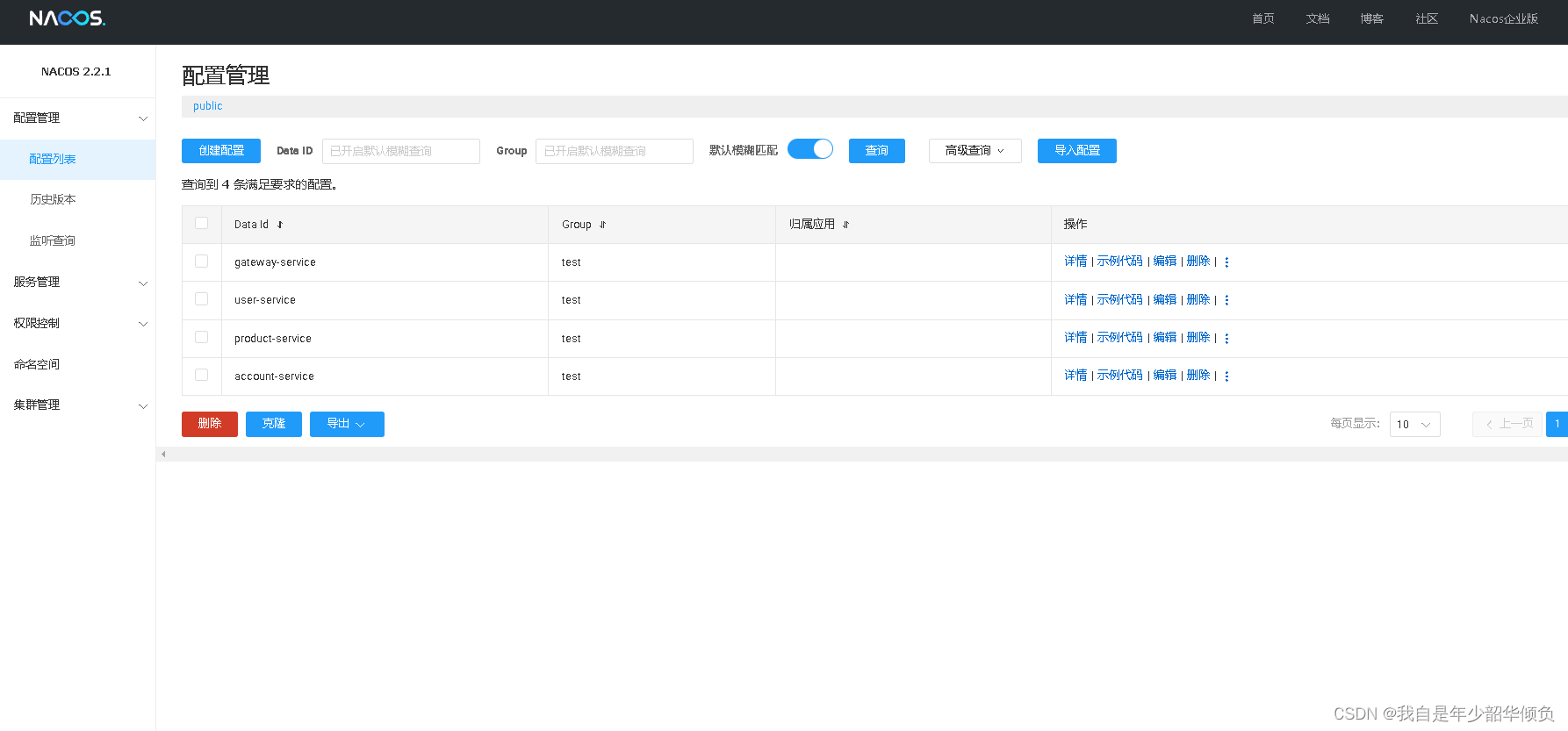
② 创建项目
父项目 (定义SpringCloud 版本 以及 SpringBoot 版本 以及公共 依赖)
gateway-service ( 子项目,实现Nacos 服务发现以及 权限过滤)
user-service (子项目,实现Nacos 服务注册以及充当服务提供者的功能)
其结构图如下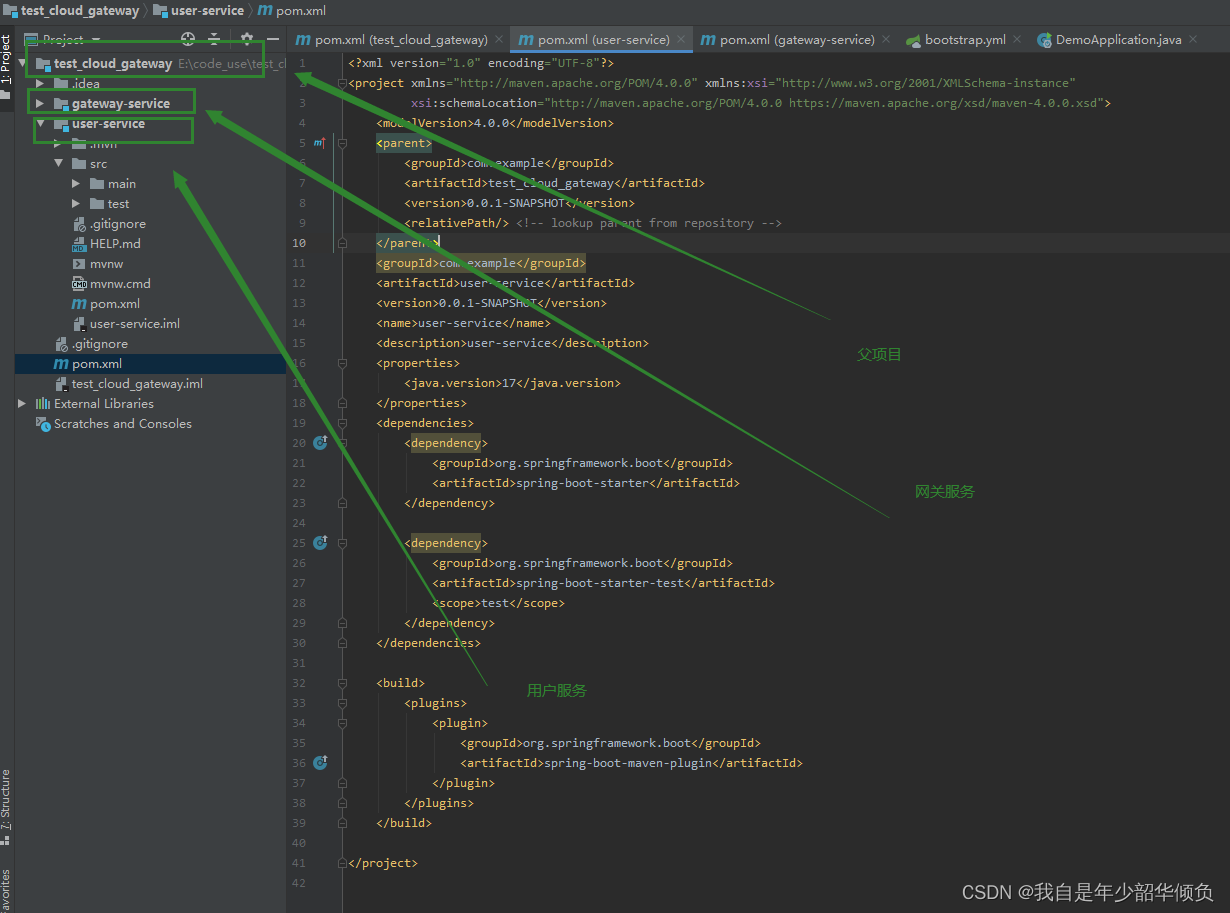
父项目 pom.xml 文件
- <?xml version="1.0" encoding="UTF-8"?>
- <project xmlns="http://maven.apache.org/POM/4.0.0" xmlns:xsi="http://www.w3.org/2001/XMLSchema-instance"
- xsi:schemaLocation="http://maven.apache.org/POM/4.0.0 https://maven.apache.org/xsd/maven-4.0.0.xsd">
- <modelVersion>4.0.0</modelVersion>
- <parent>
- <groupId>org.springframework.boot</groupId>
- <artifactId>spring-boot-starter-parent</artifactId>
- <version>2.4.2</version>
- <relativePath/> <!-- lookup parent from repository -->
- </parent>
- <groupId>com.example</groupId>
- <artifactId>test_cloud_gateway</artifactId>
- <version>0.0.1-SNAPSHOT</version>
- <name>demo</name>
- <description>test_cloud_gateway</description>
-
- <modules>
- <module>gateway-service</module>
- <module>user-service</module>
- </modules>
-
- <properties>
- <java.version>8</java.version>
- <spring.boot.version>2.4.2</spring.boot.version>
- <alibaba.cloud.version>2021.1</alibaba.cloud.version>
- <spring.cloud.version>2020.0.1</spring.cloud.version>
- <jackson.verson>2.8.9</jackson.verson>
- <maven.compiler.source>1.8</maven.compiler.source>
- <maven.compiler.target>1.8</maven.compiler.target>
- </properties>
- <dependencies>
- <dependency>
- <groupId>org.springframework.boot</groupId>
- <artifactId>spring-boot-starter</artifactId>
- </dependency>
-
- <dependency>
- <groupId>org.springframework.boot</groupId>
- <artifactId>spring-boot-starter-test</artifactId>
- <scope>test</scope>
- </dependency>
-
-
- <!-- Nacos 配置管理 -->
- <dependency>
- <groupId>com.alibaba.cloud</groupId>
- <artifactId>spring-cloud-starter-alibaba-nacos-config</artifactId>
- </dependency>
-
- <!-- Nacos 服务发现 -->
- <dependency>
- <groupId>com.alibaba.cloud</groupId>
- <artifactId>spring-cloud-starter-alibaba-nacos-discovery</artifactId>
- </dependency>
-
- <!-- 使用log4j2 作为项目日志 -->
- <dependency>
- <groupId>org.springframework.boot</groupId>
- <artifactId>spring-boot-starter</artifactId>
- <exclusions> <!-- 去掉springboot自带的日志 -->
- <exclusion>
- <groupId>org.springframework.boot</groupId>
- <artifactId>spring-boot-starter-logging</artifactId>
- </exclusion>
- </exclusions>
-
- </dependency>
-
- <dependency>
- <groupId>org.springframework.boot</groupId>
- <artifactId>spring-boot-starter-log4j2</artifactId>
- </dependency>
-
-
-
- <!-- apache.commons begin -->
- <dependency>
- <groupId>org.apache.commons</groupId>
- <artifactId>commons-lang3</artifactId>
- </dependency>
-
- <!-- SpringCloud 框架 -->
- <dependency>
- <groupId>org.springframework.cloud</groupId>
- <artifactId>spring-cloud-starter</artifactId>
- </dependency>
-
- <dependency>
- <groupId>org.projectlombok</groupId>
- <artifactId>lombok</artifactId>
- <optional>true</optional>
- <version>1.18.20</version>
- </dependency>
-
- <dependency>
- <groupId>org.springframework.cloud</groupId>
- <artifactId>spring-cloud-starter-bootstrap</artifactId>
- <version>3.1.1</version>
- </dependency>
-
-
-
- </dependencies>
-
-
-
-
-
-
- <dependencyManagement>
- <dependencies>
- <!-- spring cloud 依赖 -->
- <dependency>
- <groupId>org.springframework.cloud</groupId>
- <artifactId>spring-cloud-dependencies</artifactId>
- <version>${spring.cloud.version}</version>
- <type>pom</type>
- <scope>import</scope>
- </dependency>
-
- <dependency>
- <groupId>org.springframework.boot</groupId>
- <artifactId>spring-boot-dependencies</artifactId>
- <version>${spring.boot.version}</version>
- <type>pom</type>
- <scope>import</scope>
- </dependency>
-
- <dependency>
- <groupId>com.alibaba.cloud</groupId>
- <artifactId>spring-cloud-alibaba-dependencies</artifactId>
- <version>${alibaba.cloud.version}</version>
- <type>pom</type>
- <scope>import</scope>
- </dependency>
-
- </dependencies>
- </dependencyManagement>
-
-
-
-
- <build>
- <plugins>
- <plugin>
- <groupId>org.springframework.boot</groupId>
- <artifactId>spring-boot-maven-plugin</artifactId>
- <version>${spring.boot.version}</version>
- </plugin>
- </plugins>
- </build>
-
- </project>

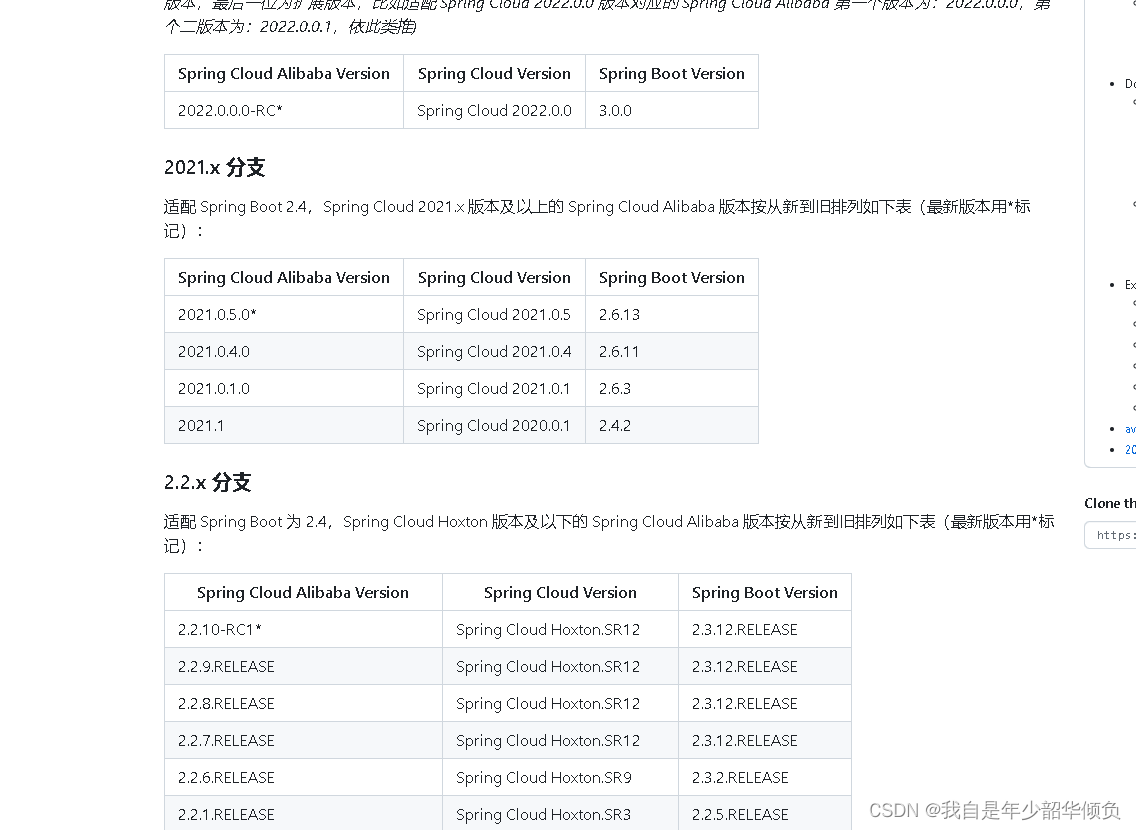
( 吐槽一下: SpringCloud 以及 SpringCloug Alibaba 的组件的版本之间有点坑,稍不注意就有可能导致 类缺少或者其他的问题)
GateWay-service 服务
pom.xml 文件
- <?xml version="1.0" encoding="UTF-8"?>
- <project xmlns="http://maven.apache.org/POM/4.0.0" xmlns:xsi="http://www.w3.org/2001/XMLSchema-instance"
- xsi:schemaLocation="http://maven.apache.org/POM/4.0.0 https://maven.apache.org/xsd/maven-4.0.0.xsd">
- <modelVersion>4.0.0</modelVersion>
- <parent>
- <groupId>com.example</groupId>
- <artifactId>test_cloud_gateway</artifactId>
- <version>0.0.1-SNAPSHOT</version>
- <relativePath/> <!-- lookup parent from repository -->
- </parent>
- <groupId>com.example</groupId>
- <artifactId>gateway-service</artifactId>
- <version>0.0.1-SNAPSHOT</version>
- <name>demo</name>
- <description>gateway-service</description>
- <properties>
- <java.version>17</java.version>
- </properties>
- <dependencies>
- <dependency>
- <groupId>org.springframework.cloud</groupId>
- <artifactId>spring-cloud-starter-gateway</artifactId>
- <version>3.0.4</version>
- </dependency>
- <dependency>
- <groupId>org.springframework.cloud</groupId>
- <artifactId>spring-cloud-starter-loadbalancer</artifactId>
- <version>3.0.4</version> <!-- 版本号是必须要加的 -->
- </dependency>
-
-
- <dependency>
- <groupId>org.springframework.boot</groupId>
- <artifactId>spring-boot-configuration-processor</artifactId>
- <optional>true</optional>
- </dependency>
- </dependencies>
-
- <build>
- <plugins>
- <plugin>
- <groupId>org.springframework.boot</groupId>
- <artifactId>spring-boot-maven-plugin</artifactId>
- </plugin>
- </plugins>
- </build>
-
- </project>
application.yml 文件
- spring:
- cloud:
- nacos:
- discovery:
- server-addr: 127.0.0.1:8848 # 注册中心地址
- username: nacos
- password: nacos
- locator:
- enabled: true # gateway 可以从nacos 中发现微服务
- application:
- name: gateway-service
-
- server:
- port: 9091
(因为在bootstrap.yml文件中声明了配置中心以及文件的后缀格式,这时候项目启动就会自动获取nacos 上的gate-way-service.yaml 文件作为其启动配置项)
User-service 服务
pom.xml 文件
- <?xml version="1.0" encoding="UTF-8"?>
- <project xmlns="http://maven.apache.org/POM/4.0.0" xmlns:xsi="http://www.w3.org/2001/XMLSchema-instance"
- xsi:schemaLocation="http://maven.apache.org/POM/4.0.0 https://maven.apache.org/xsd/maven-4.0.0.xsd">
- <modelVersion>4.0.0</modelVersion>
- <parent>
- <groupId>com.example</groupId>
- <artifactId>test_cloud_gateway</artifactId>
- <version>0.0.1-SNAPSHOT</version>
- <relativePath/> <!-- lookup parent from repository -->
- </parent>
- <groupId>com.example</groupId>
- <artifactId>user-service</artifactId>
- <version>0.0.1-SNAPSHOT</version>
- <name>user-service</name>
- <description>user-service</description>
- <properties>
- <java.version>8</java.version>
- </properties>
- <dependencies>
- <dependency>
- <groupId>org.springframework.boot</groupId>
- <artifactId>spring-boot-starter</artifactId>
- </dependency>
-
- <dependency>
- <groupId>org.springframework.boot</groupId>
- <artifactId>spring-boot-starter-test</artifactId>
- <scope>test</scope>
- </dependency>
- <dependency>
- <groupId>com.fasterxml.jackson.core</groupId>
- <artifactId>jackson-databind</artifactId>
- <version>2.10.2</version>
- </dependency>
- <dependency>
- <groupId>org.springframework.boot</groupId>
- <artifactId>spring-boot-starter-web</artifactId>
- <version>${spring.boot.version}</version>
- <exclusions> <!-- 去掉springboot自带的日志 -->
- <exclusion>
- <groupId>org.springframework.boot</groupId>
- <artifactId>spring-boot-starter-logging</artifactId>
- </exclusion>
- </exclusions>
-
- </dependency>
- </dependencies>
-
- <build>
- <plugins>
- <plugin>
- <groupId>org.springframework.boot</groupId>
- <artifactId>spring-boot-maven-plugin</artifactId>
- </plugin>
- </plugins>
- </build>
-
- </project>
application.yml
- server:
- port: 8099
- dubbo:
- application:
- name: ${spring.application.name}
- qos-enable: false
- registry:
- address: nacos://127.0.0.1:8848
- use-as-metadata-center: false
- use-as-config-center: false
- parameters:
- register-mode: instance
请求类:
- package com.example.userservice.controller;
-
- import com.example.userservice.pojo.User;
- import org.springframework.web.bind.annotation.PathVariable;
- import org.springframework.web.bind.annotation.RequestMapping;
- import org.springframework.web.bind.annotation.RestController;
-
- import java.util.HashMap;
- import java.util.Map;
-
- /**
- * @author zhangyang
- * @version 1.0
- * @Date 2023/4/9 15:44
- * @Description
- */
- @RestController
- @RequestMapping("/user")
- public class UserController {
-
- private static Map<Integer, User> userMap;
-
- static {
- userMap = new HashMap<>();
- userMap.put(1, new User(1, "张三"));
- userMap.put(2, new User(2, "李四"));
- userMap.put(3, new User(3, "王五"));
- }
-
- @RequestMapping("/findById/{id}")
- public User findById(@PathVariable("id") Integer id) {
- // 为了测试方便,用此方式模拟用户查询
- return userMap.get(id);
- }
- }
- package com.example.userservice.pojo;
-
- import lombok.AllArgsConstructor;
- import lombok.Data;
-
- /**
- * @author zhangyang
- * @version 1.0
- * @Date 2023/4/9 15:46
- * @Description
- */
- @AllArgsConstructor
- @Data
- public class User {
-
- private Integer id;
-
-
- private String name;
- }
③ 启动项目
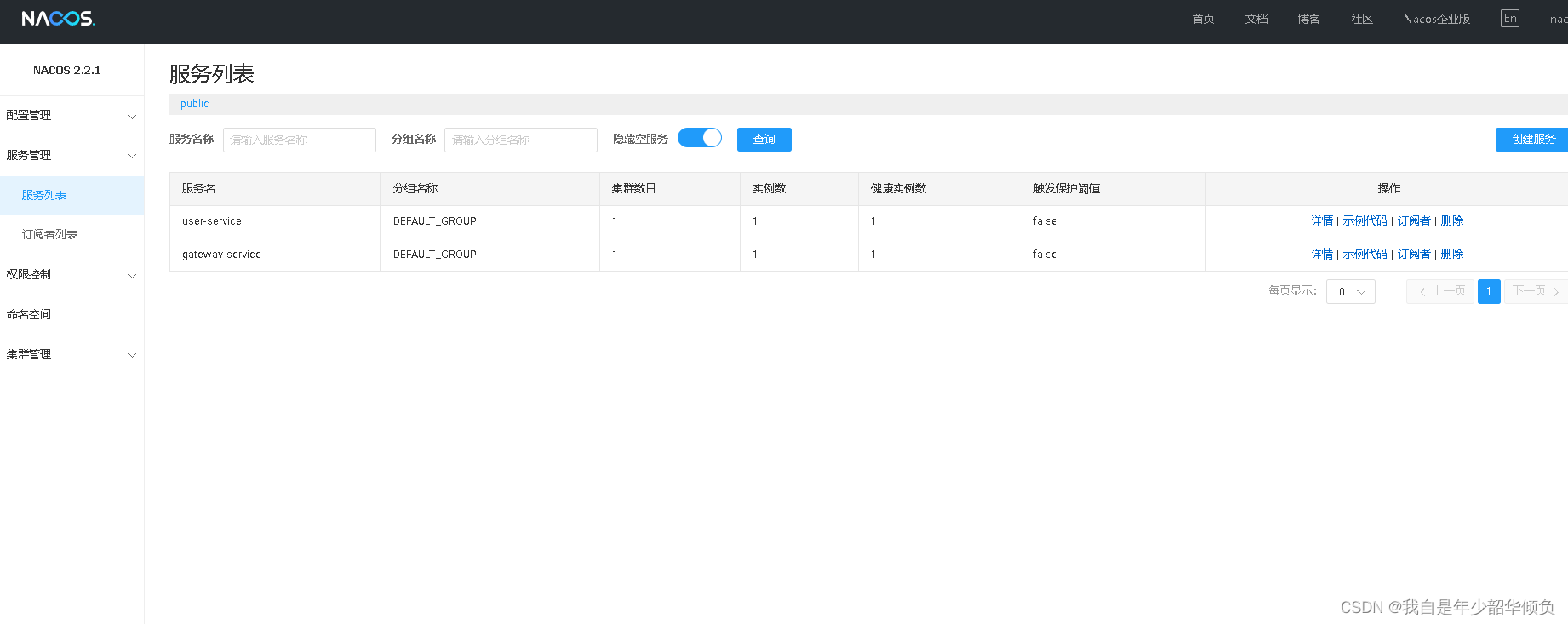
当我们启动项目后,就会在nacos 上看到注册的gateway-service 服务、user-service 服务
二、Springcloud Gateway 配置说明
Gateway 本质上就是相当于 将请求封装成一个对象,然后去匹配设置的路由信息,
然后去通过filter 处理,然后调用微服务。
1、路由服务
- spring:
- cloud:
- nacos:
- discovery:
- server-addr: 127.0.0.1:8848 # 注册中心地址
- username: nacos
- password: nacos
- locator:
- enabled: true # gateway 可以从nacos 中发现微服务
- gateway:
- routes:
- - id: user-service-route # 路由的id,要保证其唯一性
- uri: lb://user-service # lb 表示 从nacos 中按照名称获取微服务,并遵循负载均衡策略, user-service 即微服务注册名
- predicates:
- - Path=/user-api/** # 使用断言
- filters:
- - StripPrefix=1 # 使用过滤器
-
- application:
- name: gateway-service
-
-
- server:
- port: 9091
其中
id: 路由标识符,用于区分其他route
uri: 路由指向目的地uri,即客户端请求最终转发到微服务
predicate: 断言,用于条件判断,只有断言都返回真,才会真正的执行路由
filter : 过滤器由于修改请求和响应信息
重新服务后,在地址栏上访问
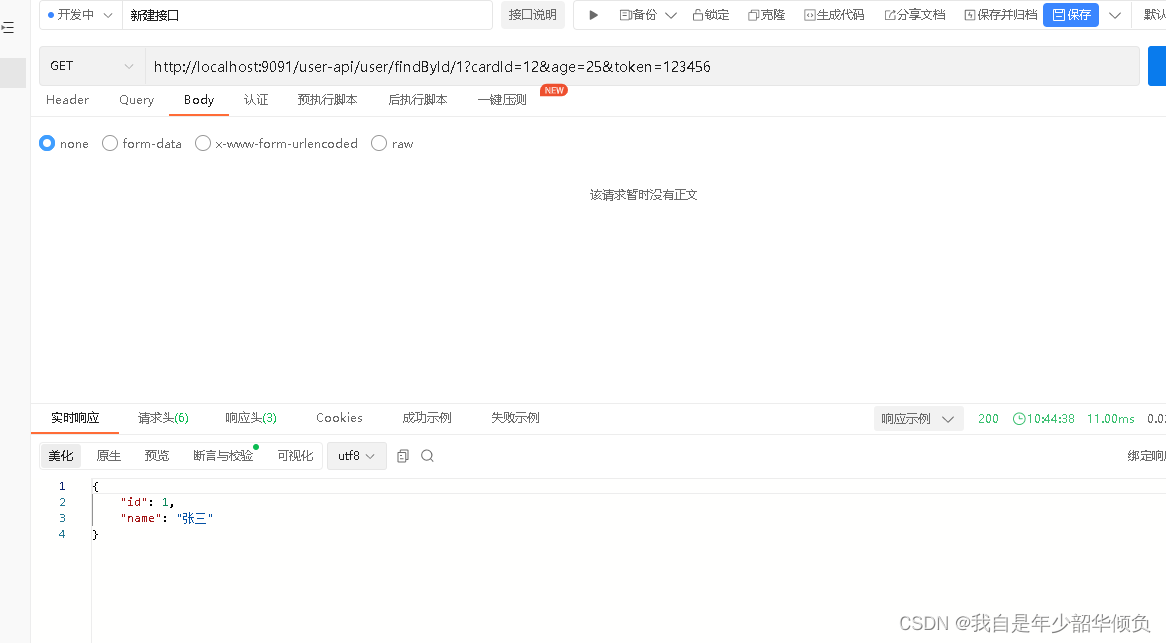
就会通过gateway 服务查询查询到对应的user-service 服务
全局过滤器
全局过滤器作用域所有路由,无需配置,通过全局过滤器可以实现对权限的统一校验,安全性验证等功能
- package com.example.demo.filter;
-
- import com.fasterxml.jackson.databind.ObjectMapper;
- import lombok.SneakyThrows;
- import lombok.extern.slf4j.Slf4j;
- import org.springframework.cloud.gateway.filter.GatewayFilterChain;
- import org.springframework.cloud.gateway.filter.GlobalFilter;
- import org.springframework.core.Ordered;
- import org.springframework.core.io.buffer.DataBuffer;
- import org.springframework.http.HttpStatus;
- import org.springframework.http.server.reactive.ServerHttpResponse;
- import org.springframework.stereotype.Component;
- import org.springframework.web.server.ServerWebExchange;
- import reactor.core.publisher.Flux;
- import reactor.core.publisher.Mono;
-
- import java.util.HashMap;
- import java.util.Map;
-
- /**
- * @author zhangyang
- * @version 1.0
- * @Date 2023/4/10 10:53
- * @Description
- */
- @Component
- @Slf4j
- public class TokenGlobalFilter implements GlobalFilter, Ordered {
-
- @SneakyThrows
- @Override
- public Mono<Void> filter(ServerWebExchange exchange, GatewayFilterChain chain) {
- String token = exchange.getRequest().getQueryParams().getFirst("token");
- if (token == null || token.length() == 0 || !token.equals("123456")) {
- log.error("鉴权失败");
- ServerHttpResponse serverHttpResponse = exchange.getResponse();
-
- serverHttpResponse.setStatusCode(HttpStatus.OK);
- serverHttpResponse.getHeaders().add("Content-type", "application/json;charset=UTF-8");
-
- // 鉴权失败,返回的数据结构
- Map<String, Object> map = new HashMap<>();
- map.put("code", HttpStatus.UNAUTHORIZED.value());
- map.put("message", HttpStatus.UNAUTHORIZED.getReasonPhrase());
-
- DataBuffer buffer = serverHttpResponse.bufferFactory().wrap(new ObjectMapper().writeValueAsBytes(map));
- return serverHttpResponse.writeWith(Flux.just(buffer));
- }
- return chain.filter(exchange);
- }
-
- @Override
- public int getOrder() {
- return 0;
- }
- }
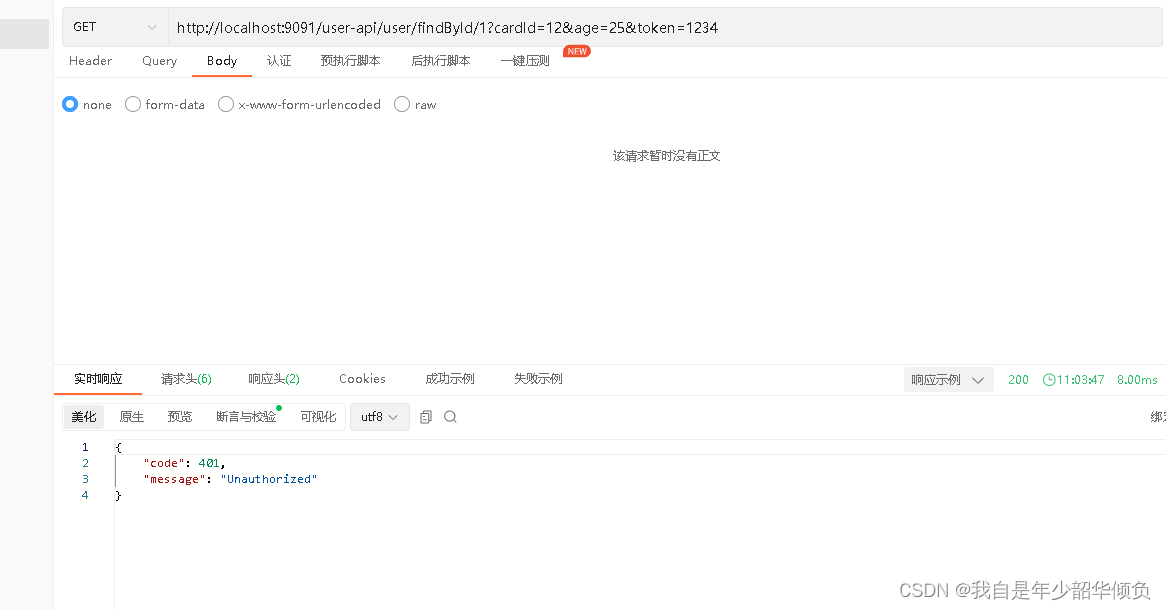
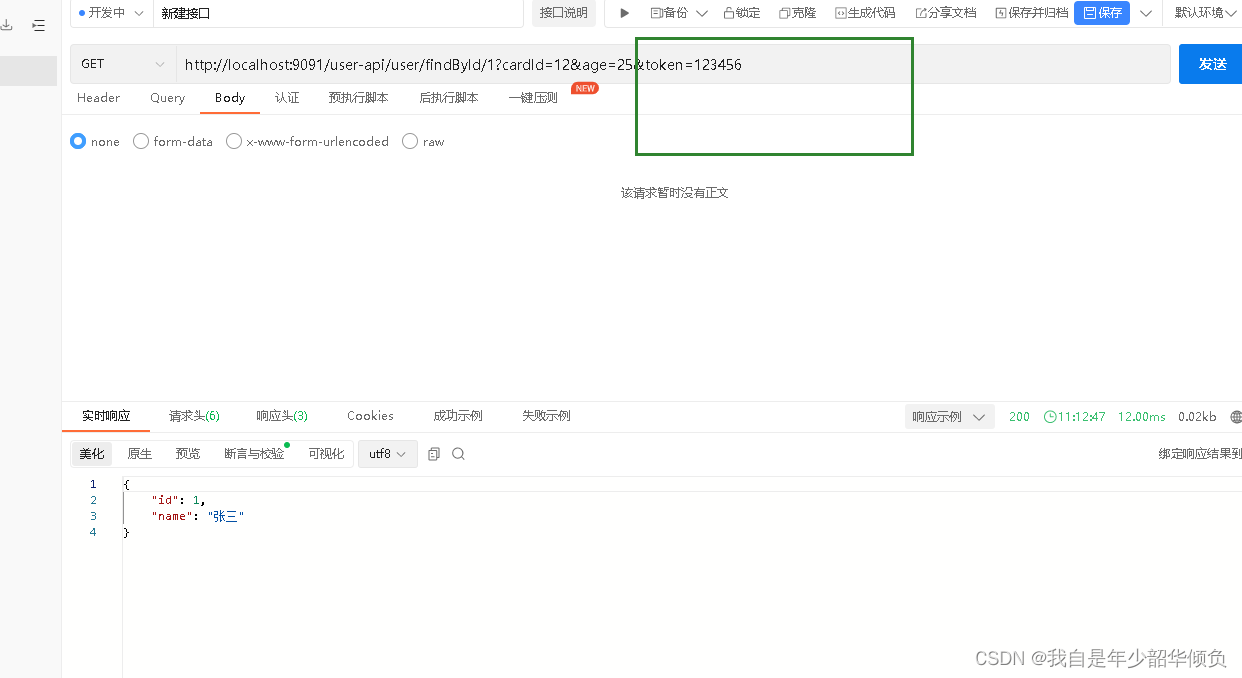
这里是通过 网关的GlobalFilter 拦截请求头上的的token 字符串,然后用于获取token 如果不符合条件则直接异常信息
转发规则
假设: uri 都设定为 http://localhost:9023****
| 规则 | 实例 | 说明 |
|---|---|---|
| Path | - Path=/gate/,/rule/ | 当请求的路径为gate、rule开头的时,转发到http:9023服务器上 |
| before | - Before=2017-01-20T17:42:47.789-07:00[America/Denver] | 在某个时间之前的请求才会被转发到http://localhost:9023服务器上 |
| After | - After=2017-01-20T17:42:47.789-07:00[America/Denver] | 在某个时间之后请求才会被转发 |
| Beteween | - Between=2017-01-20T17:42:47.789-07:00[America/Denver],2017-01-21T17:42:47.789-07:00[America/Denver] | 在某个时间段之间的才会被转发 |
| Cookie | - Cookie=chocolate, ch.p | 名为chocolate的表单或者满足正则ch.p的表单才会被匹配到进行请求转发 |
| Method | - Method=GET | 只有GET方法才会匹配转发请求,还可以限定POST、PUT等请求方式 |
过滤器规则(Filter)
| 过滤器规则 | 实例 | 说明 |
| PrefixPath | - PrefixPath=/app | 在请求路径前加上app |
| RewritePath | - RewritePath=/test, /app/test | 访问localhost:9092/test,请求会转发到localhost:8001/app/test |
| SetPath | SetPath=/app/{path} | 通过模板设置路径,转发的规则时会在路径前增加app,{path} 表示原请求路径 |
路由失败处理
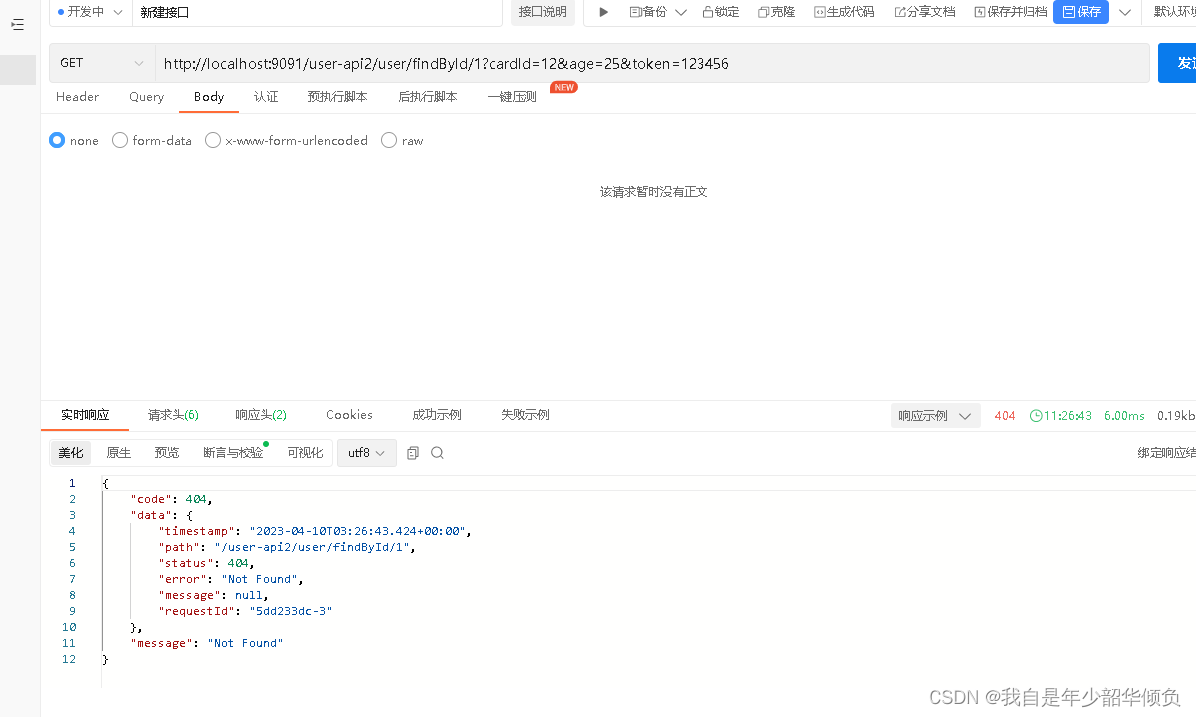
当请求路由地址不匹配或者断言为false 的时候,GateWay 会默认返回Whitelabel ErrorPage 错误页面,这种错误提示不符合我们的业务需求。
我们可以自定义返回一个较为友好的错误提示,需要创建一个类继承DefaultErrorWebExceptionHandler 类,重写其方法
- public class MyErrorWebExceptionHandler extends DefaultErrorWebExceptionHandler {
-
- public MyErrorWebExceptionHandler(ErrorAttributes errorAttributes,
- ResourceProperties resourceProperties,
- ErrorProperties errorProperties,
- ApplicationContext applicationContext) {
- super(errorAttributes, resourceProperties, errorProperties, applicationContext);
- }
-
- @Override
- protected RouterFunction<ServerResponse> getRoutingFunction(ErrorAttributes errorAttributes) {
- return RouterFunctions.route(RequestPredicates.all(), this::renderErrorResponse);
- }
-
- @Override
- protected Mono<ServerResponse> renderErrorResponse(ServerRequest request) {
- boolean includeStackTrace = isIncludeStackTrace(request, MediaType.ALL);
- Map<String, Object> errorMap = getErrorAttributes(request, includeStackTrace);
- int status = Integer.valueOf(errorMap.get("status").toString());
- Map<String, Object> response = this.response(status, errorMap.get("error").toString(), errorMap);
- return ServerResponse.status(status).contentType(MediaType.APPLICATION_JSON)
- .body(BodyInserters.fromValue(response));
- }
-
- // 我们希望返回的数据结构
- public static Map<String, Object> response(int status, String errorMessage, Map<String, Object> errorMap) {
- Map<String, Object> map = new HashMap<>();
- map.put("code", status);
- map.put("message", errorMessage);
- map.put("data", errorMap);
- return map;
- }
- }
配置Bean 实例
- @Configuration
- public class GatewayConfiguration {
-
- private final ServerProperties serverProperties;
-
- private final ApplicationContext applicationContext;
-
- private final ResourceProperties resourceProperties;
-
- private final List<ViewResolver> viewResolvers;
-
- private final ServerCodecConfigurer serverCodecConfigurer;
-
- public GatewayConfiguration(ServerProperties serverProperties,
- ApplicationContext applicationContext,
- ResourceProperties resourceProperties,
- ObjectProvider<List<ViewResolver>> viewResolversProvider,
- ServerCodecConfigurer serverCodecConfigurer) {
- this.serverProperties = serverProperties;
- this.applicationContext = applicationContext;
- this.resourceProperties = resourceProperties;
- this.viewResolvers = viewResolversProvider.getIfAvailable(Collections::emptyList);
- this.serverCodecConfigurer = serverCodecConfigurer;
- }
-
-
- @Bean("myErrorWebExceptionHandler")
- @Order(Ordered.HIGHEST_PRECEDENCE)
- public ErrorWebExceptionHandler myErrorWebExceptionHandler(ErrorAttributes errorAttributes) {
-
- MyErrorWebExceptionHandler exceptionHandler = new MyErrorWebExceptionHandler(
- errorAttributes,
- this.resourceProperties,
- this.serverProperties.getError(),
- this.applicationContext);
-
- exceptionHandler.setViewResolvers(this.viewResolvers);
- exceptionHandler.setMessageWriters(this.serverCodecConfigurer.getWriters());
- exceptionHandler.setMessageReaders(this.serverCodecConfigurer.getReaders());
- return exceptionHandler;
- }
- }
重启Gateway项目后,访问一个不符合条件的断言
跨域访问
修改配置文件
- spring:
- cloud:
- nacos:
- discovery:
- server-addr: 127.0.0.1:8848 # 注册中心地址
- username: nacos
- password: nacos
- locator:
- enabled: true # gateway 可以从nacos 中发现微服务
- gateway:
- globalcors:
- cors-configurations:
- '[/**]':
- allowedOrigins: "*"
- allowedMethods: "*"
- alloedHeaders: "*"
- routes:
- - id: user-service-route # 路由的id,要保证其唯一性
- uri: lb://user-service # lb 表示 从nacos 中按照名称获取微服务,并遵循负载均衡策略, user-service 即微服务注册名
- predicates:
- - Path=/user-api/** # 使用断言
- filters:
- - StripPrefix=1 # 使用过滤器
-
- application:
- name: gateway-service
-
-
- server:
- port: 9091
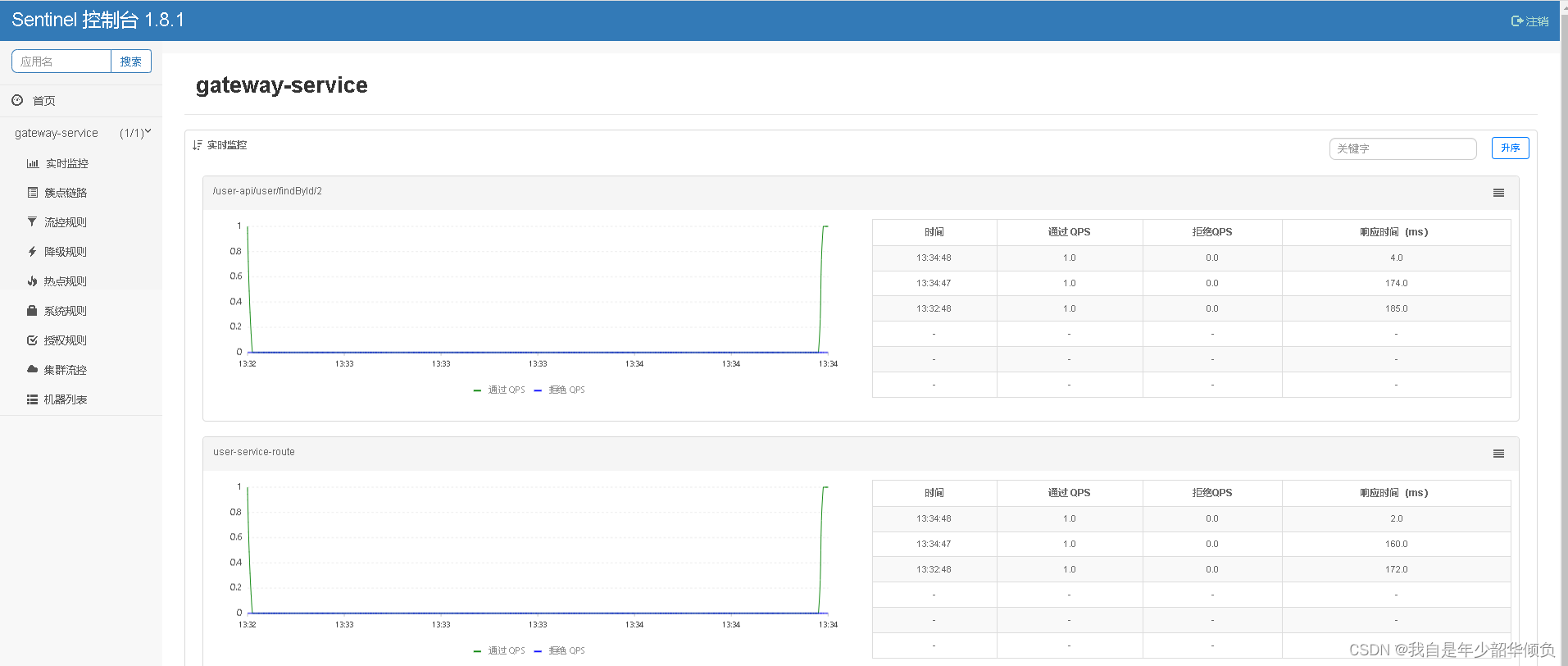
整合Setinel 进行限流
添加对应的依赖
- <dependency>
- <groupId>com.alibaba.cloud</groupId>
- <artifactId>spring-cloud-starter-alibaba-sentinel</artifactId>
- </dependency>
-
- <dependency>
- <groupId>com.alibaba.csp</groupId>
- <artifactId>sentinel-spring-cloud-gateway-adapter</artifactId>
- </dependency>
- 复制代码
修改对应的配置文件,连接Sentinel 控制台:
- spring:
- cloud:
- sentinel:
- transport:
- port: 8719
- dashboard: localhost:8081
配置对应的SentinelFilter 实例
- @Configuration
- public class GatewayConfiguration {
-
- @Bean
- @Order(-1)
- public GlobalFilter sentinelGatewayFilter() {
- return new SentinelGatewayFilter();
- }
- }
然后重启网关,登录Sentinel 控制台查看