
热门标签
热门文章
- 1雷柏 RAPOO V500PRO 键盘灯、快捷键说明书_雷柏v500pro快捷键
- 2如何用文心一言开发前端代码_文心一言上下文长度
- 3艾伟也谈项目管理,项目做完了,总结一下
- 4鸿蒙HarmonyOS4.0 -(ArkTs)_鸿蒙4.0 点击刷新text
- 5安装软件提示目前无法访问SmartScreen怎么办?
- 6C++的四种类型转换_c++ 转换结构体类型
- 7我们无法设置移动热点,因为你的电脑未建立以太网,wifi或手机网络数据连接。电脑出现这样的报错,并且不能上网!_我们无法设置移动热点,因为你的电脑未建立以太网
- 8C#实现微信自动发送消息_c# 发送微信
- 9小白的GPT入门指南 - 插件篇_gpt 插件
- 10C++入门:初识类和对象
当前位置: article > 正文
哔哩哔哩视频信息爬虫(实时爬取)_哔哩哔哩爬虫
作者:代码创新者 | 2024-02-03 15:27:15
赞
踩
哔哩哔哩爬虫
结合
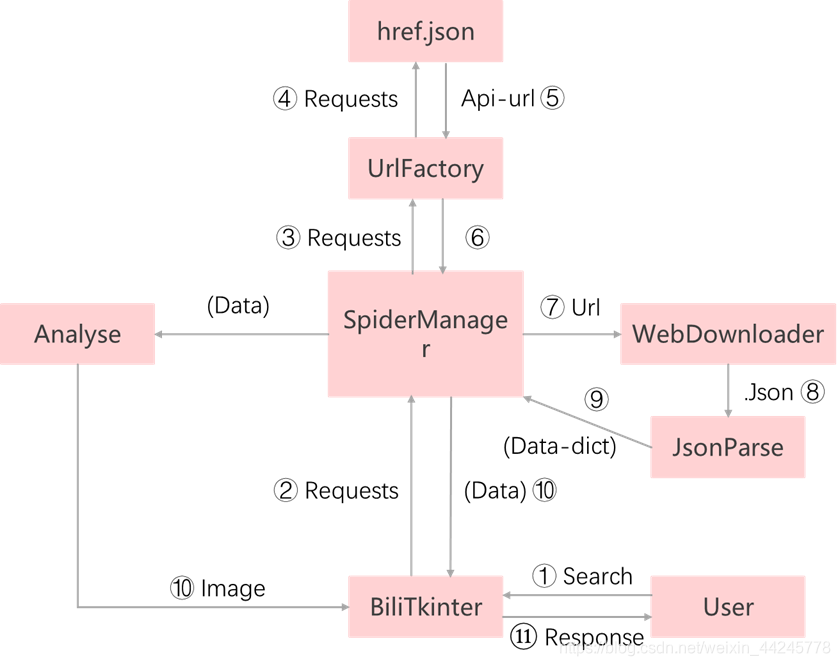
爬取思路:

自定义模块构建及框架设计:
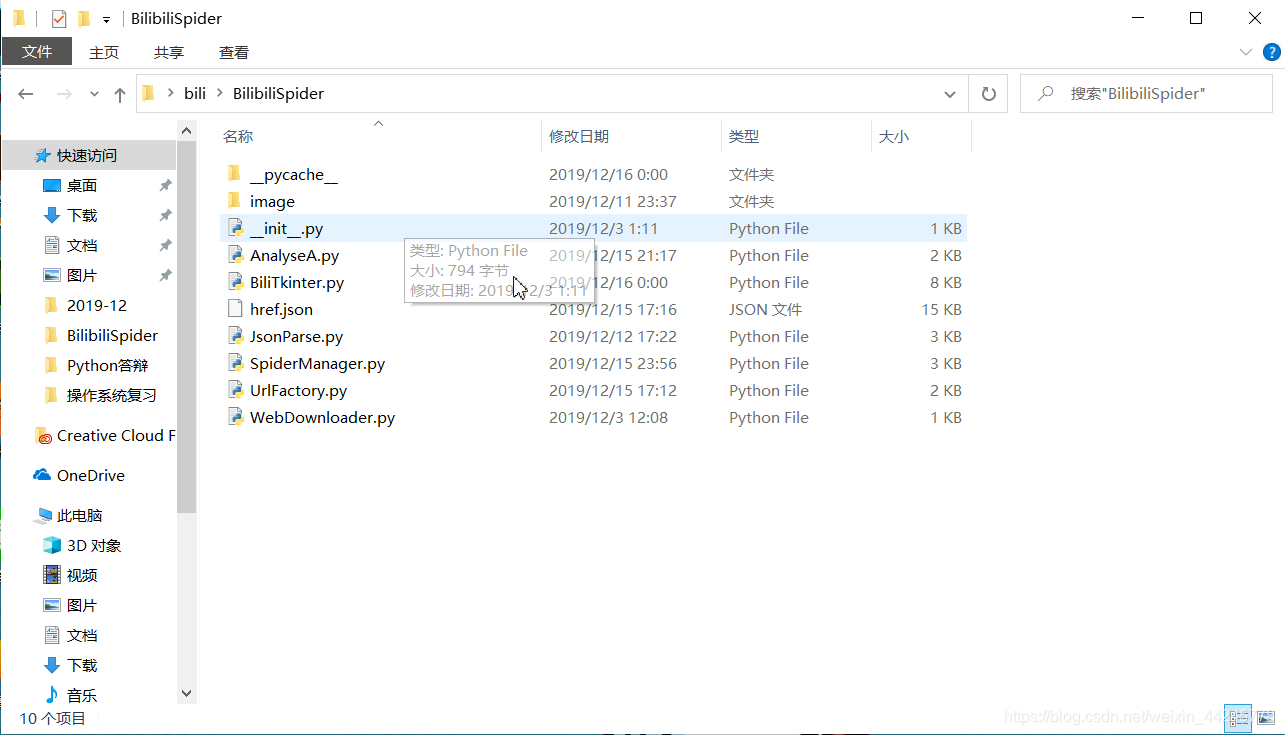
文件目录:
__init__.py:
- #__init__
-
-
- """
- 浏览json数据
- videoinfo = [
- data['aid'], # av号
- data['view'], # 播放量
- data['like'], # 点赞数
- data['favorite'], # 收藏数
- data['share'], # 转发数
- data['reply'], # 评论
- data['danmaku'], # 弹幕
- data['coin'], # 硬币数
- data['title'], # 标题
- data['tname'], # 分类
-
- ]
- """
-
-
-
-
- headers = {
-
- "User-Agent":"Mozilla/5.0 (Windows NT 10.0; Win64; x64) AppleWebKit/537.36 \
- (KHTML, like Gecko) Chrome/78.0.3904.108 Safari/537.36"
- }
-

WebDownloader模块:(请求并加载网页模块)
- #WebDownloader
-
-
-
-
-
-
- import requests
- from BilibiliSpider import headers
-
-
-
-
-
- class WebDownloader:
- global headers
- def __init__(self,headers=headers,timeout=6):
- self.headers = headers
- self.timeout = timeout
-
-
-
-
- #获取待爬取json网页
- def getJsonWeb(self,url):
- try:
- r = requests.get(url,headers=self.headers,timeout=self.timeout)
- r.raise_for_status()
- r.encoding=r.apparent_encoding
- return r.json()
- except:
- return "error"
-
-
-
JsonParse模块:(网页内容解析)
- #JsonParse
- #
-
-
-
- import json
- from BilibiliSpider import WebDownloader
-
- import threading
-
-
- class JsonParse:
- def __init__(self,total=1,lock = threading.Lock()):
- self.lock = lock
- self.total = total
-
-
-
- #将用来存入json文件中,获取av号:[视频标题,视频分类]
- def parseStat(self,dict_json,jsonPage):
-
-
- try:
- View = jsonPage['data']['View']
- aid = View['aid']
- sort = View['tname']
- title = View['title']
- if View['aid']!=None: #筛选出av号,并判断是否存在
- dict_json[aid] = [title,sort]
- with self.lock:
- return ""
-
-
-
-
- except:
- pass
-
-
- #return dict_json
-
-
- def parseJsonImage(self,jsonPage):
- try:
- View = jsonPage['data']['View']
- picHref = View['pic']
- return picHref
- except:
- pass
-
-
-
- #用于实时爬取视频信息
- def parseJsonList(self,dict_json,jsonPage):
- try:
- View = jsonPage['data']['View']
- aid = View['aid']
- sort = View['tname']
- detail = View['desc']
- title = View['title']
-
- Stat = View['stat']
- play = Stat['view']
- like = Stat['like']
- collect = Stat['favorite']
- share = Stat['share']
- reply = Stat['reply']
- danmaku = Stat['danmaku']
- coin = Stat['coin']
-
- dict_json['视频名称:'] = title
- dict_json['AV号:'] = aid
- dict_json['分类:'] = sort
- dict_json['视频简介:'] = detail
- dict_json['播放量:'] = play
- dict_json['点赞:'] = like
- dict_json['收藏:'] = collect
- dict_json['转发:'] = share
- dict_json['评论:'] = reply
- dict_json['弹幕:'] = danmaku
- dict_json['硬币:'] = coin
-
- #for i in dict_json:
- #print(i,end='')
- #print(dict_json[i])
- except:
- pass
-
UrlFactory模块:(api-url工厂,获取对应标题的API链接)
- #UrlFactory
-
-
- """
- detail? :https://api.bilibili.com/x/web-interface/view/detail?&aid=77515252
- stat? :https://api.bilibili.com/x/web-interface/archive/stat?aid=11111111
- """
- #api_urlStat = 'https://api.bilibili.com/x/web-interface/archive/stat?aid='
-
-
- import json
-
-
- class UrlFactory:
-
- def __init__(self,api_urlDetail='https://api.bilibili.com/x/web-interface/view/detail?&aid='):
- self.api_urlDetail = api_urlDetail
-
-
-
-
- #从json文件中获取apiUrl
- def getUrlJson(self,title):
- with open('href.json',mode='r')as fjson:
- data = json.loads(fjson.read())
-
- #av号:[视频标题,视频分类]
- for i in data:
-
- t = data[i][0]
- if t == title:
- apiUrl = self.api_urlDetail + i
- break
-
-
- return apiUrl
-
主函数A:
- #下载av号
- total = 0
- dict_json={}
- v = videoInfoSpider()
- print('开始爬取apiUrl...')
- for i in range(1,2019):
-
- start = 10000
- urls = [
- "https://api.bilibili.com/x/web-interface/view/detail?&aid={}".format(j)
- for j in range(start,start+10000)
- ]
- with futures.ThreadPoolExecutor(64)as executor:
- executor.map(v.apiUrlCrawl,urls)
- print(total)
- total += 1
- with open('href.json','a')as fjson:
- data = json.dumps(dict_json,indent=4)
- fjson.write(data)
-
- print("爬取结束!")
首先运行主函数A,得到一个json文件,作为后续实时爬取API
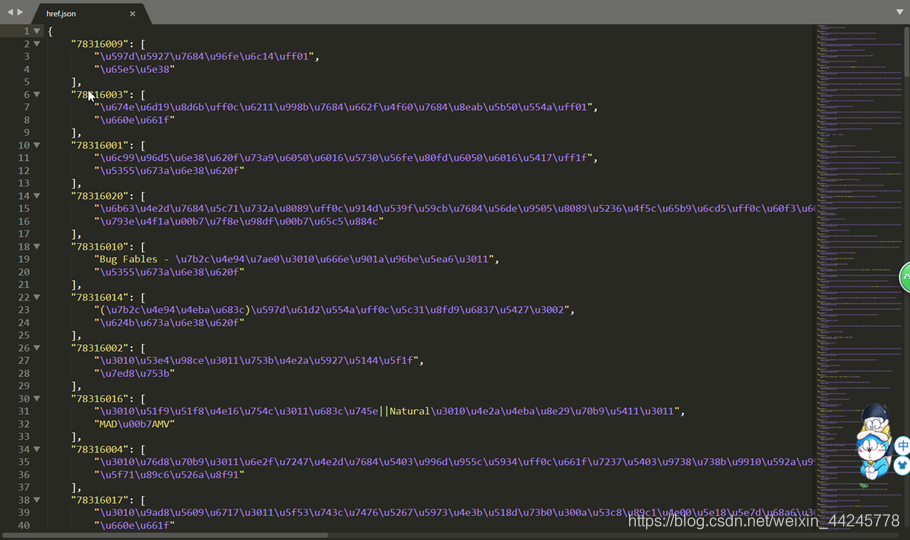
紧接着UrlFactory模块的作用就来了,调用UrlFactory中的 getUrlJson()即可获得对应搜索标题的视频信息URL,根据URL请求网页,最后调用JsonParse模块即可得到相应的信息啦
声明:本文内容由网友自发贡献,不代表【wpsshop博客】立场,版权归原作者所有,本站不承担相应法律责任。如您发现有侵权的内容,请联系我们。转载请注明出处:https://www.wpsshop.cn/article/detail/57170
推荐阅读
相关标签

