
热门标签
热门文章
- 1springboot3.0的新特性_springboot3.0新特性
- 2解决 three.js 模型颜色偏差问题_three 模型加载墙面颜色变了
- 3L1-036 A乘以B-java
- 4http://与www.开头的网站有什么区别
- 5C++ 指针与作用域_c++ 指针定义的作用域
- 6获取机器内存的三种方法_asmwbinvd
- 7win服务器系统2019和2016区别,Windows Server 2019和Windows Server, Version 1909的区别是什么?...
- 8Python中time模块详解[转]
- 9props与state的区别_state和props的区别
- 10JAVA获取当前进程的内存占用数和CPU利用率以及读写字节数并计算统计信息_java获取cpu使用率
当前位置: article > 正文
C#拆分字符串,正则表达式Regex.Split 方法 vs String.Split 方法
作者:代码领袖开发者 | 2024-02-03 13:41:59
赞
踩
C#拆分字符串,正则表达式Regex.Split 方法 vs String.Split 方法
目录
使用正则表达式可以拆分指定的字符串。同样地,使用字符串对象的Split方法也可以实现此功能。使用字符串对象的Split方法可以根据用户选择的拆分条件,方便地将字符串对象拆分为多个字符串。
一、使用的方法
1.使用Split(String, String)方法
在由正则表达式模式定义的位置将输入字符串拆分为一个子字符串数组。
- public static string[] Split (string input, string pattern);
- 参数
- input String
- 要拆分的字符串。
-
- pattern String
- 要匹配的正则表达式模式。
-
- 返回
- String[]
- 字符串数组。
-
- 例外
- ArgumentException
- 出现正则表达式分析错误。
-
- ArgumentNullException
- input 或 pattern 为 null。
-
- RegexMatchTimeoutException
- 发生超时。 有关超时的详细信息,请参阅“备注”部分。

- // 用正则表达式拆分字符串为一个子字符串数组
- using System.Text.RegularExpressions;
-
- namespace _086_2
- {
- public class Example
- {
- public static void Main()
- {
- string input = @"01-31-2024";
- string pattern = @"(-)|(/)";
-
- foreach (string result in Regex.Split(input, pattern))
- {
- Console.WriteLine("{0}", result);
- }
- }
- }
- }
- // 运行结果:
- /*
- 01
- -
- 31
- -
- 2024
- */
2.使用String.Split 方法
String对象的Split(Char[])方法,根据指定的分隔字符将字符串拆分为子字符串。
- public string[] Split (params char[]? separator);
-
- 参数
- separator Char[]
- 分隔字符的数组、不包含分隔符的空数组或 null。
-
- 返回
- String[]
- 一个数组,其元素包含此实例中的子字符串,这些子字符串由 separator 中的一个或多个字符分隔。 有关详细信息,请参阅“备注”部分。
- // 将空格字符和制表 \t 符作为分隔符
- namespace _086_1
- {
- internal class Program
- {
- private static void Main(string[] args)
- {
- ArgumentNullException.ThrowIfNull(args);
- string s = "Today\tI'm going to school";
- string[] subs = s.Split(' ', '\t');
-
- foreach (var sub in subs)
- {
- Console.WriteLine($"Substring: {sub}");
- //Console.WriteLine("Substring: {0}", sub);//等效语句
- }
- }
- }
- }
- // 运行结果:
- /*
- Substring: Today
- Substring: I'm
- Substring: going
- Substring: to
- Substring: school
- */
下面来分享源代码吧:
二、源代码
1.源码
- // 使用Split(String, String)方法拆分字符串
- // 使用String对象的Split(Char[])方法拆字符串。
- using System.Text.RegularExpressions;
- namespace _086
- {
- public partial class Form1 : Form
- {
- private GroupBox? groupBox1;
- private Button? button2;
- private Button? button1;
- private TextBox? textBox2;
- private TextBox? textBox1;
- private Label? label2;
- private Label? label1;
-
- public Form1()
- {
- InitializeComponent();
- Load += Form1_Load;
- }
- private void Form1_Load(object? sender, EventArgs e)
- {
- //
- // label1
- //
- label1 = new Label
- {
- AutoSize = true,
- Location = new Point(6, 23),
- Name = "label1",
- Size = new Size(68, 17),
- TabIndex = 0,
- Text = "源字符串:"
- };
- //
- // label2
- //
- label2 = new Label
- {
- AutoSize = true,
- Location = new Point(6, 48),
- Name = "label2",
- Size = new Size(68, 17),
- TabIndex = 1,
- Text = "子字符串:"
- };
- //
- // textBox1
- //
- textBox1 = new TextBox
- {
- Location = new Point(72, 17),
- Name = "textBox1",
- Size = new Size(262, 23),
- TabIndex = 2
- };
- //
- // textBox2
- //
- textBox2 = new TextBox
- {
- Font = new Font("Microsoft YaHei UI", 7F),
- Location = new Point(72, 48),
- Multiline = true,
- Name = "textBox2",
- Size = new Size(181, 153),
- TabIndex = 3
- };
- //
- // button1
- //
- button1 = new Button
- {
- Location = new Point(259, 48),
- Name = "button1",
- Size = new Size(75, 23),
- TabIndex = 4,
- Text = "拆分1",
- UseVisualStyleBackColor = true
- };
- button1.Click += Button1_Click;
- //
- // button2
- //
- button2 = new Button
- {
- Location = new Point(259, 74),
- Name = "button2",
- Size = new Size(75, 23),
- TabIndex = 5,
- Text = "拆分2",
- UseVisualStyleBackColor = true
- };
- button2.Click += Button2_Click;
- //
- // groupBox1
- //
- groupBox1 = new GroupBox
- {
- Location = new Point(12, 12),
- Name = "groupBox1",
- Size = new Size(340, 207),
- TabIndex = 0,
- TabStop = false,
- Text = "拆分字符串"
- };
- groupBox1.Controls.Add(button2);
- groupBox1.Controls.Add(button1);
- groupBox1.Controls.Add(textBox2);
- groupBox1.Controls.Add(textBox1);
- groupBox1.Controls.Add(label2);
- groupBox1.Controls.Add(label1);
- groupBox1.SuspendLayout();
-
- //
- // Form1
- //
- AutoScaleDimensions = new SizeF(7F, 17F);
- AutoScaleMode = AutoScaleMode.Font;
- ClientSize = new Size(364, 231);
- Controls.Add(groupBox1);
- Name = "Form1";
- StartPosition = FormStartPosition.CenterScreen;
- Text = "使用正则表达式拆分字符串";
- groupBox1.ResumeLayout(false);
- groupBox1.PerformLayout();
- }
- /// <summary>
- /// 拆分1:使用正则表达式根据数字进行拆分
- /// 遍历拆分后的字符串集合
- /// </summary>
- private void Button1_Click(object? sender, EventArgs e)
- {
- if (textBox1!.Text != "")
- {
- textBox2!.Text = "";
- string[] str = MyRegex().Split(textBox1!.Text);
- foreach (string s in str)
- {
- textBox2!.Text += s + Environment.NewLine;
- }
- }
- else
- {
- MessageBox.Show("源字符串不能为空", "拆分1");
- }
- }
- /// <summary>
- /// 拆分2
- /// </summary>
- private void Button2_Click(object? sender, EventArgs e)
- {
- if(textBox1!.Text != "")
- {
- textBox2!.Text = "";
- string s = textBox1!.Text;
- char[] separators = ['1', '2', '3', '4', '5', '6', '7', '8', '9'];
-
- string[] subs = s.Split(separators/*, StringSplitOptions.RemoveEmptyEntries*/);//注释后与正则方法输出相同结果
-
- foreach (var sub in subs)
- {
- textBox2!.Text += sub + Environment.NewLine;
- }
- }
- else
- {
- MessageBox.Show("源字符串不能为空", "拆分2");
- }
- }
-
- [GeneratedRegex("[1-9]")]
- private static partial Regex MyRegex();
- }
- }
2.生成效果
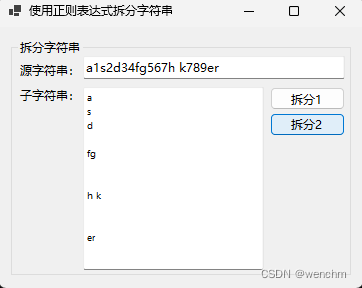
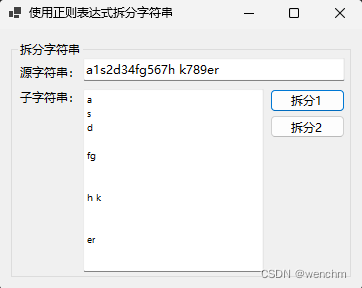
本文内容由网友自发贡献,转载请注明出处:【wpsshop博客】
推荐阅读
相关标签

