
热门标签
热门文章
- 1python福建福州游玩商家数据可视化大屏全屏系统设计与实现(django框架)
- 26款支持中文语音识别开源软件的简单使用_中文开源语音识别引擎
- 3【好书推荐】Flutter入门经典
- 4Yolov5、rtsp-server、ffmpeg、vlc,实现实时检测视频推拉流
- 5【送书福利-第二十五期】《机器学习高级实践》
- 6建模分析 | 差速轮式移动机器人运动学建模(附Python/Matlab仿真)
- 7【腾讯云Cloud Studio实战训练营】用Vue+Vite快速构建完成交互式3D小故事
- 8基于强化学习的智能机器人路径规划算法研究(附代码)_强化学习 路径规划
- 9Linux ps命令详解,Linux查看进程_psefgrep命令看进程
- 10【云原生|云计算系列】云计算基础概念_云原生 云计算
当前位置: article > 正文
adb-常用命令--模拟按键输入_adb模拟按键命令
作者:alg789 | 2024-02-02 22:03:29
赞
踩
adb模拟按键命令
模拟按键输入
物理键

媒体控制
点亮/熄灭屏幕
- # 点亮屏幕
- adb shell input keyevent 224
-
- # 熄灭屏幕
- adb shell input keyevent 223
触击屏幕
- # x,y为坐标位置
- adb shell input tap <X> <Y>
滑动屏幕
四个参数:起始点 x 坐标 起始点 y 坐标 结束点 x 坐标 结束点 y 坐标
- # 向上滑动
- adb shell input swipe 300 1000 300 500
-
- # 向下滑动
- adb shell input swipe 300 100 300 1000
-
- # 向左滑动
- adb shell input swipe 1000 500 200 500
-
- # 向右滑动
- adb shell input swipe 200 500 1000 500
其他实用功能:
屏幕截图
adb exec-out screencap -p > sc.pn截图保存到电脑执行该命令的目录下
如果指定文件名以 .png 结尾时可以省略 -p 参数
注意
如果 adb 版本较老,无法使用 exec-out 命令,建议更新 adb 版本
也可以用下面的步骤来完成
- # 先截图保存到设备里 adb shell screencap -p /sdcard/sc.png
- # 然后将 png 文件导出到电脑 adb pull /sdcard/sc.png
录制屏幕
- # 录制屏幕以 mp4 格式保存到 /sdcard adb shell screenrecord /sdcard/filename.mp4
- # 导出到电脑 adb pull /sdcard/filename.mp4
需要停止时按 Ctrl-C,默认录制时间和最长录制时间都是 180 秒
查看wifi密码
adb shell cat /data/misc/wifi/*.conf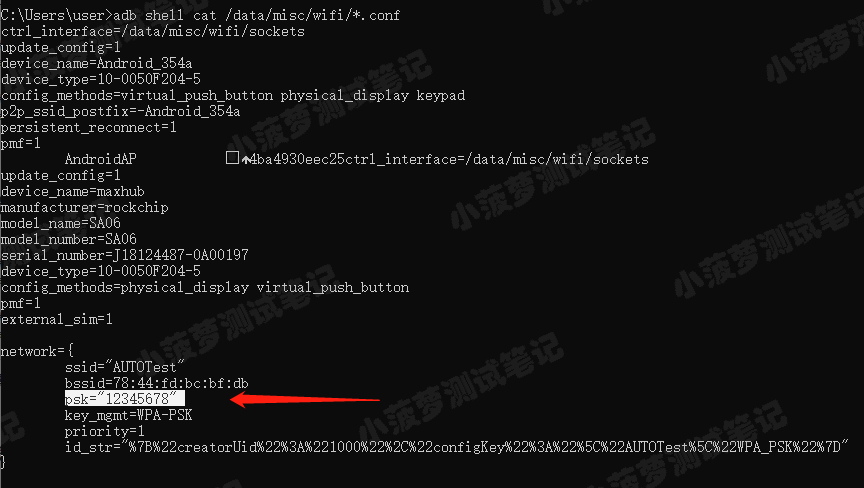
删除系统默认APP
找到要删除的包名
adb shell pm list packages -s 获取包名的地址
- adb shell pm path 包名
-
- 【如:adb shell pm path com.seewo.rainbow.pro】
获取root权限
adb root adb remount挂载系统读写权限
adb shell rm 包名地址删除包
adb shell rm -r /data/app/com.seewo.rainbow.pro-1重启
adb reboot声明:本文内容由网友自发贡献,不代表【wpsshop博客】立场,版权归原作者所有,本站不承担相应法律责任。如您发现有侵权的内容,请联系我们。转载请注明出处:https://www.wpsshop.cn/article/detail/56440
推荐阅读
相关标签

