
热门标签
热门文章
- 1linux加速访问github的方法(2023.12.2)_linux的github加速
- 2从零学习Linux操作系统 第二十二部分 企业域名解析服务的部署及安全优化
- 3初学:selenium自动化登录qq邮箱,switch_to_selenium qq邮箱
- 4抄代码对提升编程能力有用吗?
- 5阿里一P7员工为证明自己年入百万,晒出工资,却被网友..._阿里p7薪资
- 6区块链运行原理_区块链运行机制
- 7FastDFS+Nginx - 本地搭建文件服务器同时实现在外远程访问「内网穿透」
- 8HCIA——11计算机网络分层结构——OSI/ISO、TCP/IP
- 9Unity面试题
- 10前端(二十一)——WebSocket:实现实时双向数据传输的Web通信协议_websocket前端
当前位置: article > 正文
【mongoDB】 学习(三)java + mongodb 多表联合查询_java操作mangodbsql多表关联 csdn
作者:二进制舞者2 | 2024-02-02 18:36:28
赞
踩
java操作mangodbsql多表关联 csdn
【mongoDB】 学习(三)java + mongodb 多表联合查询
关键字
mongoDB、Java、$lookup、 $project、 $match 等
1、先介绍这次使用的 mongoDB 内的方法以及使用方式(Robo 3T 1.3.1)
mongoDB 官网
https://docs.mongodb.com/manual/reference/operator/aggregation/project/index.html
(1)$lookup
类似SQL server里面的 join
"$lookup": {
    "from": "users",//关联目标表名
    "localField": "human",//外键
    "foreignField": "humanSerialNumber", //目标表明内连接字名
    "as": "huamn"//别名
  }
- 1
- 2
- 3
- 4
- 5
- 6
(2)$project
类似SQL server里面 select 后面的内容
"$project" : {
        "deviceID" :1,//1=显示字段
        "humanLoc":1,
        "human":"$human",//引入列表
        "time":1,
        "checkFor":"$devices.area",//重命名列 -表devices下的area 列 (类似sql 里面的as)
    }
- 1
- 2
- 3
- 4
- 5
- 6
- 7
(3)$match
类似SQL server里面where 后面内容
"$match":{
    "origin":"QA",//eq
    "bind":{"$regex":"12972247"}//like
    }
- 1
- 2
- 3
- 4
(4)$split
字符串切割生成字符数组
{ "$split": ["$bind", "0000000000"] }
- 1
(5)$cond
{"$cond":{
    "if":{
        "$gte": [ {"$size":{ "$split": ["$bind", "0000000000"] }}
                   , 2
                ]
         }
     ,"then":1
     ,"else":0
  }
}
- 1
- 2
- 3
- 4
- 5
- 6
- 7
- 8
- 9
- 10
(6)$arrayElemAt
取列表元素
{ "$arrayElemAt": ["$devices",0]}
- 1
2、表bindings、users、devices 三表连表查询
(1)表 bindings–二维码绑定记录表
{
    "_id" : ObjectId("5c99d700d360a612e21cccba"),
    "qrcode" : "66E88CFEFB964D074290160E2F",
    "bind" : "000000000010126460",
    "device_info" : "X888D77S6||10126460",
    "device_name" : "电动车:0.4t",
    "detail" : "设备号: 10126460\n序列号: X888D77S6\n设备类型:CS0001 电动车:1.4t\n送达方客户名: 服务组001\n设备状态: 在客户处 [CUST]",
    "human" : "82306690787299121764776791679022450814",
    "humanLoc" : "121.610741,31.185281,上海市浦东新区张江高科技园区,上海市浦东新区张江高科技园区,上海市浦东新区张江高科技园区",
    "origin" : "QA",
    "timestamp" : "1553585920323",
    "area_code" : "6053"
}
- 1
- 2
- 3
- 4
- 5
- 6
- 7
- 8
- 9
- 10
- 11
- 12
- 13
(2)表 devices–设备表
{
    "_id" : ObjectId("5e96a93749b0833d2ad1b211"),
    "bindingSerial" : "[X888D77S6] [11313212]",
    "origin" : "QA",
    "deviceID" : "11313212",
    "bindContent" : [
        {
            "name" : "电动车:0.4t",
            "bindFlag" : "11313212",
            "bindValues" : [
                {
                    "fieldName" : "设备号",
                    "fieldValue" : "11313212"
                },
                {
                    "fieldName" : "序列号",
                    "fieldValue" : "G74104-001"
                },
                {
                    "fieldName" : "设备类型",
                    "fieldValue" : "CS0040"
                },
                {
                    "fieldName" : "设备状态",
                    "fieldValue" : "在客户处 [CUST]"
                },
                {
                    "fieldName" : "销售组",
                    "fieldValue" : "CTZ"
                },
                {
                    "fieldName" : "设备属性",
                    "fieldValue" : "R"
                }
            ]
        }
    ],
    "area" : "6053",
    "createTime" : "1586931965"
}

- 1
- 2
- 3
- 4
- 5
- 6
- 7
- 8
- 9
- 10
- 11
- 12
- 13
- 14
- 15
- 16
- 17
- 18
- 19
- 20
- 21
- 22
- 23
- 24
- 25
- 26
- 27
- 28
- 29
- 30
- 31
- 32
- 33
- 34
- 35
- 36
- 37
- 38
- 39
- 40
(3)表 users–用户信息表
{
    "_id" : ObjectId("5c6b5084b7a8cb502a7d8aa7"),
    "humanSerialNumber" : "82306690787299121764776791679022450814",
    "humanHash" : "82306690787299121764776791679022450814",
    "origin" : "QA",
    "humanName" : "QA-qa007",
    "passwd" : "test123",
    "customContext" : [
        {
            "paramName" : "username",
            "paramType" : "string",
            "paramValue" : "qa007",
            "showOrNot" : 1
        },
        {
            "paramName" : "phoneNumber",
            "paramType" : "string",
            "paramValue" : "13625012007",
            "showOrNot" : 1
        }
    ],
    "birthTime" : NumberLong(1550536836237)
}
- 1
- 2
- 3
- 4
- 5
- 6
- 7
- 8
- 9
- 10
- 11
- 12
- 13
- 14
- 15
- 16
- 17
- 18
- 19
- 20
- 21
- 22
- 23
3、构建完整查询语句(Robo 3T 1.3.1)
db.getCollection("bindings").aggregate([
//关联users 表
{
  "$lookup": {
    "from": "users",
    "localField": "human",
    "foreignField": "humanSerialNumber",
    "as": "userInfo"//users 表的别名--查询结果别名
  }
}
,
//查询条件
{"$match":{
    "origin":"QA",
    "bind":{"$regex":"12972247"}
    }}
,
//处理结果数据
{"$project" : {
        //对bind内容作处理,即去除bind 前导0 信息(开始连续10个0),取出id
        "deviceID":{ "$arrayElemAt": [{ "$split": ["$bind", "0000000000"] }, {"$cond":{"if":{ "$gte": [ {"$size":{ "$split": ["$bind", "0000000000"] }}, 2 ] },"then":1,"else":0}} ]},
        "humanLoc":"$humanLoc",
        "human":"$userInfo.humanName",//as 重命名列名
        "time":1,//显示时间列
    } }
,
//将上述结果再次链表查询 设备信息
{
  "$lookup": {
    "from": "devices",
    "localField": "deviceID",
    "foreignField": "deviceID",
    "as": "devices"//devices 表查询结果别名
  }
}
,
//处理数据
{"$project" : {
        "deviceID" :1,
        "humanLoc":1,
        "human":{ "$arrayElemAt": ["$human",0]},
        "time":1,
        "device":{ "$arrayElemAt": ["$devices",0]},
    } }
,
{"$project" : {
        "deviceID" :1,
        "humanLoc":1,
        "human":"$human",
        "time":1,
        "area":"$device.area",
        "device":{ "$arrayElemAt": ["$device.bindContent.bindValues",0]},
    } }

])
- 1
- 2
- 3
- 4
- 5
- 6
- 7
- 8
- 9
- 10
- 11
- 12
- 13
- 14
- 15
- 16
- 17
- 18
- 19
- 20
- 21
- 22
- 23
- 24
- 25
- 26
- 27
- 28
- 29
- 30
- 31
- 32
- 33
- 34
- 35
- 36
- 37
- 38
- 39
- 40
- 41
- 42
- 43
- 44
- 45
- 46
- 47
- 48
- 49
- 50
- 51
- 52
- 53
- 54
- 55
查询结果如下:
{
    "_id" : ObjectId("5f6d68824a3d4781a310ca97"),
    "time" : "1601005657470",
    "deviceID" : "12972247",
    "humanLoc" : "121.610741,31.185281,上海市浦东新区张江高科技园区,上海市浦东新区张江高科技园区,上海市浦东新区张江高科技园区",
    "area" : "6053",
    "device" : [
        		{
                    "fieldName" : "设备号",
                    "fieldValue" : "11313212"
                },
                {
                    "fieldName" : "序列号",
                    "fieldValue" : "G74104-001"
                },
                {
                    "fieldName" : "设备类型",
                    "fieldValue" : "CS0040"
                },
                {
                    "fieldName" : "设备状态",
                    "fieldValue" : "在客户处 [CUST]"
                },
                {
                    "fieldName" : "销售组",
                    "fieldValue" : "CTZ"
                },
                {
                    "fieldName" : "设备属性",
                    "fieldValue" : "R"
                }
    ]
}
- 1
- 2
- 3
- 4
- 5
- 6
- 7
- 8
- 9
- 10
- 11
- 12
- 13
- 14
- 15
- 16
- 17
- 18
- 19
- 20
- 21
- 22
- 23
- 24
- 25
- 26
- 27
- 28
- 29
- 30
- 31
- 32
- 33
4、Java 中实现查询语句
(1)引入mongoDB 包
//org.springframework.data:spring-data-mongodb:2.1.6.RELEASE
<dependency>
            <groupId>org.springframework.boot</groupId>
            <artifactId>spring-boot-starter-data-mongodb</artifactId>
</dependency>
- 1
- 2
- 3
- 4
- 5
(2)构造查询语句
这里使用Document 类
 List<Document> arrs = new ArrayList<Document>();
 arrs.add(new Document("$lookup",
                new Document("from", "Human_Slices")
                        .append("localField", "human")
                        .append("foreignField", "humanSerialNumber")
                        .append("as", "huamn")));
 Document match = new Document("origin", origin);
 //****************查询条件--开始***********************
 //String origin, long startDate, long endDate, String queryFieldName, String queryFieldValue, String humanName, String freebieWord
 //time
        if (startDate > 0 && endDate > 0) {
            match.append("time", new Document("$lte", String.valueOf(endDate)))
                    .append("time", new Document("$gte", String.valueOf(startDate)));
        }
        //detail
        if (queryFieldName != null && queryFieldValue != null &&
                !queryFieldName.isEmpty() && !queryFieldValue.isEmpty()) {
            match.append("detail", new Document("$regex", String.join(": ", queryFieldName, queryFieldValue)));
        }
        //human
        if (humanName != null && !humanName.isEmpty()) {
            match.append("huamn.humanName", humanName);
        }
        //name
        if (freebieWord != null && !freebieWord.isEmpty()) {
            match.append("name", new Document("$regex", freebieWord));
        }
 //*****************查询条件--结束***********************
 arrs.add(new Document("$match",match));
        arrs.add(new Document("$project",
                new Document("deviceID",
                        new Document("$arrayElemAt", Arrays.asList(new Document("$split", Arrays.asList("$bind", "0000000000")),
                                new Document("$cond",
                                        new Document("if",
                                                new Document("$gte", Arrays.asList(new Document("$size",
                                                        new Document("$split", Arrays.asList("$bind", "0000000000"))), 2L)))
                                                .append("then", 1L)
                                                .append("else", 0L)))))
                        .append("humanLoc", "$humanLoc")
                        .append("human", "$huamn.humanName")
                        .append("time", 1L)));
arrs.add(new Document("$lookup",
                new Document("from", "BindingBoundageLarge")
                        .append("localField", "deviceID")
                        .append("foreignField", "bFlagOut")
                        .append("as", "devices")));
arrs.add(new Document("$project",
                new Document("deviceID", 1L)
                        .append("humanLoc", 1L)
                        .append("human",
                                new Document("$arrayElemAt", Arrays.asList("$human", 0L)))
                        .append("time", 1L)
                        .append("device",
                                new Document("$arrayElemAt", Arrays.asList("$devices", 0L)))));
arrs.add(new Document("$project",
                new Document("deviceID", 1L)
                        .append("humanLoc", 1L)
                        .append("human", "$human")
                        .append("time", 1L)
                        .append("checkFor", "$device.checkFor")
                        .append("device",
                                new Document("$arrayElemAt", Arrays.asList("$device.bindContent.bindValues", 0L)))));
- 1
- 2
- 3
- 4
- 5
- 6
- 7
- 8
- 9
- 10
- 11
- 12
- 13
- 14
- 15
- 16
- 17
- 18
- 19
- 20
- 21
- 22
- 23
- 24
- 25
- 26
- 27
- 28
- 29
- 30
- 31
- 32
- 33
- 34
- 35
- 36
- 37
- 38
- 39
- 40
- 41
- 42
- 43
- 44
- 45
- 46
- 47
- 48
- 49
- 50
- 51
- 52
- 53
- 54
- 55
- 56
- 57
- 58
- 59
- 60
- 61
- 62
5、实现查询功能
(1)连接数据库 mongoDB
使用 Maven: org.springframework:spring-beans:5.1.6.RELEASE
	@Bean
	public MongoClient mongoClient() {
		ServerAddress address = new ServerAddress(mongoHost, mongoPort);
		MongoClientOptions options = new MongoClientOptions.Builder().build();
		return new MongoClient(address, options);
	}

	@Bean
	@Primary
	public MongoDbFactory mongoDbFactory() {
		return new SimpleMongoDbFactory(mongoClient(), dbName);
	}

	@Bean(name = "mongoTemplate")
	@Primary
	public MongoTemplate mongoTemplate() {
		return new MongoTemplate(mongoDbFactory());
	}
- 1
- 2
- 3
- 4
- 5
- 6
- 7
- 8
- 9
- 10
- 11
- 12
- 13
- 14
- 15
- 16
- 17
- 18
(2)获取collection 实例
使用 Maven: org.springframework:spring-beans:5.1.6.RELEASE
	//获取collection 实例(数据库)
	@Autowired
    @Qualifier("mongoTemplate")
    private MongoTemplate mongoTemplate;

	//数据转换工具类
 	@Autowired
    MongoConverter mongoConverter;

  //查询数据
  public List<ExportBindingAssetDto> getBounds(String origin, long startDate, long endDate, String queryFieldName, String queryFieldValue, String humanName, String freebieWord, int env) {
        MongoTemplate mt =  mongoTemplate;
        MongoCollection<Document> coll = mt.getCollection("bindings");

        List<Document> querys = QueryUtil.queryBindAssets(origin, startDate, endDate, queryFieldName, queryFieldValue, humanName, freebieWord);
        AggregateIterable<Document> results = coll.aggregate(querys);//先以document类型查询出来

		//数据类型转化
        MongoCursor<Document> it = results.iterator();
        List<ExportBindingAssetDto> resultList = new ArrayList<>();
        try {
            while (it.hasNext()) {
                ExportBindingAssetDto item = mongoConverter.read(ExportBindingAssetDto.class, it.next());
                resultList.add(item);
            }
        } finally {
            it.close();//转化完成一定要关闭
        }
        return resultList;
    }
- 1
- 2
- 3
- 4
- 5
- 6
- 7
- 8
- 9
- 10
- 11
- 12
- 13
- 14
- 15
- 16
- 17
- 18
- 19
- 20
- 21
- 22
- 23
- 24
- 25
- 26
- 27
- 28
- 29
- 30
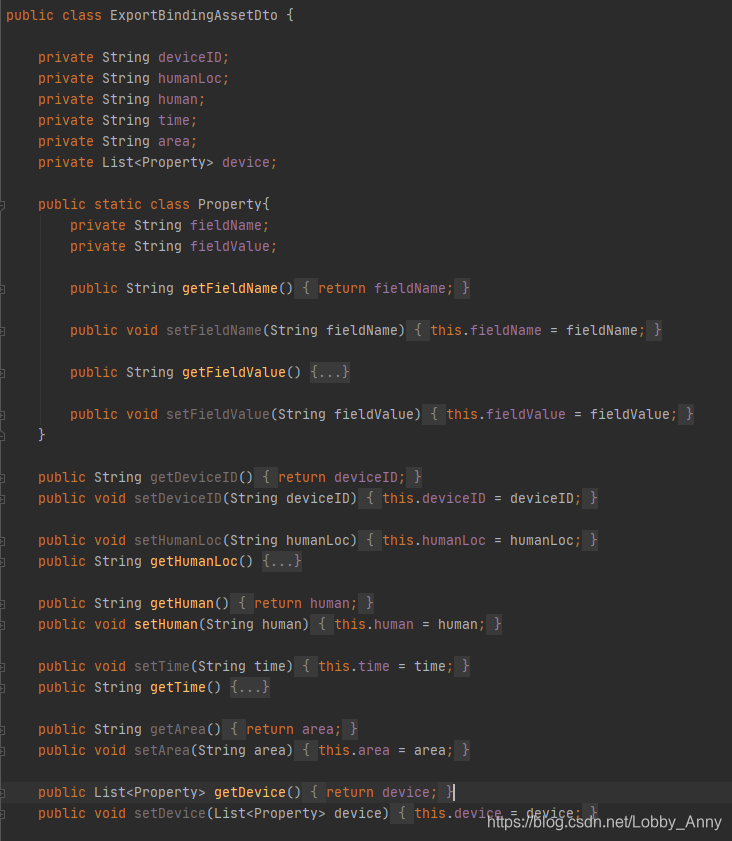
类ExportBindingAssetDto.java
- 遗留问题:
1、数据库存储的时间戳是 string 类型的,暂时没有找到怎么用sql语句直接转化成时间格式的方法
2、字符存储长度不定,即前导0(10个连续的0),暂时没有找到怎么用sql语句直接进行判断截取的方法。文中使用的是切割后获取的方法
声明:本文内容由网友自发贡献,不代表【wpsshop博客】立场,版权归原作者所有,本站不承担相应法律责任。如您发现有侵权的内容,请联系我们。转载请注明出处:https://www.wpsshop.cn/article/detail/56014
推荐阅读


相关标签

